<feed xmlns="http://www.w3.org/2005/Atom">
  <title>There is no magic here</title>
  <link href="https://alex.dzyoba.com/blog/feed/atom.xml" rel="self"/>
  <link href="https://alex.dzyoba.com/blog/"/>
  <updated>2021-06-27T00:00:00+00:00</updated>
  <id>https://alex.dzyoba.com/blog/</id>
  <author>
      <name>Alex Dzyoba</name>
      <email>alex@dzyoba.com</email>
  </author>
  <generator>Hugo -- gohugo.io</generator>

  <entry>
    <title type="html"><![CDATA[Nice nginx features for operators]]></title>
    <link href="https://alex.dzyoba.com/blog/nginx-features-for-operators/"/>
    <id>https://alex.dzyoba.com/blog/nginx-features-for-operators/</id>
    <published>2021-06-27T00:00:00+00:00</published>
    <updated>2021-06-27T00:00:00+00:00</updated>
    <content type="html"><![CDATA[<p>In the <a href="/blog/nginx-features-for-developers/">previous post</a>,
I&rsquo;ve shared a few things that were useful to me as a developer.</p>
<p>Now wearing my &ldquo;ops&rdquo; hat, there are a few things that I wanted to cover -
blocking bad clients, rate limiting, caching, and gradual rollout.</p>
<h2 id="blocking-bad-clients">Blocking bad clients</h2>
<p>Blocking bad clients in nginx is usually implemented with a simple <code>return 403</code>
for some requests. To classify request we can use any <a href="https://nginx.org/en/docs/varindex.html">builtin
variable</a>, e.g. <code>$http_user_agent</code> to
match by user agent:</p>
<div class="highlight"><pre tabindex="0" style="background-color:#f0f3f3;-moz-tab-size:4;-o-tab-size:4;tab-size:4;"><code class="language-nginx" data-lang="nginx"><span style="display:flex;"><span><span style="color:#069;font-weight:bold">server</span> {
</span></span><span style="display:flex;"><span>    <span style="color:#09f;font-style:italic"># ...
</span></span></span><span style="display:flex;"><span><span style="color:#09f;font-style:italic"></span>
</span></span><span style="display:flex;"><span>    <span style="color:#09f;font-style:italic"># Block all bots
</span></span></span><span style="display:flex;"><span><span style="color:#09f;font-style:italic"></span>    <span style="color:#069;font-weight:bold">if</span> <span style="color:#c30">(</span><span style="color:#033">$http_user_agent</span> ~ <span style="color:#3aa">&#34;.*bot.*&#34;)</span> {
</span></span><span style="display:flex;"><span>        <span style="color:#069;font-weight:bold">return</span> <span style="color:#f60">403</span>;
</span></span><span style="display:flex;"><span>    }
</span></span><span style="display:flex;"><span>
</span></span><span style="display:flex;"><span>    <span style="color:#09f;font-style:italic"># ...
</span></span></span><span style="display:flex;"><span><span style="color:#09f;font-style:italic"></span>}
</span></span></code></pre></div><p>If you need more conditions to identify bad clients, use the <code>map</code> to construct
the final variable like this:</p>
<div class="highlight"><pre tabindex="0" style="background-color:#f0f3f3;-moz-tab-size:4;-o-tab-size:4;tab-size:4;"><code class="language-nginx" data-lang="nginx"><span style="display:flex;"><span><span style="color:#069;font-weight:bold">http</span> {
</span></span><span style="display:flex;"><span>    <span style="color:#09f;font-style:italic"># Ban bots using specific API key
</span></span></span><span style="display:flex;"><span><span style="color:#09f;font-style:italic"></span>    <span style="color:#069;font-weight:bold">map</span> <span style="color:#033">$http_user_agent:$arg_key</span> <span style="color:#033">$ban</span> {
</span></span><span style="display:flex;"><span>        <span style="color:#069;font-weight:bold">~.*bot.*:1234567890</span> <span style="color:#f60">1</span>;
</span></span><span style="display:flex;"><span>        <span style="color:#069;font-weight:bold">default</span> <span style="color:#f60">0</span>;
</span></span><span style="display:flex;"><span>    }
</span></span><span style="display:flex;"><span>
</span></span><span style="display:flex;"><span>    <span style="color:#069;font-weight:bold">server</span> {
</span></span><span style="display:flex;"><span>    <span style="color:#09f;font-style:italic"># ...
</span></span></span><span style="display:flex;"><span><span style="color:#09f;font-style:italic"></span>
</span></span><span style="display:flex;"><span>        <span style="color:#069;font-weight:bold">if</span> <span style="color:#c30">(</span><span style="color:#033">$ban</span> = <span style="color:#f60">1</span><span style="color:#c30">)</span> {
</span></span><span style="display:flex;"><span>            <span style="color:#069;font-weight:bold">return</span> <span style="color:#f60">403</span>;
</span></span><span style="display:flex;"><span>        }
</span></span><span style="display:flex;"><span>
</span></span><span style="display:flex;"><span>    <span style="color:#09f;font-style:italic"># ...
</span></span></span><span style="display:flex;"><span><span style="color:#09f;font-style:italic"></span>    }
</span></span><span style="display:flex;"><span>}
</span></span></code></pre></div><p>Simple and easy. Now, let&rsquo;s see more involved cases where we need to rate limit
some clients.</p>
<h2 id="rate-limiting">Rate limiting</h2>
<p>Rate limiting allows you to throttle requests by some pattern. In nginx it is
configured with 2 directives:</p>
<ol>
<li><a href="http://nginx.org/en/docs/http/ngx_http_limit_req_module.html#limit_req_zone"><code>limit_req_zone</code></a>
where you describe the &ldquo;zone&rdquo;. A zone contains configuration on how to classify
requests for rate limiting and the actual limits.</li>
<li><a href="http://nginx.org/en/docs/http/ngx_http_limit_req_module.html#limit_req"><code>limit_req</code></a>
that applies zone to the particular context - <code>http</code> for global limits, <code>server</code>
per virtual server, and <code>location</code> for a particular location in a virtual
server.</li>
</ol>
<p>To illustrate this, let&rsquo;s say we need to implement the following rate limiting
configuration:</p>
<ul>
<li>Global rate limit of 100 RPS by IP</li>
<li>Limit search engine crawlers to 1 RPM. Crawlers are determined by the
<code>User-Agent</code> header.</li>
<li>Limit requests from some bad client by API token to 1 RPS.</li>
</ul>
<p>To classify requests you need to provide a <code>key</code> to the <code>limit_req_zone</code>. <code>key</code>
is usually some variable, either predefined by nginx or configured by you via
<code>map</code>. All requests that share some <code>key</code> value will be tracked in that hash
table for rate limiting.</p>
<p>To setup the global rate limit by IP, we need to provide IP as a <code>key</code> in
<code>limit_req_zone</code>. Looking at <a href="https://nginx.org/en/docs/varindex.html">varindex</a>
for predefined variables you can see the <code>binary_remote_addr</code> that we will use
like this:</p>
<div class="highlight"><pre tabindex="0" style="background-color:#f0f3f3;-moz-tab-size:4;-o-tab-size:4;tab-size:4;"><code class="language-nginx" data-lang="nginx"><span style="display:flex;"><span><span style="color:#069;font-weight:bold">http</span> {
</span></span><span style="display:flex;"><span>    <span style="color:#09f;font-style:italic"># ...
</span></span></span><span style="display:flex;"><span><span style="color:#09f;font-style:italic"></span>    <span style="color:#069;font-weight:bold">limit_req_zone</span> <span style="color:#033">$binary_remote_addr</span> <span style="color:#c30">zone=global:100m</span> <span style="color:#c30">rate=100r/s</span>;
</span></span><span style="display:flex;"><span>    <span style="color:#09f;font-style:italic"># ...
</span></span></span><span style="display:flex;"><span><span style="color:#09f;font-style:italic"></span>}
</span></span></code></pre></div><p>Heads up: if your nginx is not public, i.e. it&rsquo;s behind another proxy, the
remote address will be incorrectly attributed to the proxy before your nginx.
Use the <a href="http://nginx.org/en/docs/http/ngx_http_realip_module.html#set_real_ip_from"><code>set_real_ip_from</code></a>
directive to extract the remote address of the real client from request headers.</p>
<p>Now, to limit search engine crawlers by <code>User-Agent</code> header we have to use
<code>map</code>:</p>
<div class="highlight"><pre tabindex="0" style="background-color:#f0f3f3;-moz-tab-size:4;-o-tab-size:4;tab-size:4;"><code class="language-nginx" data-lang="nginx"><span style="display:flex;"><span><span style="color:#069;font-weight:bold">http</span> {
</span></span><span style="display:flex;"><span>    <span style="color:#09f;font-style:italic"># ...
</span></span></span><span style="display:flex;"><span><span style="color:#09f;font-style:italic"></span>    <span style="color:#069;font-weight:bold">map</span> <span style="color:#033">$http_user_agent</span> <span style="color:#033">$crawler</span> {
</span></span><span style="display:flex;"><span>        <span style="color:#069;font-weight:bold">~*.*(bot|spider|slurp).*</span> <span style="color:#033">$http_user_agent</span>;
</span></span><span style="display:flex;"><span>        <span style="color:#069;font-weight:bold">default</span> <span style="color:#c30">&#34;&#34;</span>;
</span></span><span style="display:flex;"><span>    }
</span></span><span style="display:flex;"><span>
</span></span><span style="display:flex;"><span>    <span style="color:#069;font-weight:bold">limit_req_zone</span> <span style="color:#033">$crawler</span> <span style="color:#c30">zone=crawlers:1M</span> <span style="color:#c30">rate=1r/m</span>;
</span></span><span style="display:flex;"><span>    <span style="color:#09f;font-style:italic"># ...
</span></span></span><span style="display:flex;"><span><span style="color:#09f;font-style:italic"></span>}
</span></span></code></pre></div><p>Here we are setting <code>$crawler</code> variable as a <code>limit_req_zone</code> key. The <code>key</code> in
<code>limit_req_zone</code> must have distinct values for different clients to correctly
attribute request counters. We store the real user agent value for keys, so all
requests with a particular user agent will be accounted as a single stream
regardless of other properties like IP address. If the request is not from a
crawler we use an <strong>empty string which disables rate limiting</strong>.</p>
<p>Finally, to limit requests by API token we use <code>map</code> to create a <code>key</code> variable
for another rate limit zone:</p>
<div class="highlight"><pre tabindex="0" style="background-color:#f0f3f3;-moz-tab-size:4;-o-tab-size:4;tab-size:4;"><code class="language-nginx" data-lang="nginx"><span style="display:flex;"><span><span style="color:#069;font-weight:bold">http</span> {
</span></span><span style="display:flex;"><span>    <span style="color:#09f;font-style:italic"># ...
</span></span></span><span style="display:flex;"><span><span style="color:#09f;font-style:italic"></span>    <span style="color:#069;font-weight:bold">map</span> <span style="color:#033">$http_authorization</span> <span style="color:#033">$badclients</span> {
</span></span><span style="display:flex;"><span>        <span style="color:#069;font-weight:bold">~.*6d96270004515a0486bb7f76196a72b40c55a47f.*</span> <span style="color:#c30">6d96270004515a0486bb7f76196a72b40c55a47f</span>;
</span></span><span style="display:flex;"><span>        <span style="color:#069;font-weight:bold">~.*956f7fd1ae68fecb2b32186415a49c316f769d75.*</span> <span style="color:#c30">956f7fd1ae68fecb2b32186415a49c316f769d75</span>;
</span></span><span style="display:flex;"><span>        <span style="color:#069;font-weight:bold">default</span> <span style="color:#c30">&#34;&#34;</span>;
</span></span><span style="display:flex;"><span>    }
</span></span><span style="display:flex;"><span>    <span style="color:#09f;font-style:italic"># ...
</span></span></span><span style="display:flex;"><span><span style="color:#09f;font-style:italic"></span>    <span style="color:#069;font-weight:bold">limit_req_zone</span> <span style="color:#033">$badclients</span> <span style="color:#c30">zone=badclients:1M</span> <span style="color:#c30">rate=1r/s</span>;
</span></span><span style="display:flex;"><span>}
</span></span></code></pre></div><p>Here we look into the <code>Authorization</code> header for API token like <code>Authorization: Bearer 1234567890</code>. If we matched against a few known tokens we use that value
for <code>$badclients</code> variable and then again use it as a <code>key</code> for
<code>limit_req_zone</code>.</p>
<p>Now, that we have configured 3 rate limit zones we can apply them where it&rsquo;s
needed. Here is the full config:</p>
<div class="highlight"><pre tabindex="0" style="background-color:#f0f3f3;-moz-tab-size:4;-o-tab-size:4;tab-size:4;"><code class="language-nginx" data-lang="nginx"><span style="display:flex;"><span><span style="color:#069;font-weight:bold">http</span> {
</span></span><span style="display:flex;"><span>    <span style="color:#09f;font-style:italic"># ...
</span></span></span><span style="display:flex;"><span><span style="color:#09f;font-style:italic"></span>    <span style="color:#09f;font-style:italic"># Global rate limit per IP.
</span></span></span><span style="display:flex;"><span><span style="color:#09f;font-style:italic"></span>    <span style="color:#09f;font-style:italic"># Used when child context doesn&#39;t provide rate limiting configuration.
</span></span></span><span style="display:flex;"><span><span style="color:#09f;font-style:italic"></span>    <span style="color:#069;font-weight:bold">limit_req_zone</span> <span style="color:#033">$binary_remote_addr</span> <span style="color:#c30">zone=global:100m</span> <span style="color:#c30">rate=100r/s</span>;
</span></span><span style="display:flex;"><span>    <span style="color:#069;font-weight:bold">limit_req</span> <span style="color:#c30">zone=global</span>;
</span></span><span style="display:flex;"><span>    <span style="color:#09f;font-style:italic"># ...
</span></span></span><span style="display:flex;"><span><span style="color:#09f;font-style:italic"></span>
</span></span><span style="display:flex;"><span>    <span style="color:#09f;font-style:italic"># Rate limit zone for crawlers
</span></span></span><span style="display:flex;"><span><span style="color:#09f;font-style:italic"></span>    <span style="color:#069;font-weight:bold">map</span> <span style="color:#033">$http_user_agent</span> <span style="color:#033">$crawler</span> {
</span></span><span style="display:flex;"><span>        <span style="color:#069;font-weight:bold">~*.*(bot|spider|slurp).*</span> <span style="color:#033">$http_user_agent</span>;
</span></span><span style="display:flex;"><span>        <span style="color:#069;font-weight:bold">default</span> <span style="color:#c30">&#34;&#34;</span>;
</span></span><span style="display:flex;"><span>    }
</span></span><span style="display:flex;"><span>    <span style="color:#069;font-weight:bold">limit_req_zone</span> <span style="color:#033">$crawler</span> <span style="color:#c30">zone=crawlers:1M</span> <span style="color:#c30">rate=1r/m</span>;
</span></span><span style="display:flex;"><span>
</span></span><span style="display:flex;"><span>    <span style="color:#09f;font-style:italic"># Rate limit zone for bad clients
</span></span></span><span style="display:flex;"><span><span style="color:#09f;font-style:italic"></span>    <span style="color:#069;font-weight:bold">map</span> <span style="color:#033">$http_authorization</span> <span style="color:#033">$badclients</span> {
</span></span><span style="display:flex;"><span>        <span style="color:#069;font-weight:bold">~.*6d96270004515a0486bb7f76196a72b40c55a47f.*</span> <span style="color:#c30">6d96270004515a0486bb7f76196a72b40c55a47f</span>;
</span></span><span style="display:flex;"><span>        <span style="color:#069;font-weight:bold">~.*956f7fd1ae68fecb2b32186415a49c316f769d75.*</span> <span style="color:#c30">956f7fd1ae68fecb2b32186415a49c316f769d75</span>;
</span></span><span style="display:flex;"><span>        <span style="color:#069;font-weight:bold">default</span> <span style="color:#c30">&#34;&#34;</span>;
</span></span><span style="display:flex;"><span>    }
</span></span><span style="display:flex;"><span>    <span style="color:#069;font-weight:bold">limit_req_zone</span> <span style="color:#033">$badclients</span> <span style="color:#c30">zone=badclients:1M</span> <span style="color:#c30">rate=1r/s</span>;
</span></span><span style="display:flex;"><span>
</span></span><span style="display:flex;"><span>    <span style="color:#069;font-weight:bold">server</span> {
</span></span><span style="display:flex;"><span>        <span style="color:#069;font-weight:bold">listen</span> <span style="color:#f60">80</span>;
</span></span><span style="display:flex;"><span>        <span style="color:#069;font-weight:bold">server_name</span> <span style="color:#c30">www.example.com</span>;
</span></span><span style="display:flex;"><span>        <span style="color:#09f;font-style:italic"># ...
</span></span></span><span style="display:flex;"><span><span style="color:#09f;font-style:italic"></span>        <span style="color:#069;font-weight:bold">limit_req</span> <span style="color:#c30">zone=crawlers</span>; <span style="color:#09f;font-style:italic"># Apply to all locations within www.example.com
</span></span></span><span style="display:flex;"><span><span style="color:#09f;font-style:italic"></span>        <span style="color:#069;font-weight:bold">limit_req</span> <span style="color:#c30">zone=global</span>; <span style="color:#09f;font-style:italic"># Fallback
</span></span></span><span style="display:flex;"><span><span style="color:#09f;font-style:italic"></span>        <span style="color:#09f;font-style:italic"># ...
</span></span></span><span style="display:flex;"><span><span style="color:#09f;font-style:italic"></span>    }
</span></span><span style="display:flex;"><span>
</span></span><span style="display:flex;"><span>    <span style="color:#069;font-weight:bold">server</span> {
</span></span><span style="display:flex;"><span>        <span style="color:#069;font-weight:bold">listen</span> <span style="color:#f60">80</span>;
</span></span><span style="display:flex;"><span>        <span style="color:#069;font-weight:bold">server_name</span> <span style="color:#c30">api.example.com</span>;
</span></span><span style="display:flex;"><span>        <span style="color:#09f;font-style:italic"># ...
</span></span></span><span style="display:flex;"><span><span style="color:#09f;font-style:italic"></span>        <span style="color:#069;font-weight:bold">location</span> <span style="color:#c30">/heavy/method</span> {
</span></span><span style="display:flex;"><span>            <span style="color:#09f;font-style:italic"># ...
</span></span></span><span style="display:flex;"><span><span style="color:#09f;font-style:italic"></span>            <span style="color:#069;font-weight:bold">limit_req</span> <span style="color:#c30">zone=badclients</span>; <span style="color:#09f;font-style:italic"># Apply to a single location serving some heavy method
</span></span></span><span style="display:flex;"><span><span style="color:#09f;font-style:italic"></span>            <span style="color:#069;font-weight:bold">limit_req</span> <span style="color:#c30">zone=global</span>; <span style="color:#09f;font-style:italic"># Fallback
</span></span></span><span style="display:flex;"><span><span style="color:#09f;font-style:italic"></span>            <span style="color:#09f;font-style:italic"># ...
</span></span></span><span style="display:flex;"><span><span style="color:#09f;font-style:italic"></span>        }
</span></span><span style="display:flex;"><span>        <span style="color:#09f;font-style:italic"># ...
</span></span></span><span style="display:flex;"><span><span style="color:#09f;font-style:italic"></span>    }
</span></span><span style="display:flex;"><span>
</span></span><span style="display:flex;"><span>}
</span></span></code></pre></div><p>Note that we had to add <code>global</code> zone as a fallback whenever we have other
<code>limit_req</code> configurations. That&rsquo;s needed because nginx fallback to <code>limit_req</code>
defined in the parent context <strong>only if</strong> the current context doesn&rsquo;t have any
<code>limit_req</code> configuration.</p>
<p>So the general pattern for configuring rate limiting is the following:</p>
<ul>
<li>Prepare variable that will store a key for rate limiting. The keys must be
distinct for different rate limiting buckets.</li>
<li>Empty key disables rate limiting.</li>
<li>Use the variable with rate limiting key to configure rate limiting zone
configuration.</li>
<li>Apply rate limit zone where needed with <code>limit_req</code>.</li>
<li>If you need a fallback configuration, define it together with the
configuration on the current level.</li>
</ul>
<p>Rate limit will help to keep your system stable. Now let&rsquo;s talk about caching
that can remove some excessive load from the backends.</p>
<h2 id="caching">Caching</h2>
<p>One of the greatest features of nginx is its ability to cache responses.</p>
<p>Let&rsquo;s say we are proxying requests to some backend that returns static data that
is expensive to compute. We can shave the load from that backend by caching its
response.</p>
<p>Here is how it&rsquo;s done:</p>
<div class="highlight"><pre tabindex="0" style="background-color:#f0f3f3;-moz-tab-size:4;-o-tab-size:4;tab-size:4;"><code class="language-nginx" data-lang="nginx"><span style="display:flex;"><span><span style="color:#069;font-weight:bold">http</span> {
</span></span><span style="display:flex;"><span>    <span style="color:#09f;font-style:italic"># ...
</span></span></span><span style="display:flex;"><span><span style="color:#09f;font-style:italic"></span>    <span style="color:#069;font-weight:bold">proxy_cache_path</span>  <span style="color:#c30">/var/cache/nginx/billing</span> <span style="color:#c30">keys_zone=billing:500m</span> <span style="color:#c30">max_size=1000m</span> <span style="color:#c30">inactive=1d</span>;
</span></span><span style="display:flex;"><span>    <span style="color:#09f;font-style:italic"># ...
</span></span></span><span style="display:flex;"><span><span style="color:#09f;font-style:italic"></span>
</span></span><span style="display:flex;"><span>    <span style="color:#069;font-weight:bold">server</span> {
</span></span><span style="display:flex;"><span>        <span style="color:#09f;font-style:italic"># ...
</span></span></span><span style="display:flex;"><span><span style="color:#09f;font-style:italic"></span>        <span style="color:#069;font-weight:bold">location</span> <span style="color:#c30">/billing</span> {
</span></span><span style="display:flex;"><span>            <span style="color:#069;font-weight:bold">proxy_pass</span> <span style="color:#c30">http://billing_backend/</span>;
</span></span><span style="display:flex;"><span>
</span></span><span style="display:flex;"><span>            <span style="color:#09f;font-style:italic"># Apply the billing cache zone
</span></span></span><span style="display:flex;"><span><span style="color:#09f;font-style:italic"></span>            <span style="color:#069;font-weight:bold">proxy_cache</span> <span style="color:#c30">billing</span>;
</span></span><span style="display:flex;"><span>
</span></span><span style="display:flex;"><span>            <span style="color:#09f;font-style:italic"># Override default cache key. Include `Customer-Token` header to distinguish cache values per customer
</span></span></span><span style="display:flex;"><span><span style="color:#09f;font-style:italic"></span>            <span style="color:#069;font-weight:bold">proxy_cache_key</span> <span style="color:#c30">&#34;</span><span style="color:#033">$scheme$proxy_host$request_uri</span> <span style="color:#033">$http_customer_token&#34;</span>;
</span></span><span style="display:flex;"><span>
</span></span><span style="display:flex;"><span>            <span style="color:#069;font-weight:bold">proxy_cache_valid</span> <span style="color:#f60">200</span> <span style="color:#f60">302</span> <span style="color:#c30">1d</span>;
</span></span><span style="display:flex;"><span>            <span style="color:#069;font-weight:bold">proxy_cache_valid</span> <span style="color:#f60">404</span> <span style="color:#f60">400</span> <span style="color:#f60">10m</span>;
</span></span><span style="display:flex;"><span>        }
</span></span><span style="display:flex;"><span>    }
</span></span><span style="display:flex;"><span>}
</span></span></code></pre></div><p>In this example, we cache responses from the &ldquo;billing&rdquo; service that returns
billing information for a client. Imagine that these requests are heavy so we
cache them per customer. We assume that clients access our billing API with the
same URL but provides a <code>Customer-Token</code> HTTP header to distinguish themselves.</p>
<p>First, caching needs some place where it will store the values. This is
configured with the <a href="https://nginx.org/en/docs/http/ngx_http_proxy_module.html#proxy_cache_path"><code>proxy_cache_path</code></a>
directive. It needs at least 2 required params - <code>keys_zone</code> and path. The
<code>keys_zone</code> gives a name to the cache and sets the size of the hash table to
track cache keys. Path will hold the actual files named after MD5 hash of the
cache key which is, by default, is the full URL of the request. But you can, of
course, configure your own cache key with the <code>proxy_cache_key</code> directive where
you can use any variables including HTTP headers and cookies.</p>
<p>In our case, we have overridden the default cache key by adding the
<code>$http_customer_token</code> variable holding the value of the <code>Customer-Token</code> HTTP
header. This way we will not poison the cache between customers.</p>
<p>Then, as with rate limits, you have to apply the configured cache zone to the
server, location, or globally using <a href="https://nginx.org/en/docs/http/ngx_http_proxy_module.html#proxy_cache"><code>proxy_cache</code></a>
directive. In my example, I&rsquo;ve applied caching for a single location.</p>
<p>Another important thing to configure from the start is cache invalidation. By
default, only responses with 200, 301, and 302 HTTP codes are cached, and values
older than 10 minutes will be deleted.</p>
<p>Finally, when proxying requests to upstreams, nginx respects some headers like
<code>Cache-Control</code>. If that header contains something like <code>no-store, must-revalidate</code> then nginx will not cache the response. To override this
behavior add <code>proxy_ignore_headers &quot;Cache-Control&quot;;</code>.</p>
<p>So to configure nginx cache invalidation do the following:</p>
<ul>
<li>Set the <code>max_size</code> in <code>proxy_cache_path</code> to bound the amount of disk that
cache will occupy. If the nginx would need to cache more than <code>max_size</code> it
will evict the least recently used values from the cache</li>
<li>Set the <code>inactive</code> param in <code>proxy_cache_path</code> to configure the TTL for the
whole cache zone. You can override it with <code>proxy_cache_valid</code> directive.</li>
<li>Finally, add <code>proxy_cache_valid</code> directive that will instruct the TTL for the
cache items in a given location or server and that will set TTL for cache
items.</li>
</ul>
<p>In my example, I&rsquo;ve configured caching of 200 and 302 responses for a day. And
also for error responses I&rsquo;ve added caching for 10 minutes to avoid thrashing
the backend in vain.</p>
<h2 id="gradual-rollout-of-a-new-service">Gradual rollout of a new service</h2>
<p>Another feature that is rarely used, but when it&rsquo;s needed it&rsquo;s a godsend, is a
gradual rollout.</p>
<p>Imagine you are doing a massive rewrite of your product. Maybe you&rsquo;re migrating
to a new database system, rewriting backend in Go, or moving to a cloud.
Whatever.</p>
<p>Your current version is used by all of the clients and you have deployed the new
version alongside. How would switch clients from the current backend to the new
one? The obvious choice is to just flip the switch and hope everything will
work. But hope is not a good strategy.</p>
<p>You could&rsquo;ve tested your new version rigorously. You might even do the <a href="/blog/nginx-mirror/">traffic
mirroring</a> to ensure that your new system
operates correctly. But anyway, from my experience there is <em>always</em> something
that goes wrong - forgotten important header in the response, slightly changed
format, rare request that swamps your DB.</p>
<p>I&rsquo;m sure that it&rsquo;s better to gradually rollout massive changes. Even a few days
helps a lot. Sure, it requires more work to do but it pays off.</p>
<p>The main feature in nginx that provides gradual rollout is a <a href="http://nginx.org/en/docs/http/ngx_http_split_clients_module.html"><code>split_client</code>
module</a>. It
works like <code>map</code> but instead of setting variable by some pattern, it creates the
variable from the source variable distribution. Let me illustrate it:</p>
<div class="highlight"><pre tabindex="0" style="background-color:#f0f3f3;-moz-tab-size:4;-o-tab-size:4;tab-size:4;"><code class="language-nginx" data-lang="nginx"><span style="display:flex;"><span><span style="color:#069;font-weight:bold">http</span> {
</span></span><span style="display:flex;"><span>    <span style="color:#069;font-weight:bold">upstream</span> <span style="color:#c30">current</span> {
</span></span><span style="display:flex;"><span>        <span style="color:#069;font-weight:bold">server</span> <span style="color:#c30">backend1</span>;
</span></span><span style="display:flex;"><span>        <span style="color:#069;font-weight:bold">server</span> <span style="color:#c30">backend2</span>;
</span></span><span style="display:flex;"><span>    }
</span></span><span style="display:flex;"><span>
</span></span><span style="display:flex;"><span>    <span style="color:#069;font-weight:bold">upstream</span> <span style="color:#c30">new</span> {
</span></span><span style="display:flex;"><span>        <span style="color:#069;font-weight:bold">server</span> <span style="color:#c30">newone.team.svc</span> <span style="color:#c30">max_fails=0</span>;
</span></span><span style="display:flex;"><span>    }
</span></span><span style="display:flex;"><span>
</span></span><span style="display:flex;"><span>    <span style="color:#069;font-weight:bold">split_clients</span> <span style="color:#033">$arg_key</span> <span style="color:#033">$destination</span> {
</span></span><span style="display:flex;"><span>        <span style="color:#069;font-weight:bold">5%</span> <span style="color:#c30">new</span>;
</span></span><span style="display:flex;"><span>        <span style="color:#069;font-weight:bold">*</span>  <span style="color:#c30">current</span>;
</span></span><span style="display:flex;"><span>    }
</span></span><span style="display:flex;"><span>
</span></span><span style="display:flex;"><span>    <span style="color:#069;font-weight:bold">server</span> {
</span></span><span style="display:flex;"><span>        <span style="color:#09f;font-style:italic"># ...
</span></span></span><span style="display:flex;"><span><span style="color:#09f;font-style:italic"></span>        <span style="color:#069;font-weight:bold">location</span> <span style="color:#c30">/api</span> {
</span></span><span style="display:flex;"><span>            <span style="color:#069;font-weight:bold">proxy_pass</span> <span style="color:#c30">http://</span><span style="color:#033">$destination/</span>;
</span></span><span style="display:flex;"><span>        }
</span></span><span style="display:flex;"><span>    }
</span></span><span style="display:flex;"><span>}
</span></span></code></pre></div><p>This <code>split_client</code> configuration does the following - it looks into the <code>key</code>
query argument and for 5% of the values it sets <code>$new_backend</code> to 1. For the
other 95% of keys, it will set <code>$new_backend</code> to 0. The way it works is that the
source variable is hashed into a 32-bit hash that produces values from 0 to
4294967296, and the X percent is simply the first <code>4294967296 * X / 100</code> values
(for 5% it&rsquo;s a <code>4294967296 * 5 / 100 = 214748364</code> first values).</p>
<p>Just to give you a sense of how the 5% example above behaves, here is what
distribution looks like</p>
<pre tabindex="0"><code>key | $destination
----+-------------
1   |   current
2   |   current
3   |   current
4   |   current
5   |   current
6   |   current
7   |   current
8   |   new
9   |   current
10  |   new
</code></pre><p>Since <code>split_client</code> creates a variable you can use it in our beloved <code>map</code> to
construct more complex examples like this:</p>
<div class="highlight"><pre tabindex="0" style="background-color:#f0f3f3;-moz-tab-size:4;-o-tab-size:4;tab-size:4;"><code class="language-nginx" data-lang="nginx"><span style="display:flex;"><span><span style="color:#069;font-weight:bold">http</span> {
</span></span><span style="display:flex;"><span>    <span style="color:#069;font-weight:bold">upstream</span> <span style="color:#c30">current</span> {
</span></span><span style="display:flex;"><span>        <span style="color:#069;font-weight:bold">server</span> <span style="color:#c30">http://backend1/</span>;
</span></span><span style="display:flex;"><span>        <span style="color:#069;font-weight:bold">server</span> <span style="color:#c30">http://backend2/</span>;
</span></span><span style="display:flex;"><span>    }
</span></span><span style="display:flex;"><span>
</span></span><span style="display:flex;"><span>    <span style="color:#069;font-weight:bold">upstream</span> <span style="color:#c30">new</span> {
</span></span><span style="display:flex;"><span>        <span style="color:#069;font-weight:bold">server</span> <span style="color:#c30">http://newone.team.svc/</span> <span style="color:#c30">max_fails=0</span>;
</span></span><span style="display:flex;"><span>    }
</span></span><span style="display:flex;"><span>
</span></span><span style="display:flex;"><span>    <span style="color:#069;font-weight:bold">split_clients</span> <span style="color:#033">$arg_key</span> <span style="color:#033">$new_api</span> {
</span></span><span style="display:flex;"><span>        <span style="color:#069;font-weight:bold">5%</span> <span style="color:#f60">1</span>;
</span></span><span style="display:flex;"><span>        <span style="color:#069;font-weight:bold">*</span>  <span style="color:#f60">0</span>;
</span></span><span style="display:flex;"><span>    }
</span></span><span style="display:flex;"><span>
</span></span><span style="display:flex;"><span>    <span style="color:#069;font-weight:bold">map</span> <span style="color:#033">$new_api:$cookie_app_switch</span> <span style="color:#033">$destination</span> {
</span></span><span style="display:flex;"><span>        <span style="color:#069;font-weight:bold">~.*:1</span> <span style="color:#c30">new</span>;
</span></span><span style="display:flex;"><span>        <span style="color:#069;font-weight:bold">~0:.*</span> <span style="color:#c30">current</span>;
</span></span><span style="display:flex;"><span>        <span style="color:#069;font-weight:bold">~1:.*</span> <span style="color:#c30">new</span>;
</span></span><span style="display:flex;"><span>    }
</span></span><span style="display:flex;"><span>
</span></span><span style="display:flex;"><span>    <span style="color:#069;font-weight:bold">server</span> {
</span></span><span style="display:flex;"><span>        <span style="color:#09f;font-style:italic"># ...
</span></span></span><span style="display:flex;"><span><span style="color:#09f;font-style:italic"></span>        <span style="color:#069;font-weight:bold">location</span> <span style="color:#c30">/api</span> {
</span></span><span style="display:flex;"><span>            <span style="color:#069;font-weight:bold">proxy_pass</span> <span style="color:#c30">http://</span><span style="color:#033">$destination/</span>;
</span></span><span style="display:flex;"><span>        }
</span></span><span style="display:flex;"><span>    }
</span></span><span style="display:flex;"><span>}
</span></span></code></pre></div><p>In this example, we are combining the value from the <code>split_clients</code>
distribution with the value of the <code>app_switch</code> cookie. If the cookie is set to
1, we set <code>$destination</code> to <code>new</code> upstream. Otherwise, we look into the value from
<code>split_clients</code>. This is a kind of feature flag to test the new system in
production - everyone with the cookie set will always get responses from the
<code>new</code> upstream.</p>
<p>The distribution of the keys is consistent. If you&rsquo;ve used API key for
<code>split_clients</code> then the user with the same API key will always be placed into
the same group.</p>
<p>With this configuration, you can diverge traffic to the new system starting with
some small percentage and gradually increment the percentage. The little
downside here is that you have to change the percentage value in the config and
reload nginx with <code>nginx -s reload</code> to apply it - there is no builtin API for
that.</p>
<p>Now, let&rsquo;s talk about nginx logging.</p>
<h2 id="structured-logs">Structured logs</h2>
<p>Collecting logs from nginx is a great idea because it&rsquo;s usually an entrypoint
for the clients&rsquo; traffic and so it can report actual service experience as
customers see it.</p>
<p>To get any profit from logs they should be collected in some central place like
Elastic stack or Splunk where you can easily query and even build decent
analytics from it. These log management tools require structured data but nginx
by default is logging in the so-called &ldquo;combined&rdquo; log format which is an
unstructured mess that is expensive to parse.</p>
<p>The solution to this is simple - configure structured logging for nginx. We can
do this with the <a href="http://nginx.org/en/docs/http/ngx_http_log_module.html#log_format"><code>log_format</code></a>
directive. I always log in JSON format because it&rsquo;s understood universally. Here
is how to configure JSON logging for nginx:</p>
<div class="highlight"><pre tabindex="0" style="background-color:#f0f3f3;-moz-tab-size:4;-o-tab-size:4;tab-size:4;"><code class="language-nginx" data-lang="nginx"><span style="display:flex;"><span><span style="color:#069;font-weight:bold">http</span> {
</span></span><span style="display:flex;"><span>    <span style="color:#09f;font-style:italic"># ...
</span></span></span><span style="display:flex;"><span><span style="color:#09f;font-style:italic"></span>    <span style="color:#069;font-weight:bold">log_format</span> <span style="color:#c30">json</span> <span style="color:#c30">escape=json</span> <span style="color:#c30">&#39;</span>{<span style="color:#069;font-weight:bold">&#39;</span>
</span></span><span style="display:flex;"><span>        <span style="color:#c30">&#39;&#34;server_name&#34;:</span> <span style="color:#c30">&#34;billing-proxy&#34;,&#39;</span>
</span></span><span style="display:flex;"><span>        <span style="color:#c30">&#39;&#34;ts&#34;:&#34;</span><span style="color:#033">$time_iso8601&#34;,&#39;</span>
</span></span><span style="display:flex;"><span>        <span style="color:#c30">&#39;&#34;remote_addr&#34;:&#34;</span><span style="color:#033">$remote_addr&#34;,&#34;host&#34;:&#34;$host&#34;,&#34;origin&#34;:&#34;$http_origin&#34;,&#34;url&#34;:&#34;$request_uri&#34;,&#39;</span>
</span></span><span style="display:flex;"><span>        <span style="color:#c30">&#39;&#34;request_id&#34;:&#34;</span><span style="color:#033">$request_id&#34;,&#34;upstream&#34;:&#34;$upstream_addr&#34;,&#39;</span>
</span></span><span style="display:flex;"><span>        <span style="color:#c30">&#39;&#34;response_size&#34;:&#34;</span><span style="color:#033">$body_bytes_sent&#34;,&#34;upstream_response_time&#34;:&#34;$upstream_response_time&#34;,&#34;request_time&#34;:&#34;$request_time&#34;,&#39;</span>
</span></span><span style="display:flex;"><span>        <span style="color:#c30">&#39;&#34;status&#34;:&#34;</span><span style="color:#033">$status&#34;&#39;</span>
</span></span><span style="display:flex;"><span>        <span style="color:#c30">&#39;</span><span style="color:#a00;background-color:#faa">}</span><span style="color:#c30">&#39;</span>;
</span></span><span style="display:flex;"><span>    <span style="color:#09f;font-style:italic"># ...
</span></span></span><span style="display:flex;"><span><span style="color:#09f;font-style:italic"></span>}
</span></span></code></pre></div><p>Yes, it&rsquo;s not the prettiest thing in the world but it does the job. You can use
any variables in the format - builtin in nginx and your own that you defined
with the <code>map</code> directive.</p>
<p>I use implicit string concatenation here to make it more readable - there are
multiple single-quoted strings one after another that nginx will glue together.
Inside each string, I use double-quoted strings for JSON fields and values.</p>
<p>The <code>escape=json</code> option will replace non-printable chars like newlines with
escaped values, e.g. <code>\n</code>. Quotes and backslash will be escaped too.</p>
<p>With this log format, you don&rsquo;t need to use the <code>grok</code> filter in logstash and
painfully parse logs into some structure. If nginx is running in kubernetes all
you have to do is:</p>
<div class="highlight"><pre tabindex="0" style="background-color:#f0f3f3;-moz-tab-size:4;-o-tab-size:4;tab-size:4;"><code class="language-ruby" data-lang="ruby"><span style="display:flex;"><span>filter {
</span></span><span style="display:flex;"><span>    json {
</span></span><span style="display:flex;"><span>        source <span style="color:#555">=&gt;</span> <span style="color:#c30">&#34;log&#34;</span>
</span></span><span style="display:flex;"><span>        remove_field <span style="color:#555">=&gt;</span> <span style="color:#555">[</span><span style="color:#c30">&#34;log&#34;</span><span style="color:#555">]</span>
</span></span><span style="display:flex;"><span>    }
</span></span><span style="display:flex;"><span>}
</span></span></code></pre></div><p>Because logs from containers are wrapped in the JSON where the log message is
store in the <code>&quot;log&quot;</code> field)</p>
<h1 id="conclusion">Conclusion</h1>
<p>And that&rsquo;s a wrap for my nginx experience so far. I&rsquo;ve written about <a href="/blog/nginx-mirror/">nginx
mirroring</a>, shared a few <a href="/blog/nginx-features-for-developers/">features useful
when you develop backends behind nginx </a> and here I&rsquo;m dumping the rest of my
knowledge gained while using nginx in production.</p>
]]></content>
  </entry>
 

  <entry>
    <title type="html"><![CDATA[Nice nginx features for developers]]></title>
    <link href="https://alex.dzyoba.com/blog/nginx-features-for-developers/"/>
    <id>https://alex.dzyoba.com/blog/nginx-features-for-developers/</id>
    <published>2021-06-02T00:00:00+00:00</published>
    <updated>2021-06-02T00:00:00+00:00</updated>
    <content type="html"><![CDATA[<p>A lot of people use nginx as a web server and fallback for something like
haproxy or traefik for service routing. But you can use nginx for that too! In
my experience nginx provides rich and flexible ways to route your requests. Here
are few things that worked well for me when I was wearing a developer hat.</p>
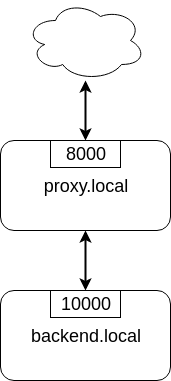
<p>First, let&rsquo;s look at the simple config that just forwards requests from
<a href="http://proxy.local/">http://proxy.local/</a> address to a single <a href="http://backend.local:10000">http://backend.local:10000</a>.</p>
<pre tabindex="0"><code class="language-config" data-lang="config">user nginx;
worker_processes auto;

events {}

http {
    access_log  /var/log/nginx/access.log combined;

    # include /etc/nginx/conf.d/*.conf;

    upstream backend {
        server backend.local:10000;
    }

    server {
        server_name proxy.local;
        listen 8000;

        location / {
            proxy_pass http://backend;
        }
    }
}
</code></pre><p>You declare your backend service as an <code>upstream</code> group. Each instance of the
backend is described with a <code>server</code> directive.</p>
<p>Then you declare entrypoint with a <code>server</code> and <code>location</code>. Given that it&rsquo;s
nginx you can go crazy with regexp location matching and stuff but it&rsquo;s not what
is required in the case of service routing.</p>
<p>Finally, you forward requests with <code>proxy_pass</code> directive.</p>
<p>From this simple config, we can start to build the necessary complexity.</p>
<h2 id="activepassive-backend-configuration">Active/Passive backend configuration</h2>
<p>If your service needs active/passive configuration where one server is the main
for requests handling and the other is a backup then you can configure it like
this:</p>
<pre tabindex="0"><code>    ...
    upstream backend {
        server main-backend.local:10000;
        server backup-backend.local:10000 backup;
    }
    ...    
</code></pre><p><code>backup</code> option tells nginx that this server in the upstream group will be used
only if the primary server is unavailable.</p>
<p>By default, server is marked as unavailable after 1 connection error or timeout.
This can be tuned with <code>max_fails</code> option for each server in an upstream group
like this:</p>
<pre tabindex="0"><code>    ...
    upstream backend {
        # Try 3 times for the main server
        server main-backend.local:10000 max_fails=3;

        # Try 10 times for backup server
        server backup-backend.local:10000 backup max_fails=10;
    }
    ...    
</code></pre><p>In addition to connection errors and timeouts, you can use various HTTP error
codes like 500 as unsuccessful attempts. This is configured by the
<a href="https://nginx.org/en/docs/http/ngx_http_proxy_module.html#proxy_next_upstream">proxy_next_upstream</a>
directive.</p>
<pre tabindex="0"><code>...
    upstream backend {
        server main-backend.local:10000;
        server backup-backend.local:10000 backup;
    }

    server {
        server_name proxy.local;
        listen 8000;

        # Switch to the next upstream in  case of connection error, timeout
        # or HTTP 429 error (rate limit).
        proxy_next_upstream error timeout http_429;

        location / {
            proxy_pass http://backend;
        }
    }
...
</code></pre><h2 id="proxy-to-kubernetes-service">Proxy to Kubernetes service</h2>
<p><code>max_fails</code> option is crucial if your nginx is running inside Kubernetes and you
want to proxy requests to the Kubernetes service (using cluster DNS). In this
case, you should have a single server with <code>max_fails=0</code> like this:</p>
<pre tabindex="0"><code>    ...
    upstream backend {
        server app.my-team.svc max_fails=0;
    }
    ...
</code></pre><p>This way nginx will not mark Kubernetes service as unavailable. It won&rsquo;t try to
do passive health checks. All of these are not needed because Kubernetes service
is doing active health checks by itself with readiness probes.</p>
<h2 id="flexible-routing-with-map">Flexible routing with <code>map</code></h2>
<p>Sometimes you need to route requests based on some header value. Or query
parameter. Or cookie value. Or hostname. Or any combination of those.</p>
<p>And this is the case where nginx really shines. It&rsquo;s the only (in my experience)
proxy server that allows requests routing with almost arbitrary logic.</p>
<p>The key part that makes this possible is
<a href="http://nginx.org/en/docs/http/ngx_http_map_module.html"><code>ngx_http_map_module</code></a>.
This module allows you to define variable from the combination of other
variables with regular expressions. Sounds complicated but wait for it.</p>
<p>Say, we have 3 backend services that are serving different kinds of data:</p>
<ol>
<li>Live data service that returns the most recent data that were just collected.</li>
<li>Historical data service that returns old data.</li>
<li>Aggregated data service that returns precalculated data.</li>
</ol>
<p>Call it microservices architecture, whatever.</p>
<p>These services are exposed to users via the same endpoint
<code>https://&lt;date&gt;.api.com/?report=&lt;report&gt;</code>. Here are a few examples to give you
an idea of how it works:</p>
<ul>
<li><a href="https://2021-04-01.api.com/?report=list_records">https://2021-04-01.api.com/?report=list_records</a> should route to the
<strong>historical</strong> data service</li>
<li><a href="https://api.com/?report=list_records">https://api.com/?report=list_records</a> should route to the <strong>live</strong> data service</li>
<li><a href="https://api.com/?report=counters">https://api.com/?report=counters</a> should also route to the <strong>aggregated</strong> data
service</li>
<li><a href="https://2018-11-01.api.com/?report=counters">https://2018-11-01.api.com/?report=counters</a> should route to the <strong>aggregated</strong>
data service</li>
</ul>
<p>This may seem like an ugly API but this is how the real world often looks like
and you have to deal with it.</p>
<p>So let&rsquo;s write a routing configuration. First, define 3 upstream groups:</p>
<pre tabindex="0"><code>upstream live {
    server live-backend-1:8000;
    server live-backend-2:8000;
    server live-backend-3:8000;
}

upstream hist {
    server hist-backend-1:9999;
    server hist-backend-2:9999;
}

upstream agg {
    server agg-backend-1:7100;
    server agg-backend-2:7100;
    server agg-backend-3:7100;
}
</code></pre><p>Next, define the server that will listen for all requests and somehow route
them:</p>
<pre tabindex="0"><code>    server {
        server_name *.api.com &#34;&#34;;
        listen 80;

        location / {
            # FIXME: proxy pass to who?
            proxy_pass http://???;
        }
    }
</code></pre><p>The question is what should we write in <code>proxy_pass</code> directive?</p>
<p>Since nginx configuration is declarative we can write <code>proxy_pass http://$destination/</code> and build the destination variable with maps.</p>
<p>In our example service, we make a routing decision based on the <code>report</code> query
variable and date subdomain. This is what we need to extract into our variables:</p>
<pre tabindex="0"><code>map $host $date {
	&#34;~^((?&lt;subdomain&gt;\d{4}-\d{2}-\d{2}).)?api.com$&#34; $subdomain;
	default &#34;&#34;;
}
</code></pre><p>Map will parse <code>$host</code> variable (one of the many predefined nginx variables) and
set the result of parsing into our <code>$date</code> variable. Inside the map, there are
parsing rules.</p>
<p>In my case there are 2 rules - the main one with regex and the other is a
fallback denoted with the <code>default</code> keyword.</p>
<p>You can <a href="https://regex101.com/r/xDvfpb/2">inspect the regex in regex101</a>. The
first symbol <code>~</code> marks the rule as a regular expression. Our regex starts with
<code>^</code> and ends with <code>$</code> which denotes the start and end of the line - it&rsquo;s a kind
of a best practice for regexes to explicitly match the whole string and I use it
as much as possible. To extract the subdomain we create a group with
parenthesis. Inside that group I use <code>\d{4}-\d{2}-\d{2}</code> to parse the date
format <code>2021-05-01</code>. There is also <code>?&lt;subdomain&gt;</code> thing inside the group. This
is called capture group and it&rsquo;s just to give a name to the matched part of the
regex. Capture group is then used on the right side of the map rule to assign
its value to the <code>$date</code> variable. Note that subdomain is optional so we need to
wrap in parenthesis together with the dot (subdomain delimiter) and add <code>?</code> to
the whole group.</p>
<p>Phew! The regex part is done so we may relax.</p>
<p>To extract report we don&rsquo;t need to use a map because nginx provides
<code>arg_&lt;param&gt;</code> predefined variables for query parameters. So <code>report</code> query
parameter can be accessed as <code>arg_report</code>.</p>
<p>The full list of nginx variables can be googled with &ldquo;nginx varindex&rdquo; and is
located <a href="https://nginx.org/en/docs/varindex.html">here</a>.</p>
<p>Ok, so now we have the date and report. How can we construct <code>$destination</code>
variable from it? With another map! The trick here is that you can use a
combination of variables to create the new variable in the map:</p>
<pre tabindex="0"><code>map &#34;$arg_report:$date&#34; $destination {
    &#34;~counters:.*&#34; agg;
    &#34;~.*:.+&#34; hist;
    default live;
}
</code></pre><p>The combination here is a string where 2 variables are joined with a colon.
Colon is a personal choice and used for convenience. You can use any symbol,
just make sure that regex will be unambiguous.</p>
<p>In the map, we have 3 rules.</p>
<ol>
<li>First is to set <code>$destination</code> to <code>agg</code> when <code>report</code> query parameter is
<code>counters</code>.</li>
<li>Second is to set <code>$destination</code> to <code>hist</code> when <code>$date</code> variable is not empty.</li>
<li>The default value set when nothing else matches is to set <code>$destination</code> to
<code>live</code>.</li>
</ol>
<p>Regexes in the map are evaluated in order.</p>
<p>Note that <code>$destination</code> value is the name of the upstream group.</p>
<p>Here is the full config:</p>
<pre tabindex="0"><code>events {}

http {
    upstream live {
        server live-backend-1:8000;
        server live-backend-2:8000;
        server live-backend-3:8000;
    }

    upstream hist {
        server hist-backend-1:9999;
        server hist-backend-2:9999;
    }

    upstream agg {
        server agg-backend-1:7100;
        server agg-backend-2:7100;
        server agg-backend-3:7100;
    }

    map $host $date {
        &#34;~^((?&lt;subdomain&gt;\d{4}-\d{2}-\d{2}).)?api.local$&#34; $subdomain;
        default &#34;&#34;;
    }

    map &#34;$arg_report:$date&#34; $destination {
        &#34;~counters:.*&#34; agg;
        &#34;~.*:.+&#34; hist;
        default live;
    }

    server {
        server_name *.api.com &#34;&#34;;
        listen 80;

        location / {
            proxy_pass http://$destination/;
        }
    }
}
</code></pre><h2 id="passing-request-to-consul-services">Passing request to Consul services</h2>
<p>If you use Consul for service discovery then your services can be accessed via
DNS provided by Consul. It&rsquo;s as simple as <code>curl myapp.service.consul</code>.</p>
<p>Very convenient but nobody knows how to resolve names in <code>.consul</code> zone. <a href="https://learn.hashicorp.com/tutorials/consul/dns-forwarding">Consul
docs gives a few ways to configure it universally in your
infrastructure</a>.
I&rsquo;ve used dnsmasq with great success.</p>
<p>Anyway, to route requests in nginx via Consul DNS you don&rsquo;t have to go hard.
There is a <code>resolver</code> directive in nginx for using custom DNS servers.</p>
<p>Here is how to forward requests via Consul DNS from nginx:</p>
<pre tabindex="0"><code>...
    server {
        server_name *.api.com &#34;&#34;;
        listen 80;

        # Resolve using Consul DNS. Fallback to Google and Cloudflare DNS.
        resolver 10.0.0.1:8600 10.0.0.2:8600 10.0.0.3:8600 8.8.8.8 1.1.1.1;
        location /v1/api {
            proxy_pass http://prod.api.service.consul/;
        }
        location /v1/rpc {
            proxy_pass http://prod.rpc.service.consul/;
        }
    }
...
</code></pre><p><strong>Update</strong>: <a href="https://lobste.rs/s/kewdvx/nice_nginx_features_for_developers#c_ak63g0">Nice people at lobste.rs pointed
out</a>
that <code>proxy_pass</code> caches DNS response until restart. There are a few ways to fix
this. First, put the Consul service URL into the upstream and use <code>valid</code> option
in <a href="https://nginx.org/en/docs/http/ngx_http_core_module.html#resolver"><code>resolver</code>
directive</a>
for tuning DNS response TTL. The other option is to use a variable for
<code>proxy_pass</code> as <a href="https://tenzer.dk/nginx-with-dynamic-upstreams/">described by Jeppe Fihl-Pearson
here</a>. Apparently, when nginx
sees a variable in <code>proxy_pass</code> it will honor the TTL of DNS response.</p>
<p>Yes, it’s not dynamic in the way that traefik does it. If a new service needs to
be added you have to edit the nginx config somehow while traefik does this
automatically.</p>
<p>But you can implement decent service discovery <a href="https://learn.hashicorp.com/tutorials/consul/load-balancing-nginx">using consul template that will
update nginx config from consul
data</a>.</p>
<h2 id="conclusion">Conclusion</h2>
<p>Nginx is a very versatile tool. It has a rich configuration language that
enables nice features for developers.</p>
<ul>
<li>Active/passive load balancing with configured failover</li>
<li>Flexible requests routing</li>
<li>Easy integration with Consul DNS</li>
</ul>
<p>Yes, it&rsquo;s not perfect - the upstream healthchecks are passive (in the open
source version), configuration defaults are not modern, initial setup is rough.</p>
<p>But given all the richness, investing a little bit of time into it is worth it.
Before ditching it in favor of something else, think hard about all the features
that nginx provides.</p>
]]></content>
  </entry>
 

  <entry>
    <title type="html"><![CDATA[How to use Ansible check mode with async tasks]]></title>
    <link href="https://alex.dzyoba.com/blog/ansible-check-async/"/>
    <id>https://alex.dzyoba.com/blog/ansible-check-async/</id>
    <published>2020-09-25T00:00:00+00:00</published>
    <updated>2020-09-25T00:00:00+00:00</updated>
    <content type="html"><![CDATA[<p>One of the most annoying things in ansible is this error:</p>
<pre><code>TASK [Some long command like backup job] ***************************
task path: /home/avd/src/ansible/playbook.yml:4
fatal: [localhost]: FAILED! =&gt; {
    &quot;changed&quot;: false,
    &quot;msg&quot;: &quot;check mode and async cannot be used on same task.&quot;
}
</code></pre>
<p>I often see it because I check every playbook that I run with <a href="https://docs.ansible.com/ansible/latest/user_guide/playbooks_checkmode.html">&ldquo;check
mode&rdquo;</a>.</p>
<p>Check mode in Ansible is doing everything described in the task except actually
executing it. It&rsquo;s like <code>--dry-run</code> in <code>svn</code> if you remember those things.</p>
<p>Most of the time check mode works but when the <a href="https://docs.ansible.com/ansible/latest/user_guide/playbooks_async.html">async
mode</a>
is enabled it fails with the above error. Async tasks are the ones that run for
a long time and when your job fails in the middle after a few hours because your
variable was rendered incorrect it is very frustrating.</p>
<p><strong>So what if you really need to check async task?</strong></p>
<p>Today, I found a way to do this:</p>
<pre><code>  async: &quot;{{ ansible_check_mode | ternary(0, 21600) }}&quot;
</code></pre>
<p>This little trick checks for check mode and if it&rsquo;s set the async will be
disabled because it&rsquo;s set 0. If check mode is not set it will set the desired
async timeout.</p>
<p>Here is an example playbook with this trick applied:</p>
<pre><code>---
- hosts: localhost
  tasks:
    - name: Some long command like backup job
      command: &gt;-
        echo &quot;/usr/local/bin/backup-job {{ date }} {{ destination }}&quot;
      async: &quot;{{ ansible_check_mode | ternary(0, 10800) }}&quot;
</code></pre>
<p>Run it and see your check mode stuff:</p>
<pre><code>$ ansible-playbook -C -vvv playbook.yml -e date='2020-09-25' -e destination='s3://mybucket/backups/'
ansible-playbook 2.9.13
...

PLAYBOOK: playbook.yml **********************************************************************************
1 plays in playbook.yml

PLAY [localhost] ****************************************************************************************

TASK [Gathering Facts] **********************************************************************************
task path: /home/avd/src/ansible/playbook.yml:2
...

TASK [Some long command like backup job] ****************************************************************
task path: /home/avd/src/ansible/playbook.yml:4
...
skipping: [localhost] =&gt; {
    &quot;changed&quot;: false,
    &quot;invocation&quot;: {
        &quot;module_args&quot;: {
            &quot;_raw_params&quot;: &quot;echo \&quot;/usr/local/bin/backup-job 2020-09-25 s3://mybucket/backups/\&quot;&quot;,
            &quot;_uses_shell&quot;: false,
            &quot;argv&quot;: null,
            &quot;chdir&quot;: null,
            &quot;creates&quot;: null,
            &quot;executable&quot;: null,
            &quot;removes&quot;: null,
            &quot;stdin&quot;: null,
            &quot;stdin_add_newline&quot;: true,
            &quot;strip_empty_ends&quot;: true,
            &quot;warn&quot;: true
        }
    },
    &quot;msg&quot;: &quot;skipped, running in check mode&quot;
}
META: ran handlers
META: ran handlers

PLAY RECAP **********************************************************************************************
localhost                  : ok=1    changed=0    unreachable=0    failed=0    skipped=1    rescued=0    ignored=0   
</code></pre>
]]></content>
  </entry>
 

  <entry>
    <title type="html"><![CDATA[Redis experience]]></title>
    <link href="https://alex.dzyoba.com/blog/redis-experience/"/>
    <id>https://alex.dzyoba.com/blog/redis-experience/</id>
    <published>2020-01-18T00:00:00+00:00</published>
    <updated>2020-01-18T00:00:00+00:00</updated>
    <content type="html"><![CDATA[<h2 id="intro">Intro</h2>
<p>Redis is an indispensable tool for many software engineering problems because it
provides great primitives, it&rsquo;s fast and solid. Most of the time it&rsquo;s used as
some sort of cache. But if you stretch it to other use cases its behavior may
surprise you.</p>
<p>Recently we&rsquo;ve tried to use it as persistent storage for a large dataset.
We&rsquo;ve got a lot of problems, fixed many and gained a lot of experience that I
wanted to share.  So here is my experience report.</p>
<p>Disclaimer &ndash; all of these problems arose from our use case and not because Redis
is somewhat flawed. Like any piece of software it requires understanding and
research before deployed in any decent production environment.</p>
<h2 id="our-use-case">Our use case</h2>
<p>We have a data collecting pipeline with the following requirements:</p>
<ul>
<li>We need aggregated counters to calculate various metrics during data collect</li>
<li>There are more than 800 million keys where 97% of the keys hold a couple of
integers</li>
<li>We need to make it available because our data pipeline is always working</li>
<li>We need to cleanup outdated entries because our dataset is changing every day</li>
<li>We want it to be persistent because loading that amount of data takes a lot of
time and we really don&rsquo;t like to stop our data pipeline</li>
</ul>
<h2 id="cluster">Cluster</h2>
<p>Given our requirements we <strong>started to use Redis cluster from the start</strong>. We chose
it over single master/replica because we couldn&rsquo;t fit our 800M+ keys on a single
instance and because Redis cluster provides <a href="/blog/redis-ha/">high availability</a> kinda
out of the box (you still need to create the cluster with <code>redis-trib.rb</code> or
<code>redis-cli --cluster create</code>). Also, such beefy nodes are very hard to manage &ndash;
loading of the dataset would take about an hour, the snapshot would take a long time</p>
<ul>
<li>generally, I prefer to use many small nodes with small datasets on each
instead of a few huge nodes.</li>
</ul>
<p>So, I&rsquo;ve setup Redis cluster and this time I did it without <a href="/blog/redis-cluster/">cross
replication</a> because I&rsquo;ve used Google Cloud instances and
because cross replication is very tedious to configure and painful to maintain.</p>
<p>Now, it&rsquo;s time to load the data.</p>
<h3 id="loading-data">Loading data</h3>
<p>The naive way of loading data by sending millions of SET commands is very
inefficient because you&rsquo;ll spend most of the time waiting for command RTT.
Instead, <strong>you should use <a href="https://redis.io/topics/pipelining">pipelining</a></strong> or even <a href="https://redis.io/topics/mass-insert">generate a
file with Redis protocol for mass insert</a>.</p>
<p>I have experience with pipelining and would recommend this way because it allows
you to control the process and anyway it&rsquo;s much more convenient than generating
text files.</p>
<p>With pipelining I saw more than 300K RPS on insert (SET/HSET/SADD) so it&rsquo;s very
performant. But it has one crucial point regarding the Redis cluster mode &ndash;
<strong>multi-key commands must hit the same node</strong>. That&rsquo;s understandable because
all commands in a pipeline are seen as one and to generate the response you
don&rsquo;t need to gather data from other nodes (potentially failing) but instead do
everything in a single process context.</p>
<p>Nevertheless, it&rsquo;s possible to use pipelining with Redis cluster &ndash; you just have
to use <strong>hash tags</strong>. Hash tags are a substring in curly braces that Redis will
use for calculating the hash slot and consequently determine the cluster node.
It looks like this:</p>
<pre><code>SET {shard}:key
</code></pre>
<p><code>{shard}</code> is a hash tag.</p>
<p>All operations in a pipeline must have the same hash tag to succeed. But the
problem here is that all keys with the same hash tag will be on the same node in
the same hash slot. This will lead to uneven data distribution and <strong>imbalanced
memory consumption</strong> on Redis cluster nodes. In our use case data partitions were
very different in sizes and after the data loading we got a 3x discrepancy in
memory consumption between some nodes. This is a problem because you&rsquo;ll have
different utilization of cluster nodes and you don&rsquo;t know how to size your
cluster now.</p>
<p>It&rsquo;s possible to rebalance your cluster by moving hash slots between nodes &ndash;
it&rsquo;s described <a href="https://redis.io/topics/cluster-tutorial#resharding-the-cluster">in the cluster tutorial</a>. I&rsquo;ve tried
the process <a href="https://redis.io/commands/cluster-setslot#redis-cluster-live-resharding-explained">described in <code>CLUSTER SETSLOT</code>
doc</a>.  But I would recommend against this
because it&rsquo;s a manual process, error-prone, you will forget about it the next
you need to setup the cluster and essentially it&rsquo;s a dirty fix.</p>
<h3 id="going-forward">Going forward</h3>
<p>So we started to use Redis cluster, load the data with pipelining and use hash
tags to make pipelining work.</p>
<h2 id="memory-consumption">Memory consumption</h2>
<p>Let&rsquo;s talk about memory consumption because Redis is an in-memory database,
meaning that your dataset is bound by the amount of memory the Redis server
node. But you can&rsquo;t only count the size of your data for capacity planning, you
have to remember that <strong>storing any Redis key is not free</strong>. The main hash table
(used for SET) and all Redis datatypes like sets and lists have overhead.</p>
<p>We can see that overhead with a <code>MEMORY USAGE</code> command.</p>
<pre><code>127.0.0.1:6379&gt; mget 0 1000 100000
1) &quot;76876987&quot;
2) &quot;76184956&quot;
3) &quot;74602210&quot;
127.0.0.1:6379&gt; MEMORY USAGE 0
(integer) 43
127.0.0.1:6379&gt; MEMORY USAGE 1000
(integer) 46
127.0.0.1:6379&gt; MEMORY USAGE 100000
(integer) 48

127.0.0.1:6379&gt; DEBUG OBJECT 0
Value at:0x7f21c8ab95e0 refcount:1 encoding:int serializedlength:5 lru:16680050 lru_seconds_idle:103
</code></pre>
<p>Serialized length of the value is 5 while real memory usage is 43, so a single
simple key storing nothing but <strong>single integer value has overhead of almost 40
bytes</strong>.</p>
<p>This overhead is needed not only for making hash table work but also for various
features that Redis provides to you like efficient memory encoding and LRU keys
eviction.</p>
<h3 id="expires">Expires</h3>
<p>If you want to store keys with expiration (i.e. TTL) prepare for a 50% increase
in memory consumption.</p>
<p>Let&rsquo;s conduct a simple experiment &ndash; load 1 million keys without TTL and then
compare memory usage with 1 million keys with TTL.</p>
<p>Here is the initial state with empty redis.</p>
<pre><code>$ redis-cli
127.0.0.1:6379&gt; dbsize
(integer) 0
127.0.0.1:6379&gt; INFO memory
# Memory
used_memory:853328
used_memory_human:833.33K
used_memory_rss:5955584
used_memory_rss_human:5.68M
used_memory_peak:853328
used_memory_peak_human:833.33K
used_memory_peak_perc:100.01%
used_memory_overhead:841102
used_memory_startup:791408
used_memory_dataset:12226
used_memory_dataset_perc:19.74%
...
</code></pre>
<p>Load 1 million keys each containing a single random integer:</p>
<pre><code>$ python3 loader.py 
$ redis-cli
127.0.0.1:6379&gt; dbsize
(integer) 1000000
127.0.0.1:6379&gt; info memory
# Memory
used_memory:57240464
used_memory_human:54.59M
used_memory_rss:62619648
used_memory_rss_human:59.72M
used_memory_peak:57240464
used_memory_peak_human:54.59M
used_memory_peak_perc:100.00%
used_memory_overhead:49229710
used_memory_startup:791408
used_memory_dataset:8010754
used_memory_dataset_perc:14.19%
...
</code></pre>
<p>Memory usage is 59.72M.</p>
<p>Now let&rsquo;s load 1 million keys with expire:</p>
<pre><code>$ python3 loader.py --expire
$ redis-cli
127.0.0.1:6379&gt; dbsize
(integer) 1000000
127.0.0.1:6379&gt; info memory
# Memory
used_memory:89628800
used_memory_human:85.48M
used_memory_rss:95326208
used_memory_rss_human:90.91M
used_memory_peak:89628800
used_memory_peak_human:85.48M
used_memory_peak_perc:100.00%
used_memory_overhead:81618318
used_memory_startup:791408
used_memory_dataset:8010482
used_memory_dataset_perc:9.02%
...
</code></pre>
<p>Memory consumption grew 52% to 90.91M.</p>
<p><strong>Redis expires gives a lot of additional overhead</strong> because, as far as I can tell, they are
stored as separate keys in the internal hash table (<code>db-&gt;expires</code>).</p>
<div class="highlight"><pre tabindex="0" style="background-color:#f0f3f3;-moz-tab-size:4;-o-tab-size:4;tab-size:4;"><code class="language-c" data-lang="c"><span style="display:flex;"><span><span style="color:#09f;font-style:italic">/* Set an expire to the specified key. If the expire is set in the context
</span></span></span><span style="display:flex;"><span><span style="color:#09f;font-style:italic"> * of an user calling a command &#39;c&#39; is the client, otherwise &#39;c&#39; is set
</span></span></span><span style="display:flex;"><span><span style="color:#09f;font-style:italic"> * to NULL. The &#39;when&#39; parameter is the absolute unix time in milliseconds
</span></span></span><span style="display:flex;"><span><span style="color:#09f;font-style:italic"> * after which the key will no longer be considered valid. */</span>
</span></span><span style="display:flex;"><span><span style="color:#078;font-weight:bold">void</span> <span style="color:#c0f">setExpire</span>(client <span style="color:#555">*</span>c, redisDb <span style="color:#555">*</span>db, robj <span style="color:#555">*</span>key, <span style="color:#078;font-weight:bold">long</span> <span style="color:#078;font-weight:bold">long</span> when) {
</span></span><span style="display:flex;"><span>    dictEntry <span style="color:#555">*</span>kde, <span style="color:#555">*</span>de;
</span></span><span style="display:flex;"><span>
</span></span><span style="display:flex;"><span>    <span style="color:#09f;font-style:italic">/* Reuse the sds from the main dict in the expire dict */</span>
</span></span><span style="display:flex;"><span>    kde <span style="color:#555">=</span> <span style="color:#c0f">dictFind</span>(db<span style="color:#555">-&gt;</span>dict,key<span style="color:#555">-&gt;</span>ptr);
</span></span><span style="display:flex;"><span>    <span style="color:#c0f">serverAssertWithInfo</span>(<span style="color:#366">NULL</span>,key,kde <span style="color:#555">!=</span> <span style="color:#366">NULL</span>);
</span></span><span style="display:flex;"><span>    de <span style="color:#555">=</span> <span style="color:#c0f">dictAddOrFind</span>(db<span style="color:#555">-&gt;</span>expires,<span style="color:#c0f">dictGetKey</span>(kde));
</span></span><span style="display:flex;"><span>    <span style="color:#c0f">dictSetSignedIntegerVal</span>(de,when);
</span></span><span style="display:flex;"><span>
</span></span><span style="display:flex;"><span>    <span style="color:#078;font-weight:bold">int</span> writable_slave <span style="color:#555">=</span> server.masterhost <span style="color:#555">&amp;&amp;</span> server.repl_slave_ro <span style="color:#555">==</span> <span style="color:#f60">0</span>;
</span></span><span style="display:flex;"><span>    <span style="color:#069;font-weight:bold">if</span> (c <span style="color:#555">&amp;&amp;</span> writable_slave <span style="color:#555">&amp;&amp;</span> <span style="color:#555">!</span>(c<span style="color:#555">-&gt;</span>flags <span style="color:#555">&amp;</span> CLIENT_MASTER))
</span></span><span style="display:flex;"><span>        <span style="color:#c0f">rememberSlaveKeyWithExpire</span>(db,key);
</span></span><span style="display:flex;"><span>}
</span></span></code></pre></div><p>By the way, this is the entire function. Redis code is very readable once you
get used to the camel case in C.</p>
<h3 id="our-memory-consumption">Our memory consumption</h3>
<p>Once we started to load the data in our Redis cluster the memory consumption was
too damn high! With our imbalanced cluster we started to use n1-highmem-16 nodes
to be able to fit our largest shard which are quite expensive.</p>
<p>So we needed to reduce our memory consumption. And the only way to do this
without (almost) any modification to the data is to use Redis hashes.</p>
<h3 id="hash">Hash</h3>
<p>One of the nicest tricks <strong>to reduce memory consumption is to store values in
small Redis hashes</strong> instead of the main hash table. This will work
because of <a href="https://redis.io/topics/memory-optimization">ziplist optimization</a> in Redis.</p>
<p>In short, with this optimization Redis stores hash values in arrays of
configurable size. You avoid hash table overhead but give up lookup speed which
is amortized over time because of the small size of the array.</p>
<p>Folks at <a href="https://instagram-engineering.com/storing-hundreds-of-millions-of-simple-key-value-pairs-in-redis-1091ae80f74c">Instagram used it</a> and we also tried it and shaved
off a considerable amount of memory.</p>
<p>But remember that you can&rsquo;t just shove your values in hash and call it done. To
trigger ziplist optimization you need to bucket the hash table to the size of
ziplist. Also, with hashes you lose some features, the most important is expires</p>
<ul>
<li>you can&rsquo;t set expire on the hash element, only on the key in the main table.</li>
</ul>
<h3 id="going-forward-1">Going forward</h3>
<p>So we started to store our dataset in Redis hashes to reduce memory consumption
and use smaller instance types for our imbalanced cluster.</p>
<h2 id="persistence">Persistence</h2>
<p>Finally, we wanted to use persistence because our dataset was important &ndash; we
cannot lose it because it would lead to the data pipeline downtime and, while we
can regenerate all of the data, it takes a lot of time to load.</p>
<p>The key lesson here is that <strong>if you want to use persistence in Redis with a lot
of data &ndash; you have a problem</strong>.</p>
<p>It all boils down to the, again, memory consumption that is quickly growing
during snapshotting. But first, let&rsquo;s quickly recall <a href="https://redis.io/topics/persistence">how persistence
works</a>.</p>
<p>There are 2 persistence options in Redis &ndash; RDB snapshots and AOF log. With RDB
snapshots Redis periodically makes snapshot of the in-memory data by forking the
main process and writing data in a child process. It works because of
Copy-on-Write feature in modern operating systems where parent and child
processes can share the memory without doubling the data <strong>unless memory is not
modified in the parent process</strong>. When memory gets written in the parent
process the operating system will make a copy for the child so it will see the
old version &ndash; that&rsquo;s why it&rsquo;s called Copy-on-Write.</p>
<p>When RDB snapshotting is performed it should be free in terms of memory
consumption because of the CoW but it&rsquo;s more subtle. If there is new data
writing happening during snapshotting then memory consumption will grow on the
size of that new data because Copy-on-Write will trigger the creation of new memory
pages. The longer your snapshot process the more likely it will hit you. And the
more data you&rsquo;re writing during this process the more your memory consumption
will grow.</p>
<p>With the default configuration snapshot will be taken every 10000 changes which
in our case means constantly during data upload. We were uploading data in huge
batches so our memory consumption grew almost twice and eventually Redis was
OOM killed.</p>
<p>So we tried to use AOF instead of RDB. But when AOF log is rewritten it uses the
same Copy-on-Write trick as RDB snapshots so we get OOM killed again.</p>
<p>There are a few possible fixes for this. First, you can simply disable
persistence if it fits your case. For example, if you can lose or quickly
recover your data.</p>
<p>You can also have 2x memory to accommodate extra writes during snapshotting.</p>
<p>And you can also control snapshotting by issuing Manual BGSAVE or REWRITEAOF.
But this won&rsquo;t help you <a href="https://groups.google.com/d/msg/redis-db/ILyp4y1em5w/PHKlhrh5gQIJ">when replica is syncing from the master</a>.
This is the most surprising thing I saw with Redis &ndash; when replica was crashed
and restarted it will need to sync with master. Syncing with master is performed
by triggering RDB snapshot and sending it over the network. So <strong>even if
persistence is completely disabled Redis may trigger RDB snapshotting for
replica sync</strong> with all the consequences like increased memory consumption and
risk of being killed by OOM. And as far as I know, you cannot disable it.</p>
<p>In our case we settled on the manual BGSAVE via cron once a day when the data
<em>most likely</em> won&rsquo;t be uploaded.</p>
<h2 id="conclusion">Conclusion</h2>
<p>At the end of this journey we had a Redis cluster for our simple aggregated
data. We loaded data via Redis pipelined commands so we used hash tags. To
reduce memory consumption we used Redis hashes. And for persistence we have a
cron job that will trigger BGSAVE in idle time.</p>
<p>This is my third post on Redis &ndash; I&rsquo;ve also written <a href="/blog/redis-ha/">on high availability
options</a> and <a href="/blog/redis-cluster/">cross-replicated cluster</a>.</p>
<p>Doing our use case taught me a lot about Redis &ndash; how it works, where it&rsquo;s good
or not and I get a much better understanding of it which is the most important
thing for software engineers.</p>
<p>As always if you have any comments or suggestions feel free to send me an email.
That&rsquo;s it for now, subscribe <a href="https://alex.dzyoba.com/feed">via RSS/Atom feed</a> to stay tuned for the next post.
Till the next time!</p>
]]></content>
  </entry>
 

  <entry>
    <title type="html"><![CDATA[Prometheus alerts examples]]></title>
    <link href="https://alex.dzyoba.com/blog/prometheus-alerts/"/>
    <id>https://alex.dzyoba.com/blog/prometheus-alerts/</id>
    <published>2019-10-29T00:00:00+00:00</published>
    <updated>2019-10-29T00:00:00+00:00</updated>
    <content type="html"><![CDATA[<p>Prometheus is my go-to tool for monitoring these days. At the core of Prometheus
is a time-series database that can be queried with a powerful language for
everything &ndash; this includes not only graphing but also alerting.  Alerts
generated with Prometheus are usually sent to Alertmanager to deliver via
various media like email or Slack message.</p>
<p>That&rsquo;s all nice and dandy but when I started to use it I was struggling because
<strong>there are no built-in alerts coming with Prometheus</strong>. Looking on the
Internet, though, I&rsquo;ve found the following alert examples:</p>
<ul>
<li><a href="https://gitlab.com/gitlab-com/runbooks/blob/0946602d55a442c6ca5ce407877c267459d8404c/rules/node.yml">Gitlab alerts for nodes</a></li>
<li><a href="https://github.com/sapcc/helm-charts/blob/a5ba80fd660aae71770fbf7c9625ad6fb5b2887d/prometheus-rules/prometheus-kubernetes-rules/alerts/node.alerts.tpl">Kubernetes node alerts from some Helm chart</a></li>
<li><a href="https://github.com/infinityworks/prometheus-example-queries">Example queries and alerts</a></li>
</ul>
<p>From my point of view, the lack of ready-to-use examples is a major pain for
anyone who is starting to use Prometheus. Fortunately, the community is aware of
that and working on various proposals:</p>
<ul>
<li><a href="https://github.com/prometheus/node_exporter/pull/590/files">PR with node_exporter bundled alerts by Julius Volz</a></li>
<li><a href="https://docs.google.com/document/d/1oXfthGcAOMriy7PEqrq_E8ecz1U_Jyn3QYqEWoHN7S8/edit?usp=drivesdk">and proposal for example bundles</a></li>
<li><a href="https://docs.google.com/document/d/1A9xvzwqnFVSOZ5fD3blKODXfsat5fg6ZhnKu9LK3lB4/edit?usp=drivesdk">Monitoring Mixins proposals by Tom Wilkie and Frederic Branczyk</a></li>
</ul>
<p>All of this seems great but we are not there yet, so <strong>here is my humble attempt
to add more examples to the sources above</strong>. I hope it will help you get started
with Prometheus and Alertmanager.</p>
<h2 id="prerequisites">Prerequisites</h2>
<p>Before you start setting up alerts you must have metrics in Prometheus
time-series database. There are various exporters for Prometheus that exposes
various metrics but I will show you examples for the following:</p>
<ul>
<li>node_exporter for hardware alerts</li>
<li>redis_exporter for Redis cluster alerts</li>
<li>jmx-exporter for Kafka and Zookeeper alerts</li>
<li>consul_exporter for alerting on Consul metrics</li>
</ul>
<p>All of the exporters are very easy to setup except JMX because the latter should
be run as Java agent within Kafka/Zookeeper JVM. Refer to <a href="/blog/jmx-exporter/">my previous post</a> on setting up jmx-exporter.</p>
<p>After setting up all the needed exporters and collecting the metrics for some
time we can start crafting out alerts.</p>
<h2 id="alerts">Alerts</h2>
<p>My philosophy for alerting is pretty simple &ndash; alert only when something is
really broken, include maximum info and deliver via multiple media.</p>
<p>You describe the alerts in <code>alert.rules</code> file (usually in <code>/etc/prometheus</code>) on
Prometheus server, not Alertmanager, because the latter is responsible for
formatting and delivering alerts.</p>
<p>The format of alert.rules is YAML and it goes like this:</p>
<pre><code>groups:
- name: Hardware alerts
  rules:
  - alert: Node down
    expr: up{job=&quot;node_exporter&quot;} == 0
    for: 3m
    labels:
      severity: warning
    annotations:
      title: Node {{ $labels.instance }} is down
      description: Failed to scrape {{ $labels.job }} on {{ $labels.instance }} for more than 3 minutes. Node seems down.
</code></pre>
<p>You have a top-level <code>groups</code> key that contains a list of groups. I usually
create group for each exporter, so I have Hardware alerts for node_exporter,
Redis alerts for redis_exporter and so on.</p>
<p>Also, all of my alerts have 2 annotations &ndash; title and description that will be
used by Alertmanager.</p>
<h3 id="hardware-alerts-with-node_exporter">Hardware alerts with node_exporter</h3>
<p>Let&rsquo;s start with a simple one &ndash; alert when the server is down.</p>
<pre><code>- alert: Node down
  expr: up{job=&quot;node_exporter&quot;} == 0
  for: 3m
  labels:
    severity: warning
  annotations:
    title: Node {{ $labels.instance }} is down
    description: Failed to scrape {{ $labels.job }} on {{ $labels.instance }} for more than 3 minutes. Node seems down.
</code></pre>
<p>The essence of this alert is expression which states <code>up{job=&quot;node_exporter&quot;} == 0</code>. I&rsquo;ve seen a lot of examples that just use <code>up == 0</code> but it&rsquo;s strange because
every exporter that is being scraped by Prometheus has this metric, so you&rsquo;ll be
alerted on a completely unwanted thing like restart of postgres_exporter which
is not the same as Postgres itself. So I set job label to node_exporter to
explicitly scrape for node health.</p>
<p>Another key part in this alert is the <code>for: 3m</code> which tells Prometheus to send
alert only when expression holds true for 3 minutes. This is intended to avoid
false positives when some scrapes were failed because of network hiccups. It
basically add robustness to your alerts.</p>
<p>Some people use blackbox_exporter with ICMP probe for this.</p>
<p>Next is the Linux md raid alert</p>
<pre><code>- alert: MDRAID degraded
  expr: (node_md_disks - node_md_disks_active) != 0
  for: 1m
  labels:
    severity: warning
  annotations:
    title: MDRAID on node {{ $labels.instance }} is in degrade mode
    description: Degraded RAID array {{ $labels.device }} on {{ $labels.instance }}: {{ $value }} disks failed
</code></pre>
<p>In this one I check the diff between the total count of the disks and count of
the active disks and use diff value <code>{{ $value }}</code> in description.</p>
<p>You can also access metric labels via <code>$labels</code> variable to put useful info into
your alerts.</p>
<p>The next one is for bonding status:</p>
<pre><code>- alert: Bond degraded
  expr: (node_bonding_active - node_bonding_slaves) != 0
  for: 1m
  labels:
    severity: warning
  annotations:
    title: Bond is degraded on {{ $labels.instance }}
    description: Bond {{ $labels.master }} is degraded on {{ $labels.instance }}
</code></pre>
<p>This one is similar to mdraid one.</p>
<p>And the final one for hardware alerts is free space:</p>
<pre><code>- alert: Low free space
  expr: (node_filesystem_free{mountpoint !~ &quot;/mnt.*&quot;} / node_filesystem_size{mountpoint !~ &quot;/mnt.*&quot;} * 100) &lt; 15
  for: 1m
  labels:
    severity: warning
  annotations:
    title: Low free space on {{ $labels.instance }}
    description: On {{ $labels.instance }} device {{ $labels.device }} mounted on {{ $labels.mountpoint }} has low free space of {{ $value }}%
</code></pre>
<p>To calculate free space I&rsquo;m calculating it as a percentage and check if it&rsquo;s
less than 15%. In the expression above I&rsquo;m also excluding all mountpoints with
<code>/mnt</code> because it&rsquo;s usualy external to the node like remote storage which may be
close to full, e.g. for backups.</p>
<p>The final note here is <code>labels</code> where I set <code>severity: warning</code>. Inspired by Google
SRE book I have decided to use only 2 severity levels for alerting &ndash; <code>warning</code>
and <code>page</code>. <code>warning</code> alerts should go to the ticketing system and you should
react to these alerts during normal working days. <code>page</code> alerts are emergencies
and can wake up on-call engineer &ndash; this type of alerts should be crafted
carefully to avoid burnout. Alerts routing based on levels is managed by
Alertmanager.</p>
<h3 id="redis-alerts">Redis alerts</h3>
<p>These are pretty simple &ndash; we have a <code>warning</code> alert on redis cluster instance
availability and <code>page</code> alert when the whole cluster is broken:</p>
<pre><code>- alert: Redis instance is down
  expr: redis_up == 0
  for: 1m
  labels:
    severity: warning
  annotations:
    title: Redis instance is down
    description: Redis is down at {{ $labels.instance }} for 1 minute.

- alert: Redis cluster is down
  expr: min(redis_cluster_state) == 0
  labels:
    severity: page
  annotations:
    title: Redis cluster is down
    description: Redis cluster is down.
</code></pre>
<p>These metrics are reported by redis_exporter. I deploy it on all instances of
Redis cluster &ndash; that&rsquo;s why there is a <code>min</code> function applied on
<code>redis_cluster_state</code>.</p>
<p>I have a single Redis cluster but if you have multiple you should include that
into alert description &ndash; possibly via labels.</p>
<h3 id="kafka-alerts">Kafka alerts</h3>
<p>For Kafka we check for availability of brokers and health of the cluster.</p>
<pre><code>- alert: KafkaDown
  expr: up{instance=~&quot;kafka-.+&quot;, job=&quot;jmx-exporter&quot;} == 0
  for: 3m
  labels:
    severity: warning
  annotations:
    title: Kafka broker is down
    description: Kafka broker is down on {{ $labels.instance }}. Could not scrape jmx-exporter for 3m.
</code></pre>
<p>To check whether Kafka is down we check <code>up</code> metric from jmx-exporter. This is
the sane way of checking is Kafka process alive because jmx-exporter runs as
java agent <em>inside</em> Kafka process. We also filter by instance name because
jmx-expoter is run for both Kafka and Zookeeper.</p>
<pre><code>- alert: KafkaNoController
  expr: sum(kafka_controller_kafkacontroller_activecontrollercount) &lt; 1
  for: 3m
  labels:
    severity: warning
  annotations:
    title: Kafka cluster has no controller
    description: Kafka controller count &lt; 1, cluster is probably broken.
</code></pre>
<p>This one checks for the active controller. The controller is responsible for
managing the states of partitions and replicas and for performing administrative
tasks like reassigning partitions. Every broker reports
<code>kafka_controller_kafkacontroller_activecontrollercount</code> metric but only current
controller will report 1 &ndash; that&rsquo;s why we use <code>sum</code>.</p>
<p>If you use Kafka as an event bus or for any other real time processing you may
choose severity <code>page</code> for this one. In my case, I use it as a queue and if it&rsquo;s
broken client requests are not affected. That&rsquo;s why I have severity warning
here.</p>
<pre><code>- alert: KafkaOfflinePartitions
  expr: sum(kafka_controller_kafkacontroller_offlinepartitionscount) &gt; 0
  for: 3m
  labels:
    severity: warning
  annotations:
    title: Kafka cluster has offline partitions
    description: &quot;{{ $value }} partitions in Kafka went offline (have no leader), cluster is probably broken.
</code></pre>
<p>In this one we check for offline partitions. These partitions have no leader and
thus can&rsquo;t accept or deliver messages. We check for offline partitions on all
nodes &ndash; that&rsquo;s why we have <code>sum</code> in alert expression.</p>
<p>Again, if you use Kafka for some real-time processing you may choose to assign
<code>page</code> severity for these alerts.</p>
<pre><code>- alert: KafkaUnderreplicatedPartitions
  expr: sum(kafka_cluster_partition_underreplicated) &gt; 10
  for: 3m
  labels:
    severity: warning
  annotations:
    title: Kafka cluster has underreplicated partitions
    description: &quot;{{ $value }} partitions in Kafka are under replicated
</code></pre>
<p>Finally, we check for under replicated partitions. This may happen when some
Kafka node failed and partition has no place to replicate. This is not
preventing Kafka to serve from this partition &ndash; producers and consumers will
continue to work but the data in this partition is at risk.</p>
<h3 id="zookeeper-alerts">Zookeeper alerts</h3>
<p>Zookeeper alerts are similar to Kafka &ndash; we check for instance availability and
cluster health.</p>
<pre><code>- alert: Zookeeper is down
  expr: up{instance=~&quot;zookeeper-.+&quot;, job=&quot;jmx-exporter&quot;} == 0
  for: 3m
  labels:
    severity: warning
  annotations:
    title: Zookeeper instance is down
    description: Zookeeper is down on {{ $labels.instance }}. Could not scrape jmx-exporter for 3 minutes&gt;
</code></pre>
<p>Just like with Kafka we check for Zookeeper instance availability from <code>up</code>
metric of jmx-exporter because it runs inside Zookepeer process.</p>
<pre><code>- alert: Zookeeper is slow
  expr: max_over_time(zookeeper_MaxRequestLatency[1m]) &gt; 10000
  for: 3m
  labels:
    severity: warning
  annotations:
    title: Zookeeper high latency
    description: Zookeeper latency is {{ $value }}ms (aggregated over 1m) on {{ $labels.instance }}.
</code></pre>
<p>You should really care about Zookeeper performance in terms of latency because
if it&rsquo;s slow dependent systems will fall miserably &ndash; leader election will fail,
replication will fail and all other sorts of bad things will happen.</p>
<p>Zookeeper latency is reported via <code>zookeeper_MaxRequestLatency</code> metric but it&rsquo;s
gauge so you can&rsquo;t apply <code>increase</code> or <code>rate</code> function on it. That&rsquo;s why we use
<code>max_over_time</code> looking in 1m intervals.</p>
<p>The alert is checking whether max latency is more than 10 seconds (10000ms).
This may seem extreme but we saw it in production.</p>
<pre><code>- alert: Zookeeper ensemble is broken
  expr: sum(up{job=&quot;jmx-exporter&quot;, instance=~&quot;zookeeper-.+&quot;}) &lt; 2
  for: 1m
  labels:
    severity: page
  annotations:
    title: Zookeeper ensemble is broken
    description: Zookeeper ensemble is broken, it has {{ $value }} nodes in it.
</code></pre>
<p>Finally, there is an alert for Zookeeper ensemble status where we sum <code>up</code>
metric values for jmx-exporter. Remember that it runs inside Zookeeper JVM so
essentially we check whether Zookeeper instances are up and compare it to the
majority of our cluster (2 in case of 3-nodes cluster).</p>
<h3 id="consul-alerts">Consul alerts</h3>
<p>Similar to Zookeeper and any other cluster system we check for Consul
availability and cluster health.</p>
<p>There are 2 metrics sources for Consul &ndash; 1) The <a href="https://github.com/prometheus/consul_exporter">official
consul_exporter</a> and 2) the
Consul itself via <a href="https://www.consul.io/docs/agent/telemetry.html">telemetry
configuration</a>.</p>
<p>consul_exporter provides most of the metrics for monitoring health of nodes and
services registered in Consul. And Consul itself exposes internal metrics like
client RPC RPS rate and other runtime metrics.</p>
<p>To check whether Consul agent is healthy we use <code>consul_agent_node_status</code>
metric with label <code>status=&quot;critical&quot;</code>:</p>
<pre><code>- alert: Consul agent is not healthy
  expr: consul_health_node_status{instance=~&quot;consul-.+&quot;, status=&quot;critical&quot;} == 1
  for: 1m
  labels:
    severity: warning
  annotations:
    title: Consul agent is down
    description: Consul agent is not healthy on {{ $labels.node }}.
</code></pre>
<p>Next, we check for cluster degrade via <code>consul_raft_peers</code>. This metric reports
how many <em>server</em> nodes are in the cluster. The trick is to apply <code>min</code> function
to it so we can detect network partitions where one instance thinks that it has
2 raft peers and the other has 1.</p>
<pre><code>- alert: Consul cluster is degraded
  expr: min(consul_raft_peers) &lt; 3
  for: 1m
  labels:
    severity: page
  annotations:
    title: Consul cluster is degraded
    description: Consul cluster has {{ $value }} servers alive. This may lead to cluster break.
</code></pre>
<p>Finally, we check for autopilot status. Autopilot is a feature in Consul when
the leader is constantly checking stability of other servers. This is internal
metric and it&rsquo;s reported from Consul itself.</p>
<pre><code>- alert: Consul cluster is not healthy
  expr: consul_autopilot_healthy == 0
  for: 1m
  labels:
    severity: page
  annotations:
    title: Consul cluster is not healthy
    description: Consul autopilot thinks that cluster is not healthy.
</code></pre>
<h2 id="conclusion">Conclusion</h2>
<p>I hope you&rsquo;ll find this useful and these sample alerts will help you jump start
your Prometheus journey.</p>
<p>There are a lot of useful metrics you can use for alerts and there is no magic
here &ndash; research what metrics you have, think how it may help to track the
stability of your system, rinse and repeat.</p>
<p>That&rsquo;s it, till the next time!</p>
]]></content>
  </entry>
 

  <entry>
    <title type="html"><![CDATA[How to configure OS Login in GCP for Ansible]]></title>
    <link href="https://alex.dzyoba.com/blog/gcp-ansible-service-account/"/>
    <id>https://alex.dzyoba.com/blog/gcp-ansible-service-account/</id>
    <published>2019-05-18T00:00:00+00:00</published>
    <updated>2019-05-18T00:00:00+00:00</updated>
    <content type="html"><![CDATA[<p>Recently I started to work with Google Cloud and port some of our infrastructure
from metal datacenter to the cloud environment. As an intermediate step, I use
Compute Engine instances as servers to host Consul, Prometheus, Zookeeper and
other stuff that I have in datacenter. I do this exclusively to maintain
production environment parity where infrastructure is managed by Ansible.</p>
<p>This is where SSH access to instances for Ansible is needed. There are 2 ways
that this could be accomplished - 1) Add SSH key to the project metadata 2) Use
OS Login feature. As you can guess I&rsquo;m using OS Login. You can read about OS
Login and its benefits <a href="https://cloud.google.com/compute/docs/oslogin/">in docs</a>.
Here I&rsquo;ll show you how to make Ansible work via OS Login.</p>
<p>In the end, we&rsquo;ll have a service account for Ansible that will be able to SSH
connect to instances via OS login.</p>
<h2 id="service-account">Service account</h2>
<p>In short, OS Login allows SSH access for IAM users - there is no need to
provision Linux users on an instance.</p>
<p>So Ansible should have access to the instances via IAM user. This is
accomplished via <a href="https://cloud.google.com/iam/docs/understanding-service-accounts">IAM service account</a>.</p>
<p>You can create service account via Console (web UI), via Terraform template or
(as in my case) via gcloud:</p>
<pre><code>$ gcloud iam service-accounts create ansible-sa \
     --display-name &quot;Service account for Ansible&quot;
</code></pre>
<h2 id="configure-os-login">Configure OS Login</h2>
<p>Now, the trickiest part &ndash; configuring OS Login for service account. Before you
do anything else make sure to enable it for your project:</p>
<pre><code>$ gcloud compute project-info add-metadata \
    --metadata enable-oslogin=TRUE
</code></pre>
<h3 id="1-add-roles">1. Add roles</h3>
<p>Fresh service account doesn&rsquo;t have any IAM roles so it doesn&rsquo;t have permission
to do anything. To allow OS Login we have to add these 4 roles to the Ansible
service account:</p>
<ul>
<li>Compute Instance Admin (beta)</li>
<li>Compute Instance Admin (v1)</li>
<li>Compute OS Admin Login</li>
<li>Service Account User</li>
</ul>
<p>Here is how to do it via gcloud:</p>
<pre><code>for role in \
    'roles/compute.instanceAdmin' \
    'roles/compute.instanceAdmin.v1' \
    'roles/compute.osAdminLogin' \
    'roles/iam.serviceAccountUser'
do \
    gcloud projects add-iam-policy-binding \
        my-gcp-project-241123 \
        --member='serviceAccount:ansible-sa@my-gcp-project-241123.iam.gserviceaccount.com' \
        --role=&quot;${role}&quot;
done
</code></pre>
<h3 id="2-create-key-for-service-account-and-save-it">2. Create key for service account and save it</h3>
<p>Service account is useless without key, create one with gcloud:</p>
<pre><code>$ gcloud iam service-accounts keys create \
    .gcp/gcp-key-ansible-sa.json \
    --iam-account=ansible-sa@my-gcp-project.iam.gserviceaccount.com
</code></pre>
<p>This will create GCP key, not the SSH key. This key is used for
interacting with Google Cloud API &ndash; tools like gcloud, gsutil and others are
using it. We will need this key for gcloud to add SSH key to the service
account.</p>
<h3 id="3-create-ssh-key-for-service-account">3. Create SSH key for service account</h3>
<p>This is the easiest part)</p>
<pre><code>$ ssh-keygen -f ssh-key-ansible-sa
</code></pre>
<h3 id="4-add-ssh-key-for-os-login-to-service-account">4. Add SSH key for OS login to service account</h3>
<p>Now, to allow service account to access instances via SSH it has to have SSH key
added to it. To do this, first, we have to activate service account in gcloud:</p>
<pre><code>$ gcloud auth activate-service-account \
    --key-file=.gcp/gcp-key-ansible-sa.json
</code></pre>
<p>This command uses GCP key we&rsquo;ve created on step 2.</p>
<p>Now we add SSH key to the service account:</p>
<pre><code>$ gcloud compute os-login ssh-keys add \
    --key-file=ssh-key-ansible-sa.pub
</code></pre>
<h3 id="5-switch-back-from-service-account">5. Switch back from service account</h3>
<pre><code>$ gcloud config set account your@gmail.com
</code></pre>
<h2 id="connecting-to-the-instance-with-os-login">Connecting to the instance with OS login</h2>
<p>Now, we have everything configured on the GCP side, we can check that it&rsquo;s
working.</p>
<p>Note, that you don&rsquo;t need to add SSH key to compute metadata, authentication
works via OS login. But this means that you need to know a special user name for
the service account.</p>
<p>Find out the service account id.</p>
<pre><code>$ gcloud iam service-accounts describe \
    ansible-sa@my-gcp-project.iam.gserviceaccount.com \
    --format='value(uniqueId)'
106627723496398399336
</code></pre>
<p>This id is used to form user name in OS login &ndash; it&rsquo;s <code>sa_&lt;unique_id&gt;</code>.</p>
<p>Here is how to use it to check SSH access is working:</p>
<pre><code>$ ssh -i .ssh/ssh-key-ansible-sa sa_106627723496398399336@10.0.0.44
...

sa_106627723496398399336@instance-1:~$ # Yay!
</code></pre>
<h2 id="configuring-ansible">Configuring Ansible</h2>
<p>And for the final part &ndash; make Ansible work with it.</p>
<p>There is a special variable <code>ansible_user</code> that sets user name for SSH when
Ansible connects to the host.</p>
<p>In my case, I have a group <code>gcp</code> where all GCP instances are added, and so I can
set <code>ansible_user</code> in group_vars like this:</p>
<pre><code># File inventory/dev/group_vars/gcp
ansible_user: sa_106627723496398399336
</code></pre>
<p>And check it:</p>
<pre><code>$ ansible -i inventory/dev gcp -m ping
10.0.0.44 | SUCCESS =&gt; {
    &quot;changed&quot;: false, 
    &quot;ping&quot;: &quot;pong&quot;
}
10.0.0.43 | SUCCESS =&gt; {
    &quot;changed&quot;: false, 
    &quot;ping&quot;: &quot;pong&quot;
}
</code></pre>
<p>And now we have Ansible configured to access GCP instances via OS Login. There
is no magic here &ndash; just a bit of gluing together a bunch of stuff after reading
lots of docs.  That&rsquo;s it for now, till the next time!</p>
]]></content>
  </entry>
 

  <entry>
    <title type="html"><![CDATA[Database connect loop in Go]]></title>
    <link href="https://alex.dzyoba.com/blog/go-connect-loop/"/>
    <id>https://alex.dzyoba.com/blog/go-connect-loop/</id>
    <published>2019-05-13T00:00:00+00:00</published>
    <updated>2019-05-13T00:00:00+00:00</updated>
    <content type="html"><![CDATA[<p>Today I wanted to talk about a useful pattern I started to use in my Go programs.
Suppose you have some service that needs to connect to the database. This is how
it probably looks like:</p>
<div class="highlight"><pre tabindex="0" style="background-color:#f0f3f3;-moz-tab-size:4;-o-tab-size:4;tab-size:4;"><code class="language-go" data-lang="go"><span style="display:flex;"><span>	db, err <span style="color:#555">:=</span> sqlx.<span style="color:#c0f">Connect</span>(<span style="color:#c30">&#34;postgres&#34;</span>, DSN)
</span></span><span style="display:flex;"><span>	<span style="color:#069;font-weight:bold">if</span> err <span style="color:#555">!=</span> <span style="color:#069;font-weight:bold">nil</span> {
</span></span><span style="display:flex;"><span>		<span style="color:#069;font-weight:bold">return</span> <span style="color:#069;font-weight:bold">nil</span>, errors.<span style="color:#c0f">Wrap</span>(err, <span style="color:#c30">&#34;failed to connect to db&#34;</span>)
</span></span><span style="display:flex;"><span>	}
</span></span></code></pre></div><p>Nice and familiar but why fail immediately? We can certainly do better!</p>
<p>We can just wait a little bit for a database in a loop because databases may
come up later than our service. Connections are usually done during
initialization so we almost certainly can wait for them.</p>
<p>Here is how I do it:</p>
<div class="highlight"><pre tabindex="0" style="background-color:#f0f3f3;-moz-tab-size:4;-o-tab-size:4;tab-size:4;"><code class="language-go" data-lang="go"><span style="display:flex;"><span><span style="color:#069;font-weight:bold">package</span> db
</span></span><span style="display:flex;"><span>
</span></span><span style="display:flex;"><span><span style="color:#069;font-weight:bold">import</span> (
</span></span><span style="display:flex;"><span>	<span style="color:#c30">&#34;fmt&#34;</span>
</span></span><span style="display:flex;"><span>	<span style="color:#c30">&#34;log&#34;</span>
</span></span><span style="display:flex;"><span>	<span style="color:#c30">&#34;time&#34;</span>
</span></span><span style="display:flex;"><span>
</span></span><span style="display:flex;"><span>	<span style="color:#c30">&#34;github.com/jmoiron/sqlx&#34;</span>
</span></span><span style="display:flex;"><span>	<span style="color:#c30">&#34;github.com/pkg/errors&#34;</span>
</span></span><span style="display:flex;"><span>)
</span></span><span style="display:flex;"><span>
</span></span><span style="display:flex;"><span><span style="color:#09f;font-style:italic">// ConnectLoop tries to connect to the DB under given DSN using a give driver
</span></span></span><span style="display:flex;"><span><span style="color:#09f;font-style:italic">// in a loop until connection succeeds. timeout specifies the timeout for the
</span></span></span><span style="display:flex;"><span><span style="color:#09f;font-style:italic">// loop.
</span></span></span><span style="display:flex;"><span><span style="color:#09f;font-style:italic"></span><span style="color:#069;font-weight:bold">func</span> <span style="color:#c0f">ConnectLoop</span>(driver, DSN <span style="color:#078;font-weight:bold">string</span>, timeout time.Duration) (<span style="color:#555">*</span>sqlx.DB, <span style="color:#078;font-weight:bold">error</span>) {
</span></span><span style="display:flex;"><span>	ticker <span style="color:#555">:=</span> time.<span style="color:#c0f">NewTicker</span>(<span style="color:#f60">1</span> <span style="color:#555">*</span> time.Second)
</span></span><span style="display:flex;"><span>	<span style="color:#069;font-weight:bold">defer</span> ticker.<span style="color:#c0f">Stop</span>()
</span></span><span style="display:flex;"><span>
</span></span><span style="display:flex;"><span>	timeoutExceeded <span style="color:#555">:=</span> time.<span style="color:#c0f">After</span>(timeout)
</span></span><span style="display:flex;"><span>	<span style="color:#069;font-weight:bold">for</span> {
</span></span><span style="display:flex;"><span>		<span style="color:#069;font-weight:bold">select</span> {
</span></span><span style="display:flex;"><span>		<span style="color:#069;font-weight:bold">case</span> <span style="color:#555">&lt;-</span>timeoutExceeded:
</span></span><span style="display:flex;"><span>			<span style="color:#069;font-weight:bold">return</span> <span style="color:#069;font-weight:bold">nil</span>, fmt.<span style="color:#c0f">Errorf</span>(<span style="color:#c30">&#34;db connection failed after %s timeout&#34;</span>, timeout)
</span></span><span style="display:flex;"><span>
</span></span><span style="display:flex;"><span>		<span style="color:#069;font-weight:bold">case</span> <span style="color:#555">&lt;-</span>ticker.C:
</span></span><span style="display:flex;"><span>			db, err <span style="color:#555">:=</span> sqlx.<span style="color:#c0f">Connect</span>(<span style="color:#c30">&#34;postgres&#34;</span>, DSN)
</span></span><span style="display:flex;"><span>			<span style="color:#069;font-weight:bold">if</span> err <span style="color:#555">==</span> <span style="color:#069;font-weight:bold">nil</span> {
</span></span><span style="display:flex;"><span>				<span style="color:#069;font-weight:bold">return</span> db, <span style="color:#069;font-weight:bold">nil</span>
</span></span><span style="display:flex;"><span>			}
</span></span><span style="display:flex;"><span>			log.<span style="color:#c0f">Println</span>(errors.<span style="color:#c0f">Wrapf</span>(err, <span style="color:#c30">&#34;failed to connect to db %s&#34;</span>, DSN))
</span></span><span style="display:flex;"><span>		}
</span></span><span style="display:flex;"><span>	}
</span></span><span style="display:flex;"><span>}
</span></span></code></pre></div><p>Our previous code is now wrapped with a ticker loop.
<a href="https://godoc.org/time#Ticker">Ticker</a> is basically a channel that delivers a
tick on a given interval. It&rsquo;s a better pattern than using for and sleep.</p>
<p>On each tick, we try to connect to the database. Note, that I&rsquo;m using
<a href="https://github.com/jmoiron/sqlx">sqlx</a> here because it provides convenient
<a href="https://godoc.org/github.com/jmoiron/sqlx#Connect"><code>Connect</code> method</a> that opens
a connection and pings a database.</p>
<p>There is a timeout to avoid infinite connect loop. Timeout is delivered via
channel and that&rsquo;s why there is a select here &ndash; to read from 2 channels.</p>
<p>Quick gotcha &ndash; initially I was doing the first case like this mimicking the
<a href="https://godoc.org/time#After">example in <code>time.After</code> docs</a>:</p>
<div class="highlight"><pre tabindex="0" style="background-color:#f0f3f3;-moz-tab-size:4;-o-tab-size:4;tab-size:4;"><code class="language-go" data-lang="go"><span style="display:flex;"><span>    <span style="color:#09f;font-style:italic">// XXX: THIS DOESN&#39;T WORK
</span></span></span><span style="display:flex;"><span><span style="color:#09f;font-style:italic"></span>	<span style="color:#069;font-weight:bold">for</span> {
</span></span><span style="display:flex;"><span>		<span style="color:#069;font-weight:bold">select</span> {
</span></span><span style="display:flex;"><span>		<span style="color:#069;font-weight:bold">case</span> <span style="color:#555">&lt;-</span>time.<span style="color:#c0f">After</span>(timeout)
</span></span><span style="display:flex;"><span>			<span style="color:#069;font-weight:bold">return</span> <span style="color:#069;font-weight:bold">nil</span>, fmt.<span style="color:#c0f">Errorf</span>(<span style="color:#c30">&#34;db connection failed after %s timeout&#34;</span>, timeout)
</span></span><span style="display:flex;"><span>
</span></span><span style="display:flex;"><span>		<span style="color:#069;font-weight:bold">case</span> <span style="color:#555">&lt;-</span>ticker.C:
</span></span><span style="display:flex;"><span>			<span style="color:#555">...</span>
</span></span><span style="display:flex;"><span>		}
</span></span><span style="display:flex;"><span>	}
</span></span></code></pre></div><p>but my timeout was never exceeded. That&rsquo;s because we have a loop and so
<code>time.After</code> creates a channel on each iteration so it was effectively resetting
timeout.</p>
<p>So this simple trick will make your code more robust without sacrificing
readability &ndash; this is what my diff for the new function looks like:</p>
<div class="highlight"><pre tabindex="0" style="background-color:#f0f3f3;-moz-tab-size:4;-o-tab-size:4;tab-size:4;"><code class="language-diff" data-lang="diff"><span style="display:flex;"><span> // New creates new Article service backed by Postgres
</span></span><span style="display:flex;"><span> func NewService(DSN string) (*Service, error) {
</span></span><span style="display:flex;"><span><span style="background-color:#fcc">-     db, err := sqlx.Connect(&#34;postgres&#34;, DSN)
</span></span></span><span style="display:flex;"><span><span style="background-color:#fcc"></span><span style="background-color:#cfc">+     db, err := db.ConnectLoop(&#34;postgres&#34;, DSN, 5*time.Minute)
</span></span></span><span style="display:flex;"><span><span style="background-color:#cfc"></span>      if err != nil {
</span></span><span style="display:flex;"><span>              return nil, errors.Wrap(err, &#34;failed to connect to articles db&#34;)
</span></span><span style="display:flex;"><span>      }
</span></span></code></pre></div><p>There is no magic here, just a simple code. Hope you find this useful. Till the
next time!</p>
]]></content>
  </entry>
 

  <entry>
    <title type="html"><![CDATA[How I revamped my Vim setup]]></title>
    <link href="https://alex.dzyoba.com/blog/vim-revamp/"/>
    <id>https://alex.dzyoba.com/blog/vim-revamp/</id>
    <published>2019-03-12T00:00:00+00:00</published>
    <updated>2019-03-12T00:00:00+00:00</updated>
    <content type="html"><![CDATA[<p>I was using Vim all my professional life but I&rsquo;ve never made an effort to use
<em>conscientiously</em>. I&rsquo;ve just copy-pasted someone&rsquo;s config, installed some random
plugins and tried to live with it, grumbling in the background when things went
not the way I wanted.</p>
<p>It came to a point when I switched to the Visual Studio Code because I wanted a
more integrated experience. And I quite liked it! Mainly it&rsquo;s because its Vim
emulation is the best across all the editors including Atom, Sublime and
JetBrains products. This is very important to me because I strongly believe that
<a href="https://yanpritzker.com/learn-to-speak-vim-verbs-nouns-and-modifiers-d7bfed1f6b2d">Vim editing language</a> is <em>superior</em> to anything else.</p>
<p>So I&rsquo;ve used the VS code with Vim mode (of course) for a while but from time to
time I missed some Vim features like flexible splits.</p>
<p>And so I decided to revamp my Vim setup. But this time I made it differently.</p>
<p>I introspected <strong>my workflow</strong> and tuned Vim to the way <strong>I work</strong>. Not the
other way around where you change your habits to work around editor setup. And I
encourage you to do this yourself regardless of your editor.</p>
<p><strong>Disclaimer: My setup may seem wrong to you but that&rsquo;s because it&rsquo;s tailored to
my needs. Don&rsquo;t blindly copy-paste my config &ndash; read the help, think and make it
yours.</strong></p>
<p>Here is the quick outline of what I did:</p>
<ol>
<li><a href="#install">Started by installing Vim the sane way</a></li>
<li><a href="#help">Learned to use Vim help</a></li>
<li><a href="#core">Learned core Vim features that I&rsquo;ve missed</a></li>
<li><a href="#tune">Adjusted Vim to my workflow</a></li>
</ol>
<h2 id="install">1. Installing Vim the sane way</h2>
<p>Let&rsquo;s do this one quick &ndash; I use Neovim. I think it&rsquo;s the best thing happened to
the Vim community in the last decade. I like the project philosophy and that it
rattled up Vim and now Vim 8.0 has adopted ideas from Neovim like async job
control and terminal.</p>
<p>To install Neovim I recommend <a href="https://github.com/neovim/neovim/wiki/Installing-Neovim#appimage-universal-linux-package"><strong>using AppImage</strong></a>. You just
download the single file and run it. No libs, no containers, nothing. It also
allows me to run the latest version hassle free. I&rsquo;ve never used appimage before
and thought that it would distribute as some kind of container image but it&rsquo;s
actually a good old binary:</p>
<pre><code>$ file nvim.appimage
nvim.appimage: ELF 64-bit LSB executable, x86-64, version 1 (SYSV), dynamically linked, interpreter /lib64/ld-linux-x86-64.so.2, for GNU/Linux 2.6.18, stripped
</code></pre>
<p>After installing Neovim you should really run <a href="https://neovim.io/doc/user/pi_health.html#:checkhealth"><code>:checkhealth</code></a> and fix top issues
&ndash; install the clipboard and python provider.</p>
<p>Next, read the help for Neovim setup &ndash; <a href="https://neovim.io/doc/user/nvim.html#nvim-from-vim"><code>:h nvim-from-vim</code></a>. I&rsquo;m doing it simple,
just put this</p>
<pre><code>set runtimepath^=~/.vim runtimepath+=~/.vim/after
let &amp;packpath = &amp;runtimepath
source ~/.vimrc
</code></pre>
<p>to the <code>.config/nvim/init.vim</code> and use the <code>~/.vimrc</code> for the configuration.</p>
<p>After that, let&rsquo;s start digging into it.</p>
<p>What this gives you is the latest version of Neovim that&rsquo;s not conflicting with
anything and compatible with Vim.</p>
<h2 id="help">2. Use Vim help</h2>
<p>IMO, Vim help is the most underestimated feature of Vim. I haven&rsquo;t used it until
this revamp and, boy, what I&rsquo;ve missed! So many useless searching, reading silly
blogs and StackOverflow could be avoided if I&rsquo;ve used the help system.</p>
<p>Vim help consists of 3.7 megabytes of text, half a million of words</p>
<pre><code>$ wc neovim-0.3.4/runtime/doc/* | tail -n1
  90804  543942 3592651 total
</code></pre>
<p>Also, almost every plugin you install has its own help so these numbers are not
final.</p>
<p>Vim help topics are comprehensive, detailed and cross-referenced. You may be
overwhelmed at first because there is a lot of information here. But don&rsquo;t be
discouraged &ndash; <em>it&rsquo;s much much more efficient and useful to read and grasp
comprehensive help topic than mindlessly searching for blog posts or
StackOverflow</em>. If you could only learn one thing from this post &ndash; please,
learn to love the Vim help system.</p>
<p>Some tips that helped me.</p>
<ul>
<li><code>:h patt</code> then TAB to find help on the subject starting with patt</li>
<li><code>:h patt</code> then Ctrl-D to find help on the subject containing patt</li>
<li>Vim help system is full of cross-references &ndash; you can jump back and forward
just like with code by using Ctrl-] and Ctrl-T.</li>
</ul>
<p>Or even better &ndash; read the <a href="https://vimhelp.org/helphelp.txt.html#%3CHelp%3E"><code>:help help</code></a> which is help on help!</p>
<p>Let&rsquo;s look at the example, if you type <code>:h word-m</code> Vim will open help on word
motions:</p>
<pre><code>==============================================================================
4. Word motions						*word-motions*

&lt;S-Right&gt;	or					*&lt;S-Right&gt;* *w*
w			[count] words forward.  |exclusive| motion.

&lt;C-Right&gt;	or					*&lt;C-Right&gt;* *W*
W			[count] WORDS forward.  |exclusive| motion.

...
</code></pre>
<p>Here you can see the header <code>Word motions</code>, its tag <code>word-motions</code> that is used
as a subject for <code>:h</code> command.</p>
<p>Next, you see the help itself describing word motions.</p>
<p>Note that there are some words that have some funky symbols around them or shown
in different colors. Anything that doesn&rsquo;t look like the plain text is a help
topic by itself &ndash; you can jump into it by <code>Ctrl-]</code>. So in this example, we could
find what is <code>[count]</code> or what is <code>|exclusive|</code> motion. And that&rsquo;s enough for
efficient using of Vim help.</p>
<p>Here are the things that I&rsquo;ve found in Vim help:</p>
<ul>
<li>I&rsquo;ve configured statusline with the help of <a href="https://vimhelp.org/options.txt.html#%27statusline%27"><code>:h statusline</code></a>.
All the blog posts were just a waste of time.</li>
<li><a href="https://vimhelp.org/insert.txt.html#ins-completion"><code>:h ins-completion</code></a> describes comprehensive builtin
completion system. Now, I&rsquo;m using Ctrl-X Ctrl-F to complete filenames in the
current directory (useful to insert links in Markdown files). Also, whole line
completion with Ctrl-X Ctrl-L is useful for editing data files.</li>
<li><a href="https://vimhelp.org/windows.txt.html#window-moving"><code>:h window-moving</code></a> taught me that you can move splits
around, e.g. Ctrl-w H will move current window to the left (it will also
convert vertical split to horizontal). Also, the whole <a href="https://vimhelp.org/windows.txt.html#windows.txt"><code>:h windows.txt</code></a> is amazing.</li>
</ul>
<p>Finally, I recommend to everyone familiar with Vim to review <a href="https://vimhelp.org/quickref.txt.html#quickref"><code>:h quickref</code></a> from time to time.</p>
<h2 id="core">3. Use missed core features</h2>
<p>After I&rsquo;ve learned to use Vim help I started to discover things that I&rsquo;ve missed
but that was always there.</p>
<p>Remember to check the help for each thing in this list &ndash; I&rsquo;ve conveniently
supplied Vim help command and a link to online help.</p>
<h3 id="auto-commands">Auto commands</h3>
<p><a href="https://vimhelp.org/autocmd.txt.html#autocmd.txt"><code>:help autocmd</code></a></p>
<p>Auto commands allow you to tune Vim behavior based on filename or filetype.
Basically, it executes Vim commands on events.</p>
<p>I use it to set correct filetype for some exotic files like this</p>
<pre><code>autocmd BufRead,BufNewFile *.pp setfiletype ruby
autocmd BufRead,BufNewFile alert.rules setfiletype yaml
</code></pre>
<p>Or to tune settings for particular filetype like this</p>
<pre><code>autocmd FileType yaml set tabstop=2 shiftwidth=2
</code></pre>
<p>Other editors required me to install full-blown extensions like Puppet extension
or YAML extension but with Vim I keep things simple and lightweight.</p>
<h3 id="persistent-undo">Persistent undo</h3>
<p><a href="https://vimhelp.org/undo.txt.html#undo-persistence"><code>:help undo-persistence</code></a></p>
<p>This feature is so awesome yet none of the other editors have it.</p>
<p>It sounds simple &ndash; when you exit Vim your edit history is saved so you can open
the file again 2 days later and undo the changes.</p>
<p>Edit history is an important part of your <em>context</em> so I think once you get used
to it you couldn&rsquo;t use any other editor without this feature.</p>
<p>To enable persistent undo I&rsquo;ve done this:</p>
<pre><code>set undodir=~/.vim/undodir
set undofile
</code></pre>
<p>Bliss!</p>
<h3 id="clipboard">Clipboard</h3>
<p><a href="https://vimhelp.org/options.txt.html#%27clipboard%27"><code>:help 'clipboard'</code></a></p>
<p>This one is actually more of a hard fix than a feature.</p>
<p>Clipboard in Linux is <a href="https://www.jwz.org/doc/x-cut-and-paste.html">a complicated story</a>. All these buffers
and selections don&rsquo;t make things understandable. And Vim makes it even more
complicated with its registers.</p>
<p>For years I had these mappings</p>
<pre><code>&quot; C-c and C-v - Copy/Paste to global clipboard
vmap &lt;C-c&gt; &quot;+yi
imap &lt;C-v&gt; &lt;esc&gt;&quot;+gpi
</code></pre>
<p>that makes Ctrl-c and Ctrl-v work.</p>
<p>But why use two-key combos when you can use a simple <code>y</code> and <code>p</code> for copying and
pasting?</p>
<p>Turns out, you can make it work very nice by using this single setting:</p>
<pre><code>set clipboard+=unnamed
</code></pre>
<p>It makes <code>y</code> and <code>p</code> copy and paste to the &ldquo;global&rdquo; buffer that is used by other
apps like the browser.</p>
<h3 id="mappings">Mappings</h3>
<p><a href="https://vimhelp.org/map.txt.html#mapping"><code>:help mapping</code></a></p>
<p>What I like the most about Vim is that its normal mode allows you to use <em>all</em>
keys for a command while others require to use some key combo based on modifier
(Ctrl-o, Ctrl-s).</p>
<p>When you can use any key for a command it&rsquo;s natural to use a single key
shortcuts, e.g. <code>p</code> to paste the text.</p>
<p>And what is even more awesome is that you can map a key or a sequence of keys at
your own will.</p>
<p>Here are my most used mappings:</p>
<pre><code>nnoremap ; :Buffers&lt;CR&gt;
nnoremap f :Files&lt;CR&gt;
nnoremap T :Tags&lt;CR&gt;
nnoremap t :BTags&lt;CR&gt;
nnoremap s :Ag&lt;CR&gt;
</code></pre>
<p><strong>NOTE: these mappings override default Vim motions and actions because I don&rsquo;t
use them. It may be better for you to map it via leader key. Anyway, read the
help on what these letters do by default and decide whether you want to override
them.</strong></p>
<p>These mappings invoke <a href="https://github.com/junegunn/fzf"><code>fzf</code></a> command (more on this later) using a <em>single</em>
key.</p>
<p>If I need to go to some function I just press <code>t</code> and got the list of tags of
the current file. Not <code>Ctrl-t</code>, not <code>Shift-t</code>, just <code>t</code>. Combined with <code>fzf</code>
fuzzy find it&rsquo;s very powerful.</p>
<h3 id="true-colors-in-vim">True colors in Vim</h3>
<p><a href="https://vimhelp.org/options.txt.html#%27termguicolors%27"><code>:help termguicolors</code></a></p>
<p>For years I&rsquo;ve been using Vim in a terminal without knowing that I&rsquo;ve been using
8-bit colorscheme. And it was actually ok because 256 colors is kinda enough.</p>
<p>It&rsquo;s worth noting that I&rsquo;m using my own colorscheme called
<a href="https://github.com/dzeban/vim-tile">tile</a>. While tuning some of the colors I
didn&rsquo;t understand why I don&rsquo;t see the difference and then I&rsquo;ve read the <a href="https://vimhelp.org/syntax.txt.html">help on
syntax highlighting</a> and realized that I
want true colors in Vim.</p>
<p>Also, most of the colorschemes that you see in the wild, e.g. on
<a href="https://vimcolors.com/">https://vimcolors.com/</a> are presented in the 24-bit colors. So you&rsquo;ll be
disappointed when you don&rsquo;t see the same colors when you install the colorscheme
in your Vim.</p>
<p>Also also, your terminal is almost certainly capable of displaying in True Color
so why limit yourself to the 256?</p>
<p>It&rsquo;s all boils down to the simple <code>set termguicolors</code> in your vimrc. This
options simply enable true color for Vim. Here is the difference with my
colorscheme:</p>
<p><img src="/img/vim-before-termguicolors.png" alt="Vim before termguicolors">
<img src="/img/vim-after-termguicolors.png" alt="Vim after termguicolors"></p>
<h3 id="search-history">Search history</h3>
<p>The last one is quick but so great that I even tweeted about it:</p>
<!-- raw HTML omitted -->
<h2 id="tune">4. Tuning Vim to my workflow</h2>
<p>All of the things above already boosted my productivity but Vim can do even
better when you know what you want.</p>
<p>In my case, here was the list:</p>
<ul>
<li>Working with projects (sessions)</li>
<li>Autocompletion</li>
<li>Quick file find by <a href="https://github.com/junegunn/fzf"><code>fzf</code></a></li>
<li>Quick search in files via <code>ag</code> (<a href="https://github.com/ggreer/the_silver_searcher"><code>the_silver_searcher</code></a>)</li>
<li>Tag jumping using ctags index</li>
<li>Find usages via cscope index</li>
<li>Git integration (spoiler: no Fugitive)</li>
<li>Linter integration</li>
<li>Build integration</li>
<li>Various niceties</li>
</ul>
<p>So let&rsquo;s dive in.</p>
<h3 id="working-with-projects">Working with projects</h3>
<p>For me working with projects is about saving context &ndash; Open files, layout,
cursor positions, settings, etc.</p>
<p>Vim has sessions (<a href="https://vimhelp.org/starting.txt.html#Session"><code>:help session</code></a>) that does all that.</p>
<p>To save a session you have to <code>:mksession!</code> (or short <code>:mks!</code>) and then to load
session start it with <code>vim -S Session.vim</code>. It may be enough for you but I found
it kinda cumbersome to use as is.</p>
<p>First thing I&rsquo;ve tried was to automate saving session. I&rsquo;ve tried nice and
simple <a href="https://github.com/tpope/vim-obsession">obsession plugin</a> that does just
that. For the loading part, I&rsquo;ve created bash alias <code>alias vims='vim -S Session.vim'</code>.</p>
<p>This was OK but a few things were annoying. The way I work is like this: I have
multiple projects that are kept in separate directories as separate git repos.
If I want to do something I <code>cd</code> into that dir, open the file, edit it or just
view, and then do something else.</p>
<p>When I was opening a file with Vim inside a directory session wasn&rsquo;t applied, so
I had to manually <code>:source</code> it. After doing this for a week it was obvious that
it&rsquo;s not the way I wanted.</p>
<p>And then I&rsquo;ve found an amazing <a href="https://github.com/thaerkh/vim-workspace"><strong>vim-workspace</strong></a> plugin that does
exactly what I need. It creates a session when you <code>:ToggleWorkspace</code> and keeps
it updated.  Then when you open any file in the workspace it automatically loads
the session.</p>
<p>It also has very nice command <code>:CloseHiddenBuffers</code> that, well, closes hidden
buffers. It&rsquo;s very useful because during session lifetime you open files and Vim
keeps them open. With this single command you can leave only the current buffer.</p>
<p>So I settled on the <a href="https://github.com/thaerkh/vim-workspace">vim-workspace</a> and found peace.</p>
<h3 id="autocompletion">Autocompletion</h3>
<p>Since the last time I&rsquo;ve done Vim configuration, which was around 2008, a lot of
things changes. But the most exploded sphere in Vim, from my point of view, was
autocompletion support in Vim.</p>
<p>Vim gained sophisticated completion engine (<a href="https://vimhelp.org/insert.txt.html#ins-completion"><code>:h ins-completion</code></a>)
with the omni-competion that gave birth to the whole load of plugins.
<a href="https://github.com/Valloric/YouCompleteMe">YouCompleteMe</a>, <a href="https://github.com/vim-scripts/OmniCppComplete">OmniCppComplete</a>,
<a href="https://github.com/Shougo/neocomplcache.vim">neocomplcache</a>/<a href="https://github.com/Shougo/neocomplete.vim">neocomplete</a>/<a href="https://github.com/Shougo/deoplete.nvim">deoplete</a>, <a href="https://github.com/vim-scripts/AutoComplPop">AutoComplPop</a>, <a href="https://github.com/Rip-Rip/clang_complete">clang_complete</a>, &hellip;</p>
<p>It is complicated and I was exhausted while researching on this topic, so here
is the shortest possible guide on completion plugins:</p>
<ul>
<li><a href="https://github.com/Valloric/YouCompleteMe">YouCompleteMe</a> &ndash; very powerful but huge plugin (&gt;200 MB
installed). Works as a client-server, requires a lot of utils.</li>
<li><a href="https://github.com/ajh17/VimCompletesMe">VimCompletesMe</a> &ndash; a wrapper around Vim&rsquo;s built-in completion
hence super lightweight.</li>
<li><a href="https://github.com/Shougo/deoplete.nvim">Deoplete</a> &ndash; current completion plugin by Shougo (previous were
<a href="https://github.com/Shougo/neocomplete.vim">neocomplete</a> and <a href="https://github.com/Shougo/neocomplcache.vim">neocomplcache</a>). Works as a
client-server, much more lightweight than YouCompleteMe, can complete from
a diverse set of sources.</li>
<li>Other plugins are usually specific for concrete language.</li>
</ul>
<p>My choice is <strong>deoplete</strong> because it&rsquo;s fast, versatile, and not heavy. If you want
to keep things native, then I&rsquo;d recommend using VimCompletesMe. I&rsquo;ve tried to
use YouCompleteMe, had some troubles with installation, gave it 250 MB and it
just showed me the function names without signatures and argument names. So I
was disappointed and switched to deoplete that provides more info.</p>
<p>For the Deoplete I&rsquo;ve added a few completion sources:</p>
<ul>
<li><a href="https://github.com/Shougo/neco-syntax">Shougo/neco-syntax</a> for generic syntax completion</li>
<li><a href="https://github.com/ujihisa/neco-look">ujihisa/neco-look</a> for dictionary completion &ndash; useful for writing blog posts.</li>
<li><a href="https://github.com/Shougo/deoplete-clangx">Shougo/deoplete-clangx</a> for C/C++ completion</li>
<li><a href="https://github.com/deoplete-plugins/deoplete-go">deoplete-plugins/deoplete-go</a> for Go completion</li>
<li><a href="https://github.com/deoplete-plugins/deoplete-jedi">deoplete-plugins/deoplete-jedi</a> for Python completion</li>
</ul>
<p>There is also <a href="https://github.com/wellle/tmux-complete.vim">tmux-complete</a> that
can complete from other tmux panes. Like view logs in one pane and Vim in the
other pane can complete the values from it! It works but I don&rsquo;t use tmux much.</p>
<p>There is also <a href="https://github.com/thalesmello/webcomplete.vim">webcomplete</a>
completion source that completes from the currently open web page in Chrome.
Alas, it works only on macos. There is an <a href="https://github.com/thalesmello/webcomplete.vim/issues/1">open discussion about adding support
for Chrome on Linux</a>.</p>
<h3 id="quick-file-find">Quick file find</h3>
<p>The ability to quickly open file is crucial to my productivity. And I need to
open a file by partial name. As an example, suppose I&rsquo;m working in some ansible
repo. I know that I have a template file for setting environment vars. I don&rsquo;t
remember exactly the full path but I know that it has <code>env</code> in it.</p>
<p>So I use <a href="https://github.com/junegunn/fzf"><strong><code>fzf</code></strong></a> to sift through the list of file in the project that is generated
by <code>ag -l</code>. Here is how it works live:</p>
<p><img src="/img/vim-fzf-find.gif" alt="Vim fzf find"></p>
<p>There are other plugins that do that like
<a href="https://github.com/ctrlpvim/ctrlp.vim">CtrlP</a> but I use <code>fzf</code> for other things
&ndash; list of buffers (open files), search, git commits, list of tags, history of
search and history of command. Anything that should be sifted through is piped
to the <code>fzf</code> because it does this job really well.</p>
<p>File find is launched with a single letter command <code>f</code> in the normal mode.</p>
<h3 id="quick-search-in-files">Quick search in files</h3>
<p>Before this revamp I&rsquo;ve used builtin <code>/</code> Vim command to search in the current
buffer and <code>:Ag</code> to search in the files. I really like <a href="https://github.com/ggreer/the_silver_searcher"><strong><code>ag</code></strong></a> &ndash; it&rsquo;s fast and
very handy.</p>
<p>After I&rsquo;ve embarked on the <code>fzf</code> I hooked Ag output to it and now it works even
better:</p>
<p><img src="/img/vim-fzf-search.gif" alt="Vim fzf search"></p>
<p>File search is launched with a single letter command <code>s</code> in the normal mode.</p>
<h3 id="find-usages">Find usages</h3>
<p>This was my long wished dream &ndash; when I stumble on some function I want to see
its callers. Sounds simple but it&rsquo;s a difficult task. The only thing that can do
it and that is not tied to an IDE is cscope.</p>
<p>But cscope is a, how to say nice, weird thing. It requires you to build its own
database by supplying a list of files and then provides tui interface to interact
with. Its documentation doesn&rsquo;t help much and it feels that nobody uses it.</p>
<p>This idiosyncratic cscope workflow was the main reason why I occasionally opted
for other editors and IDEs. Just to see if they have &ldquo;find usages&rdquo; implemented
well.</p>
<p>But this time I said to myself &ndash; you have to make it work. And here is what I
did.</p>
<p>First, I started with automatically generating cscope database. I use
vim-gutentags for this &ndash; it generates ctags index and cscope database on file
save.</p>
<p>Then to integrate cscope I&rsquo;ve tried different things:</p>
<ul>
<li>Tried to use <a href="https://sites.google.com/site/vimcctree/">CCTree</a> but it builds
its own cscope database and fails with some strange errors I don&rsquo;t want to
touch. So ditch it.</li>
<li>Tried various cscope plugins &ndash; everything is just remapping of builtin cscope
functions. No fzf support</li>
<li>Finally settled on this thing based on
<a href="https://gist.github.com/amitab/cd051f1ea23c588109c6cfcb7d1d5776">https://gist.github.com/amitab/cd051f1ea23c588109c6cfcb7d1d5776</a></li>
</ul>
<div class="highlight"><pre tabindex="0" style="background-color:#f0f3f3;-moz-tab-size:4;-o-tab-size:4;tab-size:4;"><code class="language-vim" data-lang="vim"><span style="display:flex;"><span><span style="color:#09f;font-style:italic">&#34; cscope</span><span style="color:#a00;background-color:#faa">
</span></span></span><span style="display:flex;"><span><span style="color:#a00;background-color:#faa"></span><span style="color:#069;font-weight:bold">function</span>! Cscope(option, query)<span style="color:#a00;background-color:#faa">
</span></span></span><span style="display:flex;"><span><span style="color:#a00;background-color:#faa"></span>  <span style="color:#069;font-weight:bold">let</span> color = <span style="color:#c30">&#39;{ x = $1; $1 = &#34;&#34;; z = $3; $3 = &#34;&#34;; printf &#34;\033[34m%s\033[0m:\033[31m%s\033[0m\011\033[37m%s\033[0m\n&#34;, x,z,$0; }&#39;</span><span style="color:#a00;background-color:#faa">
</span></span></span><span style="display:flex;"><span><span style="color:#a00;background-color:#faa"></span>  <span style="color:#069;font-weight:bold">let</span> opts = {<span style="color:#a00;background-color:#faa">
</span></span></span><span style="display:flex;"><span><span style="color:#a00;background-color:#faa"></span>  \ <span style="color:#c30">&#39;source&#39;</span>:  <span style="color:#c30">&#34;cscope -dL&#34;</span> . a:option . <span style="color:#c30">&#34; &#34;</span> . a:query . <span style="color:#c30">&#34; | awk &#39;&#34;</span> . color . <span style="color:#c30">&#34;&#39;&#34;</span>,<span style="color:#a00;background-color:#faa">
</span></span></span><span style="display:flex;"><span><span style="color:#a00;background-color:#faa"></span>  \ <span style="color:#c30">&#39;options&#39;</span>: [<span style="color:#c30">&#39;--ansi&#39;</span>, <span style="color:#c30">&#39;--prompt&#39;</span>, <span style="color:#c30">&#39;&gt; &#39;</span>,<span style="color:#a00;background-color:#faa">
</span></span></span><span style="display:flex;"><span><span style="color:#a00;background-color:#faa"></span>  \             <span style="color:#c30">&#39;--multi&#39;</span>, <span style="color:#c30">&#39;--bind&#39;</span>, <span style="color:#c30">&#39;alt-a:select-all,alt-d:deselect-all&#39;</span>,<span style="color:#a00;background-color:#faa">
</span></span></span><span style="display:flex;"><span><span style="color:#a00;background-color:#faa"></span>  \             <span style="color:#c30">&#39;--color&#39;</span>, <span style="color:#c30">&#39;fg:188,fg+:222,bg+:#3a3a3a,hl+:104&#39;</span>],<span style="color:#a00;background-color:#faa">
</span></span></span><span style="display:flex;"><span><span style="color:#a00;background-color:#faa"></span>  \ <span style="color:#c30">&#39;down&#39;</span>: <span style="color:#c30">&#39;40%&#39;</span><span style="color:#a00;background-color:#faa">
</span></span></span><span style="display:flex;"><span><span style="color:#a00;background-color:#faa"></span>  \ }<span style="color:#a00;background-color:#faa">
</span></span></span><span style="display:flex;"><span><span style="color:#a00;background-color:#faa"></span>  <span style="color:#069;font-weight:bold">function</span>! opts.sink(lines) <span style="color:#a00;background-color:#faa">
</span></span></span><span style="display:flex;"><span><span style="color:#a00;background-color:#faa"></span>    <span style="color:#069;font-weight:bold">let</span> data = split(a:lines)<span style="color:#a00;background-color:#faa">
</span></span></span><span style="display:flex;"><span><span style="color:#a00;background-color:#faa"></span>    <span style="color:#069;font-weight:bold">let</span> file = split(data[<span style="color:#f60">0</span>], <span style="color:#c30">&#34;:&#34;</span>)<span style="color:#a00;background-color:#faa">
</span></span></span><span style="display:flex;"><span><span style="color:#a00;background-color:#faa"></span>    execute <span style="color:#c30">&#39;e &#39;</span> . <span style="color:#c30">&#39;+&#39;</span> . file[<span style="color:#f60">1</span>] . <span style="color:#c30">&#39; &#39;</span> . file[<span style="color:#f60">0</span>]<span style="color:#a00;background-color:#faa">
</span></span></span><span style="display:flex;"><span><span style="color:#a00;background-color:#faa"></span>  <span style="color:#069;font-weight:bold">endfunction</span><span style="color:#a00;background-color:#faa">
</span></span></span><span style="display:flex;"><span><span style="color:#a00;background-color:#faa"></span>  call fzf#run(opts)<span style="color:#a00;background-color:#faa">
</span></span></span><span style="display:flex;"><span><span style="color:#a00;background-color:#faa"></span><span style="color:#069;font-weight:bold">endfunction</span><span style="color:#a00;background-color:#faa">
</span></span></span><span style="display:flex;"><span><span style="color:#a00;background-color:#faa"></span><span style="color:#09f;font-style:italic">
</span></span></span><span style="display:flex;"><span><span style="color:#09f;font-style:italic">&#34; Invoke command. &#39;g&#39; is for call graph, kinda.</span><span style="color:#a00;background-color:#faa">
</span></span></span><span style="display:flex;"><span><span style="color:#a00;background-color:#faa"></span>nnoremap &lt;silent&gt; &lt;Leader&gt;g :call Cscope(<span style="color:#c30">&#39;3&#39;</span>, expand(<span style="color:#c30">&#39;&lt;cword&gt;&#39;</span>))&lt;CR&gt;<span style="color:#a00;background-color:#faa">
</span></span></span></code></pre></div><p>What it does is call cscope and feed its output to fzf. <code>'3'</code> is the field
number in cscope TUI interface (yeah, you read it correct, :facepalm:)
corresponding to <code>Find functions calling this function</code>.</p>
<p>This thing works &ndash; I pasted it to my vimrc and invoke it via <code>&lt;Leader&gt;g</code> but it
needs to be packaged as a plugin. Maybe I&rsquo;ll do this sometime.</p>
<p>Overall cscope feels like fucking dirt but we don&rsquo;t have anything better.</p>
<h3 id="git-integration">Git integration</h3>
<p>I&rsquo;ve got used to console interface of git because it&rsquo;s stable, independent of
any editor and it provides all features of git because it&rsquo;s the main interface.
And I&rsquo;m very comfortable with this way of working with git.</p>
<p>So my requirements for Git was pretty little &ndash; actually, I wanted to explore how
this integration could help my workflow.</p>
<p>First, I&rsquo;ve tried <a href="https://github.com/tpope/vim-fugitive">fugitive</a> but quickly found that it was <strong>not for
me</strong>. It was not suitable for my workflow. The main problem is that it messes my
windows layout by opening its own buffers with git output:</p>
<ul>
<li>When I invoke <code>:Gstatus</code> I want to see the changes, so I invoke <code>:Gdiff</code>.  It
opens the diff in the closest window replacing buffer I was editing.  That&rsquo;s
OK but when I&rsquo;m done with the diff I want to close diff and return to the
previous buffer. And this is where it gets complicated &ndash; diff is a 2 window,
so I have to return with Ctrl-o to the previous buffer in one window and then
kill the other buffer with :bd. This is really not convenient.</li>
<li><code>:Glog</code> just spits git log output in messages.</li>
<li><code>:Gblame</code> shows the standard git blame output and that&rsquo;s OK. When I try to
view commit from blame it opens it in the current window, again messing with
my layout, and scrolls the commit to the diff of the chosen lines. This is not
what I want, I want to view the commit message and other related changes. The
scrolled part is what I already saw when I was doing blame.</li>
</ul>
<p>So I&rsquo;ve ditched it and settled on <a href="https://github.com/airblade/vim-gitgutter"><strong>vim-gitgutter</strong></a> because it&rsquo;s nice
and doesn&rsquo;t interfere with my workflow. This plugin shows line status in the
gutter. And it provides a motion for next/previous hunk.</p>
<p>Then I&rsquo;ve tried to use <a href="https://github.com/jreybert/vimagit"><strong>vimagit</strong></a> and it&rsquo;s <strong>great</strong>! This is what I
really want for Git integration &ndash; a convenient staging of changes and writing
commit message. Vimagit gives me a buffer with unstaged and staged diffs and a
commit message section and simple to use mappings. Really great!</p>
<p>Finally, I&rsquo;ve found <a href="https://github.com/rhysd/git-messenger.vim"><strong>git-messenger</strong></a> that shows blame info (with
history) in the floating window.</p>
<h3 id="build-and-linter-integration">Build and linter integration</h3>
<p>Similar to Git this wasn&rsquo;t a hard requirement because I&rsquo;m doing building and
linting from the shell or automatically in CI. But, again, I wanted to explore
what could be done here.</p>
<p>I setup <a href="https://github.com/neomake/neomake"><strong>Neomake</strong></a> as a linting engine. It has a pre-configured list
of linters depending on filetype. I&rsquo;ve configured it to run on only on buffer
write (it can be launched at an interval, at reading, etc.) to avoid useless
work.  The count of warnings and errors of neomake run is shown in the in
statusline (see screenshot below ). And the results of linting can be viewed in
location list &ndash; <code>:lopen,</code> <code>:lnext,</code> <code>:lprev.</code></p>
<p><img src="/img/vim-lint-statusline.png" alt="Lint results in statusline"></p>
<p>Also, Neomake can invoke make program (<a href="https://vimhelp.org/options.txt.html#%27makeprg%27"><code>:help makeprg</code></a>)
without blocking the UI so I&rsquo;ve added this mapping and that&rsquo;s it:</p>
<pre><code>nnoremap &lt;leader&gt;m :Neomake!&lt;cr&gt;
</code></pre>
<p>The results of build are in the QuickFix list (<a href="https://vimhelp.org/quickfix.txt.html#quickfix.txt"><code>:help quickfix</code></a>).</p>
<h3 id="various-niceties">Various niceties</h3>
<h3 id="zoomwintab">ZoomWinTab</h3>
<p><a href="https://github.com/troydm/zoomwintab.vim">This plugin</a> is a godsend for me. I use splits a lot and
sometimes I want to temporary zoom the current window. With this plugin, I just
do <code>&lt;Ctrl-w&gt;z</code> to toggle the zoom. This is similar to the <a href="https://github.com/tmux/tmux">tmux</a>
<a href="http://man.openbsd.org/OpenBSD-current/man1/tmux.1#KEY_BINDINGS">zoom</a> feature.</p>
<h3 id="sensible">Sensible</h3>
<p><a href="https://github.com/tpope/vim-sensible">vim-sensible</a> provides sensible defaults like enabling filetype,
autoread, statusline. But most important for me was <a href="https://github.com/tpope/vim-sensible/blob/8db5a732eff08c796de188a52e7af66b99a8b9f2/plugin/sensible.vim#L59">this
line</a></p>
<pre><code>set formatoptions+=j &quot; Delete comment character when joining commented lines
</code></pre>
<h3 id="commentary">Commentary</h3>
<p><a href="https://github.com/tpope/vim-commentary">Commentary plugin</a> adds actions to quickly comment
line, selection or pretty much any motion.</p>
<h3 id="surround">Surround</h3>
<p>Surround plugin allows me to easily add, change or delete &ldquo;surroundings&rdquo;. For
example, I often use it to add quotes to the word with <code>ysw&quot;</code> (I have a
<a href="https://github.com/dzeban/dotfiles/blob/76467fe2b4a6354937ae40831d57b96fa12dcb34/.vimrc#L281">mapping</a> for that) and change single quotes to double quotes
with <code>cs'&quot;</code>.</p>
<h2 id="conclusion">Conclusion</h2>
<p>So here I am, happily living with Vim for about 3 months now. I&rsquo;ve intentionally
waited from posting this to prove myself that my new setup is worth it. And,
gosh, it is!</p>
<p>The main boost was getting comfortable with reading Vim help. Yes, I&rsquo;m trying
again to convince you about reading it because it makes you reason about what
you do correctly.</p>
<p>And the key point is to tune Vim into your workflow, not the other way around.</p>
<p>Also, I&rsquo;m tweaking things as I keep finding new ways to make my life in the
editor more pleasant. The recent one was <code>set hidden</code> (<a href="https://vimhelp.org/options.txt.html#%27hidden%27"><code>:h hidden</code></a>) to
prevent nagging <code>'No write since last change'</code> message when switching buffers.</p>
<p>There is no magic here in Vim when you put some conscientious effort and try to
do things your way.</p>
<p>That&rsquo;s it for now, till the next time!</p>
]]></content>
  </entry>
 

  <entry>
    <title type="html"><![CDATA[Envoy first impression]]></title>
    <link href="https://alex.dzyoba.com/blog/envoy/"/>
    <id>https://alex.dzyoba.com/blog/envoy/</id>
    <published>2019-01-25T00:00:00+00:00</published>
    <updated>2019-01-25T00:00:00+00:00</updated>
    <content type="html"><![CDATA[<p>When I was doing <a href="/blog/nginx-mirror/">traffic mirroring with nginx</a>
I&rsquo;ve stumbled upon a surprising problem &ndash; nginx was delaying original request
if mirror backend was slow. This is really bad because you expect that mirroring
is &ldquo;fire and forget&rdquo;. Anyway, I&rsquo;ve solved this by mirroring only part of the
traffic but this drove me to find another proxy that could have mirror traffic
without such problems. This is when I finally found time and energy to look into
<a href="https://www.envoyproxy.io/">Envoy</a> &ndash; I&rsquo;ve heard a lot of great things about it
and always wanted to get my hands dirty with it.</p>
<p>Just in case you&rsquo;ve never heard about it &ndash; Envoy is a proxy server that is most
commonly used in a service mesh scenario but it&rsquo;s also can be an edge proxy.</p>
<p>In this post, I will look only for <strong>edge proxy scenario</strong> because I&rsquo;ve never
maintained service mesh. Keep that use case in mind. Also, I will inevitably
compare Envoy to nginx because that&rsquo;s what I know and use.</p>
<h2 id="whats-great-about-envoy">What&rsquo;s great about Envoy</h2>
<p>The main reason why I wanted to try Envoy was its several compelling features:</p>
<ul>
<li>Observability</li>
<li>Advanced load balancing policies</li>
<li>Active checks</li>
<li>Extensibility</li>
</ul>
<p>Let&rsquo;s unpack that list!</p>
<h3 id="observability">Observability</h3>
<p>Observability is one of the most thorough features in Envoy. One of its design
principles is to provide the transparency in network communication given how
complex modern systems is built with all this microservices madness.</p>
<p>Out of the box it provides <a href="https://www.envoyproxy.io/docs/envoy/latest/intro/arch_overview/statistics">lots of
metrics</a>
for various metrics system including Prometheus.</p>
<p>To get that kind of insight in nginx you have to buy <a href="https://www.nginx.com/products/nginx/live-activity-monitoring">nginx
plus</a> or use VTS
module, thus compiling nginx on your own. Hopefully, my project
<a href="https://github.com/alexdzyoba/nginx-vts-build">nginx-vts-build</a> will help &ndash; I&rsquo;m
building nginx with VTS module as a drop-in replacement for stock nginx with
systemd service and basic configs. Think about it as nginx distro. Currently, it
had only one release for Debian 9 but I&rsquo;m open for suggestions. If you have a
feature request, please let me know. But let&rsquo;s get back to Envoy.</p>
<p>In addition to metrics, Envoy <a href="https://www.envoyproxy.io/docs/envoy/latest/intro/arch_overview/tracing">can be integrated with distributed tracing
systems</a>
like Jaeger.</p>
<p>And finally, it can <a href="https://www.envoyproxy.io/docs/envoy/latest/operations/traffic_capture">capture the traffic</a>
for further analysis with wireshark.</p>
<p>I&rsquo;ve only looked at Prometheus metrics and they are quite nice!</p>
<h3 id="advanced-load-balancing">Advanced load balancing</h3>
<p>Load balancing in Envoy is <a href="https://www.envoyproxy.io/docs/envoy/latest/intro/arch_overview/load_balancing/load_balancers">very feature-rich</a>.
Not only it supports round-robin, weighted and random policies but also load
balancing using consistent hashing algorithms like ketama and maglev. The point
of the latter is fewer changes in traffic patterns in case of rebalancing in <em>the</em>
upstream cluster.</p>
<p>Again, you can get the same <a href="https://www.nginx.com/products/nginx/load-balancing">advanced features in nginx</a>
but only if you pay for nginx plus.</p>
<h3 id="active-checks">Active checks</h3>
<p>To <a href="https://www.envoyproxy.io/docs/envoy/latest/operations/traffic_capture">check the health</a>
of the upstream endpoints Envoy will actively send the request and expect the
valid answer so this endpoint will remain in the upstream cluster.  This is a
very nice feature that open source nginx lacks (but <a href="https://docs.nginx.com/nginx/admin-guide/load-balancer/http-health-check/#active-health-checks">nginx plus
has</a>).</p>
<h3 id="extensibility">Extensibility</h3>
<p>You can configure Envoy as a
<a href="https://www.envoyproxy.io/docs/envoy/latest/intro/arch_overview/redis">Redis proxy</a>,
<a href="https://www.envoyproxy.io/docs/envoy/latest/intro/arch_overview/dynamo">DynamoDB filter</a>,
<a href="https://www.envoyproxy.io/docs/envoy/latest/intro/arch_overview/mongo">MongoDB filter</a>,
<a href="https://www.envoyproxy.io/docs/envoy/latest/intro/arch_overview/grpc">grpc proxy</a>,
<a href="https://www.envoyproxy.io/docs/envoy/latest/configuration/network_filters/mysql_proxy_filter">MySQL filter</a>,
<a href="https://www.envoyproxy.io/docs/envoy/latest/configuration/network_filters/thrift_proxy_filter">Thrift filter</a>.</p>
<p>This is not a killer feature, imho, given that most of these protocols support
is experimental but anyway it&rsquo;s nice to have and shows that Envoy is extensible.</p>
<p>It also supports <a href="https://www.envoyproxy.io/docs/envoy/latest/configuration/http_filters/lua_filter#config-http-filters-lua">Lua scripting out of the box</a>.
For nginx you have to use <a href="https://openresty.org/">OpenResty</a>.</p>
<h2 id="whats-not-so-great-about-envoy">What&rsquo;s not so great about Envoy</h2>
<p>The features above alone make a very good reason to use Envoy. However, I found
a few things that keep me from switching to Envoy from nginx:</p>
<ul>
<li>No caching</li>
<li>No static content serving</li>
<li>Lack of flexible configuration</li>
<li>Docker-only packaging</li>
</ul>
<h3 id="no-caching">No caching</h3>
<p>Envoy <a href="https://github.com/envoyproxy/envoy/issues/868">doesn&rsquo;t support caching of responses</a>.
This is a must-have feature for the edge proxy and nginx implements it really
good.</p>
<h3 id="no-static-content-serving">No static content serving</h3>
<p>While Envoy does networking really well, it doesn&rsquo;t access filesystem apart from
initial config file loading and <a href="https://www.envoyproxy.io/docs/envoy/latest/configuration/runtime#config-runtime">runtime configuration handling</a>. If you thought
about serving static files like frontend things (js, html, css) then you&rsquo;re out
of luck - Envoy doesn&rsquo;t support that. Nginx, again, does it very well.</p>
<h3 id="lack-of-flexible-configuration">Lack of flexible configuration</h3>
<p>Envoy is configured via YAML and for me its configuration feels very explicit
though I think it&rsquo;s actually a good thing &ndash; explicit is better than implicit.
But I feel that Envoy configuration is bounded by features specifically
implemented in Envoy. <em>Maybe it&rsquo;s a lack of experience with Envoy and old
habits</em> but I feel that in nginx with maps, rewrite module (with <code>if</code> directive)
and other nice modules I have a very flexible config system that allows me to
implement anything. The cost of this flexibility is, of course, a good portion
of complexity &ndash; nginx configuration requires some learning and practice but in
my opinion it&rsquo;s worth it.</p>
<p>Nevertheless, Envoy supports dynamic configuration, though it&rsquo;s not like you can
change some configuration part via REST call, it&rsquo;s about the discovery of
configuration settings &ndash; that&rsquo;s what the whole XDS protocol is all about with
its EDS, CDS, RDS and what-not-DS.</p>
<p>Citing <a href="https://github.com/envoyproxy/data-plane-api/blob/master/XDS_PROTOCOL.md">docs</a>:</p>
<blockquote>
<p>Envoy discovers its various dynamic resources via the filesystem or by
<em>querying</em> one or more management servers.</p>
</blockquote>
<p>Emphasis is mine &ndash; I wanted to note that you have to provide a server that will
respond to the Envoy discovery (XDS) requests.</p>
<p>However, there is no ready-made solution that implements Envoys&rsquo; XDS protocol.
There was a <a href="https://github.com/turbinelabs/rotor">rotor</a> but the company behind
it shut down so the project is mostly dead.</p>
<p>There is an Istio but it&rsquo;s a monster I don&rsquo;t want to touch right now.  Also, if
you&rsquo;re on Kubernetes then there is a <a href="https://github.com/heptio/contour">Heptio
Contour</a>, but not everybody needs and uses
Kubernetes.</p>
<p>In the end, you could implement your own XDS service using <a href="https://github.com/envoyproxy/go-control-plane">go-control-plane
stubs</a>.</p>
<p>But that&rsquo;s doesn&rsquo;t seem to be used. What I saw most people do is using DNS for
EDS and CDS. Especially, remembering that Consul has DNS interface, it seems
that we can use Consul for dynamically providing the list of hosts to the Envoy.
This isn&rsquo;t big news because I can (and do) use Consul to provide the list of
backends for nginx by using DNS name in <code>proxy_pass</code> and <code>resolver</code> directive.</p>
<p>Also, <a href="https://www.consul.io/docs/connect/proxies/envoy.html">Consul Connect support
Envoy</a> for proxying
requests but this is not about Envoy &ndash; this is about how awesome Consul is!</p>
<p>So this whole dynamic configuration thing of Envoy is really confusing and hard
to follow because whenever you try to google it you&rsquo;ll get bombarded with posts
about Istio which is distracting.</p>
<h3 id="docker-only-packaging">Docker-only packaging</h3>
<p>This is a minor thing but it just annoys me. Also, I don&rsquo;t like that Docker
images don&rsquo;t have tags with versions. Maybe it&rsquo;s intended so you always run
the latest version but it seems very strange.</p>
<h3 id="conclusion-on-not-so-great-parts">Conclusion on not-so-great parts</h3>
<p>In the end, I&rsquo;m not saying Envoy is bad in any way &ndash; from my point of view it
just has a different focus on advanced proxying and out of process service mesh
data plane. The edge proxy part is just a bonus that is suitable in some but not
many situations.</p>
<h2 id="what-about-mirroring">What about mirroring</h2>
<p>With that being said let&rsquo;s see Envoy in practice and repeat mirroring
experiments from my previous post.</p>
<p>Here are 2 minimal configs &ndash; one for nginx and the other Envoy. Both doing the
same &ndash; simply proxying requests to some backend service.</p>
<pre tabindex="0"><code># nginx proxy config

upstream backend {
    server backend.local:10000;
}

server {
    server_name proxy.local;
    listen 8000;

    location / {
        proxy_pass http://backend;
    }
}
</code></pre><div class="highlight"><pre tabindex="0" style="background-color:#f0f3f3;-moz-tab-size:4;-o-tab-size:4;tab-size:4;"><code class="language-yaml" data-lang="yaml"><span style="display:flex;"><span><span style="color:#09f;font-style:italic"># Envoy proxy config</span><span style="color:#bbb">
</span></span></span><span style="display:flex;"><span><span style="color:#bbb"></span><span style="color:#309;font-weight:bold">static_resources</span>:<span style="color:#bbb">
</span></span></span><span style="display:flex;"><span><span style="color:#bbb">  </span><span style="color:#309;font-weight:bold">listeners</span>:<span style="color:#bbb">
</span></span></span><span style="display:flex;"><span><span style="color:#bbb">  </span>- <span style="color:#309;font-weight:bold">name</span>:<span style="color:#bbb"> </span>listener_0<span style="color:#bbb">
</span></span></span><span style="display:flex;"><span><span style="color:#bbb">    </span><span style="color:#309;font-weight:bold">address</span>:<span style="color:#bbb">
</span></span></span><span style="display:flex;"><span><span style="color:#bbb">      </span><span style="color:#309;font-weight:bold">socket_address</span>:<span style="color:#bbb">
</span></span></span><span style="display:flex;"><span><span style="color:#bbb">        </span><span style="color:#309;font-weight:bold">protocol</span>:<span style="color:#bbb"> </span>TCP<span style="color:#bbb">
</span></span></span><span style="display:flex;"><span><span style="color:#bbb">        </span><span style="color:#309;font-weight:bold">address</span>:<span style="color:#bbb"> </span><span style="color:#f60">0.0.0.0</span><span style="color:#bbb">
</span></span></span><span style="display:flex;"><span><span style="color:#bbb">        </span><span style="color:#309;font-weight:bold">port_value</span>:<span style="color:#bbb"> </span><span style="color:#f60">8001</span><span style="color:#bbb">
</span></span></span><span style="display:flex;"><span><span style="color:#bbb">    </span><span style="color:#309;font-weight:bold">filter_chains</span>:<span style="color:#bbb">
</span></span></span><span style="display:flex;"><span><span style="color:#bbb">    </span>- <span style="color:#309;font-weight:bold">filters</span>:<span style="color:#bbb">
</span></span></span><span style="display:flex;"><span><span style="color:#bbb">      </span>- <span style="color:#309;font-weight:bold">name</span>:<span style="color:#bbb"> </span>envoy.http_connection_manager<span style="color:#bbb">
</span></span></span><span style="display:flex;"><span><span style="color:#bbb">        </span><span style="color:#309;font-weight:bold">config</span>:<span style="color:#bbb">
</span></span></span><span style="display:flex;"><span><span style="color:#bbb">          </span><span style="color:#309;font-weight:bold">stat_prefix</span>:<span style="color:#bbb"> </span>ingress_http<span style="color:#bbb">
</span></span></span><span style="display:flex;"><span><span style="color:#bbb">          </span><span style="color:#309;font-weight:bold">route_config</span>:<span style="color:#bbb">
</span></span></span><span style="display:flex;"><span><span style="color:#bbb">            </span><span style="color:#309;font-weight:bold">virtual_hosts</span>:<span style="color:#bbb">
</span></span></span><span style="display:flex;"><span><span style="color:#bbb">            </span>- <span style="color:#309;font-weight:bold">name</span>:<span style="color:#bbb"> </span>local_service<span style="color:#bbb">
</span></span></span><span style="display:flex;"><span><span style="color:#bbb">              </span><span style="color:#309;font-weight:bold">domains</span>:<span style="color:#bbb"> </span>[<span style="color:#c30">&#39;*&#39;</span>]<span style="color:#bbb">
</span></span></span><span style="display:flex;"><span><span style="color:#bbb">              </span><span style="color:#309;font-weight:bold">routes</span>:<span style="color:#bbb">
</span></span></span><span style="display:flex;"><span><span style="color:#bbb">              </span>- <span style="color:#309;font-weight:bold">match</span>:<span style="color:#bbb">
</span></span></span><span style="display:flex;"><span><span style="color:#bbb">                  </span><span style="color:#309;font-weight:bold">prefix</span>:<span style="color:#bbb"> </span><span style="color:#c30">&#34;/&#34;</span><span style="color:#bbb">
</span></span></span><span style="display:flex;"><span><span style="color:#bbb">                </span><span style="color:#309;font-weight:bold">route</span>:<span style="color:#bbb">
</span></span></span><span style="display:flex;"><span><span style="color:#bbb">                  </span><span style="color:#309;font-weight:bold">cluster</span>:<span style="color:#bbb"> </span>backend<span style="color:#bbb">
</span></span></span><span style="display:flex;"><span><span style="color:#bbb">          </span><span style="color:#309;font-weight:bold">http_filters</span>:<span style="color:#bbb">
</span></span></span><span style="display:flex;"><span><span style="color:#bbb">          </span>- <span style="color:#309;font-weight:bold">name</span>:<span style="color:#bbb"> </span>envoy.router<span style="color:#bbb">
</span></span></span><span style="display:flex;"><span><span style="color:#bbb">  </span><span style="color:#309;font-weight:bold">clusters</span>:<span style="color:#bbb">
</span></span></span><span style="display:flex;"><span><span style="color:#bbb">  </span>- <span style="color:#309;font-weight:bold">name</span>:<span style="color:#bbb"> </span>backend<span style="color:#bbb">
</span></span></span><span style="display:flex;"><span><span style="color:#bbb">    </span><span style="color:#309;font-weight:bold">type</span>:<span style="color:#bbb"> </span>STATIC<span style="color:#bbb">
</span></span></span><span style="display:flex;"><span><span style="color:#bbb">    </span><span style="color:#309;font-weight:bold">connect_timeout</span>:<span style="color:#bbb"> </span>1s<span style="color:#bbb">
</span></span></span><span style="display:flex;"><span><span style="color:#bbb">    </span><span style="color:#309;font-weight:bold">hosts</span>:<span style="color:#bbb">
</span></span></span><span style="display:flex;"><span><span style="color:#bbb">      </span>- <span style="color:#309;font-weight:bold">socket_address</span>:<span style="color:#bbb">
</span></span></span><span style="display:flex;"><span><span style="color:#bbb">          </span><span style="color:#309;font-weight:bold">address</span>:<span style="color:#bbb"> </span><span style="color:#f60">127.0.0.1</span><span style="color:#bbb">
</span></span></span><span style="display:flex;"><span><span style="color:#bbb">          </span><span style="color:#309;font-weight:bold">port_value</span>:<span style="color:#bbb"> </span><span style="color:#f60">10000</span><span style="color:#bbb">
</span></span></span></code></pre></div><p>They perform identical:</p>
<pre tabindex="0"><code>$ # Load test nginx
$ hey -z 10s -q 1000 -c 1 -t 1 http://proxy.local:8000

Summary:
  Total:	10.0006 secs
  Slowest:	0.0229 secs
  Fastest:	0.0002 secs
  Average:	0.0004 secs
  Requests/sec:	996.7418
  
  Total data:	36881600 bytes
  Size/request:	3700 bytes

Response time histogram:
  0.000 [1]	|
  0.002 [9963]	|■■■■■■■■■■■■■■■■■■■■■■■■■■■■■■■■■■■■■■■■
  0.005 [3]	|
  0.007 [0]	|
  0.009 [0]	|
  0.012 [0]	|
  0.014 [0]	|
  0.016 [0]	|
  0.018 [0]	|
  0.021 [0]	|
  0.023 [1]	|

...

Status code distribution:
  [200]	9968 responses
</code></pre><pre tabindex="0"><code>$ # Load test Envoy
$ hey -z 10s -q 1000 -c 1 -t 1 http://proxy.local:8001

Summary:
  Total:	10.0006 secs
  Slowest:	0.0307 secs
  Fastest:	0.0003 secs
  Average:	0.0007 secs
  Requests/sec:	996.1445
  
  Total data:	36859400 bytes
  Size/request:	3700 bytes

Response time histogram:
  0.000 [1]	|
  0.003 [9960]	|■■■■■■■■■■■■■■■■■■■■■■■■■■■■■■■■■■■■■■■■
  0.006 [0]	|
  0.009 [0]	|
  0.012 [0]	|
  0.015 [0]	|
  0.019 [0]	|
  0.022 [0]	|
  0.025 [0]	|
  0.028 [0]	|
  0.031 [1]	|

...

Status code distribution:
  [200]	9962 responses
</code></pre><p>Anyway, let&rsquo;s check the crucial part &ndash; mirroring to the backend with a delay. A
quick reminder &ndash; nginx, in that case, will throttle original request thus
affecting your production users.</p>
<p>Here is the mirroring config for Envoy:</p>
<div class="highlight"><pre tabindex="0" style="background-color:#f0f3f3;-moz-tab-size:4;-o-tab-size:4;tab-size:4;"><code class="language-yaml" data-lang="yaml"><span style="display:flex;"><span><span style="color:#09f;font-style:italic"># Envoy mirroring config</span><span style="color:#bbb">
</span></span></span><span style="display:flex;"><span><span style="color:#bbb"></span><span style="color:#309;font-weight:bold">static_resources</span>:<span style="color:#bbb">
</span></span></span><span style="display:flex;"><span><span style="color:#bbb">  </span><span style="color:#309;font-weight:bold">listeners</span>:<span style="color:#bbb">
</span></span></span><span style="display:flex;"><span><span style="color:#bbb">  </span>- <span style="color:#309;font-weight:bold">name</span>:<span style="color:#bbb"> </span>listener_0<span style="color:#bbb">
</span></span></span><span style="display:flex;"><span><span style="color:#bbb">    </span><span style="color:#309;font-weight:bold">address</span>:<span style="color:#bbb">
</span></span></span><span style="display:flex;"><span><span style="color:#bbb">      </span><span style="color:#309;font-weight:bold">socket_address</span>:<span style="color:#bbb">
</span></span></span><span style="display:flex;"><span><span style="color:#bbb">        </span><span style="color:#309;font-weight:bold">protocol</span>:<span style="color:#bbb"> </span>TCP<span style="color:#bbb">
</span></span></span><span style="display:flex;"><span><span style="color:#bbb">        </span><span style="color:#309;font-weight:bold">address</span>:<span style="color:#bbb"> </span><span style="color:#f60">0.0.0.0</span><span style="color:#bbb">
</span></span></span><span style="display:flex;"><span><span style="color:#bbb">        </span><span style="color:#309;font-weight:bold">port_value</span>:<span style="color:#bbb"> </span><span style="color:#f60">8001</span><span style="color:#bbb">
</span></span></span><span style="display:flex;"><span><span style="color:#bbb">    </span><span style="color:#309;font-weight:bold">filter_chains</span>:<span style="color:#bbb">
</span></span></span><span style="display:flex;"><span><span style="color:#bbb">    </span>- <span style="color:#309;font-weight:bold">filters</span>:<span style="color:#bbb">
</span></span></span><span style="display:flex;"><span><span style="color:#bbb">      </span>- <span style="color:#309;font-weight:bold">name</span>:<span style="color:#bbb"> </span>envoy.http_connection_manager<span style="color:#bbb">
</span></span></span><span style="display:flex;"><span><span style="color:#bbb">        </span><span style="color:#309;font-weight:bold">config</span>:<span style="color:#bbb">
</span></span></span><span style="display:flex;"><span><span style="color:#bbb">          </span><span style="color:#309;font-weight:bold">stat_prefix</span>:<span style="color:#bbb"> </span>ingress_http<span style="color:#bbb">
</span></span></span><span style="display:flex;"><span><span style="color:#bbb">          </span><span style="color:#309;font-weight:bold">route_config</span>:<span style="color:#bbb">
</span></span></span><span style="display:flex;"><span><span style="color:#bbb">            </span><span style="color:#309;font-weight:bold">virtual_hosts</span>:<span style="color:#bbb">
</span></span></span><span style="display:flex;"><span><span style="color:#bbb">            </span>- <span style="color:#309;font-weight:bold">name</span>:<span style="color:#bbb"> </span>local_service<span style="color:#bbb">
</span></span></span><span style="display:flex;"><span><span style="color:#bbb">              </span><span style="color:#309;font-weight:bold">domains</span>:<span style="color:#bbb"> </span>[<span style="color:#c30">&#39;*&#39;</span>]<span style="color:#bbb">
</span></span></span><span style="display:flex;"><span><span style="color:#bbb">              </span><span style="color:#309;font-weight:bold">routes</span>:<span style="color:#bbb">
</span></span></span><span style="display:flex;"><span><span style="color:#bbb">              </span>- <span style="color:#309;font-weight:bold">match</span>:<span style="color:#bbb">
</span></span></span><span style="display:flex;"><span><span style="color:#bbb">                  </span><span style="color:#309;font-weight:bold">prefix</span>:<span style="color:#bbb"> </span><span style="color:#c30">&#34;/&#34;</span><span style="color:#bbb">
</span></span></span><span style="display:flex;"><span><span style="color:#bbb">                </span><span style="color:#309;font-weight:bold">route</span>:<span style="color:#bbb">
</span></span></span><span style="display:flex;"><span><span style="color:#bbb">                  </span><span style="color:#309;font-weight:bold">cluster</span>:<span style="color:#bbb"> </span>backend<span style="color:#bbb">
</span></span></span><span style="display:flex;"><span><span style="color:#bbb">                  </span><span style="color:#309;font-weight:bold">request_mirror_policy</span>:<span style="color:#bbb">
</span></span></span><span style="display:flex;"><span><span style="color:#bbb">                    </span><span style="color:#309;font-weight:bold">cluster</span>:<span style="color:#bbb"> </span>mirror<span style="color:#bbb">
</span></span></span><span style="display:flex;"><span><span style="color:#bbb">          </span><span style="color:#309;font-weight:bold">http_filters</span>:<span style="color:#bbb">
</span></span></span><span style="display:flex;"><span><span style="color:#bbb">          </span>- <span style="color:#309;font-weight:bold">name</span>:<span style="color:#bbb"> </span>envoy.router<span style="color:#bbb">
</span></span></span><span style="display:flex;"><span><span style="color:#bbb">  </span><span style="color:#309;font-weight:bold">clusters</span>:<span style="color:#bbb">
</span></span></span><span style="display:flex;"><span><span style="color:#bbb">  </span>- <span style="color:#309;font-weight:bold">name</span>:<span style="color:#bbb"> </span>backend<span style="color:#bbb">
</span></span></span><span style="display:flex;"><span><span style="color:#bbb">    </span><span style="color:#309;font-weight:bold">type</span>:<span style="color:#bbb"> </span>STATIC<span style="color:#bbb">
</span></span></span><span style="display:flex;"><span><span style="color:#bbb">    </span><span style="color:#309;font-weight:bold">connect_timeout</span>:<span style="color:#bbb"> </span>1s<span style="color:#bbb">
</span></span></span><span style="display:flex;"><span><span style="color:#bbb">    </span><span style="color:#309;font-weight:bold">hosts</span>:<span style="color:#bbb">
</span></span></span><span style="display:flex;"><span><span style="color:#bbb">      </span>- <span style="color:#309;font-weight:bold">socket_address</span>:<span style="color:#bbb">
</span></span></span><span style="display:flex;"><span><span style="color:#bbb">          </span><span style="color:#309;font-weight:bold">address</span>:<span style="color:#bbb"> </span><span style="color:#f60">127.0.0.1</span><span style="color:#bbb">
</span></span></span><span style="display:flex;"><span><span style="color:#bbb">          </span><span style="color:#309;font-weight:bold">port_value</span>:<span style="color:#bbb"> </span><span style="color:#f60">10000</span><span style="color:#bbb">
</span></span></span><span style="display:flex;"><span><span style="color:#bbb">  </span>- <span style="color:#309;font-weight:bold">name</span>:<span style="color:#bbb"> </span>mirror<span style="color:#bbb">
</span></span></span><span style="display:flex;"><span><span style="color:#bbb">    </span><span style="color:#309;font-weight:bold">type</span>:<span style="color:#bbb"> </span>STATIC<span style="color:#bbb">
</span></span></span><span style="display:flex;"><span><span style="color:#bbb">    </span><span style="color:#309;font-weight:bold">connect_timeout</span>:<span style="color:#bbb"> </span>1s<span style="color:#bbb">
</span></span></span><span style="display:flex;"><span><span style="color:#bbb">    </span><span style="color:#309;font-weight:bold">hosts</span>:<span style="color:#bbb">
</span></span></span><span style="display:flex;"><span><span style="color:#bbb">      </span>- <span style="color:#309;font-weight:bold">socket_address</span>:<span style="color:#bbb">
</span></span></span><span style="display:flex;"><span><span style="color:#bbb">          </span><span style="color:#309;font-weight:bold">address</span>:<span style="color:#bbb"> </span><span style="color:#f60">127.0.0.1</span><span style="color:#bbb">
</span></span></span><span style="display:flex;"><span><span style="color:#bbb">          </span><span style="color:#309;font-weight:bold">port_value</span>:<span style="color:#bbb"> </span><span style="color:#f60">20000</span><span style="color:#bbb">
</span></span></span></code></pre></div><p>Basically, we&rsquo;ve added <code>request_mirror_policy</code> to the main route and defined the
cluster for mirroring. Let&rsquo;s load test it!</p>
<pre tabindex="0"><code>$ hey -z 10s -q 1000 -c 1 -t 1 http://proxy.local:8001

Summary:
  Total:	10.0012 secs
  Slowest:	0.0046 secs
  Fastest:	0.0003 secs
  Average:	0.0008 secs
  Requests/sec:	997.6801
  
  Total data:	36918600 bytes
  Size/request:	3700 bytes

Response time histogram:
  0.000 [1]	|
  0.001 [2983]	|■■■■■■■■■■■■■■■■■
  0.001 [6916]	|■■■■■■■■■■■■■■■■■■■■■■■■■■■■■■■■■■■■■■■■
  0.002 [72]	|
  0.002 [2]	|
  0.002 [0]	|
  0.003 [0]	|
  0.003 [3]	|
  0.004 [0]	|
  0.004 [0]	|
  0.005 [1]	|

...

Status code distribution:
  [200]	9978 responses
</code></pre><p>Zero errors and amazing latency! This is a victory and it proves that Envoy&rsquo;s
mirroring is truly &ldquo;fire and forget&rdquo;!</p>
<h2 id="conclusion">Conclusion</h2>
<p>Envoy&rsquo;s networking is of exceptional quality &ndash; its mirroring is well thought,
its load balancing is very advanced and I like the active health check feature.</p>
<p>I&rsquo;m not convinced to use it in the edge proxy scenario because you might need
features of a web server like caching, content serving and advanced configuration.</p>
<p>As for the service mesh &ndash; I&rsquo;ll surely evaluate Envoy for that when the
opportunity arises, so stay tuned &ndash; subscribe to the <a href="/feed">Atom feed</a> and
check <a href="https://twitter.com/AlexDzyoba/">my twitter @AlexDzyoba</a>.</p>
<p>That&rsquo;s it for now, till the next time!</p>
]]></content>
  </entry>
 

  <entry>
    <title type="html"><![CDATA[nginx mirroring tips and tricks]]></title>
    <link href="https://alex.dzyoba.com/blog/nginx-mirror/"/>
    <id>https://alex.dzyoba.com/blog/nginx-mirror/</id>
    <published>2019-01-14T00:00:00+00:00</published>
    <updated>2019-01-14T00:00:00+00:00</updated>
    <content type="html"><![CDATA[<p>Lately, I&rsquo;ve been playing with nginx and its relatively new <a href="http://nginx.org/en/docs/http/ngx_http_mirror_module.html"><strong>mirror</strong>
module</a> which appeared
in 1.13.4. The mirror module allows you to copy requests to another backend
while ignoring answers from it. The example use cases for this are:</p>
<ul>
<li>Pre-production testing by observing how your new system handle real production
traffic</li>
<li>Logging of requests for security analysis. This is <a href="https://docs.wallarm.com/en/admin-en/mirror-traffic-en.htm">what Wallarm tool do</a></li>
<li>Copying requests for data science research</li>
<li>etc.</li>
</ul>
<p>I&rsquo;ve used it for pre-production testing of the new rewritten system to see how
well (if at all ;-) it can handle the production workload. There are some
non-obvious problems and tips that I didn&rsquo;t find when I started this journey and
now I wanted to share it.</p>
<h2 id="basic-setup">Basic setup</h2>
<p>Let&rsquo;s begin with a simple setup. Say, we have some backend that handles
production workload and we put a proxy in front of it:</p>
<p><img src="/img/nginx-mirror-basic-setup.png" alt="nginx basic setup"></p>
<p>Here is the nginx config:</p>
<pre tabindex="0"><code>upstream backend {
    server backend.local:10000;
}

server {
    server_name proxy.local;
    listen 8000;

    location / {
        proxy_pass http://backend;
    }
}
</code></pre><p>There are 2 parts &ndash; backend and proxy. The proxy (nginx) is listening on port
8000 and just passing requests to the backend on port 10000. Nothing fancy, but
let&rsquo;s do a quick load test to see how it performs. I&rsquo;m using <a href="https://github.com/rakyll/hey"><code>hey</code>
tool</a> because it&rsquo;s simple and allows generating
constant load instead of bombarding as hard as possible like many other tools do
(wrk, apache benchmark, siege).</p>
<pre tabindex="0"><code>$ hey -z 10s -q 1000 -n 100000 -c 1 -t 1 http://proxy.local:8000

Summary:
  Total:	10.0016 secs
  Slowest:	0.0225 secs
  Fastest:	0.0003 secs
  Average:	0.0005 secs
  Requests/sec:	995.8393

  Total data:	6095520 bytes
  Size/request:	612 bytes

Response time histogram:
  0.000 [1]	|
  0.003 [9954]	|■■■■■■■■■■■■■■■■■■■■■■■■■■■■■■■■■■■■■■■■■■■
  0.005 [4]	|
  0.007 [0]	|
  0.009 [0]	|
  0.011 [0]	|
  0.014 [0]	|
  0.016 [0]	|
  0.018 [0]	|
  0.020 [0]	|
  0.022 [1]	|


Latency distribution:
  10% in 0.0003 secs
  25% in 0.0004 secs
  50% in 0.0005 secs
  75% in 0.0006 secs
  90% in 0.0007 secs
  95% in 0.0007 secs
  99% in 0.0009 secs

Details (average, fastest, slowest):
  DNS+dialup:	0.0000 secs, 0.0003 secs, 0.0225 secs
  DNS-lookup:	0.0000 secs, 0.0000 secs, 0.0008 secs
  req write:	0.0000 secs, 0.0000 secs, 0.0003 secs
  resp wait:	0.0004 secs, 0.0002 secs, 0.0198 secs
  resp read:	0.0001 secs, 0.0000 secs, 0.0012 secs

Status code distribution:
  [200]	9960 responses
</code></pre><p>Good, most of the requests are handled in less than a millisecond and there are
no errors &ndash; that&rsquo;s our baseline.</p>
<h2 id="basic-mirroring">Basic mirroring</h2>
<p>Now, let&rsquo;s put another test backend and mirror traffic to it</p>
<p><img src="/img/nginx-mirror-mirror-setup.png" alt="nginx mirror setup"></p>
<p>The basic mirroring is configured like this:</p>
<pre tabindex="0"><code>upstream backend {
    server backend.local:10000;
}

upstream test_backend {
    server test.local:20000;
}

server {
    server_name proxy.local;
    listen 8000;

    location / {
        mirror /mirror;
        proxy_pass http://backend;
    }

    location = /mirror {
        internal;
        proxy_pass http://test_backend$request_uri;
    }

}
</code></pre><p>We add <code>mirror</code> directive to mirror requests to the internal location and define
that internal location. In that internal location we can do whatever nginx
allows us to do but for now we just simply proxy pass all requests.</p>
<p>Let&rsquo;s load test it again to check how mirroring affects the performance:</p>
<pre tabindex="0"><code>$ hey -z 10s -q 1000 -n 100000 -c 1 -t 1 http://proxy.local:8000

Summary:
  Total:	10.0010 secs
  Slowest:	0.0042 secs
  Fastest:	0.0003 secs
  Average:	0.0005 secs
  Requests/sec:	997.3967

  Total data:	6104700 bytes
  Size/request:	612 bytes

Response time histogram:
  0.000 [1]	|
  0.001 [9132]	|■■■■■■■■■■■■■■■■■■■■■■■■■■■■■■■■■■■■■■■■
  0.001 [792]	|■■■
  0.001 [43]	|
  0.002 [3]	|
  0.002 [0]	|
  0.003 [2]	|
  0.003 [0]	|
  0.003 [0]	|
  0.004 [1]	|
  0.004 [1]	|


Latency distribution:
  10% in 0.0003 secs
  25% in 0.0004 secs
  50% in 0.0005 secs
  75% in 0.0006 secs
  90% in 0.0007 secs
  95% in 0.0008 secs
  99% in 0.0010 secs

Details (average, fastest, slowest):
  DNS+dialup:	0.0000 secs, 0.0003 secs, 0.0042 secs
  DNS-lookup:	0.0000 secs, 0.0000 secs, 0.0009 secs
  req write:	0.0000 secs, 0.0000 secs, 0.0002 secs
  resp wait:	0.0004 secs, 0.0002 secs, 0.0041 secs
  resp read:	0.0001 secs, 0.0000 secs, 0.0021 secs

Status code distribution:
  [200]	9975 responses
</code></pre><p>It&rsquo;s pretty much the same &ndash; millisecond latency and no errors. And that&rsquo;s good because it proves that mirroring itself doesn&rsquo;t affect original requests.</p>
<h2 id="mirroring-to-buggy-backend">Mirroring to buggy backend</h2>
<p>That&rsquo;s all nice and dandy but what if mirror backend has some bugs and sometimes
replies with errors? What would happen to the original requests?</p>
<p>To test this I&rsquo;ve made a <a href="https://github.com/dzeban/mirror-backend">trivial Go
service</a> that can inject errors
randomly. Let&rsquo;s launch it</p>
<pre><code>$ mirror-backend -errors
2019/01/13 14:43:12 Listening on port 20000, delay is 0, error injecting is true
</code></pre>
<p>and see what load testing will show:</p>
<pre tabindex="0"><code>$ hey -z 10s -q 1000 -n 100000 -c 1 -t 1 http://proxy.local:8000

Summary:
  Total:	10.0008 secs
  Slowest:	0.0027 secs
  Fastest:	0.0003 secs
  Average:	0.0005 secs
  Requests/sec:	998.7205

  Total data:	6112656 bytes
  Size/request:	612 bytes

Response time histogram:
  0.000 [1]	|
  0.001 [7388]	|■■■■■■■■■■■■■■■■■■■■■■■■■■■■■■■■■■■■■■■■
  0.001 [2232]	|■■■■■■■■■■■■
  0.001 [324]	|■■
  0.001 [27]	|
  0.002 [6]	|
  0.002 [2]	|
  0.002 [3]	|
  0.002 [2]	|
  0.002 [0]	|
  0.003 [3]	|


Latency distribution:
  10% in 0.0003 secs
  25% in 0.0003 secs
  50% in 0.0004 secs
  75% in 0.0006 secs
  90% in 0.0007 secs
  95% in 0.0008 secs
  99% in 0.0009 secs

Details (average, fastest, slowest):
  DNS+dialup:	0.0000 secs, 0.0003 secs, 0.0027 secs
  DNS-lookup:	0.0000 secs, 0.0000 secs, 0.0008 secs
  req write:	0.0000 secs, 0.0000 secs, 0.0001 secs
  resp wait:	0.0004 secs, 0.0002 secs, 0.0026 secs
  resp read:	0.0001 secs, 0.0000 secs, 0.0006 secs

Status code distribution:
  [200]	9988 responses
</code></pre><p>Nothing changed at all! And that&rsquo;s great because errors in the mirror backend
don&rsquo;t affect the main backend. nginx mirror module ignores responses to the
mirror subrequests so this behavior is nice and intended.</p>
<h2 id="mirroring-to-a-slow-backend">Mirroring to a slow backend</h2>
<p>But what if our mirror backend is not returning errors but just plain slow? How
original requests will work? Let&rsquo;s find out!</p>
<p>My mirror backend has an option to delay every request by configured amount of
seconds. Here I&rsquo;m launching it with a 1 second delay:</p>
<pre><code>$ mirror-backend -delay 1
2019/01/13 14:50:39 Listening on port 20000, delay is 1, error injecting is false
</code></pre>
<p>So let&rsquo;s see what load test show:</p>
<pre tabindex="0"><code>$ hey -z 10s -q 1000 -n 100000 -c 1 -t 1 http://proxy.local:8000

Summary:
  Total:	10.0290 secs
  Slowest:	0.0023 secs
  Fastest:	0.0018 secs
  Average:	0.0021 secs
  Requests/sec:	1.9942

  Total data:	6120 bytes
  Size/request:	612 bytes

Response time histogram:
  0.002 [1]	|■■■■■■■■■■
  0.002 [0]	|
  0.002 [1]	|■■■■■■■■■■
  0.002 [0]	|
  0.002 [0]	|
  0.002 [0]	|
  0.002 [1]	|■■■■■■■■■■
  0.002 [1]	|■■■■■■■■■■
  0.002 [0]	|
  0.002 [4]	|■■■■■■■■■■■■■■■■■■■■■■■■■■■■■■■■■■■■■■■■
  0.002 [2]	|■■■■■■■■■■■■■■■■■■■■


Latency distribution:
  10% in 0.0018 secs
  25% in 0.0021 secs
  50% in 0.0022 secs
  75% in 0.0023 secs
  90% in 0.0023 secs
  0% in 0.0000 secs
  0% in 0.0000 secs

Details (average, fastest, slowest):
  DNS+dialup:	0.0007 secs, 0.0018 secs, 0.0023 secs
  DNS-lookup:	0.0003 secs, 0.0002 secs, 0.0006 secs
  req write:	0.0001 secs, 0.0001 secs, 0.0002 secs
  resp wait:	0.0011 secs, 0.0007 secs, 0.0013 secs
  resp read:	0.0002 secs, 0.0001 secs, 0.0002 secs

Status code distribution:
  [200]	10 responses

Error distribution:
  [10]	Get http://proxy.local:8000: net/http: request canceled (Client.Timeout exceeded while awaiting headers)
</code></pre><p>What? 1.9 rps? Where is my 1000 rps? We&rsquo;ve got errors? What&rsquo;s happening?</p>
<p>Let me explain how mirroring in nginx works.</p>
<h3 id="how-mirroring-in-nginx-works">How mirroring in nginx works</h3>
<p>When the request is coming to nginx and if mirroring is enabled, nginx will
create a mirror subrequest and do what mirror location specifies &ndash; in our case,
it will send it to the mirror backend.</p>
<p>But the thing is that subrequest is linked to the original request, so <em>as far as
I understand</em> unless that mirror subrequest is not finished the original requests
will throttle.</p>
<p>That&rsquo;s why we get ~2 rps in the previous test &ndash; <code>hey</code> sent 10 requests, got
responses, sent next 10 requests but they stalled because previous mirror
subrequests were delayed and then timeout kicked in and errored the last 10
requests.</p>
<p>If we increase the timeout in hey to, say, 10 seconds we will receive no errors
and 1 rps:</p>
<pre tabindex="0"><code>$ hey -z 10s -q 1000 -n 100000 -c 1 -t 10 http://proxy.local:8000

Summary:
  Total:	10.0197 secs
  Slowest:	1.0018 secs
  Fastest:	0.0020 secs
  Average:	0.9105 secs
  Requests/sec:	1.0978

  Total data:	6732 bytes
  Size/request:	612 bytes

Response time histogram:
  0.002 [1]	|■■■■
  0.102 [0]	|
  0.202 [0]	|
  0.302 [0]	|
  0.402 [0]	|
  0.502 [0]	|
  0.602 [0]	|
  0.702 [0]	|
  0.802 [0]	|
  0.902 [0]	|
  1.002 [10]	|■■■■■■■■■■■■■■■■■■■■■■■■■■■■■■■■■■■■■■■■


Latency distribution:
  10% in 1.0011 secs
  25% in 1.0012 secs
  50% in 1.0016 secs
  75% in 1.0016 secs
  90% in 1.0018 secs
  0% in 0.0000 secs
  0% in 0.0000 secs

Details (average, fastest, slowest):
  DNS+dialup:	0.0001 secs, 0.0020 secs, 1.0018 secs
  DNS-lookup:	0.0000 secs, 0.0000 secs, 0.0005 secs
  req write:	0.0001 secs, 0.0000 secs, 0.0002 secs
  resp wait:	0.9101 secs, 0.0008 secs, 1.0015 secs
  resp read:	0.0002 secs, 0.0001 secs, 0.0003 secs

Status code distribution:
  [200]	11 responses
</code></pre><p>So the point here is that <strong>if mirrored subrequests are slow then the original
requests will be throttled</strong>. I don&rsquo;t know how to fix this but I know the
workaround &ndash; mirror only some part of the traffic. Let me show you how.</p>
<h2 id="mirroring-part-of-the-traffic">Mirroring part of the traffic</h2>
<p>If you&rsquo;re not sure that mirror backend can handle the original load you can
mirror only some part of the traffic &ndash; for example, 10%.</p>
<p><code>mirror</code> directive is not configurable and replicates all requests to the mirror location so it&rsquo;s
not obvious how to do this. The key point in achieving this is the internal mirror location.
If you remember I&rsquo;ve said that you can anything to mirrored requests in its
location. So here is how I did this:</p>
<pre tabindex="0"><code> 1	upstream backend {
 2	    server backend.local:10000;
 3	}
 4	
 5	upstream test_backend {
 6	    server test.local:20000;
 7	}
 8	
 9	split_clients $remote_addr $mirror_backend {
10	    50% test_backend;
11	    *   &#34;&#34;;
12	}
13	
14	server {
15	    server_name proxy.local;
16	    listen 8000;
17	
18	    access_log /var/log/nginx/proxy.log;
19	    error_log /var/log/nginx/proxy.error.log info;
20	
21	    location / {
22	        mirror /mirror;
23	        proxy_pass http://backend;
24	    }
25	
26	    location = /mirror {
27	        internal;
28	        if ($mirror_backend = &#34;&#34;) {
29	            return 400;
30	        }
31	
32	        proxy_pass http://$mirror_backend$request_uri;
33	    }
34	
35	}
36	
</code></pre><p>First of all, in mirror location we proxy pass to the upstream that is taken
from variable <code>$mirror_backend</code> (line 32). This variable is set in <code>split_client</code>
block (lines 9-12) based on client remote address. What <code>split_client</code> does is it
sets right variable value based on left variable distribution. In our case, we
look at requests remote address (<code>$remote_addr</code> variable) and for 50% of remote addresses we set
<code>$mirror_backend</code> to the <code>test_backend</code>, for other requests it&rsquo;s set to empty
string. Finally, the partial part is performed in mirror location &ndash;  if
<code>$mirror_backend</code> variable is empty we reject that mirror subrequest, otherwise we
<code>proxy_pass</code> it. Remember that failure in mirror subrequests doesn&rsquo;t affect
original requests so it&rsquo;s safe to drop request with error status.</p>
<p>The beauty of this solution is that you can split traffic for mirroring based on
any variable or combination. If you want to really differentiate your users then
remote address may not be the best split key &ndash; user may use many IPs or change
them.  In that case, you&rsquo;re better off using some user-sticky key like API key.
For mirroring 50% of traffic based on <code>apikey</code> query parameter we just change
key in <code>split_client</code>:</p>
<pre tabindex="0"><code>split_clients $arg_apikey $mirror_backend {
    50% test_backend;
    *   &#34;&#34;;
}
</code></pre><p>When we&rsquo;ll query apikeys from 1 to 20 only half of it (11) will be mirrored.
Here is the curl:</p>
<pre><code>$ for i in {1..20};do curl -i &quot;proxy.local:8000/?apikey=${i}&quot; ;done
</code></pre>
<p>and here is the log of mirror backend:</p>
<pre><code>...
2019/01/13 22:34:34 addr=127.0.0.1:47224 host=test_backend uri=&quot;/?apikey=1&quot;
2019/01/13 22:34:34 addr=127.0.0.1:47230 host=test_backend uri=&quot;/?apikey=2&quot;
2019/01/13 22:34:34 addr=127.0.0.1:47240 host=test_backend uri=&quot;/?apikey=4&quot;
2019/01/13 22:34:34 addr=127.0.0.1:47246 host=test_backend uri=&quot;/?apikey=5&quot;
2019/01/13 22:34:34 addr=127.0.0.1:47252 host=test_backend uri=&quot;/?apikey=6&quot;
2019/01/13 22:34:34 addr=127.0.0.1:47262 host=test_backend uri=&quot;/?apikey=8&quot;
2019/01/13 22:34:34 addr=127.0.0.1:47272 host=test_backend uri=&quot;/?apikey=10&quot;
2019/01/13 22:34:34 addr=127.0.0.1:47278 host=test_backend uri=&quot;/?apikey=11&quot;
2019/01/13 22:34:34 addr=127.0.0.1:47288 host=test_backend uri=&quot;/?apikey=13&quot;
2019/01/13 22:34:34 addr=127.0.0.1:47298 host=test_backend uri=&quot;/?apikey=15&quot;
2019/01/13 22:34:34 addr=127.0.0.1:47308 host=test_backend uri=&quot;/?apikey=17&quot;
...
</code></pre>
<p>And the most awesome thing is that partitioning in <code>split_client</code> is consistent &ndash;
requests with <code>apikey=1</code> will always be mirrored.</p>
<h2 id="conclusion">Conclusion</h2>
<p>So this was my experience with nginx mirror module so far. I&rsquo;ve shown you how to
simply mirror all of the traffic, how to mirror part of the traffic with the
help of <code>split_client</code> module. I&rsquo;ve also covered error handling and non-obvious
problem when normal requests are throttled in case of slow mirror backend.</p>
<p>Hope you&rsquo;ve enjoyed it! Subscribe to the <a href="/feed">Atom feed</a>.
I also post <a href="https://twitter.com/AlexDzyoba/">on twitter @AlexDzyoba</a>.</p>
<p>That&rsquo;s it for now, till the next time!</p>
]]></content>
  </entry>
 

  <entry>
    <title type="html"><![CDATA[tzconv - convert time between timezones]]></title>
    <link href="https://alex.dzyoba.com/blog/tzconv/"/>
    <id>https://alex.dzyoba.com/blog/tzconv/</id>
    <published>2018-08-15T00:00:00+00:00</published>
    <updated>2018-08-15T00:00:00+00:00</updated>
    <content type="html"><![CDATA[<p>I made a nice little thing called <code>tzconv</code> &ndash;
<a href="https://github.com/alexdzyoba/tzconv">https://github.com/alexdzyoba/tzconv</a>. It&rsquo;s a CLI tool that converts time between
timezones and it&rsquo;s useful (at least for me) when you investigate done incident
and need to match times.</p>
<p>Imagine, you had an incident that happened at 11:45 your local time but your
logs in ELK or Splunk are in UTC. So, what time was 11:45 in UTC?</p>
<pre tabindex="0"><code>$ tzconv utc 11:45
08:45
</code></pre><p>Boom! You got it!</p>
<p>You can add the third parameter to convert time from specific timezone, not from
your local. For instance, your alert system sent you an email with a central
European time and your server log timestamps are in Eastern time.</p>
<pre tabindex="0"><code>$ tzconv neyork 20:20 cet
14:20
</code></pre><p>Note, that I&rsquo;ve mistyped New York and it still worked. That&rsquo;s because locations
are not matched exactly but fuzzy searched!</p>
<p>You can find more examples in the <a href="https://github.com/alexdzyoba/tzconv/blob/master/README.md#examples">project
README</a>.
Feel free to contribute, I&rsquo;ve got a couple of things I would like to see
implemented &ndash; check the <a href="https://github.com/alexdzyoba/tzconv/issues">issues page</a>.
The tool itself is written in Go and quite simple yet useful.</p>
<p>That&rsquo;s it for now, till the next time!</p>
]]></content>
  </entry>
 

  <entry>
    <title type="html"><![CDATA[Peculiarities of c10k client]]></title>
    <link href="https://alex.dzyoba.com/blog/c10k-client/"/>
    <id>https://alex.dzyoba.com/blog/c10k-client/</id>
    <published>2018-07-04T00:00:00+00:00</published>
    <updated>2018-07-04T00:00:00+00:00</updated>
    <content type="html"><![CDATA[<p>There is a well-known problem called
<a href="https://en.wikipedia.org/wiki/C10k_problem">c10k</a>. The essence of it is to
handle 10000 concurrent clients on a single server. This problem was conceived
<a href="http://www.kegel.com/c10k.html">in 1999 by Dan Kegel</a> and at that time it made the
industry to rethink the way the web servers were handling connections.
Then-state-of-the-art solution to allocate a thread for each client started
to leak facing the upcoming web scale. Nginx was born to solve this problem
by embracing event-driven I/O model provided by a shiny new
<a href="https://en.wikipedia.org/wiki/Epoll">epoll</a> system call (in Linux).</p>
<p>Times were different back then and now we can have a really beefy server with
the 10G network, 32 cores and 256 GiB RAM that can easily handle that amount of
clients, so c10k is not much of a problem even with threaded I/O. But, anyway, I
wanted to check how various solutions like threads and non-blocking async I/O
will handle it, so I started to write some silly servers in my <a href="https://github.com/dzeban/c10k">c10k repo</a>
and then I&rsquo;ve stuck because I needed some tools to test my implementations.</p>
<p>Basically, I needed a <strong>c10k client</strong>. And I actually wrote a couple &ndash; one in
Go and the other in C with <em>libuv</em>. I&rsquo;m going to also write the one in Python 3
with <em>asyncio</em>.</p>
<p>While I was writing each client I&rsquo;ve found 2 peculiarities &ndash; how to make it bad
and how to make it slow.</p>
<h2 id="how-to-make-it-bad">How to make it bad</h2>
<p>By making bad I mean making it really c10k &ndash; creating a lot of connections to
the server thus saturation its resources.</p>
<h3 id="go-client">Go client</h3>
<p>I started with the client in Go and quickly stumbled upon the first roadblock. When I was making
10 concurrent HTTP request with simple <code>&quot;net/http&quot;</code> requests there were only 2 TCP connections</p>
<pre><code>$ lsof -p $(pgrep go-client) -n -P
COMMAND     PID USER   FD      TYPE DEVICE SIZE/OFF    NODE NAME
go-client 11959  avd  cwd       DIR  253,0     4096 1183846 /home/avd/go/src/github.com/dzeban/c10k
go-client 11959  avd  rtd       DIR  253,0     4096       2 /
go-client 11959  avd  txt       REG  253,0  6240125 1186984 /home/avd/go/src/github.com/dzeban/c10k/go-client
go-client 11959  avd  mem       REG  253,0  2066456 3151328 /usr/lib64/libc-2.26.so
go-client 11959  avd  mem       REG  253,0   149360 3152802 /usr/lib64/libpthread-2.26.so
go-client 11959  avd  mem       REG  253,0   178464 3151302 /usr/lib64/ld-2.26.so
go-client 11959  avd    0u      CHR  136,0      0t0       3 /dev/pts/0
go-client 11959  avd    1u      CHR  136,0      0t0       3 /dev/pts/0
go-client 11959  avd    2u      CHR  136,0      0t0       3 /dev/pts/0
go-client 11959  avd    4u  a_inode   0,13        0   12735 [eventpoll]
go-client 11959  avd    8u     IPv4  68232      0t0     TCP 127.0.0.1:55224-&gt;127.0.0.1:80 (ESTABLISHED)
go-client 11959  avd   10u     IPv4  68235      0t0     TCP 127.0.0.1:55230-&gt;127.0.0.1:80 (ESTABLISHED)
</code></pre>
<p>The same with <code>ss</code><sup id="fnref:1"><a href="#fn:1" class="footnote-ref" role="doc-noteref">1</a></sup></p>
<pre><code>$ ss -tnp dst 127.0.0.1:80
State  Recv-Q  Send-Q   Local Address:Port     Peer Address:Port
ESTAB  0       0         127.0.0.1:55224       127.0.0.1:80       users:((&quot;go-client&quot;,pid=11959,fd=8))
ESTAB  0       0         127.0.0.1:55230       127.0.0.1:80       users:((&quot;go-client&quot;,pid=11959,fd=10))
</code></pre>
<p>The reason for this is quite simple &ndash; HTTP 1.1 is using persistent connections
with TCP keepalive for clients to avoid the overhead of TCP handshake on each
HTTP request. Go&rsquo;s <code>&quot;net/http&quot;</code> fully implements this logic &ndash; it multiplexes
multiple requests over a handful of TCP connections. It can be tuned via
<a href="https://golang.org/pkg/net/http/#Transport"><code>Transport</code></a>.</p>
<p>But I don&rsquo;t need to tune it, I need to avoid it. And we can avoid it by
explicitly creating TCP connection via <code>net.Dial</code> and then sending a single
request over this connection. Here the function that does it and runs
concurrently inside a dedicated goroutine.</p>
<div class="highlight"><pre tabindex="0" style="background-color:#f0f3f3;-moz-tab-size:4;-o-tab-size:4;tab-size:4;"><code class="language-go" data-lang="go"><span style="display:flex;"><span><span style="color:#069;font-weight:bold">func</span> <span style="color:#c0f">request</span>(addr <span style="color:#078;font-weight:bold">string</span>, delay <span style="color:#078;font-weight:bold">int</span>, wg <span style="color:#555">*</span>sync.WaitGroup) {
</span></span><span style="display:flex;"><span>	conn, err <span style="color:#555">:=</span> net.<span style="color:#c0f">Dial</span>(<span style="color:#c30">&#34;tcp&#34;</span>, addr)
</span></span><span style="display:flex;"><span>	<span style="color:#069;font-weight:bold">if</span> err <span style="color:#555">!=</span> <span style="color:#069;font-weight:bold">nil</span> {
</span></span><span style="display:flex;"><span>		log.<span style="color:#c0f">Fatal</span>(<span style="color:#c30">&#34;dial error &#34;</span>, err)
</span></span><span style="display:flex;"><span>	}
</span></span><span style="display:flex;"><span>
</span></span><span style="display:flex;"><span>	req, err <span style="color:#555">:=</span> http.<span style="color:#c0f">NewRequest</span>(<span style="color:#c30">&#34;GET&#34;</span>, <span style="color:#c30">&#34;/index.html&#34;</span>, <span style="color:#069;font-weight:bold">nil</span>)
</span></span><span style="display:flex;"><span>	<span style="color:#069;font-weight:bold">if</span> err <span style="color:#555">!=</span> <span style="color:#069;font-weight:bold">nil</span> {
</span></span><span style="display:flex;"><span>		log.<span style="color:#c0f">Fatal</span>(<span style="color:#c30">&#34;failed to create http request&#34;</span>)
</span></span><span style="display:flex;"><span>	}
</span></span><span style="display:flex;"><span>
</span></span><span style="display:flex;"><span>	req.Host = <span style="color:#c30">&#34;localhost&#34;</span>
</span></span><span style="display:flex;"><span>
</span></span><span style="display:flex;"><span>	err = req.<span style="color:#c0f">Write</span>(conn)
</span></span><span style="display:flex;"><span>	<span style="color:#069;font-weight:bold">if</span> err <span style="color:#555">!=</span> <span style="color:#069;font-weight:bold">nil</span> {
</span></span><span style="display:flex;"><span>		log.<span style="color:#c0f">Fatal</span>(<span style="color:#c30">&#34;failed to send http request&#34;</span>)
</span></span><span style="display:flex;"><span>	}
</span></span><span style="display:flex;"><span>
</span></span><span style="display:flex;"><span>	_, err = bufio.<span style="color:#c0f">NewReader</span>(conn).<span style="color:#c0f">ReadString</span>(<span style="color:#c30">&#39;\n&#39;</span>)
</span></span><span style="display:flex;"><span>	<span style="color:#069;font-weight:bold">if</span> err <span style="color:#555">!=</span> <span style="color:#069;font-weight:bold">nil</span> {
</span></span><span style="display:flex;"><span>		log.<span style="color:#c0f">Fatal</span>(<span style="color:#c30">&#34;read error &#34;</span>, err)
</span></span><span style="display:flex;"><span>	}
</span></span><span style="display:flex;"><span>
</span></span><span style="display:flex;"><span>	wg.<span style="color:#c0f">Done</span>()
</span></span><span style="display:flex;"><span>}
</span></span></code></pre></div><p>Let&rsquo;s check it&rsquo;s working</p>
<pre><code>$ lsof -p $(pgrep go-client) -n -P
COMMAND     PID USER   FD      TYPE DEVICE SIZE/OFF    NODE NAME
go-client 12231  avd  cwd       DIR  253,0     4096 1183846 /home/avd/go/src/github.com/dzeban/c10k
go-client 12231  avd  rtd       DIR  253,0     4096       2 /
go-client 12231  avd  txt       REG  253,0  6167884 1186984 /home/avd/go/src/github.com/dzeban/c10k/go-client
go-client 12231  avd  mem       REG  253,0  2066456 3151328 /usr/lib64/libc-2.26.so
go-client 12231  avd  mem       REG  253,0   149360 3152802 /usr/lib64/libpthread-2.26.so
go-client 12231  avd  mem       REG  253,0   178464 3151302 /usr/lib64/ld-2.26.so
go-client 12231  avd    0u      CHR  136,0      0t0       3 /dev/pts/0
go-client 12231  avd    1u      CHR  136,0      0t0       3 /dev/pts/0
go-client 12231  avd    2u      CHR  136,0      0t0       3 /dev/pts/0
go-client 12231  avd    3u     IPv4  71768      0t0     TCP 127.0.0.1:55256-&gt;127.0.0.1:80 (ESTABLISHED)
go-client 12231  avd    4u  a_inode   0,13        0   12735 [eventpoll]
go-client 12231  avd    5u     IPv4  73753      0t0     TCP 127.0.0.1:55258-&gt;127.0.0.1:80 (ESTABLISHED)
go-client 12231  avd    6u     IPv4  71769      0t0     TCP 127.0.0.1:55266-&gt;127.0.0.1:80 (ESTABLISHED)
go-client 12231  avd    7u     IPv4  71770      0t0     TCP 127.0.0.1:55264-&gt;127.0.0.1:80 (ESTABLISHED)
go-client 12231  avd    8u     IPv4  73754      0t0     TCP 127.0.0.1:55260-&gt;127.0.0.1:80 (ESTABLISHED)
go-client 12231  avd    9u     IPv4  71771      0t0     TCP 127.0.0.1:55262-&gt;127.0.0.1:80 (ESTABLISHED)
go-client 12231  avd   10u     IPv4  71774      0t0     TCP 127.0.0.1:55268-&gt;127.0.0.1:80 (ESTABLISHED)
go-client 12231  avd   11u     IPv4  73755      0t0     TCP 127.0.0.1:55270-&gt;127.0.0.1:80 (ESTABLISHED)
go-client 12231  avd   12u     IPv4  71775      0t0     TCP 127.0.0.1:55272-&gt;127.0.0.1:80 (ESTABLISHED)
go-client 12231  avd   13u     IPv4  73758      0t0     TCP 127.0.0.1:55274-&gt;127.0.0.1:80 (ESTABLISHED)

$ ss -tnp dst 127.0.0.1:80
State  Recv-Q  Send-Q   Local Address:Port     Peer Address:Port
ESTAB  0       0         127.0.0.1:55260       127.0.0.1:80     users:((&quot;go-client&quot;,pid=12231,fd=8))
ESTAB  0       0         127.0.0.1:55262       127.0.0.1:80     users:((&quot;go-client&quot;,pid=12231,fd=9))
ESTAB  0       0         127.0.0.1:55270       127.0.0.1:80     users:((&quot;go-client&quot;,pid=12231,fd=11))
ESTAB  0       0         127.0.0.1:55266       127.0.0.1:80     users:((&quot;go-client&quot;,pid=12231,fd=6))
ESTAB  0       0         127.0.0.1:55256       127.0.0.1:80     users:((&quot;go-client&quot;,pid=12231,fd=3))
ESTAB  0       0         127.0.0.1:55272       127.0.0.1:80     users:((&quot;go-client&quot;,pid=12231,fd=12))
ESTAB  0       0         127.0.0.1:55258       127.0.0.1:80     users:((&quot;go-client&quot;,pid=12231,fd=5))
ESTAB  0       0         127.0.0.1:55268       127.0.0.1:80     users:((&quot;go-client&quot;,pid=12231,fd=10))
ESTAB  0       0         127.0.0.1:55264       127.0.0.1:80     users:((&quot;go-client&quot;,pid=12231,fd=7))
ESTAB  0       0         127.0.0.1:55274       127.0.0.1:80     users:((&quot;go-client&quot;,pid=12231,fd=13))
</code></pre>
<h3 id="c-client">C client</h3>
<p>I also decided to make a C client built on top of libuv for convenient event
loop.</p>
<p>In my C client, there is no HTTP library so we&rsquo;re making TCP connections from the
start.  It works well by creating a connection for each request so it doesn&rsquo;t
have the problem (more like feature :-) of the Go client. But when it finishes
reading response it stucks and doesn&rsquo;t return the control to the event loop
until the very long timeout.</p>
<p>Here is the response reading callback that seems stuck:</p>
<div class="highlight"><pre tabindex="0" style="background-color:#f0f3f3;-moz-tab-size:4;-o-tab-size:4;tab-size:4;"><code class="language-c" data-lang="c"><span style="display:flex;"><span><span style="color:#069;font-weight:bold">static</span> <span style="color:#078;font-weight:bold">void</span> <span style="color:#c0f">on_read</span>(<span style="color:#078;font-weight:bold">uv_stream_t</span><span style="color:#555">*</span> stream, <span style="color:#078;font-weight:bold">ssize_t</span> nread, <span style="color:#069;font-weight:bold">const</span> <span style="color:#078;font-weight:bold">uv_buf_t</span><span style="color:#555">*</span> buf)
</span></span><span style="display:flex;"><span>{
</span></span><span style="display:flex;"><span>    <span style="color:#069;font-weight:bold">if</span> (nread <span style="color:#555">&gt;</span> <span style="color:#f60">0</span>) {
</span></span><span style="display:flex;"><span>        <span style="color:#c0f">printf</span>(<span style="color:#c30">&#34;%s&#34;</span>, buf<span style="color:#555">-&gt;</span>base);
</span></span><span style="display:flex;"><span>    } <span style="color:#069;font-weight:bold">else</span> <span style="color:#069;font-weight:bold">if</span> (nread <span style="color:#555">==</span> UV_EOF) {
</span></span><span style="display:flex;"><span>        <span style="color:#c0f">log</span>(<span style="color:#c30">&#34;close stream&#34;</span>);
</span></span><span style="display:flex;"><span>        <span style="color:#078;font-weight:bold">uv_connect_t</span> <span style="color:#555">*</span>conn <span style="color:#555">=</span> <span style="color:#c0f">uv_handle_get_data</span>((<span style="color:#078;font-weight:bold">uv_handle_t</span> <span style="color:#555">*</span>)stream);
</span></span><span style="display:flex;"><span>        <span style="color:#c0f">uv_close</span>((<span style="color:#078;font-weight:bold">uv_handle_t</span> <span style="color:#555">*</span>)stream, free_close_cb);
</span></span><span style="display:flex;"><span>        <span style="color:#c0f">free</span>(conn);
</span></span><span style="display:flex;"><span>    } <span style="color:#069;font-weight:bold">else</span> {
</span></span><span style="display:flex;"><span>        <span style="color:#c0f">return_uv_err</span>(nread);
</span></span><span style="display:flex;"><span>    }
</span></span><span style="display:flex;"><span>
</span></span><span style="display:flex;"><span>    <span style="color:#c0f">free</span>(buf<span style="color:#555">-&gt;</span>base);
</span></span><span style="display:flex;"><span>}
</span></span></code></pre></div><p>It appears like we&rsquo;re stuck here and wait for some (quite long) time until we
finally got EOF.</p>
<p>This <em>&ldquo;quite long time&rdquo;</em> is actually HTTP keepalive timeout set <a href="https://nginx.ru/en/docs/http/ngx_http_core_module.html#keepalive_timeout">in nginx and by
default it&rsquo;s 75 seconds</a>.</p>
<p>We can control it on the client though with
<a href="https://developer.mozilla.org/en-US/docs/Web/HTTP/Headers/Connection"><code>Connection</code></a>
and
<a href="https://developer.mozilla.org/en-US/docs/Web/HTTP/Headers/Keep-Alive"><code>Keep-Alive</code></a>
HTTP headers which are part of HTTP 1.1.</p>
<p>And that&rsquo;s the only sane solution because on the libuv side I had no way to
close the convection &ndash; I don&rsquo;t receive EOF because it is sent only when
connection actually closed.</p>
<p>So what is happening is that my client creates a connection, send a request, nginx
replies and then nginx is keeping connection because it waits for the subsequent
requests. Tinkering with libuv showed me that and that&rsquo;s why I love making
things in C &ndash; you have to dig really deep and really understand how things
work.</p>
<p>So to solve this hanging requests I&rsquo;ve just set <code>Connection: close</code> header to
enforce the new connection on each request from the same client and to disable
HTTP keepalive. As an alternative, I could just insist on HTTP 1.0 where there is
no keep-alive.</p>
<p>Now, that it&rsquo;s creating lots of connections let&rsquo;s make it keep those connections
for a client-specified delay to appear a slow client.</p>
<h2 id="how-to-make-it-slow">How to make it slow</h2>
<p>I needed to make it slow because I wanted my server to spend some time
handling the requests while avoiding putting sleeps in the server code.</p>
<p>Initially, I thought to make reading on the client side slow, i.e. reading one
byte at a time or delaying reading the server response. Interestingly, none
of these solutions worked.</p>
<p>I tested my client with nginx by watching access log with the
<a href="https://nginx.ru/en/docs/http/ngx_http_core_module.html#var_request_time"><code>$request_time</code></a>
variable. Needless to say, all of my requests were served in 0.000 seconds.
Whatever delay I&rsquo;ve inserted, nginx seemed to ignore it.</p>
<p>I started to figure out why by tweaking various parts of the request-response
pipeline like the number of connections, response size, etc.</p>
<p>Finally, I was able to see my delay only when nginx was serving really big file
like 30 MB and that&rsquo;s when it clicked.</p>
<p>The whole reason for this delay ignoring behavior were socket buffers.
Socket buffers are, well, buffers for sockets, in other words, it&rsquo;s the piece
of memory where the Linux kernel buffers the network requests and responses
for performance reason &ndash; to send data in big chunks over the network and to
mitigate slow clients, and also for other things like TCP retransmission. Socket
buffers are like page cache &ndash; all network I/O (with page cache it&rsquo;s disk
I/O) is made through it unless explicitly skipped.</p>
<p>So in my case, when nginx received a request, the response written by
send/write syscall was merely stored in the socket buffer but from nginx
point of view, it was done. Only when the response was large enough to not fit
in the socket buffer, nginx would be blocked in syscall and wait until the
client delay was elapsed, socket buffer was read and freed for the next portion
of data.</p>
<p>You can check and tube the size of the socket buffers in
<code>/proc/sys/net/ipv4/tcp_rmem</code> and <code>/proc/sys/net/ipv4/tcp_wmem</code>.</p>
<p>So after figuring this out, I&rsquo;ve inserted delay after establishing the
connection and before sending a request.</p>
<p>This way the server will keep around client connections (yay, c10k!) for a
client-specified delay.</p>
<h2 id="recap">Recap</h2>
<p>So in the end, I have a 2 c10k clients &ndash; one written <a href="https://github.com/dzeban/c10k/blob/master/go-client.go">in Go</a>
and the other written <a href="https://github.com/dzeban/c10k/blob/master/libuv-client.c">in C with libuv</a>.
The Python 3 client is on its way.</p>
<p>All of these clients connect to the HTTP server, waits for a specified delay
and then sends GET request with <code>Connection: close</code> header.</p>
<p>This makes HTTP server keep a dedicated connection for each request and spend some
time waiting to emulate I/O.</p>
<p>That&rsquo;s how my c10k clients work.</p>
<div class="footnotes" role="doc-endnotes">
<hr>
<ol>
<li id="fn:1">
<p><code>ss</code> stands for <em>socket stats</em> and it&rsquo;s more versatile tool to inspect sockets than <code>netstat</code>.&#160;<a href="#fnref:1" class="footnote-backref" role="doc-backlink">&#x21a9;&#xfe0e;</a></p>
</li>
</ol>
</div>
]]></content>
  </entry>
 

  <entry>
    <title type="html"><![CDATA[Configuring JMX exporter for Kafka and Zookeeper]]></title>
    <link href="https://alex.dzyoba.com/blog/jmx-exporter/"/>
    <id>https://alex.dzyoba.com/blog/jmx-exporter/</id>
    <published>2018-05-12T00:00:00+00:00</published>
    <updated>2018-05-12T00:00:00+00:00</updated>
    <content type="html"><![CDATA[<p>I&rsquo;ve been using Prometheus for quite some time and really enjoying it. Most of
the things are quite simple &ndash; installing and configuring Prometheus is easy,
setting up exporters is launch and forget, <a href="/blog/go-prometheus-service/">instrumenting your code</a> is a bliss. But there are 2 things that I&rsquo;ve
really struggled with:</p>
<ol>
<li>Grokking data model and PromQL to get meaningful insights.</li>
<li>Configuring jmx-exporter.</li>
</ol>
<p>In this post, I&rsquo;ll share the JMX part because I don&rsquo;t feel that I&rsquo;ve fully
understood the data model and PromQL. So let&rsquo;s dive into that jmx-exporter
thing.</p>
<h2 id="what-is-jmx-exporter">What is jmx-exporter</h2>
<p><a href="https://github.com/prometheus/jmx_exporter">jmx-exporter</a> is a program that
reads JMX data from JVM based applications (e.g. Java and Scala) and exposes it
via HTTP in a simple text format that Prometheus understand and can scrape.</p>
<p>JMX is a common technology in Java world for exporting statistics of running
application and also to control it (you can trigger GC with JMX, for example).</p>
<p>jmx-exporter is a Java application that uses JMX APIs to collect the app and JVM
metrics. It is Java agent which means it is running inside the same JVM. This
gives you a nice benefit of not exposing JMX remotely &ndash; jmx-exporter will just
collect the metrics and exposes it over HTTP in read-only mode.</p>
<h2 id="installing-jmx-exporter">Installing jmx-exporter</h2>
<p>Because it&rsquo;s written in Java, jmx-exporter is distributed as a jar, so you just
need to download it <a href="https://repo1.maven.org/maven2/io/prometheus/jmx/jmx_prometheus_javaagent/0.3.0/jmx_prometheus_javaagent-0.3.0.jar">from
maven</a>
and put it somewhere on your target host.</p>
<p>I have an Ansible role for this &ndash;
<a href="https://github.com/alexdzyoba/ansible-jmx-exporter">https://github.com/alexdzyoba/ansible-jmx-exporter</a>. Besides downloading the jar
it&rsquo;ll also put the configuration file for jmx-exporter.</p>
<p>This configuration file contains rules for rewriting JMX MBeans to the
Prometheus exposition format metrics. Basically, it&rsquo;s a collection of regexps to
convert MBeans strings to Prometheus strings.</p>
<p>The <a href="https://github.com/prometheus/jmx_exporter/tree/master/example_configs">example_configs directory</a>
in jmx-exporter sources contains examples for many popular Java apps including
Kafka and Zookeeper.</p>
<h2 id="configuring-zookeeper-with-jmx-exporter">Configuring Zookeeper with jmx-exporter</h2>
<p>As I&rsquo;ve said jmx-exporter runs inside other JVM as java agent to collect JMX
metrics. To demonstrate how it all works, let&rsquo;s run it within Zookeeper.</p>
<p>Zookeeper is a crucial part of many production systems including Hadoop, Kafka
and Clickhouse, so you really want to monitor it. Despite the fact that you can
do this with <a href="https://zookeeper.apache.org/doc/current/zookeeperAdmin.html#sc_zkCommands">4lw commands</a>
(<code>mntr</code>, <code>stat</code>, etc.) and that there <a href="https://github.com/dln/zookeeper_exporter">are</a>
<a href="https://github.com/lucianjon/zk-exporter">dedicated</a> <a href="https://github.com/dabealu/zookeeper-exporter">exporters</a>
I prefer to use JMX to avoid constant Zookeeper querying (they add noise to
metrics because 4lw commands counted as normal Zookeeper requests).</p>
<p>To scrape Zookeeper JMX metrics with jmx-exporter you have to pass the following
arguments to Zookeeper launch:</p>
<pre><code>-javaagent:/opt/jmx-exporter/jmx-exporter.jar=7070:/etc/jmx-exporter/zookeeper.yml
</code></pre>
<p>If you use the Zookeeper that is distributed with Kafka (you shouldn&rsquo;t) then
pass it via <code>EXTRA_ARGS</code>:</p>
<pre><code>$ export EXTRA_ARGS=&quot;-javaagent:/opt/jmx-exporter/jmx-exporter.jar=7070:/etc/jmx-exporter/zookeeper.yml&quot;
$ /opt/kafka_2.11-0.10.1.0/bin/zookeeper-server-start.sh /opt/kafka_2.11-0.10.1.0/config/zookeeper.properties
</code></pre>
<p>If you use standalone Zookeeper distribution then add it as SERVER_JVMFLAGS to
the zookeeper-env.sh:</p>
<pre><code># zookeeper-env.sh
SERVER_JVMFLAGS=&quot;-javaagent:/opt/jmx-exporter/jmx-exporter.jar=7070:/etc/jmx-exporter/zookeeper.yml&quot;
</code></pre>
<p>Anyway, when you launch Zookeeper you should see the process listening on the
specified port (7070 in my case) and responding to <code>/metrics</code> queries:</p>
<pre><code>$ netstat -tlnp | grep 7070
tcp        0      0 0.0.0.0:7070            0.0.0.0:*               LISTEN      892/java

$ curl -s localhost:7070/metrics | head
# HELP jvm_threads_current Current thread count of a JVM
# TYPE jvm_threads_current gauge
jvm_threads_current 16.0
# HELP jvm_threads_daemon Daemon thread count of a JVM
# TYPE jvm_threads_daemon gauge
jvm_threads_daemon 12.0
# HELP jvm_threads_peak Peak thread count of a JVM
# TYPE jvm_threads_peak gauge
jvm_threads_peak 16.0
# HELP jvm_threads_started_total Started thread count of a JVM
</code></pre>
<h2 id="configuring-kafka-with-jmx-exporter">Configuring Kafka with jmx-exporter</h2>
<p>Kafka is a message broker written in Scala so it runs in JVM which in turn means
that we can use jmx-exporter for its metrics.</p>
<p>To run jmx-exporter within Kafka, you should set <code>KAFKA_OPTS</code> environment
variable like this:</p>
<pre><code>$ export KAFKA_OPTS='-javaagent:/opt/jmx-exporter/jmx-exporter.jar=7071:/etc/jmx-exporter/kafka.yml'
</code></pre>
<p>Then launch the Kafka (I assume that Zookeeper is already launched as it&rsquo;s
required by Kafka):</p>
<pre><code>$ /opt/kafka_2.11-0.10.1.0/bin/kafka-server-start.sh /opt/kafka_2.11-0.10.1.0/conf/server.properties
</code></pre>
<p>Check that jmx-exporter HTTP server is listening:</p>
<pre><code>$ netstap -tlnp | grep 7071
tcp6       0      0 :::7071                 :::*                    LISTEN      19288/java
</code></pre>
<p>And scrape the metrics!</p>
<pre><code>$ curl -s localhost:7071 | grep -i kafka | head
# HELP kafka_server_replicafetchermanager_minfetchrate Attribute exposed for management (kafka.server&lt;type=ReplicaFetcherManager, name=MinFetchRate, clientId=Replica&gt;&lt;&gt;Value)
# TYPE kafka_server_replicafetchermanager_minfetchrate untyped
kafka_server_replicafetchermanager_minfetchrate{clientId=&quot;Replica&quot;,} 0.0
# HELP kafka_network_requestmetrics_totaltimems Attribute exposed for management (kafka.network&lt;type=RequestMetrics, name=TotalTimeMs, request=OffsetFetch&gt;&lt;&gt;Count)
# TYPE kafka_network_requestmetrics_totaltimems untyped
kafka_network_requestmetrics_totaltimems{request=&quot;OffsetFetch&quot;,} 0.0
kafka_network_requestmetrics_totaltimems{request=&quot;JoinGroup&quot;,} 0.0
kafka_network_requestmetrics_totaltimems{request=&quot;DescribeGroups&quot;,} 0.0
kafka_network_requestmetrics_totaltimems{request=&quot;LeaveGroup&quot;,} 0.0
kafka_network_requestmetrics_totaltimems{request=&quot;GroupCoordinator&quot;,} 0.0
</code></pre>
<p>Here is how to run jmx-exporter java agent if you are running Kafka under
systemd:</p>
<pre><code>...
[Service]
Restart=on-failure
Environment=KAFKA_OPTS=-javaagent:/opt/jmx-exporter/jmx-exporter.jar=7071:/etc/jmx-exporter/kafka.yml
ExecStart=/opt/kafka/bin/kafka-server-start.sh /etc/kafka/server.properties
ExecStop=/opt/kafka/bin/kafka-server-stop.sh
TimeoutStopSec=600
User=kafka
...
</code></pre>
<h2 id="recap">Recap</h2>
<p>With jmx-exporter you can scrape the metrics of running JVM applications.
jmx-exporter runs as a Java agent (inside the target JVM) scrapes JMX metrics,
rewrite it according to config rules and exposes it in Prometheus exposition
format.</p>
<p>For a quick setup check my Ansible <a href="https://github.com/alexdzyoba/ansible-jmx-exporter">role for
jmx-exporter</a>
<a href="https://galaxy.ansible.com/alexdzyoba/jmx-exporter/">alexdzyoba.jmx-exporter</a>.</p>
<p>That&rsquo;s all for now, stay tuned by <a href="https://alex.dzyoba.com/feed">subscribing to the
RSS</a> or follow me on <a href="https://twitter.com/alexdzyoba">Twitter
@AlexDzyoba</a>.</p>
]]></content>
  </entry>
 

  <entry>
    <title type="html"><![CDATA[Redis cluster with cross replication]]></title>
    <link href="https://alex.dzyoba.com/blog/redis-cluster/"/>
    <id>https://alex.dzyoba.com/blog/redis-cluster/</id>
    <published>2018-04-21T00:00:00+00:00</published>
    <updated>2018-04-21T00:00:00+00:00</updated>
    <content type="html"><![CDATA[<p>In my previous post on <a href="/blog/redis-ha/">Redis high availability</a>, I&rsquo;ve said that Redis cluster has some sharp corners
and promised to tell about it.</p>
<p>This post will cover tricky cases with cross-replicated cluster only because
that&rsquo;s what I use. If you have a plain flat topology with single Redis
instances on the dedicated nodes you&rsquo;ll be fine. But it&rsquo;s not my case.</p>
<p>So let&rsquo;s dive in.</p>
<h2 id="intro">Intro</h2>
<p>First, let&rsquo;s define some terms so we understand each other.</p>
<ul>
<li>Node &ndash; physical <strong>server</strong> or VM where you will run the Redis instance.</li>
<li>Instance &ndash; Redis server <strong>process</strong> in a cluster mode.</li>
</ul>
<p>Second, let me describe how my Redis cluster topology looks like and what is
cross-replication.</p>
<p>Redis cluster is built from multiple Redis instances that are run in a
cluster mode. Each instance is isolated because it serves a particular subset
of keys in a master or slave <strong>role</strong>. The emphasis on the role is intentional &ndash;
there is separate Redis instance for every shard master and every shard
replica, e.g. if you have 3 shards with replication factor 3 (2 additional
replicas) you have to run 9 Redis instances. This was my first naive attempt
to create a cluster on 3 nodes:</p>
<pre><code>$ redis-trib create --replicas 2 10.135.78.153:7000 10.135.78.196:7000 10.135.64.55:7000
&gt;&gt;&gt; Creating cluster
*** ERROR: Invalid configuration for cluster creation.
*** Redis Cluster requires at least 3 master nodes.
*** This is not possible with 3 nodes and 2 replicas per node.
*** At least 9 nodes are required.
</code></pre>
<p>(<code>redis-trib</code> is an &ldquo;official&rdquo; tool to create a Redis cluster)</p>
<p>The important point here is that all of the Redis tools operate with Redis
instances, not nodes, so it&rsquo;s your responsibility to put the instances in the
right redundant topology.</p>
<h2 id="the-motivation-for-cross-replication">The motivation for cross replication</h2>
<p>Redis cluster requires at least 3 nodes because to survive network partition
it needs a masters majority (like in Sentinel). If you want 1 replica than
add another 3 nodes and boom! now you have a 6 nodes cluster to operate.</p>
<p>It&rsquo;s fine if you work in the cloud where you can just spin up a dozen of
small nodes that cost you a little. Unfortunately, not everyone joined the
cloud party and have to operate real metal nodes and server hardware usually
starts with something like 32 GiB of RAM and 8 core CPU which is a real
overkill for a Redis node.</p>
<p>So to save on hardware we can make a trick and run several instances on a
single node (and probably colocate it with other services). But remember that
in that case, you have to distribute masters among nodes manually and
configure <strong>cross-replication</strong>.</p>
<p>Cross replication simply means that you don&rsquo;t have dedicated nodes for
replicas, you just replicate the data to the next node.</p>
<p><img src="/img/redis-cluster-cross-replication.png" alt="Redis cluster with cross replication"></p>
<p>This way you save on the cluster size &ndash; you can make a Redis cluster with 2
replicas on 3 nodes instead of 9. So you have fewer things to operate and
nodes are better utilized &ndash; instead of one single-threaded lightweight Redis
process per 9 nodes now you&rsquo;ll have 3 such processes on 3 nodes.</p>
<p>To create a cluster you have to run a <code>redis-server</code> with <code>cluster-enabled yes</code> parameter. With a cross-replicated cluster you run multiple Redis
instances on a node, so you have to run it on separate ports. You can check
these <a href="https://linode.com/docs/applications/big-data/how-to-install-and-configure-a-redis-cluster-on-ubuntu-1604/">two</a>
<a href="http://codeflex.co/configuring-redis-cluster-on-linux/">manuals</a> for details
but the essential part are configs. This is the config file I&rsquo;m using:</p>
<pre><code>protected-mode no
port {{ redis_port }}
daemonize no
loglevel notice
logfile &quot;&quot;
cluster-enabled yes
cluster-config-file nodes-{{ redis_port }}.conf
cluster-node-timeout 5000
cluster-require-full-coverage no
cluster-slave-validity-factor 0
</code></pre>
<p>The <code>redis_port</code> variable takes 7000, 7001 and 7002 values for each shard. Launch
3 instances of Redis server with 7000, 7001 and 7002 on each of 3 nodes so
you&rsquo;ll have 9 instances total and let&rsquo;s continue.</p>
<h2 id="building-a-cross-replicated-cluster">Building a cross-replicated cluster</h2>
<p>The first surprise may hit you when you&rsquo;ll build the cluster. If you invoke the
<code>redis-trib</code> like this</p>
<pre><code>$ redis-trib create --replicas 2 10.135.78.153:7000 10.135.78.196:7000 10.135.64.55:7000 10.135.78.153:7001 10.135.78.196:7001 10.135.64.55:7001 10.135.78.153:7002 10.135.78.196:7002 10.135.64.55:7002 
</code></pre>
<p>then it may put all your master instances on a single node. This is happening
because, again, it assumes that each instance lives on the separate node.</p>
<p>So you have to distribute masters and slaves by hand. To do so, first, create
a cluster from masters and then add slaves for each master.</p>
<pre><code># Create a cluster with masters
$ redis-trib create 10.135.78.153:7000 10.135.78.196:7001 10.135.64.55:7002
&gt;&gt;&gt; Creating cluster
&gt;&gt;&gt; Performing hash slots allocation on 3 nodes...
Using 3 masters:
10.135.78.153:7000
10.135.78.196:7001
10.135.64.55:7002
M: 763646767dd5492366c3c9f2978faa022833b7af 10.135.78.153:7000
slots:0-5460 (5461 slots) master
M: f63c210b13d68fa5dc97ca078af6d9c167f8c6ec 10.135.78.196:7001
slots:5461-10922 (5462 slots) master
M: 5f4bb09230ca016e7ffe2e6a4e5a32470175fb66 10.135.64.55:7002
slots:10923-16383 (5461 slots) master
Can I set the above configuration? (type 'yes' to accept): yes
&gt;&gt;&gt; Nodes configuration updated
&gt;&gt;&gt; Assign a different config epoch to each node
&gt;&gt;&gt; Sending CLUSTER MEET messages to join the cluster
Waiting for the cluster to join.
&gt;&gt;&gt; Performing Cluster Check (using node 10.135.78.153:7000)
M: 763646767dd5492366c3c9f2978faa022833b7af 10.135.78.153:7000
slots:0-5460 (5461 slots) master
0 additional replica(s)
M: 5f4bb09230ca016e7ffe2e6a4e5a32470175fb66 10.135.64.55:7002
slots:10923-16383 (5461 slots) master
0 additional replica(s)
M: f63c210b13d68fa5dc97ca078af6d9c167f8c6ec 10.135.78.196:7001
slots:5461-10922 (5462 slots) master
0 additional replica(s)
[OK] All nodes agree about slots configuration.
&gt;&gt;&gt; Check for open slots...
&gt;&gt;&gt; Check slots coverage...
[OK] All 16384 slots covered.
</code></pre>
<p>This is our cluster now:</p>
<pre><code>127.0.0.1:7000&gt; CLUSTER NODES                
763646767dd5492366c3c9f2978faa022833b7af 10.135.78.153:7000@17000 myself,master - 0 1524041299000 1 connected 0-5460
f63c210b13d68fa5dc97ca078af6d9c167f8c6ec 10.135.78.196:7001@17001 master - 0 1524041299426 2 connected 5461-10922
5f4bb09230ca016e7ffe2e6a4e5a32470175fb66 10.135.64.55:7002@17002 master - 0 1524041298408 3 connected 10923-16383
</code></pre>
<p>Now add 2 replicas for each master:</p>
<pre><code>$ redis-trib add-node --slave --master-id 763646767dd5492366c3c9f2978faa022833b7af 10.135.78.196:7000 10.135.78.153:7000
$ redis-trib add-node --slave --master-id 763646767dd5492366c3c9f2978faa022833b7af 10.135.64.55:7000 10.135.78.153:7000

$ redis-trib add-node --slave --master-id f63c210b13d68fa5dc97ca078af6d9c167f8c6ec 10.135.78.153:7001 10.135.78.153:7000
$ redis-trib add-node --slave --master-id f63c210b13d68fa5dc97ca078af6d9c167f8c6ec 10.135.64.55:7001 10.135.78.153:7000

$ redis-trib add-node --slave --master-id 5f4bb09230ca016e7ffe2e6a4e5a32470175fb66 10.135.78.153:7002 10.135.78.153:7000
$ redis-trib add-node --slave --master-id 5f4bb09230ca016e7ffe2e6a4e5a32470175fb66 10.135.78.196:7002 10.135.78.153:7000
</code></pre>
<p>Now, this is our brand new cross replicated cluster with 2 replicas:</p>
<pre><code>$ redis-cli -c -p 7000 cluster nodes
763646767dd5492366c3c9f2978faa022833b7af 10.135.78.153:7000@17000 myself,master - 0 1524041947000 1 connected 0-5460
216a5ea51af1faed7fa42b0c153c91855f769321 10.135.78.196:7000@17000 slave 763646767dd5492366c3c9f2978faa022833b7af 0 1524041948515 1 connected
0441f7534aed16123bb3476124506251dab80747 10.135.64.55:7000@17000 slave 763646767dd5492366c3c9f2978faa022833b7af 0 1524041947094 1 connected
f63c210b13d68fa5dc97ca078af6d9c167f8c6ec 10.135.78.196:7001@17001 master - 0 1524043602115 2 connected 5461-10922
f90c932d5cf435c75697dc984b0cbb94c130f115 10.135.78.153:7001@17001 slave f63c210b13d68fa5dc97ca078af6d9c167f8c6ec 0 1524043601595 2 connected
00eb2402fc1868763a393ae2c9843c47cd7d49da 10.135.64.55:7001@17001 slave f63c210b13d68fa5dc97ca078af6d9c167f8c6ec 0 1524043600057 2 connected
5f4bb09230ca016e7ffe2e6a4e5a32470175fb66 10.135.64.55:7002@17002 master - 0 1524041948515 3 connected 10923-16383
af75fc17e552279e5939bfe2df68075b3b6f9b29 10.135.78.153:7002@17002 slave 5f4bb09230ca016e7ffe2e6a4e5a32470175fb66 0 1524041948000 3 connected
19b8c9f7ac472ecfedd109e6bb7a4b932905c4fd 10.135.78.196:7002@17002 slave 5f4bb09230ca016e7ffe2e6a4e5a32470175fb66 0 1524041947094 3 connected
</code></pre>
<h2 id="failover-of-a-cluster-node">Failover of a cluster node</h2>
<p>If we fail (with <code>DEBUG SEGFAULT</code> command) our third node (10.135.64.55)
cluster will continue to work:</p>
<pre><code>127.0.0.1:7000&gt; CLUSTER NODES
763646767dd5492366c3c9f2978faa022833b7af 10.135.78.153:7000@17000 myself,master - 0 1524043923000 1 connected 0-5460
216a5ea51af1faed7fa42b0c153c91855f769321 10.135.78.196:7000@17000 slave 763646767dd5492366c3c9f2978faa022833b7af 0 1524043924569 1 connected
0441f7534aed16123bb3476124506251dab80747 10.135.64.55:7000@17000 slave,fail 763646767dd5492366c3c9f2978faa022833b7af 1524043857000 1524043856593 1 disconnected
f63c210b13d68fa5dc97ca078af6d9c167f8c6ec 10.135.78.196:7001@17001 master - 0 1524043924874 2 connected 5461-10922
f90c932d5cf435c75697dc984b0cbb94c130f115 10.135.78.153:7001@17001 slave f63c210b13d68fa5dc97ca078af6d9c167f8c6ec 0 1524043924000 2 connected
00eb2402fc1868763a393ae2c9843c47cd7d49da 10.135.64.55:7001@17001 slave,fail f63c210b13d68fa5dc97ca078af6d9c167f8c6ec 1524043862669 1524043862000 2 disconnected
5f4bb09230ca016e7ffe2e6a4e5a32470175fb66 10.135.64.55:7002@17002 master,fail - 1524043864490 1524043862567 3 disconnected
af75fc17e552279e5939bfe2df68075b3b6f9b29 10.135.78.153:7002@17002 slave 19b8c9f7ac472ecfedd109e6bb7a4b932905c4fd 0 1524043924568 4 connected
19b8c9f7ac472ecfedd109e6bb7a4b932905c4fd 10.135.78.196:7002@17002 master - 0 1524043924000 4 connected 10923-16383
</code></pre>
<p>We can see that replica on 10.135.78.196:7002 took over the slot range
10923-16383 and now it&rsquo;s master</p>
<pre><code>127.0.0.1:7000&gt; set a 2
-&gt; Redirected to slot [15495] located at 10.135.78.196:7002
OK
</code></pre>
<p>Should we restore Redis instances on the third node cluster will restore</p>
<pre><code>127.0.0.1:7000&gt; CLUSTER nodes
763646767dd5492366c3c9f2978faa022833b7af 10.135.78.153:7000@17000 myself,master - 0 1524044130000 1 connected 0-5460
216a5ea51af1faed7fa42b0c153c91855f769321 10.135.78.196:7000@17000 slave 763646767dd5492366c3c9f2978faa022833b7af 0 1524044131572 1 connected
0441f7534aed16123bb3476124506251dab80747 10.135.64.55:7000@17000 slave 763646767dd5492366c3c9f2978faa022833b7af 0 1524044131367 1 connected
f63c210b13d68fa5dc97ca078af6d9c167f8c6ec 10.135.78.196:7001@17001 master - 0 1524044130334 2 connected 5461-10922
f90c932d5cf435c75697dc984b0cbb94c130f115 10.135.78.153:7001@17001 slave f63c210b13d68fa5dc97ca078af6d9c167f8c6ec 0 1524044131876 2 connected
00eb2402fc1868763a393ae2c9843c47cd7d49da 10.135.64.55:7001@17001 slave f63c210b13d68fa5dc97ca078af6d9c167f8c6ec 0 1524044131877 2 connected
19b8c9f7ac472ecfedd109e6bb7a4b932905c4fd 10.135.78.196:7002@17002 master - 0 1524044131572 4 connected 10923-16383
af75fc17e552279e5939bfe2df68075b3b6f9b29 10.135.78.153:7002@17002 slave 19b8c9f7ac472ecfedd109e6bb7a4b932905c4fd 0 1524044131000 4 connected
5f4bb09230ca016e7ffe2e6a4e5a32470175fb66 10.135.64.55:7002@17002 slave 19b8c9f7ac472ecfedd109e6bb7a4b932905c4fd 0 1524044131572 4 connected
</code></pre>
<p>However, master was <strong>not restored back</strong> on original node, it&rsquo;s still on the
second node (10.135.78.196). After reboot the third node contains only slave
instances</p>
<pre><code>$ redis-cli -c -p 7000 cluster nodes | grep 10.135.64.55
0441f7534aed16123bb3476124506251dab80747 10.135.64.55:7000@17000 slave 763646767dd5492366c3c9f2978faa022833b7af 0 1524044294347 1 connected
00eb2402fc1868763a393ae2c9843c47cd7d49da 10.135.64.55:7001@17001 slave f63c210b13d68fa5dc97ca078af6d9c167f8c6ec 0 1524044293138 2 connected
5f4bb09230ca016e7ffe2e6a4e5a32470175fb66 10.135.64.55:7002@17002 slave 19b8c9f7ac472ecfedd109e6bb7a4b932905c4fd 0 1524044294553 4 connected
</code></pre>
<p>and the second node serve 2 master instances.</p>
<pre><code>$ redis-cli -c -p 7000 cluster nodes | grep 10.135.78.196
216a5ea51af1faed7fa42b0c153c91855f769321 10.135.78.196:7000@17000 slave 763646767dd5492366c3c9f2978faa022833b7af 0 1524044345000 1 connected
f63c210b13d68fa5dc97ca078af6d9c167f8c6ec 10.135.78.196:7001@17001 master - 0 1524044345000 2 connected 5461-10922
19b8c9f7ac472ecfedd109e6bb7a4b932905c4fd 10.135.78.196:7002@17002 master - 0 1524044345000 4 connected 10923-16383
</code></pre>
<p>Now, what is interesting is that if the second node will fail in this state
we&rsquo;ll lose 2 out of 3 masters and we&rsquo;ll <strong>lose the whole cluster</strong> because
there is no masters quorum.</p>
<pre><code>$ redis-cli -c -p 7000 cluster nodes
763646767dd5492366c3c9f2978faa022833b7af 10.135.78.153:7000@17000 myself,master - 0 1524046655000 1 connected 0-5460
216a5ea51af1faed7fa42b0c153c91855f769321 10.135.78.196:7000@17000 slave,fail 763646767dd5492366c3c9f2978faa022833b7af 1524046544940 1524046544000 1 disconnected
0441f7534aed16123bb3476124506251dab80747 10.135.64.55:7000@17000 slave 763646767dd5492366c3c9f2978faa022833b7af 0 1524046654010 1 connected
f63c210b13d68fa5dc97ca078af6d9c167f8c6ec 10.135.78.196:7001@17001 master,fail? - 1524046602511 1524046601582 2 disconnected 5461-10922
f90c932d5cf435c75697dc984b0cbb94c130f115 10.135.78.153:7001@17001 slave f63c210b13d68fa5dc97ca078af6d9c167f8c6ec 0 1524046655039 2 connected
00eb2402fc1868763a393ae2c9843c47cd7d49da 10.135.64.55:7001@17001 slave f63c210b13d68fa5dc97ca078af6d9c167f8c6ec 0 1524046656075 2 connected
19b8c9f7ac472ecfedd109e6bb7a4b932905c4fd 10.135.78.196:7002@17002 master,fail? - 1524046605581 1524046603746 4 disconnected 10923-16383
af75fc17e552279e5939bfe2df68075b3b6f9b29 10.135.78.153:7002@17002 slave 19b8c9f7ac472ecfedd109e6bb7a4b932905c4fd 0 1524046654623 4 connected
5f4bb09230ca016e7ffe2e6a4e5a32470175fb66 10.135.64.55:7002@17002 slave 19b8c9f7ac472ecfedd109e6bb7a4b932905c4fd 0 1524046654515 4 connected
</code></pre>
<p>Let me reiterate that &ndash; with cross replicated cluster you may
lose the whole cluster after 2 consequent reboots of the single nodes. This
is the reason why you&rsquo;re better off with a dedicated node for each Redis
instance, otherwise, with cross replication, we should really watch for
masters distribution.</p>
<p>To avoid the situation above we should manually failover one of the slaves on
the third node to become a master.</p>
<p>To do this we should connect to the 10.135.64.55:7002 which is replica now and then issue <code>CLUSTER FAILOVER</code> command:</p>
<pre><code>127.0.0.1:7002&gt; CLUSTER FAILOVER
OK

127.0.0.1:7002&gt; CLUSTER NODES
763646767dd5492366c3c9f2978faa022833b7af 10.135.78.153:7000@17000 master - 0 1524047703000 1 connected 0-5460
216a5ea51af1faed7fa42b0c153c91855f769321 10.135.78.196:7000@17000 slave 763646767dd5492366c3c9f2978faa022833b7af 0 1524047703512 1 connected
0441f7534aed16123bb3476124506251dab80747 10.135.64.55:7000@17000 slave 763646767dd5492366c3c9f2978faa022833b7af 0 1524047703512 1 connected
f63c210b13d68fa5dc97ca078af6d9c167f8c6ec 10.135.78.196:7001@17001 master - 0 1524047703000 2 connected 5461-10922
f90c932d5cf435c75697dc984b0cbb94c130f115 10.135.78.153:7001@17001 slave f63c210b13d68fa5dc97ca078af6d9c167f8c6ec 0 1524047703000 2 connected
00eb2402fc1868763a393ae2c9843c47cd7d49da 10.135.64.55:7001@17001 slave f63c210b13d68fa5dc97ca078af6d9c167f8c6ec 0 1524047703110 2 connected
5f4bb09230ca016e7ffe2e6a4e5a32470175fb66 10.135.64.55:7002@17002 myself,master - 0 1524047703000 5 connected 10923-16383
af75fc17e552279e5939bfe2df68075b3b6f9b29 10.135.78.153:7002@17002 slave 5f4bb09230ca016e7ffe2e6a4e5a32470175fb66 0 1524047702510 5 connected
19b8c9f7ac472ecfedd109e6bb7a4b932905c4fd 10.135.78.196:7002@17002 slave 5f4bb09230ca016e7ffe2e6a4e5a32470175fb66 0 1524047702009 5 connected
</code></pre>
<h2 id="replacing-a-failed-node">Replacing a failed node</h2>
<p>Now, suppose we&rsquo;ve lost our third node completely and want to replace it with
a completely new node.</p>
<pre><code>$ redis-cli -c -p 7000 cluster nodes
763646767dd5492366c3c9f2978faa022833b7af 10.135.78.153:7000@17000 myself,master - 0 1524047906000 1 connected 0-5460
216a5ea51af1faed7fa42b0c153c91855f769321 10.135.78.196:7000@17000 slave 763646767dd5492366c3c9f2978faa022833b7af 0 1524047906811 1 connected
0441f7534aed16123bb3476124506251dab80747 10.135.64.55:7000@17000 slave,fail 763646767dd5492366c3c9f2978faa022833b7af 1524047871538 1524047869000 1 connected
f90c932d5cf435c75697dc984b0cbb94c130f115 10.135.78.153:7001@17001 slave f63c210b13d68fa5dc97ca078af6d9c167f8c6ec 0 1524047908000 2 connected
f63c210b13d68fa5dc97ca078af6d9c167f8c6ec 10.135.78.196:7001@17001 master - 0 1524047907318 2 connected 5461-10922
00eb2402fc1868763a393ae2c9843c47cd7d49da 10.135.64.55:7001@17001 slave,fail f63c210b13d68fa5dc97ca078af6d9c167f8c6ec 1524047872042 1524047869515 2 connected
19b8c9f7ac472ecfedd109e6bb7a4b932905c4fd 10.135.78.196:7002@17002 master - 0 1524047907000 6 connected 10923-16383
af75fc17e552279e5939bfe2df68075b3b6f9b29 10.135.78.153:7002@17002 slave 19b8c9f7ac472ecfedd109e6bb7a4b932905c4fd 0 1524047908336 6 connected
5f4bb09230ca016e7ffe2e6a4e5a32470175fb66 10.135.64.55:7002@17002 master,fail - 1524047871840 1524047869314 5 connected
</code></pre>
<p>First, we have to forget the lost node by issuing <code>CLUSTER FORGET &lt;node-id&gt;</code>
on <strong>every single node</strong> of the cluster (even slaves).</p>
<pre tabindex="0"><code>for id in 0441f7534aed16123bb3476124506251dab80747 00eb2402fc1868763a393ae2c9843c47cd7d49da 5f4bb09230ca016e7ffe2e6a4e5a32470175fb66; do 
    for port in 7000 7001 7002; do 
        redis-cli -c -p ${port} CLUSTER FORGET ${id}
    done
done
</code></pre><p>Check that we&rsquo;ve forgotten the failed node:</p>
<pre><code>$ redis-cli -c -p 7000 cluster nodes
763646767dd5492366c3c9f2978faa022833b7af 10.135.78.153:7000@17000 myself,master - 0 1524048240000 1 connected 0-5460
216a5ea51af1faed7fa42b0c153c91855f769321 10.135.78.196:7000@17000 slave 763646767dd5492366c3c9f2978faa022833b7af 0 1524048241342 1 connected
f63c210b13d68fa5dc97ca078af6d9c167f8c6ec 10.135.78.196:7001@17001 master - 0 1524048240332 2 connected 5461-10922
f90c932d5cf435c75697dc984b0cbb94c130f115 10.135.78.153:7001@17001 slave f63c210b13d68fa5dc97ca078af6d9c167f8c6ec 0 1524048240000 2 connected
19b8c9f7ac472ecfedd109e6bb7a4b932905c4fd 10.135.78.196:7002@17002 master - 0 1524048241000 6 connected 10923-16383
af75fc17e552279e5939bfe2df68075b3b6f9b29 10.135.78.153:7002@17002 slave 19b8c9f7ac472ecfedd109e6bb7a4b932905c4fd 0 1524048241845 6 connected
</code></pre>
<p>Now spin up a new node, install redis on it and launch 3 new instances with our
cluster configuration.</p>
<p>These 3 new nodes doesn&rsquo;t know anything about the cluster:</p>
<pre><code>[root@redis-replaced ~]# redis-cli -c -p 7000 cluster nodes
9a9c19e24e04df35ad54a8aff750475e707c8367 :7000@17000 myself,master - 0 0 0 connected
[root@redis-replaced ~]# redis-cli -c -p 7001 cluster nodes
3a35ebbb6160232d36984e7a5b97d430077e7eb0 :7001@17001 myself,master - 0 0 0 connected
[root@redis-replaced ~]# redis-cli -c -p 7002 cluster nodes
df701f8b24ae3c68ca6f9e1015d7362edccbb0ab :7002@17002 myself,master - 0 0 0 connected
</code></pre>
<p>so we have to add these Redis instances to the cluster:</p>
<pre><code>$ redis-trib add-node --slave --master-id 763646767dd5492366c3c9f2978faa022833b7af 10.135.82.90:7000 10.135.78.153:7000
$ redis-trib add-node --slave --master-id f63c210b13d68fa5dc97ca078af6d9c167f8c6ec 10.135.82.90:7001 10.135.78.153:7000
$ redis-trib add-node --slave --master-id 19b8c9f7ac472ecfedd109e6bb7a4b932905c4fd 10.135.82.90:7002 10.135.78.153:7000
</code></pre>
<p>Now we should failover for the third shard:</p>
<pre><code>[root@redis-replaced ~]# redis-cli -c -p 7002 cluster failover
OK
</code></pre>
<p>Aaaand, it&rsquo;s done!</p>
<pre><code>$ redis-cli -c -p 7000 cluster nodes
763646767dd5492366c3c9f2978faa022833b7af 10.135.78.153:7000@17000 myself,master - 0 1524049388000 1 connected 0-5460
f90c932d5cf435c75697dc984b0cbb94c130f115 10.135.78.153:7001@17001 slave f63c210b13d68fa5dc97ca078af6d9c167f8c6ec 0 1524049389000 2 connected
af75fc17e552279e5939bfe2df68075b3b6f9b29 10.135.78.153:7002@17002 slave df701f8b24ae3c68ca6f9e1015d7362edccbb0ab 0 1524049388000 7 connected
216a5ea51af1faed7fa42b0c153c91855f769321 10.135.78.196:7000@17000 slave 763646767dd5492366c3c9f2978faa022833b7af 0 1524049389579 1 connected
f63c210b13d68fa5dc97ca078af6d9c167f8c6ec 10.135.78.196:7001@17001 master - 0 1524049389579 2 connected 5461-10922
19b8c9f7ac472ecfedd109e6bb7a4b932905c4fd 10.135.78.196:7002@17002 slave df701f8b24ae3c68ca6f9e1015d7362edccbb0ab 0 1524049388565 7 connected
9a9c19e24e04df35ad54a8aff750475e707c8367 10.135.82.90:7000@17000 slave 763646767dd5492366c3c9f2978faa022833b7af 0 1524049389880 1 connected
3a35ebbb6160232d36984e7a5b97d430077e7eb0 10.135.82.90:7001@17001 slave f63c210b13d68fa5dc97ca078af6d9c167f8c6ec 0 1524049389579 2 connected
df701f8b24ae3c68ca6f9e1015d7362edccbb0ab 10.135.82.90:7002@17002 master - 0 1524049389579 7 connected 10923-16383
</code></pre>
<h2 id="recap">Recap</h2>
<p>If you have to deal with bare metal servers, want a highly available Redis
cluster and effectively utilize your hardware you have a good option of
building cross replicated topology of Redis cluster.</p>
<p>This will work great but there are 2 caveats:</p>
<ol>
<li>Cluster building is a manual process because you have to put masters on
separate nodes.</li>
<li>You have to monitor your masters&rsquo; distribution to avoid cluster failure
after a single node failure.</li>
</ol>
]]></content>
  </entry>
 

  <entry>
    <title type="html"><![CDATA[Redis high availability]]></title>
    <link href="https://alex.dzyoba.com/blog/redis-ha/"/>
    <id>https://alex.dzyoba.com/blog/redis-ha/</id>
    <published>2018-03-28T00:00:00+00:00</published>
    <updated>2018-03-28T00:00:00+00:00</updated>
    <content type="html"><![CDATA[<p>Recently, at the place where I work, we started to use Redis for session-like
objects storage. Despite that these objects are small and short-lived,
without them our service would stop working, so a question about Redis high
availability arose. Turns out, for Redis there is no ready-made solution &ndash;
there are multiple options with different tradeoffs and information sometimes
is a bit scarce and distributed across documentation and blog posts, hence
I&rsquo;m writing this in shy hope of helping another poor soul like myself to
solve such problem. I&rsquo;m by no means a Redis guru but I wanted to share my
experience anyway because, after all, it&rsquo;s my personal blog.</p>
<p>I&rsquo;m going to describe high availability in terms of node failure and not
persistence.</p>
<h2 id="redis-high-availability-options">Redis high availability options</h2>
<p>Standalone Redis, which is a good old <code>redis-server</code> you launch after
installation, is easy to setup and use, but it&rsquo;s not resilient to the
failure of a node it&rsquo;s running on. It doesn&rsquo;t matter whether you use RDB or
AOF as long as a node is unavailable you are in a trouble.</p>
<p>Over the years, Redis community came up with a few high availability options
&ndash; most of them are built in Redis itself, though there are some others that are
3rd party tools. Let&rsquo;s dive into it.</p>
<h2 id="simple-redis-replication">Simple Redis replication</h2>
<p>Redis has a replication support since, like, forever and it works great &ndash;
just put the <code>slaveof &lt;addr&gt; &lt;port&gt;</code> in your config file and the instance
will start receiving the stream of the data from the master.</p>
<p>You can configure multiple slaves for the master, you can configure slave for
a slave, you can enable slave-only persistence, you can make replication
synchronous (it&rsquo;s async by default) &ndash; the list of what you can do with Redis
seems like bounded only by your imagination. Just read the <a href="https://redis.io/topics/replication">docs for
replication</a> &ndash; it&rsquo;s really great.</p>
<p>Pros:</p>
<ul>
<li>Quick and simple to setup</li>
<li>Could be automated via configuration management tools</li>
<li>Continue to work as long as a single master instance is available - it can
survive failures of all of the slave instances.</li>
</ul>
<p>Cons:</p>
<ul>
<li>Writes must go to the master</li>
<li>Slaves may serve reads but because replication is asynchronous you may get
stale reads</li>
<li>It doesn&rsquo;t shard data, so master and slaves will have unbalanced utilization</li>
<li>In case of master failure, you have to elect the new master manually</li>
</ul>
<p>The last thing is, IMHO, a major downside and that&rsquo;s where the Redis Sentinel
helps.</p>
<h2 id="redis-replication-with-sentinel">Redis replication with Sentinel</h2>
<p>Nobody wants to wake up in the middle of the night, just to issue the
<code>SLAVEOF NO ONE</code> to elect new master &ndash; it&rsquo;s pretty silly and should be
automated, right? Right. That&rsquo;s why Redis Sentinel exists.</p>
<p>Redis Sentinel is the tool that monitors Redis masters and slaves and
automatically elects the new master from one of the slaves. It&rsquo;s a really
critical task so you&rsquo;re better off making Sentinel highly available itself.
Luckily, it has a built-in clustering which makes it a distributed system.</p>
<p>Sentinel is a quorum system, meaning that to agree on the new master there
should be a majority of Sentinel nodes alive. This has a huge implication on
how to deploy Sentinel. There are basically 2 options here &ndash; colocate with
Redis server or deploy on a separate cluster. Colocating with Redis server
makes sense because Sentinel is a very lightweight process, so why pay for
additional nodes? But in this case, we lose our resilience because if you
colocate Redis server and Sentinel on, say, 3 nodes, you can only lose 1 node
because Sentinel needs 2 nodes to elect the new Redis server master. Without
Sentinel, we could lose 2 slave nodes. So maybe you should think about a
dedicated Sentinel cluster. If you&rsquo;re on the cloud you could deploy it on
some sort of nano instances but maybe it&rsquo;s not your case. Tradeoffs,
tradeoffs, I know.</p>
<p>Besides dealing with maintaining one more distributed system, with Sentinel,
you should change the way your clients work with Redis because now your
master node can move. For this case, your application should first go to
Sentinel, ask it about current master and only then work with it. You can
build a clever hack with HAProxy here &ndash; instead of going to Sentinel you can
put a HAProxy in front of Redis servers to detect the new master with the help
of TCP checks. See example <a href="https://www.haproxy.com/blog/haproxy-advanced-redis-health-check">at HAProxy
blog</a></p>
<p>Nevertheless, Sentinel colocated with Redis servers is a really common
solution for Redis high availability, for example, Gitlab recommends it in
<a href="https://docs.gitlab.com/ee/administration/high_availability/redis.html">its admin
guide</a>.</p>
<p>Pros:</p>
<ul>
<li>Automatically selects new master in case of its failure. Yay!</li>
<li>Easy to setup, (seems) easy to maintain.</li>
</ul>
<p>Cons:</p>
<ul>
<li>Yet another distributed system to maintain</li>
<li>May require a dedicated cluster if not colocated with Redis server</li>
<li>Still doesn&rsquo;t shard data, so master will be overutilized in comparison to
slaves</li>
</ul>
<h2 id="redis-cluster">Redis cluster</h2>
<p>All of the solutions above seems IMHO half-assed because they add more things
and these things are not obvious at least at first sight. I don&rsquo;t know any
other system that solves availability problem by adding yet another cluster
that must be available itself. It&rsquo;s just annoying.</p>
<p>So with recent versions of Redis came the Cluster &ndash; a builtin feature that
adds sharding, replication and high availability to the known and loved
Redis. Within a cluster, you have multiple master instances that serve a
subset of the keyspace. Clients may send requests to any of the master
instances which will redirect to the correct instance for the given key.
Master instances may have as many replicas as they want, and these replicas
will be promoted to master automatically even without a quorum. Note, though,
that master instances quorum is required for the whole cluster work, but a
quorum is not required for the shard working including the new master
election.</p>
<p>Each instance in the Redis cluster (master or slave) should be deployed on a
dedicated node but you can configure cross replication where each node will
contain multiple instances. There are sharp corners here, though, that I&rsquo;ll
illustrate in the next post, so stay tuned!</p>
<p>Pros:</p>
<ul>
<li>Shards data across multiple nodes</li>
<li>Has replication support</li>
<li>Has builtin failover of the master</li>
</ul>
<p>Cons:</p>
<ul>
<li>Not every library supports it</li>
<li>May not be as robust (yet) as standalone Redis or Sentinel</li>
<li>Tooling is wack, building and maintaining (replacing a node) cluster is a
manual process</li>
<li>Introduces an extra network hop in case we missed the shard.</li>
</ul>
<h2 id="twemproxy">Twemproxy</h2>
<p><a href="https://github.com/twitter/twemproxy">Twemproxy</a> is a special proxy for
in-memory databases &ndash; namely, memcached and Redis &ndash; that was built by
Twitter. It adds sharding with consistent hashing, so resharding is not that
painful, and also maintains persistent connections and enables
requests/response pipelining.</p>
<p>I haven&rsquo;t tried it because in the era of Redis cluster it doesn&rsquo;t seem
relevant to me anymore, so I couldn&rsquo;t tell pros and cons, but YMMV.</p>
<h2 id="redis-enterprise">Redis Enterprise</h2>
<p>After the initial post, quite a few people reached out to me telling that
they have great success with Redis Enterprise from Redis Labs. Check out
<a href="https://www.reddit.com/r/devops/comments/86tcry/redis_high_availability/dw9lulm/">this one from Reddit</a>.
The point is that if you have a really high workload and your data is more
critical and you can afford it then you should consider their solution.</p>
<p>You may also check their guide on <a href="https://redislabs.com/redis-features/high-availability">Redis High Availability</a>
&ndash; it is also well written and illustrated.</p>
<h2 id="conclusion">Conclusion</h2>
<p>Choosing the right solution for Redis high availability is full of tradeoffs.
Nobody knows your situation better than you, so get to know how Redis works
&ndash; there is no magic here &ndash; in the end, you&rsquo;ll have to maintain the solution.
In my case, we have chosen a Redis cluster with cross replication after lots
of testing and writing a doc with instructions on how to deal with failures.</p>
<p>That&rsquo;s all for now, stay tuned for the dedicated Redis cluster post!</p>
]]></content>
  </entry>
 

  <entry>
    <title type="html"><![CDATA[How to use Ansible with Terraform]]></title>
    <link href="https://alex.dzyoba.com/blog/terraform-ansible/"/>
    <id>https://alex.dzyoba.com/blog/terraform-ansible/</id>
    <published>2018-03-09T00:00:00+00:00</published>
    <updated>2018-03-09T00:00:00+00:00</updated>
    <content type="html"><![CDATA[<p>Recently, I&rsquo;ve started using Terraform for creating a cloud test rig and it&rsquo;s
pretty dope. In a matter of a few days, I went from &ldquo;never used AWS&rdquo; to the &ldquo;I
have a declarative way to create an isolated infrastructure in the cloud&rdquo;. I&rsquo;m
spinning a couple of instances in a dedicated subnet inside a VPC with a
security group and dedicated SSH keypair and all of this is coded in a mere few
hundred lines.</p>
<p>It&rsquo;s all nice and dandy but after creating an instance from some basic AMI I
need to provision it. My go-to tool for this is Ansible but, unfortunately,
Terraform doesn&rsquo;t support it natively as it does for Chef and Salt. This is
unlike <a href="https://www.packer.io/">Packer</a> that has
<code>ansible</code> (remote) and <code>ansible-local</code> that <a href="/blog/packer-for-docker/">I&rsquo;ve used for creating a Docker
image</a>.</p>
<p>So I&rsquo;ve spent some time and found a few ways to marry Terraform with Ansible
that I&rsquo;ll describe hereafter. But first, let&rsquo;s talk about provisioning.</p>
<h2 id="do-we-really-need-provisioning-in-the-cloud">Do we really need provisioning in the cloud?</h2>
<p>Instead of using the empty AMIs you could bake your own AMI and skip the whole
provisioning part completely but I see a giant flaw in this setup. Every
change, even a small one, requires recreation of the whole instance. If it&rsquo;s a
change somewhere on the base level then you&rsquo;ll need to recreate your whole
fleet. It quickly becomes unusable in case of deployment, security patching,
adding/removing a user, changing config and other simple things.</p>
<p>Even more so if you bake your own AMIs then you should again provision it
somehow and that&rsquo;s where things like Ansible appears again. My recommendation
here is again to <a href="/blog/packer-for-docker/">use Packer with Ansible</a>.</p>
<p>So in the most cases, I&rsquo;m strongly for the provisioning because it&rsquo;s unavoidable
anyway.</p>
<h2 id="how-to-use-ansible-with-terraform">How to use Ansible with Terraform</h2>
<p>Now, returning to the actual provisioning I found 3 ways to use Ansible with
Terraform after reading the heated discussion at [this GitHub issue]
(<a href="https://github.com/hashicorp/terraform/issues/2661)">https://github.com/hashicorp/terraform/issues/2661)</a>. Read on to find the one
that&rsquo;s most suitable for you.</p>
<h3 id="inline-inventory-with-instance-ip">Inline inventory with instance IP</h3>
<p>One of the most obvious yet hacky solutions is to invoke Ansible within
<code>local-exec</code> provisioner. Here is how it looks like:</p>
<pre><code>provisioner &quot;local-exec&quot; {
    command = &quot;ansible-playbook -i '${self.public_ip},' --private-key ${var.ssh_key_private} provision.yml&quot;
}
</code></pre>
<p>Nice and simple, but there is a problem here. <code>local-exec</code> provisioner starts
without waiting for an instance to launch, so in the most cases, it will fail
because by the time it will try to connect there is nobody listening.</p>
<p>As a nice workaround, you can use preliminary <code>remote-exec</code> provisioner that
will wait until the connection to the instance is established and then invoke the
<code>local-exec</code> provisioner.</p>
<p>As a result, I have this thingy that plays the role of &ldquo;Ansible provisioner&rdquo;</p>
<pre tabindex="0"><code>  provisioner &#34;remote-exec&#34; {
    inline = [&#34;sudo dnf -y install python&#34;]

    connection {
      type        = &#34;ssh&#34;
      user        = &#34;fedora&#34;
      private_key = &#34;${file(var.ssh_key_private)}&#34;
    }
  }

  provisioner &#34;local-exec&#34; {
    command = &#34;ansible-playbook -u fedora -i &#39;${self.public_ip},&#39; --private-key ${var.ssh_key_private} provision.yml&#34; 
  }
</code></pre><p>To make <code>ansible-playbook</code> work you have to have an Ansible code in the same
directory with Terraform code like this:</p>
<pre><code>$ ll infra
drwxrwxr-x. 3 avd avd 4.0K Mar  5 15:54 roles/
-rw-rw-r--. 1 avd avd  367 Mar  5 15:19 ansible.cfg
-rw-rw-r--. 1 avd avd 2.5K Mar  7 18:54 main.tf
-rw-rw-r--. 1 avd avd  454 Mar  5 15:27 variables.tf
-rw-rw-r--. 1 avd avd   38 Mar  5 15:54 provision.yml
</code></pre>
<p>This inline inventory will work in most cases, except when you need multiple
hosts in inventory. For example, when you setup Consul agent you need a list of
Consul servers for rendering a config and that is usually found in the usual
inventory. So but it won&rsquo;t work here because you have a single host in your
inventory.</p>
<p>Anyway, I&rsquo;m using this approach for the basic things like setting up users and
installing some basic packages.</p>
<h3 id="dynamic-inventory-after-terraform">Dynamic inventory after Terraform</h3>
<p>Another simple solution for provisioning infrastructure created by Terraform is
just don&rsquo;t tie Terraform and Ansible together. Create infrastructure with
Terraform and then use Ansible with dynamic inventory regardless of how your
instances were created.</p>
<p>So you first create an infra with <code>terraform apply</code> and then you invoke
<code>ansible-playbook -i inventory site.yml</code>, where <code>inventory</code> dir contains
dynamic inventory scripts.</p>
<p>This will work great but has a little drawback &ndash; if you need to increase the
number of instances you must remember to launch Ansible after Terraform.</p>
<p>That&rsquo;s what I use complementary to the previous approach.</p>
<h3 id="inventory-from-terraform-state">Inventory from Terraform state</h3>
<p>There is another interesting thing that might work for you &ndash; generate static
inventory from Terraform state.</p>
<p>When you work with Terraform it maintains the state of the infrastructure that
contains everything including your instances. With a <a href="https://www.terraform.io/docs/backends/index.html">local
backend</a>, this state is
stored in a JSON file that can be easily parsed and converted to the Ansible
inventory.</p>
<p>Here are 2 projects with examples that you can use if you want to go this way.</p>
<p><a href="https://github.com/adammck/terraform-inventory">https://github.com/adammck/terraform-inventory</a></p>
<pre><code>$ terraform-inventory -inventory terraform.tfstate
[all]
52.51.215.84

[all:vars]

[server]
52.51.215.84

[server.0]
52.51.215.84

[type_aws_instance]
52.51.215.84

[name_c10k server]
52.51.215.84

[%_1]
52.51.215.84
</code></pre>
<p><a href="https://github.com/express42/terraform-ansible-example/blob/master/ansible/terraform.py">https://github.com/express42/terraform-ansible-example/blob/master/ansible/terraform.py</a></p>
<pre><code>$ ~/soft/terraform.py --root . --hostfile
## begin hosts generated by terraform.py ##
52.51.215.84    	C10K Server
## end hosts generated by terraform.py ##
</code></pre>
<p>IMHO, I don&rsquo;t see a point in this approach.</p>
<h3 id="ansible-plugin-for-terraform-that-didnt-work-for-me">Ansible plugin for Terraform that didn&rsquo;t work for me</h3>
<p>Finally, there are few projects that try to make a native looking Ansible
provisioner for Terraform like builtin Chef provisioner.</p>
<p><a href="https://github.com/jonmorehouse/terraform-provisioner-ansible">https://github.com/jonmorehouse/terraform-provisioner-ansible</a> &ndash; this was the
first attempt to make such plugin but, unfortunately, it&rsquo;s not currently
maintained and moreover it&rsquo;s not supported by the current Terraform plugin
system.</p>
<p><a href="https://github.com/radekg/terraform-provisioner-ansible">https://github.com/radekg/terraform-provisioner-ansible</a> &ndash; this one is more
recent and currently maintained. It enables this kind of provisioning:</p>
<pre><code>...
provisioner &quot;ansible&quot; {
    plays {
        playbook = &quot;./provision.yml&quot;
        hosts = [&quot;${self.public_ip}&quot;]
    }
    become = &quot;yes&quot;
    local = &quot;yes&quot;
}
...
</code></pre>
<p>Unfortunately, I wasn&rsquo;t able to make it work so I blew it off because first
2 solutions cover all of my cases.</p>
<h2 id="conclusion">Conclusion</h2>
<p>Terraform and Ansible is a powerful combo that I use for provisioning cloud
infrastructure. For basic cloud instances setup, I invoke Ansible with
<code>local-exec</code> and later I invoke Ansible separately with dynamic inventory.</p>
<p>You can find an example of how I do it at <a href="https://github.com/dzeban/c10k/tree/master/infrastructure">c10k/infrastructure</a></p>
<p>Thanks! Until next time!</p>
]]></content>
  </entry>
 

  <entry>
    <title type="html"><![CDATA[Instrumenting a Go service for Prometheus]]></title>
    <link href="https://alex.dzyoba.com/blog/go-prometheus-service/"/>
    <id>https://alex.dzyoba.com/blog/go-prometheus-service/</id>
    <published>2018-02-03T00:00:00+00:00</published>
    <updated>2018-02-03T00:00:00+00:00</updated>
    <content type="html"><![CDATA[<p>I&rsquo;m the big proponent of the DevOps practices and always been keen to operate things I&rsquo;ve developed. That&rsquo;s why I&rsquo;m really excited about DevOps, SRE, Observability, Service Discovery and other great things which I believe will transform our industry to be truly software <strong>engineering</strong>. In this blog I&rsquo;m trying to (among other cool stuff I&rsquo;m doing) share examples of how you can help yourself or your grumpy Ops guys to operate your service. <a href="/blog/go-consul-service/">Last time</a> we developed a typical web service, serving a data from key-value storage, and added Consul integration into it for Service Discovery. This time we are going to instrument our code for monitoring.</p>
<h2 id="why-instrument">Why instrument?</h2>
<p>At first, you may wonder why should we instrument our code, why not collect metrics needed for the monitoring from the outside like just install Zabbix agent or setup Nagios checks? There is nothing really wrong with that solution where you treat monitoring targets as black boxes. Though there is another way to do that &ndash; white-box monitoring &ndash; where your services provide metrics themselves as a result of instrumentation. It&rsquo;s not really about choosing only one way of doing things &ndash; both of these solutions may, and should, supplement each other. For example, you may treat your database servers as a black box providing metrics such as available memory, while instrumenting your database access layer to measure DB request latency.</p>
<p>It&rsquo;s all about different points of view and it was discussed <a href="https://landing.google.com/sre/book/chapters/monitoring-distributed-systems.html">in Google&rsquo;s SRE book</a>:</p>
<blockquote>
<p>The simplest way to think about black-box monitoring versus white-box monitoring is that black-box monitoring is symptom-oriented and represents active—not predicted—problems: &ldquo;The system isn’t working correctly, right now.&rdquo; White-box monitoring depends on the ability to inspect the innards of the system, such as logs or HTTP endpoints, with instrumentation. White-box monitoring, therefore, allows detection of imminent problems, failures masked by retries, and so forth.
&hellip;
When collecting telemetry for debugging, white-box monitoring is essential. If web servers seem slow on database-heavy requests, you need to know both how fast the web server perceives the database to be, and how fast the database believes itself to be. Otherwise, you can’t distinguish an actually slow database server from a network problem between your web server and your database.</p>
</blockquote>
<p>My point is that to gain a real observability of your system you should supplement your existing black-box monitoring with a white-box by instrumenting your services.</p>
<h2 id="what-to-instrument">What to instrument</h2>
<p>Now, after we convinced that instrumenting is a good thing let&rsquo;s think about what to monitor. A lot of people say that you should instrument everything you can, but I think it&rsquo;s over-engineering and you should instrument for things that really matter to avoid codebase complexity and unnecessary CPU cycles in your service for collecting the bloat of metrics.</p>
<p>So what are those <em>things that really matter</em> that we should instrument for? Well, the same SRE book defines the so-called <strong>four golden signals</strong> of monitoring:</p>
<ul>
<li>Traffic or Request Rate</li>
<li>Errors</li>
<li>Latency or Duration of the requests</li>
<li>Saturation</li>
</ul>
<p>Out of these 4 signals, saturation is the most confusing because it&rsquo;s not clear how to measure it or if it&rsquo;s even possible in a software system. I see saturation mostly for the hardware resources which I&rsquo;m not going to cover here, check the <a href="http://www.brendangregg.com/usemethod.html">Brendan Gregg&rsquo;s USE method</a> for this.</p>
<p>Because saturation is hard to measure in a software system, there is a service tailored version of 4 golden signals which is called <a href="https://www.weave.works/blog/the-red-method-key-metrics-for-microservices-architecture/">&ldquo;the RED method&rdquo;</a>, which lists 3 metrics:</p>
<ul>
<li><strong>R</strong>equest rate</li>
<li><strong>E</strong>rrors</li>
<li><strong>D</strong>uration (latency) distribution</li>
</ul>
<p>That&rsquo;s what we&rsquo;ll instrument for in the <code>webkv</code> service.</p>
<p>We will use Prometheus to monitor our service because it&rsquo;s go-to tool for monitoring these days &ndash; it&rsquo;s simple, easy to setup and fast. We will need <a href="https://godoc.org/github.com/prometheus/client_golang/prometheus">Prometheus Go client library</a> for instrumenting our code.</p>
<h2 id="instrumenting-http-handlers">Instrumenting HTTP handlers</h2>
<p>Prometheus works by pulling data from <code>/metrics</code> HTTP handler that serves metrics in a simple text-based exposition format so we need to calculate RED metrics and export it via a dedicated endpoint.</p>
<p>Luckily, all of these metrics can be easily exported with an <code>InstrumentHandler</code> helper.</p>
<div class="highlight"><pre tabindex="0" style="background-color:#f0f3f3;-moz-tab-size:4;-o-tab-size:4;tab-size:4;"><code class="language-diff" data-lang="diff"><span style="display:flex;"><span><span style="color:#030;font-weight:bold">diff --git a/webkv.go b/webkv.go
</span></span></span><span style="display:flex;"><span><span style="color:#030;font-weight:bold">index 94bd025..f43534f 100644
</span></span></span><span style="display:flex;"><span><span style="color:#030;font-weight:bold"></span><span style="background-color:#fcc">--- a/webkv.go
</span></span></span><span style="display:flex;"><span><span style="background-color:#fcc"></span><span style="background-color:#cfc">+++ b/webkv.go
</span></span></span><span style="display:flex;"><span><span style="background-color:#cfc"></span><span style="color:#030;font-weight:bold">@@ -9,6 +9,7 @@ import (
</span></span></span><span style="display:flex;"><span><span style="color:#030;font-weight:bold"></span>        &#34;strings&#34;
</span></span><span style="display:flex;"><span>        &#34;time&#34;
</span></span><span style="display:flex;"><span> 
</span></span><span style="display:flex;"><span><span style="background-color:#cfc">+       &#34;github.com/prometheus/client_golang/prometheus&#34;
</span></span></span><span style="display:flex;"><span><span style="background-color:#cfc"></span>        &#34;github.com/prometheus/client_golang/prometheus/promhttp&#34;
</span></span><span style="display:flex;"><span> 
</span></span><span style="display:flex;"><span>        &#34;github.com/alexdzyoba/webkv/service&#34;
</span></span><span style="display:flex;"><span><span style="color:#030;font-weight:bold">@@ -32,7 +33,7 @@ func main() {
</span></span></span><span style="display:flex;"><span><span style="color:#030;font-weight:bold"></span>        if err != nil {
</span></span><span style="display:flex;"><span>                log.Fatal(err)
</span></span><span style="display:flex;"><span>        }
</span></span><span style="display:flex;"><span><span style="background-color:#fcc">-       http.Handle(&#34;/&#34;, s)
</span></span></span><span style="display:flex;"><span><span style="background-color:#fcc"></span><span style="background-color:#cfc">+       http.Handle(&#34;/&#34;, prometheus.InstrumentHandler(&#34;webkv&#34;, s))
</span></span></span><span style="display:flex;"><span><span style="background-color:#cfc"></span>        http.Handle(&#34;/metrics&#34;, promhttp.Handler())
</span></span><span style="display:flex;"><span> 
</span></span><span style="display:flex;"><span>        l := fmt.Sprintf(&#34;:%d&#34;, *port)
</span></span></code></pre></div><p>and now to export the metrics via <code>/metrics</code> endpoint just add another 2 lines:</p>
<div class="highlight"><pre tabindex="0" style="background-color:#f0f3f3;-moz-tab-size:4;-o-tab-size:4;tab-size:4;"><code class="language-diff" data-lang="diff"><span style="display:flex;"><span><span style="color:#030;font-weight:bold">diff --git a/webkv.go b/webkv.go
</span></span></span><span style="display:flex;"><span><span style="color:#030;font-weight:bold">index 1b2a9d7..94bd025 100644
</span></span></span><span style="display:flex;"><span><span style="color:#030;font-weight:bold"></span><span style="background-color:#fcc">--- a/webkv.go
</span></span></span><span style="display:flex;"><span><span style="background-color:#fcc"></span><span style="background-color:#cfc">+++ b/webkv.go
</span></span></span><span style="display:flex;"><span><span style="background-color:#cfc"></span><span style="color:#030;font-weight:bold">@@ -9,6 +9,8 @@ import (
</span></span></span><span style="display:flex;"><span><span style="color:#030;font-weight:bold"></span>        &#34;strings&#34;
</span></span><span style="display:flex;"><span>        &#34;time&#34;
</span></span><span style="display:flex;"><span> 
</span></span><span style="display:flex;"><span><span style="background-color:#cfc">+       &#34;github.com/prometheus/client_golang/prometheus/promhttp&#34;
</span></span></span><span style="display:flex;"><span><span style="background-color:#cfc">+
</span></span></span><span style="display:flex;"><span><span style="background-color:#cfc"></span>        &#34;github.com/alexdzyoba/webkv/service&#34;
</span></span><span style="display:flex;"><span> )
</span></span><span style="display:flex;"><span> 
</span></span><span style="display:flex;"><span><span style="color:#030;font-weight:bold">@@ -31,6 +33,7 @@ func main() {
</span></span></span><span style="display:flex;"><span><span style="color:#030;font-weight:bold"></span>                log.Fatal(err)
</span></span><span style="display:flex;"><span>        }
</span></span><span style="display:flex;"><span>        http.Handle(&#34;/&#34;, s)
</span></span><span style="display:flex;"><span><span style="background-color:#cfc">+       http.Handle(&#34;/metrics&#34;, promhttp.Handler())
</span></span></span><span style="display:flex;"><span><span style="background-color:#cfc"></span> 
</span></span><span style="display:flex;"><span>        l := fmt.Sprintf(&#34;:%d&#34;, *port)
</span></span><span style="display:flex;"><span>        log.Print(&#34;Listening on &#34;, l)
</span></span></code></pre></div><p>And that&rsquo;s it!</p>
<p>No, seriously, that&rsquo;s all you need to do to make your service observable. It&rsquo;s so nice and easy that you don&rsquo;t have excuses for not doing it.</p>
<p><code>InstrumentHandler</code> conveniently wraps your handler and export the following metrics:</p>
<ul>
<li><code>http_request_duration_microseconds</code> summary with 50, 90 and 99 percentiles</li>
<li><code>http_request_size_bytes</code> summary with 50, 90 and 99 percentiles</li>
<li><code>http_response_size_bytes</code> summary with 50, 90 and 99 percentiles</li>
<li><code>http_requests_total</code> counter labeled by status code and handler</li>
</ul>
<p><code>promhttp.Handler</code> also exports Go runtime information like a number of goroutines and memory stats.</p>
<p>The point is that you export simple metrics that you can easily calculate on the service and everything else is done with Prometheus and its powerful query language PromQL.</p>
<h2 id="scraping-metrics-with-prometheus">Scraping metrics with Prometheus</h2>
<p>Now you need to tell Prometheus about your services so it will start scraping them. We could&rsquo;ve hard code our endpoint with <a href="https://prometheus.io/docs/prometheus/latest/configuration/configuration/#%3Cstatic_config%3E"><code>static_configs</code></a> pointing it to the &rsquo;localhost:8080&rsquo;. But remember how <a href="/blog/go-consul-service/">we previously registered out service in Consul</a>? Prometheus can discover targets for scraping from Consul for our service and any other services with a single job definition:</p>
<div class="highlight"><pre tabindex="0" style="background-color:#f0f3f3;-moz-tab-size:4;-o-tab-size:4;tab-size:4;"><code class="language-yaml" data-lang="yaml"><span style="display:flex;"><span>- <span style="color:#309;font-weight:bold">job_name</span>:<span style="color:#bbb"> </span><span style="color:#c30">&#39;consul&#39;</span><span style="color:#bbb">
</span></span></span><span style="display:flex;"><span><span style="color:#bbb">  </span><span style="color:#309;font-weight:bold">consul_sd_configs</span>:<span style="color:#bbb">
</span></span></span><span style="display:flex;"><span><span style="color:#bbb">    </span>- <span style="color:#309;font-weight:bold">server</span>:<span style="color:#bbb"> </span><span style="color:#c30">&#39;localhost:8500&#39;</span><span style="color:#bbb">
</span></span></span><span style="display:flex;"><span><span style="color:#bbb">  </span><span style="color:#309;font-weight:bold">relabel_configs</span>:<span style="color:#bbb">
</span></span></span><span style="display:flex;"><span><span style="color:#bbb">    </span>- <span style="color:#309;font-weight:bold">source_labels</span>:<span style="color:#bbb"> </span>[__meta_consul_service]<span style="color:#bbb">
</span></span></span><span style="display:flex;"><span><span style="color:#bbb">      </span><span style="color:#309;font-weight:bold">target_label</span>:<span style="color:#bbb"> </span>job<span style="color:#bbb">
</span></span></span></code></pre></div><p>That&rsquo;s the pure awesomeness of Service Discovery! Your ops buddy will thank you for that :-)</p>
<p>(<code>relabel_configs</code> is needed because otherwise all services would be scraped as
<code>consul</code>)</p>
<p>Check that Prometheus recognized new targets:</p>
<p><img src="/img/prometheus-consul-discovery.png" alt="Consul services in Prometheus"></p>
<p>Yay!</p>
<h2 id="the-red-method-metrics">The RED method metrics</h2>
<p>Now let&rsquo;s calculate the metrics for the RED method. First one is the request rate and it can be calculated from <code>http_requests_total</code> metric like this:</p>
<pre><code>rate(http_requests_total{job=&quot;webkv&quot;,code=~&quot;^2.*&quot;}[1m])
</code></pre>
<p>We filter HTTP request counter for the <code>webkv</code> job and successful HTTP status code, get a vector of values for the last 1 minute and then take a rate, which is basically a diff between first and last values. This gives us the amount of request that was successfully handled in the last minute. Because counter is accumulating we&rsquo;ll never miss values even if some scrape failed.</p>
<p><img src="/img/webkv-request-rate.png" alt="Request rate"></p>
<p>The second one is the errors that we can calculate from the same metric as a rate but what we actually want is a percentage of errors. This is how I calculate it:</p>
<p>sum(rate(http_requests_total{job=&ldquo;webkv&rdquo;,code!~&quot;^2.*&quot;}[1m]))
/ sum(rate(http_requests_total{job=&ldquo;webkv&rdquo;}[1m]))
* 100</p>
<p>In this error query, we take the rate of error requests, that is the ones with non 2xx status code. This will give us multiple series for each status code like 404 or 500 so we need to <code>sum</code> them. Next, we do the same <code>sum</code> and <code>rate</code> but for all of the requests regardless of its status to get the overall request rate. And finally, we divide and multiply by 100 to get a percentage.</p>
<p><img src="/img/webkv-errors.png" alt="Errors"></p>
<p>Finally, the latency distribution lies directly in <code>http_request_duration_microseconds</code> metric:</p>
<pre><code>http_request_duration_microseconds{job=&quot;webkv&quot;}
</code></pre>
<p><img src="/img/webkv-latency.png" alt="Latency"></p>
<p>So that was easy and it&rsquo;s more than enough for my simple service.</p>
<p>If you want to instrument for some custom metrics you can do it easily. I&rsquo;ll show you how to do the same for the Redis requests that are made from the <code>webkv</code> handler. It&rsquo;s not of a much use because there is a dedicated <a href="https://github.com/oliver006/redis_exporter">Redis exporter</a> for Prometheus but, anyway, it&rsquo;s just for the illustration.</p>
<h2 id="instrumenting-for-the-custom-metrics-redis-requests">Instrumenting for the custom metrics (Redis requests)</h2>
<p>As you can see from the previous sections all we need to get the meaningful monitoring are just 2 metrics &ndash; a plain counter for HTTP request quantified on status code and a <a href="https://prometheus.io/docs/concepts/metric_types/">summary</a> for request durations.</p>
<p>Let&rsquo;s start with the counter. First, to make things nice, we define a new type <code>Metrics</code> with Prometheus <code>CounterVec</code> and add it to the <code>Service</code> struct:</p>
<div class="highlight"><pre tabindex="0" style="background-color:#f0f3f3;-moz-tab-size:4;-o-tab-size:4;tab-size:4;"><code class="language-diff" data-lang="diff"><span style="display:flex;"><span><span style="background-color:#fcc">--- a/service/service.go
</span></span></span><span style="display:flex;"><span><span style="background-color:#fcc"></span><span style="background-color:#cfc">+++ b/service/service.go
</span></span></span><span style="display:flex;"><span><span style="background-color:#cfc"></span><span style="color:#030;font-weight:bold">@@ -13,6 +14,7 @@ type Service struct {
</span></span></span><span style="display:flex;"><span><span style="color:#030;font-weight:bold"></span>        Port        int
</span></span><span style="display:flex;"><span>        RedisClient redis.UniversalClient
</span></span><span style="display:flex;"><span>        ConsulAgent *consul.Agent
</span></span><span style="display:flex;"><span><span style="background-color:#cfc">+       Metrics     Metrics
</span></span></span><span style="display:flex;"><span><span style="background-color:#cfc"></span> }
</span></span><span style="display:flex;"><span><span style="background-color:#cfc">+
</span></span></span><span style="display:flex;"><span><span style="background-color:#cfc">+type Metrics struct {
</span></span></span><span style="display:flex;"><span><span style="background-color:#cfc">+       RedisRequests *prometheus.CounterVec
</span></span></span><span style="display:flex;"><span><span style="background-color:#cfc">+}
</span></span></span><span style="display:flex;"><span><span style="background-color:#cfc">+
</span></span></span></code></pre></div><p>Next, we must register our metric:</p>
<div class="highlight"><pre tabindex="0" style="background-color:#f0f3f3;-moz-tab-size:4;-o-tab-size:4;tab-size:4;"><code class="language-diff" data-lang="diff"><span style="display:flex;"><span><span style="background-color:#fcc">--- a/service/service.go
</span></span></span><span style="display:flex;"><span><span style="background-color:#fcc"></span><span style="background-color:#cfc">+++ b/service/service.go
</span></span></span><span style="display:flex;"><span><span style="background-color:#cfc"></span><span style="color:#030;font-weight:bold">@@ -28,6 +30,15 @@ func New(addrs []string, ttl time.Duration, port int) (*Service, error) {
</span></span></span><span style="display:flex;"><span><span style="color:#030;font-weight:bold"></span>                Addrs: addrs,
</span></span><span style="display:flex;"><span>        })
</span></span><span style="display:flex;"><span> 
</span></span><span style="display:flex;"><span><span style="background-color:#cfc">+       s.Metrics.RedisRequests = prometheus.NewCounterVec(
</span></span></span><span style="display:flex;"><span><span style="background-color:#cfc">+               prometheus.CounterOpts{
</span></span></span><span style="display:flex;"><span><span style="background-color:#cfc">+                       Name: &#34;redis_requests_total&#34;,
</span></span></span><span style="display:flex;"><span><span style="background-color:#cfc">+                       Help: &#34;How many Redis requests processed, partitioned by status&#34;,
</span></span></span><span style="display:flex;"><span><span style="background-color:#cfc">+               },
</span></span></span><span style="display:flex;"><span><span style="background-color:#cfc">+               []string{&#34;status&#34;},
</span></span></span><span style="display:flex;"><span><span style="background-color:#cfc">+       )
</span></span></span><span style="display:flex;"><span><span style="background-color:#cfc">+       prometheus.MustRegister(s.Metrics.RedisRequests)
</span></span></span><span style="display:flex;"><span><span style="background-color:#cfc">+
</span></span></span><span style="display:flex;"><span><span style="background-color:#cfc"></span>        ok, err := s.Check()
</span></span><span style="display:flex;"><span>        if !ok {
</span></span><span style="display:flex;"><span>                return nil, err
</span></span></code></pre></div><p>We have created a variable of <code>CounterVec</code> type because plain <code>Counter</code> is for a single time series and we have a label for status, which makes it a vector of time series.</p>
<p>Finally, we need to increment the counter depending on the status:</p>
<div class="highlight"><pre tabindex="0" style="background-color:#f0f3f3;-moz-tab-size:4;-o-tab-size:4;tab-size:4;"><code class="language-diff" data-lang="diff"><span style="display:flex;"><span><span style="background-color:#fcc">--- a/service/redis.go
</span></span></span><span style="display:flex;"><span><span style="background-color:#fcc"></span><span style="background-color:#cfc">+++ b/service/redis.go
</span></span></span><span style="display:flex;"><span><span style="background-color:#cfc"></span><span style="color:#030;font-weight:bold">@@ -15,7 +15,9 @@ func (s *Service) ServeHTTP(w http.ResponseWriter, r *http.Request) {
</span></span></span><span style="display:flex;"><span><span style="color:#030;font-weight:bold"></span>        if err != nil {
</span></span><span style="display:flex;"><span>                http.Error(w, &#34;Key not found&#34;, http.StatusNotFound)
</span></span><span style="display:flex;"><span>                status = 404
</span></span><span style="display:flex;"><span><span style="background-color:#cfc">+               s.Metrics.RedisRequests.WithLabelValues(&#34;fail&#34;).Inc()
</span></span></span><span style="display:flex;"><span><span style="background-color:#cfc"></span>        }
</span></span><span style="display:flex;"><span><span style="background-color:#cfc">+       s.Metrics.RedisRequests.WithLabelValues(&#34;success&#34;).Inc()
</span></span></span><span style="display:flex;"><span><span style="background-color:#cfc"></span> 
</span></span><span style="display:flex;"><span>        fmt.Fprint(w, val)
</span></span><span style="display:flex;"><span>        log.Printf(&#34;url=\&#34;%s\&#34; remote=\&#34;%s\&#34; key=\&#34;%s\&#34; status=%d\n&#34;,
</span></span></code></pre></div><p>Check, that it&rsquo;s working:</p>
<div class="highlight"><pre tabindex="0" style="background-color:#f0f3f3;-moz-tab-size:4;-o-tab-size:4;tab-size:4;"><code class="language-shell" data-lang="shell"><span style="display:flex;"><span>$ curl -s <span style="color:#c30">&#39;localhost:8080/metrics&#39;</span> | grep redis
</span></span><span style="display:flex;"><span><span style="color:#09f;font-style:italic"># HELP redis_requests_total How many Redis requests processed, partitioned by status</span>
</span></span><span style="display:flex;"><span><span style="color:#09f;font-style:italic"># TYPE redis_requests_total counter</span>
</span></span><span style="display:flex;"><span>redis_requests_total<span style="color:#555">{</span><span style="color:#033">status</span><span style="color:#555">=</span><span style="color:#c30">&#34;fail&#34;</span><span style="color:#555">}</span> <span style="color:#f60">904</span>
</span></span><span style="display:flex;"><span>redis_requests_total<span style="color:#555">{</span><span style="color:#033">status</span><span style="color:#555">=</span><span style="color:#c30">&#34;success&#34;</span><span style="color:#555">}</span> <span style="color:#f60">5433</span>
</span></span></code></pre></div><p>Nice!</p>
<p>Calculating latency distribution is a little bit more involved because we have
to time our requests and put it in distribution buckets. Fortunately, there is a very nice <code>prometheus.Timer</code> helper to help measure time. As for the distribution buckets, Prometheus has a <code>Summary</code> type that does it automatically.</p>
<p>Ok, so first we have to register our new metric (adding it to our <code>Metrics</code> type):</p>
<div class="highlight"><pre tabindex="0" style="background-color:#f0f3f3;-moz-tab-size:4;-o-tab-size:4;tab-size:4;"><code class="language-diff" data-lang="diff"><span style="display:flex;"><span><span style="background-color:#fcc">--- a/service/service.go
</span></span></span><span style="display:flex;"><span><span style="background-color:#fcc"></span><span style="background-color:#cfc">+++ b/service/service.go
</span></span></span><span style="display:flex;"><span><span style="background-color:#cfc"></span><span style="color:#030;font-weight:bold">@@ -18,7 +18,8 @@ type Service struct {
</span></span></span><span style="display:flex;"><span><span style="color:#030;font-weight:bold"></span> }
</span></span><span style="display:flex;"><span> 
</span></span><span style="display:flex;"><span> type Metrics struct {
</span></span><span style="display:flex;"><span>        RedisRequests  *prometheus.CounterVec
</span></span><span style="display:flex;"><span><span style="background-color:#cfc">+       RedisDurations prometheus.Summary
</span></span></span><span style="display:flex;"><span><span style="background-color:#cfc"></span> }
</span></span><span style="display:flex;"><span> 
</span></span><span style="display:flex;"><span> func New(addrs []string, ttl time.Duration, port int) (*Service, error) {
</span></span><span style="display:flex;"><span><span style="color:#030;font-weight:bold">@@ -39,6 +40,14 @@ func New(addrs []string, ttl time.Duration, port int) (*Service, error) {
</span></span></span><span style="display:flex;"><span><span style="color:#030;font-weight:bold"></span>        )
</span></span><span style="display:flex;"><span>        prometheus.MustRegister(s.Metrics.RedisRequests)
</span></span><span style="display:flex;"><span> 
</span></span><span style="display:flex;"><span><span style="background-color:#cfc">+       s.Metrics.RedisDurations = prometheus.NewSummary(
</span></span></span><span style="display:flex;"><span><span style="background-color:#cfc">+               prometheus.SummaryOpts{
</span></span></span><span style="display:flex;"><span><span style="background-color:#cfc">+                       Name:       &#34;redis_request_durations&#34;,
</span></span></span><span style="display:flex;"><span><span style="background-color:#cfc">+                       Help:       &#34;Redis requests latencies in seconds&#34;,
</span></span></span><span style="display:flex;"><span><span style="background-color:#cfc">+                       Objectives: map[float64]float64{0.5: 0.05, 0.9: 0.01, 0.99: 0.001},
</span></span></span><span style="display:flex;"><span><span style="background-color:#cfc">+               })
</span></span></span><span style="display:flex;"><span><span style="background-color:#cfc">+       prometheus.MustRegister(s.Metrics.RedisDurations)
</span></span></span><span style="display:flex;"><span><span style="background-color:#cfc">+
</span></span></span><span style="display:flex;"><span><span style="background-color:#cfc"></span>        ok, err := s.Check()
</span></span><span style="display:flex;"><span>        if !ok {
</span></span><span style="display:flex;"><span>                return nil, err
</span></span></code></pre></div><p>Our new metrics is just a <code>Summary</code>, not a <code>SummaryVec</code> because we have no labels. We defined 3 &ldquo;objectives&rdquo; &ndash; basically 3 buckets for calculating distribution &ndash; 50, 90 and 99 percentiles.</p>
<p>Here is how we measure request latency:</p>
<div class="highlight"><pre tabindex="0" style="background-color:#f0f3f3;-moz-tab-size:4;-o-tab-size:4;tab-size:4;"><code class="language-diff" data-lang="diff"><span style="display:flex;"><span><span style="background-color:#fcc">--- a/service/redis.go
</span></span></span><span style="display:flex;"><span><span style="background-color:#fcc"></span><span style="background-color:#cfc">+++ b/service/redis.go
</span></span></span><span style="display:flex;"><span><span style="background-color:#cfc"></span><span style="color:#030;font-weight:bold">@@ -5,12 +5,18 @@ import (
</span></span></span><span style="display:flex;"><span><span style="color:#030;font-weight:bold"></span>        &#34;log&#34;
</span></span><span style="display:flex;"><span>        &#34;net/http&#34;
</span></span><span style="display:flex;"><span>        &#34;strings&#34;
</span></span><span style="display:flex;"><span><span style="background-color:#cfc">+
</span></span></span><span style="display:flex;"><span><span style="background-color:#cfc">+       &#34;github.com/prometheus/client_golang/prometheus&#34;
</span></span></span><span style="display:flex;"><span><span style="background-color:#cfc"></span> )
</span></span><span style="display:flex;"><span> 
</span></span><span style="display:flex;"><span> func (s *Service) ServeHTTP(w http.ResponseWriter, r *http.Request) {
</span></span><span style="display:flex;"><span>    status := 200
</span></span><span style="display:flex;"><span> 
</span></span><span style="display:flex;"><span>    key := strings.Trim(r.URL.Path, &#34;/&#34;)
</span></span><span style="display:flex;"><span><span style="background-color:#cfc">+
</span></span></span><span style="display:flex;"><span><span style="background-color:#cfc">+   timer := prometheus.NewTimer(s.Metrics.RedisDurations)
</span></span></span><span style="display:flex;"><span><span style="background-color:#cfc">+   defer timer.ObserveDuration()
</span></span></span><span style="display:flex;"><span><span style="background-color:#cfc">+
</span></span></span><span style="display:flex;"><span><span style="background-color:#cfc"></span>    val, err := s.RedisClient.Get(key).Result()
</span></span><span style="display:flex;"><span>    if err != nil {
</span></span><span style="display:flex;"><span>            http.Error(w, &#34;Key not found&#34;, http.StatusNotFound)
</span></span><span style="display:flex;"><span>			status = 404
</span></span><span style="display:flex;"><span>			s.Metrics.RedisRequests.WithLabelValues(&#34;fail&#34;).Inc()
</span></span><span style="display:flex;"><span>		}
</span></span><span style="display:flex;"><span>	s.Metrics.RedisRequests.WithLabelValues(&#34;success&#34;).Inc()
</span></span><span style="display:flex;"><span>
</span></span><span style="display:flex;"><span>	fmt.Fprint(w, val)
</span></span><span style="display:flex;"><span>	log.Printf(&#34;url=\&#34;%s\&#34; remote=\&#34;%s\&#34; key=\&#34;%s\&#34; status=%d\n&#34;,
</span></span><span style="display:flex;"><span>		r.URL, r.RemoteAddr, key, status)
</span></span><span style="display:flex;"><span>}
</span></span></code></pre></div><p>Yep, it&rsquo;s that easy. You just create a new timer and defer it&rsquo;s invocation so it will be invoked on the function exit. Although it will additionaly calculate a logging I&rsquo;m okay with that.</p>
<p>By default, this timer measure time in seconds. To mimic <code>http_request_duration_microseconds</code> we can implement <code>Observer</code> interface that <code>NewTimer</code> accepts that does the calculation our way:</p>
<div class="highlight"><pre tabindex="0" style="background-color:#f0f3f3;-moz-tab-size:4;-o-tab-size:4;tab-size:4;"><code class="language-diff" data-lang="diff"><span style="display:flex;"><span><span style="background-color:#fcc">--- a/service/redis.go
</span></span></span><span style="display:flex;"><span><span style="background-color:#fcc"></span><span style="background-color:#cfc">+++ b/service/redis.go
</span></span></span><span style="display:flex;"><span><span style="background-color:#cfc"></span><span style="color:#030;font-weight:bold">@@ -14,7 +14,10 @@ func (s *Service) ServeHTTP(w http.ResponseWriter, r *http.Request) {
</span></span></span><span style="display:flex;"><span><span style="color:#030;font-weight:bold"></span> 
</span></span><span style="display:flex;"><span>        key := strings.Trim(r.URL.Path, &#34;/&#34;)
</span></span><span style="display:flex;"><span> 
</span></span><span style="display:flex;"><span><span style="background-color:#fcc">-       timer := prometheus.NewTimer(s.Metrics.RedisDurations)
</span></span></span><span style="display:flex;"><span><span style="background-color:#fcc"></span><span style="background-color:#cfc">+       timer := prometheus.NewTimer(prometheus.ObserverFunc(func(v float64) {
</span></span></span><span style="display:flex;"><span><span style="background-color:#cfc">+               us := v * 1000000 // make microseconds
</span></span></span><span style="display:flex;"><span><span style="background-color:#cfc">+               s.Metrics.RedisDurations.Observe(us)
</span></span></span><span style="display:flex;"><span><span style="background-color:#cfc">+       }))
</span></span></span><span style="display:flex;"><span><span style="background-color:#cfc"></span>        defer timer.ObserveDuration()
</span></span><span style="display:flex;"><span> 
</span></span><span style="display:flex;"><span>        val, err := s.RedisClient.Get(key).Result()
</span></span><span style="display:flex;"><span>
</span></span><span style="display:flex;"><span><span style="background-color:#fcc">--- a/service/service.go
</span></span></span><span style="display:flex;"><span><span style="background-color:#fcc"></span><span style="background-color:#cfc">+++ b/service/service.go
</span></span></span><span style="display:flex;"><span><span style="background-color:#cfc"></span><span style="color:#030;font-weight:bold">@@ -43,7 +43,7 @@ func New(addrs []string, ttl time.Duration, port int) (*Service, error) {
</span></span></span><span style="display:flex;"><span><span style="color:#030;font-weight:bold"></span>        s.Metrics.RedisDurations = prometheus.NewSummary(
</span></span><span style="display:flex;"><span>                prometheus.SummaryOpts{
</span></span><span style="display:flex;"><span>                        Name:       &#34;redis_request_durations&#34;,
</span></span><span style="display:flex;"><span><span style="background-color:#fcc">-                       Help:       &#34;Redis requests latencies in seconds&#34;,
</span></span></span><span style="display:flex;"><span><span style="background-color:#fcc"></span><span style="background-color:#cfc">+                       Help:       &#34;Redis requests latencies in microseconds&#34;,
</span></span></span><span style="display:flex;"><span><span style="background-color:#cfc"></span>                        Objectives: map[float64]float64{0.5: 0.05, 0.9: 0.01, 0.99: 0.001},
</span></span><span style="display:flex;"><span>                })
</span></span><span style="display:flex;"><span>        prometheus.MustRegister(s.Metrics.RedisDurations)
</span></span></code></pre></div><p>That&rsquo;s it!</p>
<div class="highlight"><pre tabindex="0" style="background-color:#f0f3f3;-moz-tab-size:4;-o-tab-size:4;tab-size:4;"><code class="language-shell" data-lang="shell"><span style="display:flex;"><span>$ curl -s <span style="color:#c30">&#39;localhost:8080/metrics&#39;</span> | grep -P <span style="color:#c30">&#39;(redis.*durations)&#39;</span>
</span></span><span style="display:flex;"><span><span style="color:#09f;font-style:italic"># HELP redis_request_durations Redis requests latencies in microseconds</span>
</span></span><span style="display:flex;"><span><span style="color:#09f;font-style:italic"># TYPE redis_request_durations summary</span>
</span></span><span style="display:flex;"><span>redis_request_durations<span style="color:#555">{</span><span style="color:#033">quantile</span><span style="color:#555">=</span><span style="color:#c30">&#34;0.5&#34;</span><span style="color:#555">}</span> 207.17399999999998
</span></span><span style="display:flex;"><span>redis_request_durations<span style="color:#555">{</span><span style="color:#033">quantile</span><span style="color:#555">=</span><span style="color:#c30">&#34;0.9&#34;</span><span style="color:#555">}</span> 230.399
</span></span><span style="display:flex;"><span>redis_request_durations<span style="color:#555">{</span><span style="color:#033">quantile</span><span style="color:#555">=</span><span style="color:#c30">&#34;0.99&#34;</span><span style="color:#555">}</span> 298.585
</span></span><span style="display:flex;"><span>redis_request_durations_sum 3.290851703000006e+06
</span></span><span style="display:flex;"><span>redis_request_durations_count <span style="color:#f60">15728</span>
</span></span></code></pre></div><p>And now, when we have beautiful metrics let&rsquo;s make a dashboard for them!</p>
<h2 id="grafana-dashboard">Grafana dashboard</h2>
<p>It&rsquo;s no secret, that once you have a Prometheus, you will eventually have Grafana to show dashboards for your metrics because Grafana has builtin support for Prometheus as a data source.</p>
<p>In my dashboard, I&rsquo;ve just put our RED metrics and sprinkled some colors. Here is the final dashboard:</p>
<p><img src="/img/webkv-dashboard.png" alt="webkv dashboard"></p>
<p>Note, that for latency graph, I&rsquo;ve created 3 series for each of the 0.5, 0.9 and 0.99 quantiles, and divided it by 1000 for millisecond values.</p>
<h2 id="conclusion">Conclusion</h2>
<p>There is no magic here, monitoring the four golden signals or the RED metrics is easy with modern tools like Prometheus and Grafana and you really need it because without it you&rsquo;re flying blind. So the next time you will develop any service, just add some instrumentation &ndash; be nice and cultivate at least some operational sympathy for great good.</p>
]]></content>
  </entry>
 

  <entry>
    <title type="html"><![CDATA[Hitchhiker&#39;s guide to the Python imports]]></title>
    <link href="https://alex.dzyoba.com/blog/python-import/"/>
    <id>https://alex.dzyoba.com/blog/python-import/</id>
    <published>2018-01-13T00:00:00+00:00</published>
    <updated>2018-01-13T00:00:00+00:00</updated>
    <content type="html"><![CDATA[<p><strong>Disclaimer</strong>: If you write Python on a daily basis you will find nothing new
in this post. It&rsquo;s for people who <strong>occasionally use Python</strong> like Ops guys and
forget/misuse its import system. Nonetheless, the code is written with Python
3.6 type annotations to entertain an experienced Python reader. As usual, if you
find any mistakes, please let me know!</p>
<h2 id="modules">Modules</h2>
<p>Let&rsquo;s start with a common Python stanza of</p>
<div class="highlight"><pre tabindex="0" style="background-color:#f0f3f3;-moz-tab-size:4;-o-tab-size:4;tab-size:4;"><code class="language-python" data-lang="python"><span style="display:flex;"><span><span style="color:#069;font-weight:bold">if</span> __name__ <span style="color:#555">==</span> <span style="color:#c30">&#39;__main__&#39;</span>:
</span></span><span style="display:flex;"><span>    invoke_the_real_code()
</span></span></code></pre></div><p>A lot of people, and I&rsquo;m not an exception, write it as a ritual without trying
to understand it. We somewhat know that this snippet makes difference when you
invoke your code from CLI versus import it. But let&rsquo;s try to understand why we
really need it.</p>
<p>For illustration, assume that we&rsquo;re writing some pizza shop software. It&rsquo;s <a href="https://github.com/dzeban/python-imports">on
Github</a>. Here is the <code>pizza.py</code> file.</p>
<div class="highlight"><pre tabindex="0" style="background-color:#f0f3f3;-moz-tab-size:4;-o-tab-size:4;tab-size:4;"><code class="language-python" data-lang="python"><span style="display:flex;"><span><span style="color:#09f;font-style:italic"># pizza.py file</span>
</span></span><span style="display:flex;"><span>
</span></span><span style="display:flex;"><span><span style="color:#069;font-weight:bold">import</span> <span style="color:#0cf;font-weight:bold">math</span>
</span></span><span style="display:flex;"><span>
</span></span><span style="display:flex;"><span><span style="color:#069;font-weight:bold">class</span> <span style="color:#0a8;font-weight:bold">Pizza</span>:
</span></span><span style="display:flex;"><span>    name: <span style="color:#366">str</span> <span style="color:#555">=</span> <span style="color:#c30">&#39;&#39;</span>
</span></span><span style="display:flex;"><span>    size: <span style="color:#366">int</span> <span style="color:#555">=</span> <span style="color:#f60">0</span>
</span></span><span style="display:flex;"><span>    price: <span style="color:#366">float</span> <span style="color:#555">=</span> <span style="color:#f60">0</span>
</span></span><span style="display:flex;"><span>
</span></span><span style="display:flex;"><span>    <span style="color:#069;font-weight:bold">def</span> __init__(self, name: <span style="color:#366">str</span>, size: <span style="color:#366">int</span>, price: <span style="color:#366">float</span>) <span style="color:#555">-&gt;</span> <span style="color:#069;font-weight:bold">None</span>:
</span></span><span style="display:flex;"><span>        self<span style="color:#555">.</span>name <span style="color:#555">=</span> name
</span></span><span style="display:flex;"><span>        self<span style="color:#555">.</span>size <span style="color:#555">=</span> size
</span></span><span style="display:flex;"><span>        self<span style="color:#555">.</span>price <span style="color:#555">=</span> price
</span></span><span style="display:flex;"><span>
</span></span><span style="display:flex;"><span>    <span style="color:#069;font-weight:bold">def</span> <span style="color:#c0f">area</span>(self) <span style="color:#555">-&gt;</span> <span style="color:#366">float</span>:
</span></span><span style="display:flex;"><span>        <span style="color:#069;font-weight:bold">return</span> math<span style="color:#555">.</span>pi <span style="color:#555">*</span> math<span style="color:#555">.</span>pow(self<span style="color:#555">.</span>size <span style="color:#555">/</span> <span style="color:#f60">2</span>, <span style="color:#f60">2</span>)
</span></span><span style="display:flex;"><span>
</span></span><span style="display:flex;"><span>    <span style="color:#069;font-weight:bold">def</span> <span style="color:#c0f">awesomeness</span>(self) <span style="color:#555">-&gt;</span> <span style="color:#366">int</span>:
</span></span><span style="display:flex;"><span>        <span style="color:#069;font-weight:bold">if</span> self<span style="color:#555">.</span>name <span style="color:#555">==</span> <span style="color:#c30">&#39;Carbonara&#39;</span>:
</span></span><span style="display:flex;"><span>            <span style="color:#069;font-weight:bold">return</span> <span style="color:#f60">9000</span>
</span></span><span style="display:flex;"><span>
</span></span><span style="display:flex;"><span>        <span style="color:#069;font-weight:bold">return</span> self<span style="color:#555">.</span>size <span style="color:#555">//</span> <span style="color:#366">int</span>(self<span style="color:#555">.</span>price) <span style="color:#555">*</span> <span style="color:#f60">100</span>
</span></span><span style="display:flex;"><span>
</span></span><span style="display:flex;"><span><span style="color:#366">print</span>(<span style="color:#c30">&#39;pizza.py module name is </span><span style="color:#a00">%s</span><span style="color:#c30">&#39;</span> <span style="color:#555">%</span> __name__)
</span></span><span style="display:flex;"><span><span style="color:#069;font-weight:bold">if</span> __name__ <span style="color:#555">==</span> <span style="color:#c30">&#39;__main__&#39;</span>:
</span></span><span style="display:flex;"><span>    <span style="color:#366">print</span>(<span style="color:#c30">&#39;Carbonara is the most awesome pizza.&#39;</span>)
</span></span></code></pre></div><p>I&rsquo;ve added printing of the magical <code>__name__</code> variable to see how it may change.</p>
<p>OK, first, let&rsquo;s run it as a script:</p>
<pre><code>$ python3 pizza.py
pizza.py module name is __main__
Carbonara is the most awesome pizza.
</code></pre>
<p>Indeed, the <code>__name__</code> global variable is set to the <code>__main__</code> when we invoke
it from CLI.</p>
<p>But what if we import it from another file? Here is the <code>menu.py</code> source
code:</p>
<div class="highlight"><pre tabindex="0" style="background-color:#f0f3f3;-moz-tab-size:4;-o-tab-size:4;tab-size:4;"><code class="language-python" data-lang="python"><span style="display:flex;"><span><span style="color:#09f;font-style:italic"># menu.py file</span>
</span></span><span style="display:flex;"><span>
</span></span><span style="display:flex;"><span><span style="color:#069;font-weight:bold">from</span> <span style="color:#0cf;font-weight:bold">typing</span> <span style="color:#069;font-weight:bold">import</span> List
</span></span><span style="display:flex;"><span><span style="color:#069;font-weight:bold">from</span> <span style="color:#0cf;font-weight:bold">pizza</span> <span style="color:#069;font-weight:bold">import</span> Pizza
</span></span><span style="display:flex;"><span>
</span></span><span style="display:flex;"><span>MENU: List[Pizza] <span style="color:#555">=</span> [
</span></span><span style="display:flex;"><span>    Pizza(<span style="color:#c30">&#39;Margherita&#39;</span>, <span style="color:#f60">30</span>, <span style="color:#f60">10.0</span>),
</span></span><span style="display:flex;"><span>    Pizza(<span style="color:#c30">&#39;Carbonara&#39;</span>, <span style="color:#f60">45</span>, <span style="color:#f60">14.99</span>),
</span></span><span style="display:flex;"><span>    Pizza(<span style="color:#c30">&#39;Marinara&#39;</span>, <span style="color:#f60">35</span>, <span style="color:#f60">16.99</span>),
</span></span><span style="display:flex;"><span>]
</span></span><span style="display:flex;"><span>
</span></span><span style="display:flex;"><span><span style="color:#069;font-weight:bold">if</span> __name__ <span style="color:#555">==</span> <span style="color:#c30">&#39;__main__&#39;</span>:
</span></span><span style="display:flex;"><span>    <span style="color:#366">print</span>(MENU)
</span></span></code></pre></div><p>Run <code>menu.py</code></p>
<pre><code>$ python3 menu.py
pizza.py module name is pizza
[&lt;pizza.Pizza object at 0x7fbbc1045470&gt;, &lt;pizza.Pizza object at 0x7fbbc10454e0&gt;, &lt;pizza.Pizza object at 0x7fbbc1045b38&gt;]
</code></pre>
<p>And now we see 2 things:</p>
<ol>
<li>The top-level <code>print</code> statement from pizza.py was executed on import</li>
<li><code>__name__</code> in pizza.py is now set to the filename without <code>.py</code> suffix.</li>
</ol>
<p>So, the thing is, <code>__name__</code> is the global variable that holds the name of the
current Python module.</p>
<ul>
<li>Module name is set by the interpreter in <code>__name__</code> variable</li>
<li>When module is invoked from CLI its name is set to <code>__main__</code></li>
</ul>
<p>So what is the module, after all? It&rsquo;s really simple - module is a file
containing Python code that you can execute with the interpreter (the <code>python</code>
program) or import from other modules.</p>
<ul>
<li>Python module is just a file with Python code</li>
</ul>
<p>Just like when executing, when the module is being imported, its top-level
statements are executed, but be aware that it&rsquo;ll be executed only once even if
you import it several times even from different files.</p>
<ul>
<li>When you import module it&rsquo;s executed</li>
</ul>
<p>Because modules are just plain files, there is a simple way to import them. Just
take the filename, remove the <code>.py</code> extension and put it in the <code>import</code>
statement.</p>
<ul>
<li>To import modules you use the filename without the <code>.py</code> extensions</li>
</ul>
<p>What is interesting is that <code>__name__</code> is set to the filename regardless how you
import it &ndash; with <code>import pizza as broccoli</code> <code>__name__</code> will still be the
<code>pizza</code>. So</p>
<ul>
<li>When imported, the module name is set to filename without <code>.py</code> extension
even if it&rsquo;s renamed with <code>import module as othername</code></li>
</ul>
<p>But what if the module that we import is not located in the same directory, how
can we import it? The answer is in module search path that we&rsquo;ll eventually
discover while discussing packages.</p>
<h2 id="packages">Packages</h2>
<ul>
<li>Package is a <strong>namespace</strong> for a collection of modules</li>
</ul>
<p>The namespace part is important because by itself package doesn&rsquo;t provide any
functionality &ndash; it only gives you a way to group a bunch of your modules.</p>
<p>There are 2 cases where you really want to put modules into a package. First is
to isolate definitions of one module from the other. In our <code>pizza</code> module, we
have a <code>Pizza</code> class that might conflict with other&rsquo;s Pizza packages (<a href="https://pypi.org/search/?q=pizza">and we do
have some pizza packages on pypi</a>)</p>
<p>The second case is if you want to distribute your code because</p>
<ul>
<li>Package is the minimal unit of code <em>distribution</em> in Python</li>
</ul>
<p>Everything that you see on PyPI and install via <code>pip</code> is a package, so in order
to share your awesome stuff, you have to make a package out of it.</p>
<p>Alright, assume we&rsquo;re convinced and want to convert our 2 modules into a nice
package. To do this we need to create a directory with empty <code>__init__.py</code> file
and move our files to it:</p>
<pre><code>pizzapy/
├── __init__.py
├── menu.py
└── pizza.py
</code></pre>
<p>And that&rsquo;s it &ndash; now you have a <code>pizzapy</code> package!</p>
<ul>
<li>To make a package create the directory with <code>__init__.py</code> file</li>
</ul>
<p>Remember that package is a <strong>namespace</strong> for modules, so you don&rsquo;t import the
package itself, you import a module from a package.</p>
<pre><code>&gt;&gt;&gt; import pizzapy.menu
pizza.py module name is pizza
&gt;&gt;&gt; pizzapy.menu.MENU
[&lt;pizza.Pizza object at 0x7fa065291160&gt;, &lt;pizza.Pizza object at 0x7fa065291198&gt;, &lt;pizza.Pizza object at 0x7fa065291a20&gt;]
</code></pre>
<p>If you do the import that way, it may seem too verbose because you need to use
the fully qualified name. I guess that&rsquo;s intentional behavior because one of
the Python Zen items is &ldquo;explicit is better than implicit&rdquo;.</p>
<p>Anyway, you can always use a <code>from package import module</code> form to shorten names:</p>
<pre><code>&gt;&gt;&gt; from pizzapy import menu
pizza.py module name is pizza
&gt;&gt;&gt; menu.MENU
[&lt;pizza.Pizza object at 0x7fa065291160&gt;, &lt;pizza.Pizza object at 0x7fa065291198&gt;, &lt;pizza.Pizza object at 0x7fa065291a20&gt;]
</code></pre>
<h3 id="package-init">Package init</h3>
<p>Remember how we put a <code>__init__.py</code> file in a directory and it magically became
a package? That&rsquo;s a great example of convention over configuration &ndash; we don&rsquo;t
need to describe any configuration or register anything. Any directory with
<code>__init__.py</code> by convention is a Python package.</p>
<p>Besides making a package <code>__init__.py</code> conveys one more purpose &ndash; package
initialization. That&rsquo;s why it&rsquo;s called init after all! Initialization is
triggered on the package import, in other words importing a package invokes
<code>__init__.py</code></p>
<ul>
<li>When you import a package, the <code>__init__.py</code> module of the package is
executed</li>
</ul>
<p>In the <code>__init__</code> module you can do anything you want, but most commonly it&rsquo;s
used for some package initialization or setting the special <code>__all__</code> variable.
The latter controls star import &ndash; <code>from package import *</code>.</p>
<p>And because Python is awesome we can do pretty much anything in the <code>__init__</code>
module, even really strange things. Suppose we don&rsquo;t like the explicitness of
import and want to drag all of the modules&rsquo; symbols up to the package level, so
we don&rsquo;t have to remember the actual module names.</p>
<p>To do that we can import everything from <code>menu</code> and <code>pizza</code> modules in
<code>__init__.py</code> like this</p>
<div class="highlight"><pre tabindex="0" style="background-color:#f0f3f3;-moz-tab-size:4;-o-tab-size:4;tab-size:4;"><code class="language-python" data-lang="python"><span style="display:flex;"><span><span style="color:#09f;font-style:italic"># pizzapy/__init__.py</span>
</span></span><span style="display:flex;"><span>
</span></span><span style="display:flex;"><span><span style="color:#069;font-weight:bold">from</span> <span style="color:#0cf;font-weight:bold">pizzapy.pizza</span> <span style="color:#069;font-weight:bold">import</span> <span style="color:#555">*</span>
</span></span><span style="display:flex;"><span><span style="color:#069;font-weight:bold">from</span> <span style="color:#0cf;font-weight:bold">pizzapy.menu</span> <span style="color:#069;font-weight:bold">import</span> <span style="color:#555">*</span>
</span></span></code></pre></div><p>See:</p>
<pre><code>&gt;&gt;&gt; import pizzapy
pizza.py module name is pizzapy.pizza
pizza.py module name is pizza
&gt;&gt;&gt; pizzapy.MENU
[&lt;pizza.Pizza object at 0x7f1bf03b8828&gt;, &lt;pizza.Pizza object at 0x7f1bf03b8860&gt;, &lt;pizza.Pizza object at 0x7f1bf03b8908&gt;]
</code></pre>
<p>No more <code>pizzapy.menu.Menu</code> or <code>menu.MENU</code> :-) That way it kinda works like
packages in Go, but note that this is discouraged because you are trying to
abuse the Python and if you gonna check in such code you gonna have a bad time
at code review. I&rsquo;m showing you this just for the illustration, don&rsquo;t blame me!</p>
<p>You could rewrite the import more succinctly like this</p>
<div class="highlight"><pre tabindex="0" style="background-color:#f0f3f3;-moz-tab-size:4;-o-tab-size:4;tab-size:4;"><code class="language-python" data-lang="python"><span style="display:flex;"><span><span style="color:#09f;font-style:italic"># pizzapy/__init__.py</span>
</span></span><span style="display:flex;"><span>
</span></span><span style="display:flex;"><span><span style="color:#069;font-weight:bold">from</span> <span style="color:#0cf;font-weight:bold">.pizza</span> <span style="color:#069;font-weight:bold">import</span> <span style="color:#555">*</span>
</span></span><span style="display:flex;"><span><span style="color:#069;font-weight:bold">from</span> <span style="color:#0cf;font-weight:bold">.menu</span> <span style="color:#069;font-weight:bold">import</span> <span style="color:#555">*</span>
</span></span></code></pre></div><p>This is just another syntax for doing the same thing which is called relative
imports. Let&rsquo;s look at it closer.</p>
<h3 id="absolute-and-relative-imports">Absolute and relative imports</h3>
<p>The 2 code pieces above is the only way of doing so-called relative import
because since Python 3 all imports are absolute by default (as in
<a href="https://docs.python.org/2.5/whatsnew/pep-328.html">PEP328</a>), meaning that
import will try to import standard modules first and only then local packages.
This is needed to avoid shadowing of standard modules when you create your own
<code>sys.py</code> module and doing <code>import sys</code> could override the standard library <code>sys</code>
module.</p>
<ul>
<li>Since Python 3 all import are absolute by default &ndash; it will look for system
package first</li>
</ul>
<p>But if your package has a module called <code>sys</code> and you want to import it into
another module of the same package you have to make a <strong>relative import</strong>. To do
it you have to be explicit again and write <code>from package.module import somesymbol</code> or <code>from .module import somesymbol</code>. That funny single dot before
module name is read as &ldquo;current package&rdquo;.</p>
<ul>
<li>To make a relative import prepend the module with the package name or dot</li>
</ul>
<h3 id="executable-package">Executable package</h3>
<p>In Python you can invoke a module with a <code>python3 -m &lt;module&gt;</code> construction.</p>
<pre><code>$ python3 -m pizza
pizza.py module name is __main__
Carbonara is the most awesome pizza.
</code></pre>
<p>But packages can also be invoked this way:</p>
<pre><code>$ python3 -m pizzapy
/usr/bin/python3: No module named pizzapy.__main__; 'pizzapy' is a package and cannot be directly executed
</code></pre>
<p>As you can see, it needs a <code>__main__</code> module, so let&rsquo;s implement it:</p>
<div class="highlight"><pre tabindex="0" style="background-color:#f0f3f3;-moz-tab-size:4;-o-tab-size:4;tab-size:4;"><code class="language-python" data-lang="python"><span style="display:flex;"><span><span style="color:#09f;font-style:italic"># pizzapy/__main__.py</span>
</span></span><span style="display:flex;"><span>
</span></span><span style="display:flex;"><span><span style="color:#069;font-weight:bold">from</span> <span style="color:#0cf;font-weight:bold">pizzapy.menu</span> <span style="color:#069;font-weight:bold">import</span> MENU
</span></span><span style="display:flex;"><span>
</span></span><span style="display:flex;"><span><span style="color:#366">print</span>(<span style="color:#c30">&#39;Awesomeness of pizzas:&#39;</span>)
</span></span><span style="display:flex;"><span><span style="color:#069;font-weight:bold">for</span> pizza <span style="color:#000;font-weight:bold">in</span> MENU:
</span></span><span style="display:flex;"><span>    <span style="color:#366">print</span>(pizza<span style="color:#555">.</span>name, pizza<span style="color:#555">.</span>awesomeness())
</span></span></code></pre></div><p>And now it works:</p>
<pre><code>$ python3 -m pizzapy
pizza.py module name is pizza
Awesomeness of pizzas:
Margherita 300
Carbonara 9000
Marinara 200
</code></pre>
<ul>
<li>Adding <code>__main__.py</code> makes package executable (invoke it with <code>python3 -m package</code>)</li>
</ul>
<h3 id="import-sibling-packages">Import sibling packages</h3>
<p>And the last thing I want to cover is the import of sibling packages. Suppose we
have a sibling package <code>pizzashop</code>:</p>
<pre><code>.
├── pizzapy
│   ├── __init__.py
│   ├── __main__.py
│   ├── menu.py
│   └── pizza.py
└── pizzashop
    ├── __init__.py
    └── shop.py
</code></pre>
<div class="highlight"><pre tabindex="0" style="background-color:#f0f3f3;-moz-tab-size:4;-o-tab-size:4;tab-size:4;"><code class="language-python" data-lang="python"><span style="display:flex;"><span><span style="color:#09f;font-style:italic"># pizzashop/shop.py</span>
</span></span><span style="display:flex;"><span>
</span></span><span style="display:flex;"><span><span style="color:#069;font-weight:bold">import</span> <span style="color:#0cf;font-weight:bold">pizzapy.menu</span>
</span></span><span style="display:flex;"><span><span style="color:#366">print</span>(pizzapy<span style="color:#555">.</span>menu<span style="color:#555">.</span>MENU)
</span></span></code></pre></div><p>Now, sitting in the top level directory, if we try to invoke shop.py like this</p>
<pre><code>$ python3 pizzashop/shop.py
Traceback (most recent call last):
  File &quot;pizzashop/shop.py&quot;, line 1, in &lt;module&gt;
    import pizzapy.menu
ModuleNotFoundError: No module named 'pizzapy'
</code></pre>
<p>we get the error that our pizzapy module not found. But if we invoke it as a
part of the package</p>
<pre><code>$ python3 -m pizzashop.shop
pizza.py module name is pizza
[&lt;pizza.Pizza object at 0x7f372b59ccc0&gt;, &lt;pizza.Pizza object at 0x7f372b59ccf8&gt;, &lt;pizza.Pizza object at 0x7f372b59cda0&gt;]
</code></pre>
<p>it suddenly works. What the hell is going on here?</p>
<p>The explanation to this lies in the Python module search path and it&rsquo;s greatly
described in <a href="https://docs.python.org/3/tutorial/modules.html#the-module-search-path">the documentation on modules</a>.</p>
<p>Module search path is a list of directories (available at runtime as <code>sys.path</code>)
that interpreter uses to locate modules. It is initialized with the path to
Python standard modules (<code>/usr/lib64/python3.6</code>), <code>site-packages</code> where <code>pip</code> puts
everything you install globally, and also a directory that depends on how you
run a module. If you run a module as a file like <code>python3 pizzashop/shop.py</code> the
path to containing directory (<code>pizzashop</code>) is added to <code>sys.path</code>. Otherwise,
including running with <code>-m</code> option, the current directory (as in <code>pwd</code>) is added
to module search path. We can check it by printing <code>sys.path</code> in
<code>pizzashop/shop.py</code>:</p>
<pre><code>$ pwd
/home/avd/dev/python-imports

$ tree
.
├── pizzapy
│   ├── __init__.py
│   ├── __main__.py
│   ├── menu.py
│   └── pizza.py
└── pizzashop
    ├── __init__.py
    └── shop.py

$ python3 pizzashop/shop.py
['/home/avd/dev/python-imports/pizzashop',
 '/usr/lib64/python36.zip',
 '/usr/lib64/python3.6',
 '/usr/lib64/python3.6/lib-dynload',
 '/usr/local/lib64/python3.6/site-packages',
 '/usr/local/lib/python3.6/site-packages',
 '/usr/lib64/python3.6/site-packages',
 '/usr/lib/python3.6/site-packages']
Traceback (most recent call last):
  File &quot;pizzashop/shop.py&quot;, line 5, in &lt;module&gt;
    import pizzapy.menu
ModuleNotFoundError: No module named 'pizzapy'

$ python3 -m pizzashop.shop
['',
 '/usr/lib64/python36.zip',
 '/usr/lib64/python3.6',
 '/usr/lib64/python3.6/lib-dynload',
 '/usr/local/lib64/python3.6/site-packages',
 '/usr/local/lib/python3.6/site-packages',
 '/usr/lib64/python3.6/site-packages',
 '/usr/lib/python3.6/site-packages']
pizza.py module name is pizza
[&lt;pizza.Pizza object at 0x7f2f75747f28&gt;, &lt;pizza.Pizza object at 0x7f2f75747f60&gt;, &lt;pizza.Pizza object at 0x7f2f75747fd0&gt;]
</code></pre>
<p>As you can see in the first case we have the <code>pizzashop</code> dir in our path and so
we cannot find sibling <code>pizzapy</code> package, while in the second case the current
dir (denoted as <code>''</code>) is in <code>sys.path</code> and it contains both packages.</p>
<ul>
<li>Python has module search path available at runtime as <code>sys.path</code></li>
<li>If you run a module as a script file, the containing directory is added to
<code>sys.path</code>, otherwise, the current directory is added to it</li>
</ul>
<p>This problem of importing the sibling package often arise when people put a
bunch of test or example scripts in a directory or package next to the
main package. Here is a couple of StackOverflow questions:</p>
<ul>
<li><a href="https://stackoverflow.com/q/6323860">https://stackoverflow.com/q/6323860</a></li>
<li><a href="https://stackoverflow.com/q/6670275">https://stackoverflow.com/q/6670275</a></li>
</ul>
<p>The good solution is to avoid the problem &ndash; put tests or examples in the
package itself and use relative import. The dirty solution is to modify
<code>sys.path</code> at runtime (yay, dynamic!) by adding the parent directory of the
needed package. People actually do this despite it&rsquo;s an awful hack.</p>
<h2 id="the-end">The End!</h2>
<p>I hope that after reading this post you&rsquo;ll have a better understanding of Python
imports and could finally decompose that giant script you have in your toolbox
without fear. In the end, everything in Python is really simple and even when it
is not sufficient to your case, you can always monkey patch anything at runtime.</p>
<p>And on that note, I would like to stop and thank you for your attention. Until next
time!</p>
]]></content>
  </entry>
 

  <entry>
    <title type="html"><![CDATA[Write your own diff for fun]]></title>
    <link href="https://alex.dzyoba.com/blog/writing-diff/"/>
    <id>https://alex.dzyoba.com/blog/writing-diff/</id>
    <published>2017-12-27T00:00:00+00:00</published>
    <updated>2017-12-27T00:00:00+00:00</updated>
    <content type="html"><![CDATA[<p>On the other day, when I was looking at <code>git diff</code>, I thought &ldquo;How does it
work?&rdquo;. Brute-force idea of comparing all possible pairs of lines doesn&rsquo;t seem
efficient and indeed it has exponential algorithmic complexity. There must be
a better way, right?</p>
<p>As it turned out, <code>git diff</code>, like a usual <code>diff</code> tool is modeled as a solution
to a problem called Longest Common Subsequence. The idea is really ingenious &ndash;
when we try to diff 2 files we see it as 2 sequences of lines and try to find a
Longest Common Subsequence. Then anything that is not in that subsequence is our
diff. Sounds neat, but how can one implement it in an effective way (without that
exponential complexity)?</p>
<p>LCS problem is a classic problem that is better solved with dynamic programming
&ndash; somewhat advanced technique in algorithm design that roughly means an
iteration with memoization.</p>
<p>I&rsquo;ve always struggled with dynamic programming because it&rsquo;s mostly presented
through some (in my opinion) artificial problem that is hard for me to work on.
But now, when I see something so useful that can help me write a diff, I just
can&rsquo;t resist.</p>
<p>I used a <a href="https://en.wikipedia.org/wiki/Longest_common_subsequence_problem">Wikipedia article on
LCS</a> as my
guide, so if you want to check the algorithm nitty-gritty, go ahead to the link.
I&rsquo;m going to show you my implementation (that is, of course, <a href="https://github.com/alexdzyoba/diff">available on
GitHub</a>) to demonstrate how easily you can
solve such seemingly hard problem.</p>
<p>I&rsquo;ve chosen Python to implement it and immediately felt grateful because you can
copy-paste pseudocode and use it with minimal changes. Here is the diff printing
function from Wikipedia article in pseudocode:</p>
<pre tabindex="0"><code>function printDiff(C[0..m,0..n], X[1..m], Y[1..n], i, j)
    if i &gt; 0 and j &gt; 0 and X[i] = Y[j]
        printDiff(C, X, Y, i-1, j-1)
        print &#34;  &#34; + X[i]
    else if j &gt; 0 and (i = 0 or C[i,j-1] ≥ C[i-1,j])
        printDiff(C, X, Y, i, j-1)
        print &#34;+ &#34; + Y[j]
    else if i &gt; 0 and (j = 0 or C[i,j-1] &lt; C[i-1,j])
        printDiff(C, X, Y, i-1, j)
        print &#34;- &#34; + X[i]
    else
        print &#34;&#34;
</code></pre><p>And in Python:</p>
<div class="highlight"><pre tabindex="0" style="background-color:#f0f3f3;-moz-tab-size:4;-o-tab-size:4;tab-size:4;"><code class="language-python" data-lang="python"><span style="display:flex;"><span><span style="color:#069;font-weight:bold">def</span> <span style="color:#c0f">print_diff</span>(c, x, y, i, j):
</span></span><span style="display:flex;"><span>    <span style="color:#c30">&#34;&#34;&#34;Print the diff using LCS length matrix by backtracking it&#34;&#34;&#34;</span>
</span></span><span style="display:flex;"><span>
</span></span><span style="display:flex;"><span>    <span style="color:#069;font-weight:bold">if</span> i <span style="color:#555">&gt;=</span> <span style="color:#f60">0</span> <span style="color:#000;font-weight:bold">and</span> j <span style="color:#555">&gt;=</span> <span style="color:#f60">0</span> <span style="color:#000;font-weight:bold">and</span> x[i] <span style="color:#555">==</span> y[j]:
</span></span><span style="display:flex;"><span>        print_diff(c, x, y, i<span style="color:#555">-</span><span style="color:#f60">1</span>, j<span style="color:#555">-</span><span style="color:#f60">1</span>)
</span></span><span style="display:flex;"><span>        <span style="color:#366">print</span>(<span style="color:#c30">&#34;  &#34;</span> <span style="color:#555">+</span> x[i])
</span></span><span style="display:flex;"><span>    <span style="color:#069;font-weight:bold">elif</span> j <span style="color:#555">&gt;=</span> <span style="color:#f60">0</span> <span style="color:#000;font-weight:bold">and</span> (i <span style="color:#555">==</span> <span style="color:#f60">0</span> <span style="color:#000;font-weight:bold">or</span> c[i][j<span style="color:#555">-</span><span style="color:#f60">1</span>] <span style="color:#555">&gt;=</span> c[i<span style="color:#555">-</span><span style="color:#f60">1</span>][j]):
</span></span><span style="display:flex;"><span>        print_diff(c, x, y, i, j<span style="color:#555">-</span><span style="color:#f60">1</span>)
</span></span><span style="display:flex;"><span>        <span style="color:#366">print</span>(<span style="color:#c30">&#34;+ &#34;</span> <span style="color:#555">+</span> y[j])
</span></span><span style="display:flex;"><span>    <span style="color:#069;font-weight:bold">elif</span> i <span style="color:#555">&gt;=</span> <span style="color:#f60">0</span> <span style="color:#000;font-weight:bold">and</span> (j <span style="color:#555">==</span> <span style="color:#f60">0</span> <span style="color:#000;font-weight:bold">or</span> c[i][j<span style="color:#555">-</span><span style="color:#f60">1</span>] <span style="color:#555">&lt;</span> c[i<span style="color:#555">-</span><span style="color:#f60">1</span>][j]):
</span></span><span style="display:flex;"><span>        print_diff(c, x, y, i<span style="color:#555">-</span><span style="color:#f60">1</span>, j)
</span></span><span style="display:flex;"><span>        <span style="color:#366">print</span>(<span style="color:#c30">&#34;- &#34;</span> <span style="color:#555">+</span> x[i])
</span></span><span style="display:flex;"><span>    <span style="color:#069;font-weight:bold">else</span>:
</span></span><span style="display:flex;"><span>        <span style="color:#366">print</span>(<span style="color:#c30">&#34;&#34;</span>)
</span></span></code></pre></div><p>This is not the actual function for my diff printing because it doesn&rsquo;t handle
few corner cases &ndash; it&rsquo;s just to illustrate Python awesomeness.</p>
<p>The essence of diffing is building the matrix <code>C</code> which contains lengths for all
subsequences. Building it may seem daunting until you start looking at the
simple cases:</p>
<ul>
<li>LCS of &ldquo;A&rdquo; and &ldquo;A&rdquo; is &ldquo;A&rdquo;.</li>
<li>LCS of &ldquo;AA&rdquo; and &ldquo;AB&rdquo; is &ldquo;A&rdquo;.</li>
<li>LCS of &ldquo;AAA&rdquo; and &ldquo;ABA&rdquo; is &ldquo;AA&rdquo;.</li>
</ul>
<p>Building iteratively we can define the LCS function:</p>
<ul>
<li>LCS of 2 empty sequences is the empty sequence.</li>
<li>LCS of &ldquo;${prefix1}A&rdquo; and &ldquo;${prefix2}A&rdquo; is LCS(${prefix1}, ${prefix2}) + A</li>
<li>LCS of &ldquo;${prefix1}A&rdquo; and &ldquo;${prefix2}B&rdquo; is the longest of
LCS(${prefix1}A, ${prefix2}) and LCS(${prefix1}, ${prefix2}B)</li>
</ul>
<p>That&rsquo;s basically the core of dynamic programming &ndash; building the solution
iteratively starting from the simple base cases. Note, though, that it&rsquo;s working
only when the problem has so-called &ldquo;optimal&rdquo; structure, meaning that it can be
built by reusing previous memoized steps.</p>
<p>Here is the Python function that builds that length matrix for all subsequences:</p>
<div class="highlight"><pre tabindex="0" style="background-color:#f0f3f3;-moz-tab-size:4;-o-tab-size:4;tab-size:4;"><code class="language-python" data-lang="python"><span style="display:flex;"><span><span style="color:#069;font-weight:bold">def</span> <span style="color:#c0f">lcslen</span>(x, y):
</span></span><span style="display:flex;"><span>    <span style="color:#c30">&#34;&#34;&#34;Build a matrix of LCS length.
</span></span></span><span style="display:flex;"><span><span style="color:#c30">
</span></span></span><span style="display:flex;"><span><span style="color:#c30">    This matrix will be used later to backtrack the real LCS.
</span></span></span><span style="display:flex;"><span><span style="color:#c30">    &#34;&#34;&#34;</span>
</span></span><span style="display:flex;"><span>
</span></span><span style="display:flex;"><span>    <span style="color:#09f;font-style:italic"># This is our matrix comprised of list of lists.</span>
</span></span><span style="display:flex;"><span>    <span style="color:#09f;font-style:italic"># We allocate extra row and column with zeroes for the base case of empty</span>
</span></span><span style="display:flex;"><span>    <span style="color:#09f;font-style:italic"># sequence. Extra row and column is appended to the end and exploit</span>
</span></span><span style="display:flex;"><span>    <span style="color:#09f;font-style:italic"># Python&#39;s ability of negative indices: x[-1] is the last elem.</span>
</span></span><span style="display:flex;"><span>    c <span style="color:#555">=</span> [[<span style="color:#f60">0</span> <span style="color:#069;font-weight:bold">for</span> _ <span style="color:#000;font-weight:bold">in</span> <span style="color:#366">range</span>(<span style="color:#366">len</span>(y) <span style="color:#555">+</span> <span style="color:#f60">1</span>)] <span style="color:#069;font-weight:bold">for</span> _ <span style="color:#000;font-weight:bold">in</span> <span style="color:#366">range</span>(<span style="color:#366">len</span>(x) <span style="color:#555">+</span> <span style="color:#f60">1</span>)]
</span></span><span style="display:flex;"><span>
</span></span><span style="display:flex;"><span>    <span style="color:#069;font-weight:bold">for</span> i, xi <span style="color:#000;font-weight:bold">in</span> <span style="color:#366">enumerate</span>(x):
</span></span><span style="display:flex;"><span>        <span style="color:#069;font-weight:bold">for</span> j, yj <span style="color:#000;font-weight:bold">in</span> <span style="color:#366">enumerate</span>(y):
</span></span><span style="display:flex;"><span>            <span style="color:#069;font-weight:bold">if</span> xi <span style="color:#555">==</span> yj:
</span></span><span style="display:flex;"><span>                c[i][j] <span style="color:#555">=</span> <span style="color:#f60">1</span> <span style="color:#555">+</span> c[i<span style="color:#555">-</span><span style="color:#f60">1</span>][j<span style="color:#555">-</span><span style="color:#f60">1</span>]
</span></span><span style="display:flex;"><span>            <span style="color:#069;font-weight:bold">else</span>:
</span></span><span style="display:flex;"><span>                c[i][j] <span style="color:#555">=</span> <span style="color:#366">max</span>(c[i][j<span style="color:#555">-</span><span style="color:#f60">1</span>], c[i<span style="color:#555">-</span><span style="color:#f60">1</span>][j])
</span></span><span style="display:flex;"><span>    <span style="color:#069;font-weight:bold">return</span> c
</span></span></code></pre></div><p>Having the matrix of LCS lengths we can now build the actual LCS by backtracking
it.</p>
<div class="highlight"><pre tabindex="0" style="background-color:#f0f3f3;-moz-tab-size:4;-o-tab-size:4;tab-size:4;"><code class="language-python" data-lang="python"><span style="display:flex;"><span><span style="color:#069;font-weight:bold">def</span> <span style="color:#c0f">backtrack</span>(c, x, y, i, j):
</span></span><span style="display:flex;"><span>    <span style="color:#c30">&#34;&#34;&#34;Backtrack the LCS length matrix to get the actual LCS&#34;&#34;&#34;</span>
</span></span><span style="display:flex;"><span>
</span></span><span style="display:flex;"><span>    <span style="color:#069;font-weight:bold">if</span> i <span style="color:#555">==</span> <span style="color:#555">-</span><span style="color:#f60">1</span> <span style="color:#000;font-weight:bold">or</span> j <span style="color:#555">==</span> <span style="color:#555">-</span><span style="color:#f60">1</span>:
</span></span><span style="display:flex;"><span>        <span style="color:#069;font-weight:bold">return</span> <span style="color:#c30">&#34;&#34;</span>
</span></span><span style="display:flex;"><span>    <span style="color:#069;font-weight:bold">elif</span> x[i] <span style="color:#555">==</span> y[j]:
</span></span><span style="display:flex;"><span>        <span style="color:#069;font-weight:bold">return</span> backtrack(c, x, y, i<span style="color:#555">-</span><span style="color:#f60">1</span>, j<span style="color:#555">-</span><span style="color:#f60">1</span>) <span style="color:#555">+</span> x[i]
</span></span><span style="display:flex;"><span>    <span style="color:#069;font-weight:bold">else</span>:
</span></span><span style="display:flex;"><span>        <span style="color:#069;font-weight:bold">if</span> c[i][j<span style="color:#555">-</span><span style="color:#f60">1</span>] <span style="color:#555">&gt;</span> c[i<span style="color:#555">-</span><span style="color:#f60">1</span>][j]:
</span></span><span style="display:flex;"><span>            <span style="color:#069;font-weight:bold">return</span> backtrack(c, x, y, i, j<span style="color:#555">-</span><span style="color:#f60">1</span>)
</span></span><span style="display:flex;"><span>        <span style="color:#069;font-weight:bold">else</span>:
</span></span><span style="display:flex;"><span>            <span style="color:#069;font-weight:bold">return</span> backtrack(c, x, y, i<span style="color:#555">-</span><span style="color:#f60">1</span>, j)
</span></span></code></pre></div><p>But for diff we don&rsquo;t need the actual LCS, we need the opposite. So diff
printing is actually slightly changed backtrack function with 2 additional cases
for changes in the head of sequence:</p>
<div class="highlight"><pre tabindex="0" style="background-color:#f0f3f3;-moz-tab-size:4;-o-tab-size:4;tab-size:4;"><code class="language-python" data-lang="python"><span style="display:flex;"><span><span style="color:#069;font-weight:bold">def</span> <span style="color:#c0f">print_diff</span>(c, x, y, i, j):
</span></span><span style="display:flex;"><span>    <span style="color:#c30">&#34;&#34;&#34;Print the diff using LCS length matrix by backtracking it&#34;&#34;&#34;</span>
</span></span><span style="display:flex;"><span>
</span></span><span style="display:flex;"><span>    <span style="color:#069;font-weight:bold">if</span> i <span style="color:#555">&lt;</span> <span style="color:#f60">0</span> <span style="color:#000;font-weight:bold">and</span> j <span style="color:#555">&lt;</span> <span style="color:#f60">0</span>:
</span></span><span style="display:flex;"><span>        <span style="color:#069;font-weight:bold">return</span> <span style="color:#c30">&#34;&#34;</span>
</span></span><span style="display:flex;"><span>    <span style="color:#069;font-weight:bold">elif</span> i <span style="color:#555">&lt;</span> <span style="color:#f60">0</span>:
</span></span><span style="display:flex;"><span>        print_diff(c, x, y, i, j<span style="color:#555">-</span><span style="color:#f60">1</span>)
</span></span><span style="display:flex;"><span>        <span style="color:#366">print</span>(<span style="color:#c30">&#34;+ &#34;</span> <span style="color:#555">+</span> y[j])
</span></span><span style="display:flex;"><span>    <span style="color:#069;font-weight:bold">elif</span> j <span style="color:#555">&lt;</span> <span style="color:#f60">0</span>:
</span></span><span style="display:flex;"><span>        print_diff(c, x, y, i<span style="color:#555">-</span><span style="color:#f60">1</span>, j)
</span></span><span style="display:flex;"><span>        <span style="color:#366">print</span>(<span style="color:#c30">&#34;- &#34;</span> <span style="color:#555">+</span> x[i])
</span></span><span style="display:flex;"><span>    <span style="color:#069;font-weight:bold">elif</span> x[i] <span style="color:#555">==</span> y[j]:
</span></span><span style="display:flex;"><span>        print_diff(c, x, y, i<span style="color:#555">-</span><span style="color:#f60">1</span>, j<span style="color:#555">-</span><span style="color:#f60">1</span>)
</span></span><span style="display:flex;"><span>        <span style="color:#366">print</span>(<span style="color:#c30">&#34;  &#34;</span> <span style="color:#555">+</span> x[i])
</span></span><span style="display:flex;"><span>    <span style="color:#069;font-weight:bold">elif</span> c[i][j<span style="color:#555">-</span><span style="color:#f60">1</span>] <span style="color:#555">&gt;=</span> c[i<span style="color:#555">-</span><span style="color:#f60">1</span>][j]:
</span></span><span style="display:flex;"><span>        print_diff(c, x, y, i, j<span style="color:#555">-</span><span style="color:#f60">1</span>)
</span></span><span style="display:flex;"><span>        <span style="color:#366">print</span>(<span style="color:#c30">&#34;+ &#34;</span> <span style="color:#555">+</span> y[j])
</span></span><span style="display:flex;"><span>    <span style="color:#069;font-weight:bold">elif</span> c[i][j<span style="color:#555">-</span><span style="color:#f60">1</span>] <span style="color:#555">&lt;</span> c[i<span style="color:#555">-</span><span style="color:#f60">1</span>][j]:
</span></span><span style="display:flex;"><span>        print_diff(c, x, y, i<span style="color:#555">-</span><span style="color:#f60">1</span>, j)
</span></span><span style="display:flex;"><span>        <span style="color:#366">print</span>(<span style="color:#c30">&#34;- &#34;</span> <span style="color:#555">+</span> x[i])
</span></span></code></pre></div><p>To invoke it we read input files into Python lists of strings and pass it to our
diff functions. We also add some usual Python stanza:</p>
<div class="highlight"><pre tabindex="0" style="background-color:#f0f3f3;-moz-tab-size:4;-o-tab-size:4;tab-size:4;"><code class="language-python" data-lang="python"><span style="display:flex;"><span><span style="color:#069;font-weight:bold">def</span> <span style="color:#c0f">diff</span>(x, y):
</span></span><span style="display:flex;"><span>    c <span style="color:#555">=</span> lcslen(x, y)
</span></span><span style="display:flex;"><span>    <span style="color:#069;font-weight:bold">return</span> print_diff(c, x, y, <span style="color:#366">len</span>(x)<span style="color:#555">-</span><span style="color:#f60">1</span>, <span style="color:#366">len</span>(y)<span style="color:#555">-</span><span style="color:#f60">1</span>)
</span></span><span style="display:flex;"><span>
</span></span><span style="display:flex;"><span><span style="color:#069;font-weight:bold">def</span> <span style="color:#c0f">usage</span>():
</span></span><span style="display:flex;"><span>    <span style="color:#366">print</span>(<span style="color:#c30">&#34;Usage: </span><span style="color:#a00">{}</span><span style="color:#c30"> &lt;file1&gt; &lt;file2&gt;&#34;</span><span style="color:#555">.</span>format(sys<span style="color:#555">.</span>argv[<span style="color:#f60">0</span>]))
</span></span><span style="display:flex;"><span>
</span></span><span style="display:flex;"><span><span style="color:#069;font-weight:bold">def</span> <span style="color:#c0f">main</span>():
</span></span><span style="display:flex;"><span>    <span style="color:#069;font-weight:bold">if</span> <span style="color:#366">len</span>(sys<span style="color:#555">.</span>argv) <span style="color:#555">!=</span> <span style="color:#f60">3</span>:
</span></span><span style="display:flex;"><span>        usage()
</span></span><span style="display:flex;"><span>        sys<span style="color:#555">.</span>exit(<span style="color:#f60">1</span>)
</span></span><span style="display:flex;"><span>
</span></span><span style="display:flex;"><span>    <span style="color:#069;font-weight:bold">with</span> <span style="color:#366">open</span>(sys<span style="color:#555">.</span>argv[<span style="color:#f60">1</span>], <span style="color:#c30">&#39;r&#39;</span>) <span style="color:#069;font-weight:bold">as</span> f1, <span style="color:#366">open</span>(sys<span style="color:#555">.</span>argv[<span style="color:#f60">2</span>], <span style="color:#c30">&#39;r&#39;</span>) <span style="color:#069;font-weight:bold">as</span> f2:
</span></span><span style="display:flex;"><span>        diff(f1<span style="color:#555">.</span>readlines(), f2<span style="color:#555">.</span>readlines())
</span></span><span style="display:flex;"><span>
</span></span><span style="display:flex;"><span><span style="color:#069;font-weight:bold">if</span> __name__ <span style="color:#555">==</span> <span style="color:#c30">&#39;__main__&#39;</span>:
</span></span><span style="display:flex;"><span>    main()
</span></span></code></pre></div><p>And there you go:</p>
<pre tabindex="0"><code>$ python3 diff.py f1 f2
+ &#34;&#34;&#34;Simple diff based on LCS solution&#34;&#34;&#34;
+ 
+ import sys
  from lcs import lcslen
  
  def print_diff(c, x, y, i, j):
+     &#34;&#34;&#34;Print the diff using LCS length matrix by backtracking it&#34;&#34;&#34;
+ 
       if i &gt;= 0 and j &gt;= 0 and x[i] == y[j]:
           print_diff(c, x, y, i-1, j-1)
           print(&#34;  &#34; + x[i])
       elif j &gt;= 0 and (i == 0 or c[i][j-1] &gt;= c[i-1][j]):
           print_diff(c, x, y, i, j-1)
-          print(&#34;+ &#34; +  y[j])
+          print(&#34;+ &#34; + y[j])
       elif i &gt;= 0 and (j == 0 or c[i][j-1] &lt; c[i-1][j]):
           print_diff(c, x, y, i-1, j)
           print(&#34;- &#34; + x[i])
       else:
-          print(&#34;&#34;)
- 
+         print(&#34;&#34;)  # pass?
</code></pre><p>You can check out the full source code at <a href="https://github.com/alexdzyoba/diff">https://github.com/alexdzyoba/diff</a>.</p>
<p>That&rsquo;s it. Until next time!</p>
]]></content>
  </entry>
 

  <entry>
    <title type="html"><![CDATA[Go service with Consul integration]]></title>
    <link href="https://alex.dzyoba.com/blog/go-consul-service/"/>
    <id>https://alex.dzyoba.com/blog/go-consul-service/</id>
    <published>2017-12-14T00:00:00+00:00</published>
    <updated>2017-12-14T00:00:00+00:00</updated>
    <content type="html"><![CDATA[<p>In the world of stateless microservices, which are usually written in Go, we
need to discover them. This is where Hashicorp&rsquo;s Consul helps. Services register
within Consul so other services can discover them via simple DNS or HTTP
queries.</p>
<p>Go has a Consul client library, alas, I didn&rsquo;t see any real examples of how to
integrate it into your services. So here I&rsquo;m going to show you how to do exactly
this.</p>
<p>I&rsquo;m going to write a service that will serve at some HTTP endpoint and will
serve key-value data &ndash; I believe this resembles a lot of existing microservices
that people write these days. Ours is called <code>webkv</code> and it&rsquo;s <a href="https://github.com/alexdzyoba/webkv">on Github</a>.
Choose the <a href="https://github.com/alexdzyoba/webkv/tree/v1">&ldquo;v1&rdquo; tag</a> and you&rsquo;re good to go.</p>
<p>This service will register itself in Consul with TTL check that will, well,
check internal health status and send a heartbeat like signals to Consul. Should
Consul not receive a signal from our service within a TTL interval it will mark
it as failed and remove it from queries results.</p>
<p>Side note: Consul has also simple port checks when Consul agent will judge the
health of the service based on the port availability. While it&rsquo;s much simpler,
e.g.  you don&rsquo;t have to add anything to your code, it&rsquo;s not that powerful as a
TTL check. With TTL checks you can inspect internal state of your service which
is a huge advantage in comparison with simple availability &ndash; you can accept
queries but your data may be stale or invalid. Also, with TTL checks service
status can be not only in binary state &ndash; good/bad &ndash; but also with a warning.</p>
<p>All right, to the point! The &ldquo;v1&rdquo; version of <code>webkv</code> uses only the standard
library and the bare minimum of dependencies like Redis client and Consul API
lib. Later I&rsquo;m going to extend it with other niceties like Prometheus
integration, structured logging, and sane configuration management.</p>
<h2 id="basic-web-service">Basic Web service</h2>
<p>Let&rsquo;s start with a basic web service that will serve key-value data from Redis.</p>
<p>First, parse <code>port</code>, <code>ttl</code>, and <code>addrs</code> commandline flags. The last one is the
list of Redis addresses separated with <code>;</code>.</p>
<div class="highlight"><pre tabindex="0" style="background-color:#f0f3f3;-moz-tab-size:4;-o-tab-size:4;tab-size:4;"><code class="language-go" data-lang="go"><span style="display:flex;"><span><span style="color:#069;font-weight:bold">func</span> <span style="color:#c0f">main</span>() {
</span></span><span style="display:flex;"><span>	port <span style="color:#555">:=</span> flag.<span style="color:#c0f">Int</span>(<span style="color:#c30">&#34;port&#34;</span>, <span style="color:#f60">8080</span>, <span style="color:#c30">&#34;Port to listen on&#34;</span>)
</span></span><span style="display:flex;"><span>	addrsStr <span style="color:#555">:=</span> flag.<span style="color:#c0f">String</span>(<span style="color:#c30">&#34;addrs&#34;</span>, <span style="color:#c30">&#34;&#34;</span>, <span style="color:#c30">&#34;(Required) Redis addrs (may be delimited by ;)&#34;</span>)
</span></span><span style="display:flex;"><span>	ttl <span style="color:#555">:=</span> flag.<span style="color:#c0f">Duration</span>(<span style="color:#c30">&#34;ttl&#34;</span>, time.Second<span style="color:#555">*</span><span style="color:#f60">15</span>, <span style="color:#c30">&#34;Service TTL check duration&#34;</span>)
</span></span><span style="display:flex;"><span>	flag.<span style="color:#c0f">Parse</span>()
</span></span><span style="display:flex;"><span>
</span></span><span style="display:flex;"><span>	<span style="color:#069;font-weight:bold">if</span> <span style="color:#366">len</span>(<span style="color:#555">*</span>addrsStr) <span style="color:#555">==</span> <span style="color:#f60">0</span> {
</span></span><span style="display:flex;"><span>		fmt.<span style="color:#c0f">Fprintln</span>(os.Stderr, <span style="color:#c30">&#34;addrs argument is required&#34;</span>)
</span></span><span style="display:flex;"><span>		flag.<span style="color:#c0f">PrintDefaults</span>()
</span></span><span style="display:flex;"><span>		os.<span style="color:#c0f">Exit</span>(<span style="color:#f60">1</span>)
</span></span><span style="display:flex;"><span>	}
</span></span><span style="display:flex;"><span>
</span></span><span style="display:flex;"><span>	addrs <span style="color:#555">:=</span> strings.<span style="color:#c0f">Split</span>(<span style="color:#555">*</span>addrsStr, <span style="color:#c30">&#34;;&#34;</span>)
</span></span></code></pre></div><p>Now, we create a service that should implement <a href="https://golang.org/pkg/net/http/#Handler"><code>Handler</code></a> interface and
launch it.</p>
<div class="highlight"><pre tabindex="0" style="background-color:#f0f3f3;-moz-tab-size:4;-o-tab-size:4;tab-size:4;"><code class="language-go" data-lang="go"><span style="display:flex;"><span>	s, err <span style="color:#555">:=</span> service.<span style="color:#c0f">New</span>(addrs, <span style="color:#555">*</span>ttl)
</span></span><span style="display:flex;"><span>	<span style="color:#069;font-weight:bold">if</span> err <span style="color:#555">!=</span> <span style="color:#069;font-weight:bold">nil</span> {
</span></span><span style="display:flex;"><span>		log.<span style="color:#c0f">Fatal</span>(err)
</span></span><span style="display:flex;"><span>	}
</span></span><span style="display:flex;"><span>	http.<span style="color:#c0f">Handle</span>(<span style="color:#c30">&#34;/&#34;</span>, s)
</span></span><span style="display:flex;"><span>
</span></span><span style="display:flex;"><span>	l <span style="color:#555">:=</span> fmt.<span style="color:#c0f">Sprintf</span>(<span style="color:#c30">&#34;:%d&#34;</span>, <span style="color:#555">*</span>port)
</span></span><span style="display:flex;"><span>	log.<span style="color:#c0f">Print</span>(<span style="color:#c30">&#34;Listening on &#34;</span>, l)
</span></span><span style="display:flex;"><span>	log.<span style="color:#c0f">Fatal</span>(http.<span style="color:#c0f">ListenAndServe</span>(l, <span style="color:#069;font-weight:bold">nil</span>))
</span></span></code></pre></div><p>Nothing fancy here. Now let&rsquo;s look at the service itself.</p>
<div class="highlight"><pre tabindex="0" style="background-color:#f0f3f3;-moz-tab-size:4;-o-tab-size:4;tab-size:4;"><code class="language-go" data-lang="go"><span style="display:flex;"><span><span style="color:#069;font-weight:bold">import</span> (
</span></span><span style="display:flex;"><span>	<span style="color:#c30">&#34;time&#34;</span>
</span></span><span style="display:flex;"><span>
</span></span><span style="display:flex;"><span>	<span style="color:#c30">&#34;github.com/go-redis/redis&#34;</span>
</span></span><span style="display:flex;"><span>)
</span></span><span style="display:flex;"><span>
</span></span><span style="display:flex;"><span><span style="color:#069;font-weight:bold">type</span> Service <span style="color:#069;font-weight:bold">struct</span> {
</span></span><span style="display:flex;"><span>	Name        <span style="color:#078;font-weight:bold">string</span>
</span></span><span style="display:flex;"><span>	TTL         time.Duration
</span></span><span style="display:flex;"><span>	RedisClient redis.UniversalClient
</span></span><span style="display:flex;"><span>}
</span></span></code></pre></div><p>The <code>Service</code> is a type that holds a name, TTL and Redis client handler. It&rsquo;s
instantiated like this:</p>
<div class="highlight"><pre tabindex="0" style="background-color:#f0f3f3;-moz-tab-size:4;-o-tab-size:4;tab-size:4;"><code class="language-go" data-lang="go"><span style="display:flex;"><span><span style="color:#069;font-weight:bold">func</span> <span style="color:#c0f">New</span>(addrs []<span style="color:#078;font-weight:bold">string</span>, ttl time.Duration) (<span style="color:#555">*</span>Service, <span style="color:#078;font-weight:bold">error</span>) {
</span></span><span style="display:flex;"><span>	s <span style="color:#555">:=</span> <span style="color:#366">new</span>(Service)
</span></span><span style="display:flex;"><span>	s.Name = <span style="color:#c30">&#34;webkv&#34;</span>
</span></span><span style="display:flex;"><span>	s.TTL = ttl
</span></span><span style="display:flex;"><span>	s.RedisClient = redis.<span style="color:#c0f">NewUniversalClient</span>(<span style="color:#555">&amp;</span>redis.UniversalOptions{
</span></span><span style="display:flex;"><span>		Addrs: addrs,
</span></span><span style="display:flex;"><span>	})
</span></span><span style="display:flex;"><span>
</span></span><span style="display:flex;"><span>	ok, err <span style="color:#555">:=</span> s.<span style="color:#c0f">Check</span>()
</span></span><span style="display:flex;"><span>	<span style="color:#069;font-weight:bold">if</span> !ok {
</span></span><span style="display:flex;"><span>		<span style="color:#069;font-weight:bold">return</span> <span style="color:#069;font-weight:bold">nil</span>, err
</span></span><span style="display:flex;"><span>	}
</span></span><span style="display:flex;"><span>
</span></span><span style="display:flex;"><span>	<span style="color:#069;font-weight:bold">return</span> s, <span style="color:#069;font-weight:bold">nil</span>
</span></span><span style="display:flex;"><span>}
</span></span></code></pre></div><p><code>Check</code> method issues <code>PING</code> Redis command to check if we&rsquo;re ok. This will be
used later with Consul registration.</p>
<div class="highlight"><pre tabindex="0" style="background-color:#f0f3f3;-moz-tab-size:4;-o-tab-size:4;tab-size:4;"><code class="language-go" data-lang="go"><span style="display:flex;"><span><span style="color:#069;font-weight:bold">func</span> (s <span style="color:#555">*</span>Service) <span style="color:#c0f">Check</span>() (<span style="color:#078;font-weight:bold">bool</span>, <span style="color:#078;font-weight:bold">error</span>) {
</span></span><span style="display:flex;"><span>	_, err <span style="color:#555">:=</span> s.RedisClient.<span style="color:#c0f">Ping</span>().<span style="color:#c0f">Result</span>()
</span></span><span style="display:flex;"><span>	<span style="color:#069;font-weight:bold">if</span> err <span style="color:#555">!=</span> <span style="color:#069;font-weight:bold">nil</span> {
</span></span><span style="display:flex;"><span>		<span style="color:#069;font-weight:bold">return</span> <span style="color:#069;font-weight:bold">false</span>, err
</span></span><span style="display:flex;"><span>	}
</span></span><span style="display:flex;"><span>	<span style="color:#069;font-weight:bold">return</span> <span style="color:#069;font-weight:bold">true</span>, <span style="color:#069;font-weight:bold">nil</span>
</span></span></code></pre></div><p>And now the implementation of <code>ServeHTTP</code> method that will be invoked for
request processing:</p>
<div class="highlight"><pre tabindex="0" style="background-color:#f0f3f3;-moz-tab-size:4;-o-tab-size:4;tab-size:4;"><code class="language-go" data-lang="go"><span style="display:flex;"><span><span style="color:#069;font-weight:bold">func</span> (s <span style="color:#555">*</span>Service) <span style="color:#c0f">ServeHTTP</span>(w http.ResponseWriter, r <span style="color:#555">*</span>http.Request) {
</span></span><span style="display:flex;"><span>	status <span style="color:#555">:=</span> <span style="color:#f60">200</span>
</span></span><span style="display:flex;"><span>
</span></span><span style="display:flex;"><span>	key <span style="color:#555">:=</span> strings.<span style="color:#c0f">Trim</span>(r.URL.Path, <span style="color:#c30">&#34;/&#34;</span>)
</span></span><span style="display:flex;"><span>	val, err <span style="color:#555">:=</span> s.RedisClient.<span style="color:#c0f">Get</span>(key).<span style="color:#c0f">Result</span>()
</span></span><span style="display:flex;"><span>	<span style="color:#069;font-weight:bold">if</span> err <span style="color:#555">!=</span> <span style="color:#069;font-weight:bold">nil</span> {
</span></span><span style="display:flex;"><span>		http.<span style="color:#c0f">Error</span>(w, <span style="color:#c30">&#34;Key not found&#34;</span>, http.StatusNotFound)
</span></span><span style="display:flex;"><span>		status = <span style="color:#f60">404</span>
</span></span><span style="display:flex;"><span>	}
</span></span><span style="display:flex;"><span>
</span></span><span style="display:flex;"><span>	fmt.<span style="color:#c0f">Fprint</span>(w, val)
</span></span><span style="display:flex;"><span>	log.<span style="color:#c0f">Printf</span>(<span style="color:#c30">&#34;url=\&#34;%s\&#34; remote=\&#34;%s\&#34; key=\&#34;%s\&#34; status=%d\n&#34;</span>,
</span></span><span style="display:flex;"><span>		r.URL, r.RemoteAddr, key, status)
</span></span><span style="display:flex;"><span>}
</span></span></code></pre></div><p>Basically, what we do is retrieve URL path from request and use it as a key for
Redis &ldquo;GET&rdquo; command. After that we return the value or 404 in case of an error.
Last, we log the request with a quick and dirty structured logging message in
<a href="https://brandur.org/logfmt">logfmt format</a>.</p>
<p>Launch it:</p>
<pre><code>$ ./webkv -addrs 'localhost:6379'
2017/12/13 21:44:15 Listening on :8080
</code></pre>
<p>Query it:</p>
<pre><code>$ curl 'localhost:8080/blink'
182
</code></pre>
<p>And see the log message:</p>
<pre><code>2017/12/13 21:44:29 url=&quot;/blink&quot; remote=&quot;[::1]:35020&quot; key=&quot;blink&quot; status=200
</code></pre>
<h2 id="consul-integration">Consul integration</h2>
<p>Now let&rsquo;s make our service discoverable via Consul. Consul has simple HTTP API
to register services that you can employ directly via &ldquo;net/http&rdquo; but we will use
its <a href="https://godoc.org/github.com/hashicorp/consul/api">Go library</a>.</p>
<p>Consul Go library doesn&rsquo;t have examples, BUT, it has tests! Tests are nice not
only because it gives you confidence in your lib, approval for the sanity of
your code structure and API and, finally, a set of usage examples. <a href="https://github.com/hashicorp/consul/blob/9f2989424e75ecbcaecb990cf7616ea8ad128adf/api/agent_test.go#L383">Here is an
example</a> from Consul API test suite for service
registration and TTL checks.</p>
<p>Looking at these tests, we can tell that we interact with Consul by creating a
<code>Client</code> and then getting a handle for the particular <a href="https://www.consul.io/api/index.html">endpoint</a> like
<code>/agent</code> or <code>/kv</code>. For each endpoint, there is a corresponding Go type. Agent
endpoint is responsible for service registration and sending health checks. To
store an <code>Agent</code> handle we extend our <code>Service</code> type with a new pointer:</p>
<div class="highlight"><pre tabindex="0" style="background-color:#f0f3f3;-moz-tab-size:4;-o-tab-size:4;tab-size:4;"><code class="language-go" data-lang="go"><span style="display:flex;"><span><span style="color:#069;font-weight:bold">import</span> (
</span></span><span style="display:flex;"><span>	consul <span style="color:#c30">&#34;github.com/hashicorp/consul/api&#34;</span>
</span></span><span style="display:flex;"><span>)
</span></span><span style="display:flex;"><span>
</span></span><span style="display:flex;"><span><span style="color:#069;font-weight:bold">type</span> Service <span style="color:#069;font-weight:bold">struct</span> {
</span></span><span style="display:flex;"><span>	Name        <span style="color:#078;font-weight:bold">string</span>
</span></span><span style="display:flex;"><span>	TTL         time.Duration
</span></span><span style="display:flex;"><span>	RedisClient redis.UniversalClient
</span></span><span style="display:flex;"><span>	ConsulAgent <span style="color:#555">*</span>consul.Agent
</span></span><span style="display:flex;"><span>}
</span></span></code></pre></div><p>Next in the Service &ldquo;constructor&rdquo; we add the creation of Consul agent handle:</p>
<div class="highlight"><pre tabindex="0" style="background-color:#f0f3f3;-moz-tab-size:4;-o-tab-size:4;tab-size:4;"><code class="language-go" data-lang="go"><span style="display:flex;"><span><span style="color:#069;font-weight:bold">func</span> <span style="color:#c0f">New</span>(addrs []<span style="color:#078;font-weight:bold">string</span>, ttl time.Duration) (<span style="color:#555">*</span>Service, <span style="color:#078;font-weight:bold">error</span>) {
</span></span><span style="display:flex;"><span>    <span style="color:#555">...</span>
</span></span><span style="display:flex;"><span>	c, err <span style="color:#555">:=</span> consul.<span style="color:#c0f">NewClient</span>(consul.<span style="color:#c0f">DefaultConfig</span>())
</span></span><span style="display:flex;"><span>	<span style="color:#069;font-weight:bold">if</span> err <span style="color:#555">!=</span> <span style="color:#069;font-weight:bold">nil</span> {
</span></span><span style="display:flex;"><span>		<span style="color:#069;font-weight:bold">return</span> <span style="color:#069;font-weight:bold">nil</span>, err
</span></span><span style="display:flex;"><span>	}
</span></span><span style="display:flex;"><span>	s.ConsulAgent = c.<span style="color:#c0f">Agent</span>()
</span></span></code></pre></div><p>Next, we use the agent to register our service:</p>
<div class="highlight"><pre tabindex="0" style="background-color:#f0f3f3;-moz-tab-size:4;-o-tab-size:4;tab-size:4;"><code class="language-go" data-lang="go"><span style="display:flex;"><span>	serviceDef <span style="color:#555">:=</span> <span style="color:#555">&amp;</span>consul.AgentServiceRegistration{
</span></span><span style="display:flex;"><span>		Name: s.Name,
</span></span><span style="display:flex;"><span>		Check: <span style="color:#555">&amp;</span>consul.AgentServiceCheck{
</span></span><span style="display:flex;"><span>			TTL: s.TTL.<span style="color:#c0f">String</span>(),
</span></span><span style="display:flex;"><span>		},
</span></span><span style="display:flex;"><span>	}
</span></span><span style="display:flex;"><span>
</span></span><span style="display:flex;"><span>	<span style="color:#069;font-weight:bold">if</span> err <span style="color:#555">:=</span> s.ConsulAgent.<span style="color:#c0f">ServiceRegister</span>(serviceDef); err <span style="color:#555">!=</span> <span style="color:#069;font-weight:bold">nil</span> {
</span></span><span style="display:flex;"><span>		<span style="color:#069;font-weight:bold">return</span> <span style="color:#069;font-weight:bold">nil</span>, err
</span></span><span style="display:flex;"><span>	}
</span></span></code></pre></div><p>The key thing here is the <code>Check</code> part where we tell Consul how it should check
our service. In our case, we say that we ourselves will send heartbeat-like
signals to Consul so that it will mark our service failed after TTL. Failed
service is not returned as part of DNS or HTTP API queries.</p>
<p>After service is registered we have to send a TTL check signal with Pass, Fail
or Warn type. We have to send it periodically and in time to avoid service
failure by TTL. We&rsquo;ll do it in a separate goroutine:</p>
<div class="highlight"><pre tabindex="0" style="background-color:#f0f3f3;-moz-tab-size:4;-o-tab-size:4;tab-size:4;"><code class="language-go" data-lang="go"><span style="display:flex;"><span>	<span style="color:#069;font-weight:bold">go</span> s.<span style="color:#c0f">UpdateTTL</span>(s.Check)
</span></span></code></pre></div><p><code>UpdateTTL</code> method uses <a href="https://golang.org/pkg/time/#Ticker"><code>time.Ticker</code></a> to periodically invoke the
actual update function:</p>
<pre tabindex="0"><code>func (s *Service) UpdateTTL(check func() (bool, error)) {
	ticker := time.NewTicker(s.TTL / 2)
	for range ticker.C {
		s.update(check)
	}
}
</code></pre><p><code>check</code> argument is a function that returns a service status. Based on its
result we send either pass or fail check:</p>
<pre tabindex="0"><code>func (s *Service) update(check func() (bool, error)) {
	ok, err := check()
	if !ok {
		log.Printf(&#34;err=\&#34;Check failed\&#34; msg=\&#34;%s\&#34;&#34;, err.Error())
		if agentErr := s.ConsulAgent.FailTTL(&#34;service:&#34;+s.Name, err.Error()); agentErr != nil {
			log.Print(agentErr)
		}
	} else {
		if agentErr := s.ConsulAgent.PassTTL(&#34;service:&#34;+s.Name, &#34;&#34;); agentErr != nil {
			log.Print(agentErr)
		}
	}
}
</code></pre><p>Check function that we pass to goroutine is the one we used earlier on creating
service, it just returns bool status of Redis PING command.</p>
<p>And that&rsquo;s it! This is how it all works together:</p>
<ul>
<li>We launch the <code>webkv</code></li>
<li>It connects to Redis and start serving at given port</li>
<li>It connects to Consul agent and register service with TTL check</li>
<li>Every TTL/2 seconds we check service status by PINGing Redis and send Pass
check</li>
<li>Should Redis connectivity fail we detect it and send a Fail check that will
remove our service instance from DNS and HTTP query to avoid returning errors
or invalid data</li>
</ul>
<p>To see it in action you need to launch a Consul and Redis. You can launch Consul
with <code>consul agent -dev</code> or start a normal cluster. How to launch Redis depends
on your distro, in my Fedora it&rsquo;s just <code>systemctl start redis</code>.</p>
<p>Now launch the <code>webkv</code> like this:</p>
<pre><code>$ ./webkv -addrs localhost:6379 -port 8888
2017/12/14 19:00:29 Listening on :8888
</code></pre>
<p>Query the Consul for services:</p>
<pre><code>$ dig +noall +answer @127.0.0.1 -p 8600 webkv.service.dc1.consul
webkv.service.dc1.consul. 0     IN      A       127.0.0.1

$ curl localhost:8500/v1/health/service/webkv?passing
[
    {
        &quot;Node&quot;: {
            &quot;ID&quot;: &quot;a4618035-c73d-9e9e-2b83-24ece7c24f45&quot;,
            &quot;Node&quot;: &quot;alien&quot;,
            &quot;Address&quot;: &quot;127.0.0.1&quot;,
            &quot;Datacenter&quot;: &quot;dc1&quot;,
            &quot;TaggedAddresses&quot;: {
                &quot;lan&quot;: &quot;127.0.0.1&quot;,
                &quot;wan&quot;: &quot;127.0.0.1&quot;
            },
            &quot;Meta&quot;: {
                &quot;consul-network-segment&quot;: &quot;&quot;
            },
            &quot;CreateIndex&quot;: 5,
            &quot;ModifyIndex&quot;: 6
        },
        &quot;Service&quot;: {
            &quot;ID&quot;: &quot;webkv&quot;,
            &quot;Service&quot;: &quot;webkv&quot;,
            &quot;Tags&quot;: [],
            &quot;Address&quot;: &quot;&quot;,
            &quot;Port&quot;: 0,
            &quot;EnableTagOverride&quot;: false,
            &quot;CreateIndex&quot;: 15,
            &quot;ModifyIndex&quot;: 37
        },
        &quot;Checks&quot;: [
            {
                &quot;Node&quot;: &quot;alien&quot;,
                &quot;CheckID&quot;: &quot;serfHealth&quot;,
                &quot;Name&quot;: &quot;Serf Health Status&quot;,
                &quot;Status&quot;: &quot;passing&quot;,
                &quot;Notes&quot;: &quot;&quot;,
                &quot;Output&quot;: &quot;Agent alive and reachable&quot;,
                &quot;ServiceID&quot;: &quot;&quot;,
                &quot;ServiceName&quot;: &quot;&quot;,
                &quot;ServiceTags&quot;: [],
                &quot;Definition&quot;: {},
                &quot;CreateIndex&quot;: 5,
                &quot;ModifyIndex&quot;: 5
            },
            {
                &quot;Node&quot;: &quot;alien&quot;,
                &quot;CheckID&quot;: &quot;service:webkv&quot;,
                &quot;Name&quot;: &quot;Service 'webkv' check&quot;,
                &quot;Status&quot;: &quot;passing&quot;,
                &quot;Notes&quot;: &quot;&quot;,
                &quot;Output&quot;: &quot;&quot;,
                &quot;ServiceID&quot;: &quot;webkv&quot;,
                &quot;ServiceName&quot;: &quot;webkv&quot;,
                &quot;ServiceTags&quot;: [],
                &quot;Definition&quot;: {},
                &quot;CreateIndex&quot;: 15,
                &quot;ModifyIndex&quot;: 141
            }
        ]
    }
]
</code></pre>
<p>Now if we stop the Redis we&rsquo;ll see the log messages</p>
<pre><code>...
2017/12/14 19:29:19 err=&quot;Check failed&quot; msg=&quot;EOF&quot;
2017/12/14 19:29:27 err=&quot;Check failed&quot; msg=&quot;dial tcp [::1]:6379: getsockopt: connection refused&quot;
...
</code></pre>
<p>and that Consul doesn&rsquo;t return our service:</p>
<pre><code>$ dig +noall +answer @127.0.0.1 -p 8600 webkv.service.dc1.consul
$ # empty reply

$ curl localhost:8500/v1/health/service/webkv?passing
[]
</code></pre>
<p>Starting Redis again will make service healthy.</p>
<p>So, basically this is it &ndash; the basic Web service with Consul integration for
service discovery and health checking. Check out the full source code at
<a href="https://github.com/alexdzyoba/webkv">github.com/alexdzyoba/webkv</a>. Next time we&rsquo;ll add metrics export for
monitoring our service with Prometheus.</p>
]]></content>
  </entry>
 

  <entry>
    <title type="html"><![CDATA[Packer &#43; Ansible - Dockerfile = AwesomeContainer]]></title>
    <link href="https://alex.dzyoba.com/blog/packer-for-docker/"/>
    <id>https://alex.dzyoba.com/blog/packer-for-docker/</id>
    <published>2017-12-03T00:00:00+00:00</published>
    <updated>2017-12-03T00:00:00+00:00</updated>
    <content type="html"><![CDATA[<p>As a trendy software engineer, I use Docker because it&rsquo;s a nice way to try
software without environment setup hassle. But as an SRE/DevOps kinda guy I also
create my own images &ndash; for CI environment, for experimenting and sometimes even
for production.</p>
<p>We all know that Docker images are built with
<a href="https://docs.docker.com/engine/reference/builder/">Dockerfiles</a> but in my not
so humble opinion, Dockerfiles are silly - they are fragile, makes bloated
images and look like crap. For me, building Docker images was tedious and grumpy
work until I&rsquo;ve found Ansible. The moment when you have your first Ansible
playbook work you&rsquo;ll never look back. I immediately felt grateful for Ansible&rsquo;s
simple automation tools and I started to use Ansible to provision Docker
containers.  During that time I&rsquo;ve found <a href="http://docs.ansible.com/ansible-container/">Ansible Container
project</a> and tried to use it but in
2016 it was not ready for me.  Soon after I&rsquo;ve found <a href="https://www.packer.io/">Hashicorp&rsquo;s
Packer</a> that has Ansible provisioning support and
from that moment I use this powerful combo to build all of my Docker
images.</p>
<p>Hereafter, I want to show you an example of how it all works together, but first
let&rsquo;s return to my point about Dockerfiles.</p>
<h2 id="why-dockerfiles-are-silly">Why Dockerfiles are silly</h2>
<p>In short, because each line in Dockerfile creates a new layer. While it&rsquo;s
awesome to see the layered fs and be able to reuse the layers for other images,
in reality, it&rsquo;s madness. Your images size grows without control and now you have
a 2GB image for a python app, and 90% of your layers are not reused.
So, actually, you don&rsquo;t need all these layers.</p>
<p>To squash layers, you either use do some additional steps like invoking
<a href="http://jasonwilder.com/blog/2014/08/19/squashing-docker-images/">docker-squash</a>
or you have to give as little commands as possible. And that&rsquo;s why in real
production Dockerfiles we see way too much <code>&amp;&amp;</code>s because chaining <code>RUN</code>
commands with <code>&amp;&amp;</code> will create a single layer.</p>
<p>To illustrate my point, look at the 2 Dockerfiles for the one of the most
popular docker images &ndash;
<a href="https://github.com/docker-library/redis/blob/99a06c057297421f9ea46934c342a2fc00644c4f/3.2/Dockerfile">Redis</a>
and
<a href="https://github.com/nginxinc/docker-nginx/blob/3ba04e37d8f9ed7709fd30bf4dc6c36554e578ac/mainline/stretch/Dockerfile">nginx</a>.
The main part of these Dockerfiles is the giant chain of commands with newline
escaping, inplace config patching with sed and cleanup as the last command.</p>
<pre tabindex="0"><code>RUN set -ex; \
	\
	buildDeps=&#39; \
		wget \
		\
		gcc \
		libc6-dev \
		make \
	&#39;; \
	apt-get update; \
	apt-get install -y $buildDeps --no-install-recommends; \
	rm -rf /var/lib/apt/lists/*; \
	\
	wget -O redis.tar.gz &#34;$REDIS_DOWNLOAD_URL&#34;; \
	echo &#34;$REDIS_DOWNLOAD_SHA *redis.tar.gz&#34; | sha256sum -c -; \
	mkdir -p /usr/src/redis; \
	tar -xzf redis.tar.gz -C /usr/src/redis --strip-components=1; \
	rm redis.tar.gz; \
	\
# disable Redis protected mode [1] as it is unnecessary in context of Docker
# (ports are not automatically exposed when running inside Docker, but rather explicitly by specifying -p / -P)
# [1]: https://github.com/antirez/redis/commit/edd4d555df57dc84265fdfb4ef59a4678832f6da
	grep -q &#39;^#define CONFIG_DEFAULT_PROTECTED_MODE 1$&#39; /usr/src/redis/src/server.h; \
	sed -ri &#39;s!^(#define CONFIG_DEFAULT_PROTECTED_MODE) 1$!\1 0!&#39; /usr/src/redis/src/server.h; \
	grep -q &#39;^#define CONFIG_DEFAULT_PROTECTED_MODE 0$&#39; /usr/src/redis/src/server.h; \
# for future reference, we modify this directly in the source instead of just supplying a default configuration flag because apparently &#34;if you specify any argument to redis-server, [it assumes] you are going to specify everything&#34;
# see also https://github.com/docker-library/redis/issues/4#issuecomment-50780840
# (more exactly, this makes sure the default behavior of &#34;save on SIGTERM&#34; stays functional by default)
	\
	make -C /usr/src/redis -j &#34;$(nproc)&#34;; \
	make -C /usr/src/redis install; \
	\
	rm -r /usr/src/redis; \
	\
	apt-get purge -y --auto-remove $buildDeps
</code></pre><p>All of this madness is for the sake of avoiding layers creation. And that&rsquo;s
where I want to ask a question &ndash; is this the best way to do things in 2017?
Really? For me, all these Dockerfiles looks like a <strong>poor man&rsquo;s bash script</strong>.
And gosh, I hate bash. But on the other hand, I like containers, so I need a neat
way to fight this insanity.</p>
<h2 id="ansible-in-dockerfile">Ansible in Dockerfile</h2>
<p>Instead of putting raw bash commands we can write a reusable Ansible role invoke
it from the playbook that will be used inside Docker container to provision it.</p>
<p>This is how I do it</p>
<pre><code>FROM debian:9

# Bootstrap Ansible via pip
RUN apt-get update &amp;&amp; apt-get install -y wget gcc make python python-dev python-setuptools python-pip libffi-dev libssl-dev libyaml-dev
RUN pip install -U pip
RUN pip install -U ansible

# Prepare Ansible environment
RUN mkdir /ansible
COPY . /ansible
ENV ANSIBLE_ROLES_PATH /ansible/roles
ENV ANSIBLE_VAULT_PASSWORD_FILE /ansible/.vaultpass

# Launch Ansible playbook from inside container
RUN cd /ansible &amp;&amp; ansible-playbook -c local -v mycontainer.yml

# Cleanup
RUN rm -rf /ansible
RUN for dep in $(pip show ansible | grep Requires | sed 's/Requires: //g; s/,//g'); do pip uninstall -y $dep; done
RUN apt-get purge -y python-dev python-pip
RUN apt-get autoremove -y &amp;&amp; apt-get autoclean -y &amp;&amp; apt-get clean -y
RUN rm -rf /var/lib/apt/lists/* /tmp/* /var/tmp* /usr/share/doc/*

# Environment setup
ENV HOME /home/test
WORKDIR /
USER test

CMD [&quot;/bin/bash&quot;]
</code></pre>
<p>Drop this Dockerfile to the root of your Ansible repo and it will build Docker
image using your playbooks, roles, inventory and vault secrets.</p>
<p>It works, it&rsquo;s reusable, e.g. I have some base roles that applied for docker
container and on bare metal machines, provisioning is easier to maintain in
Ansible. But still, it feels awkward.</p>
<h2 id="packer-with-ansible-provisioner">Packer with Ansible provisioner</h2>
<p>So I went a step further and started to use Packer. Packer is a tool
specifically built for creating of machine images. It can be used not only to
build container image but VM images for cloud providers like AWS and GCP.</p>
<p>It immediately hooked me with <a href="https://www.packer.io/docs/builders/docker.html">these lines in the
documentation</a>:</p>
<blockquote>
<p>Packer builds Docker containers without the use of Dockerfiles. By not using
Dockerfiles, Packer is able to provision containers with portable scripts or
configuration management systems that are not tied to Docker in any way. It
also has a simple mental model: you provision containers much the same way you
provision a normal virtualized or dedicated server.</p>
</blockquote>
<p>That&rsquo;s what I wanted to achieve previously with my Ansiblized Dockerfiles.</p>
<p>So let&rsquo;s see how we can build Redis image that is almost identical to the
official.</p>
<h3 id="building-redis-image-with-packer-and-ansible">Building Redis image with Packer and Ansible</h3>
<p>First, let&rsquo;s create a playground dir</p>
<pre><code>$ mkdir redis-packer &amp;&amp; cd redis-packer
</code></pre>
<p>Packer is controlled with a declarative configuration in JSON format. Here is
ours:</p>
<div class="highlight"><pre tabindex="0" style="background-color:#f0f3f3;-moz-tab-size:4;-o-tab-size:4;tab-size:4;"><code class="language-json" data-lang="json"><span style="display:flex;"><span>{
</span></span><span style="display:flex;"><span>    <span style="color:#309;font-weight:bold">&#34;builders&#34;</span>: [{
</span></span><span style="display:flex;"><span>        <span style="color:#309;font-weight:bold">&#34;type&#34;</span>: <span style="color:#c30">&#34;docker&#34;</span>,
</span></span><span style="display:flex;"><span>        <span style="color:#309;font-weight:bold">&#34;image&#34;</span>: <span style="color:#c30">&#34;debian:jessie-slim&#34;</span>,
</span></span><span style="display:flex;"><span>        <span style="color:#309;font-weight:bold">&#34;commit&#34;</span>: <span style="color:#069;font-weight:bold">true</span>,
</span></span><span style="display:flex;"><span>        <span style="color:#309;font-weight:bold">&#34;changes&#34;</span>: [
</span></span><span style="display:flex;"><span>            <span style="color:#c30">&#34;VOLUME /data&#34;</span>,
</span></span><span style="display:flex;"><span>            <span style="color:#c30">&#34;WORKDIR /data&#34;</span>,
</span></span><span style="display:flex;"><span>            <span style="color:#c30">&#34;EXPOSE 6379&#34;</span>,
</span></span><span style="display:flex;"><span>            <span style="color:#c30">&#34;ENTRYPOINT [\&#34;docker-entrypoint.sh\&#34;]&#34;</span>,
</span></span><span style="display:flex;"><span>            <span style="color:#c30">&#34;CMD [\&#34;redis-server\&#34;]&#34;</span>
</span></span><span style="display:flex;"><span>        ]
</span></span><span style="display:flex;"><span>    }],
</span></span><span style="display:flex;"><span>
</span></span><span style="display:flex;"><span>    <span style="color:#309;font-weight:bold">&#34;provisioners&#34;</span>: [{
</span></span><span style="display:flex;"><span>        <span style="color:#309;font-weight:bold">&#34;type&#34;</span>: <span style="color:#c30">&#34;ansible&#34;</span>,
</span></span><span style="display:flex;"><span>        <span style="color:#309;font-weight:bold">&#34;user&#34;</span>: <span style="color:#c30">&#34;root&#34;</span>,
</span></span><span style="display:flex;"><span>        <span style="color:#309;font-weight:bold">&#34;playbook_file&#34;</span>: <span style="color:#c30">&#34;provision.yml&#34;</span>
</span></span><span style="display:flex;"><span>    }],
</span></span><span style="display:flex;"><span>
</span></span><span style="display:flex;"><span>    <span style="color:#309;font-weight:bold">&#34;post-processors&#34;</span>: [[ {
</span></span><span style="display:flex;"><span>        <span style="color:#309;font-weight:bold">&#34;type&#34;</span>: <span style="color:#c30">&#34;docker-tag&#34;</span>,
</span></span><span style="display:flex;"><span>        <span style="color:#309;font-weight:bold">&#34;repository&#34;</span>: <span style="color:#c30">&#34;docker.io/alexdzyoba/redis-packer&#34;</span>,
</span></span><span style="display:flex;"><span>        <span style="color:#309;font-weight:bold">&#34;tag&#34;</span>: <span style="color:#c30">&#34;latest&#34;</span>
</span></span><span style="display:flex;"><span>    } ]]
</span></span><span style="display:flex;"><span>}
</span></span></code></pre></div><p>Put this in <code>redis.json</code> file and let&rsquo;s figure out what all of this means.</p>
<p>First, we describe our builders &ndash; what kind of image we&rsquo;re going to build. In
our case, it&rsquo;s a Docker image based on <code>debian:jessie-slim</code>. <code>commit: true</code> tells
that after all the setup we want to have changes committed. The other option is
export to tar archive with <a href="https://www.packer.io/docs/builders/docker.html#required-">the <code>export_path</code>
option</a>.</p>
<p>Next, we describe our provisioner and that&rsquo;s where Ansible will step in the game.
Packer has support for Ansible in 2 modes &ndash;
<a href="https://www.packer.io/docs/provisioners/ansible-local.html">local</a> and
<a href="https://www.packer.io/docs/provisioners/ansible.html">remote</a>.</p>
<p>Local mode (<code>&quot;type&quot;: &quot;ansible-local&quot;</code>) means that Ansible will be launched
inside the Docker container &ndash; just like my previous setup. But Ansible won&rsquo;t be
installed by Packer so you have to do this by yourself with <a href="https://www.packer.io/docs/provisioners/shell.html"><code>shell</code>
provisioner</a>
&ndash; similar to my Ansible bootstrapping in Dockerfile.</p>
<p>Remote mode means that Ansible will be run on your build host and connect to the
container via SSH, so you don&rsquo;t need a full-blown Ansible installed in Docker
container &ndash; just a Python interpreter.</p>
<p>So, I&rsquo;m using remote Ansible that will connect as root user and launch
<code>provision.yml</code> playbook.</p>
<p>After provisioning is done, Packer does post-processing. I&rsquo;m doing just the
tagging of the image but you can also push to the Docker registry.</p>
<p>Now let&rsquo;s see the provision.yml playbook:</p>
<pre tabindex="0"><code>---

- name: Provision Python
  hosts: all
  gather_facts: no
  tasks:
    - name: Boostrap python
      raw: test -e /usr/bin/python || (apt-get -y update &amp;&amp; apt-get install -y python-minimal)

- name: Provision Redis
  hosts: all

  tasks:
    - name: Ensure Redis configured with role
      import_role:
        name: alexdzyoba.redis

    - name: Create workdir
      file:
        path: /data
        state: directory
        owner: root
        group: root
        mode: 0755

    - name: Put runtime programs
      copy:
        src: files/{{ item }}
        dest: /usr/local/bin/{{ item }}
        mode: 0755
        owner: root
        group: root
      with_items:
        - gosu
        - docker-entrypoint.sh

- name: Container cleanup
  hosts: all
  gather_facts: no
  tasks:
    - name: Remove python
      raw: apt-get purge -y python-minimal &amp;&amp; apt-get autoremove -y

    - name: Remove apt lists
      raw: rm -rf /var/lib/apt/lists/*
</code></pre><p>The playbook consists of 3 plays:</p>
<ol>
<li>Provision Python for Ansible</li>
<li>Provision Redis using my role</li>
<li>Container cleanup</li>
</ol>
<p>To provision container (or any other host) for Ansible, we need to install
Python. But how install Python via Ansible for Ansible?
There is a special Ansible <a href="https://docs.ansible.com/ansible/2.4/raw_module.html"><code>raw</code>
module</a> for exactly this
case &ndash; it doesn&rsquo;t require Python interpreter because it does bare shell
commands over SSH. We need to invoke it with <code>gather_facts: no</code> to skip invoking
facts gathering which is done in Python.</p>
<p>Redis provisioning is done with <a href="https://galaxy.ansible.com/alexdzyoba/redis/">my Ansible role</a>
that does exactly the same steps as in official Redis Dockerfile &ndash; it creates
<code>redis</code> user and group, it downloads source tarball, disables protected mode,
compile it and do the afterbuild cleanup. Check out the details
<a href="https://github.com/alexdzyoba/ansible-redis">on Github</a>.</p>
<p>Finally, we do the container cleanup by removing Python and cleaning up package
management stuff.</p>
<p>There are only 2 things left &ndash; gosu and docker-entrypoint.sh files.
These files along with Packer config and Ansible role are available at
<a href="https://github.com/alexdzyoba/redis-packer">my redis-packer Github repo</a></p>
<p>Finally, all we do is launch it like this</p>
<pre><code>$GOPATH/bin/packer build redis.json
</code></pre>
<p>You can see example output in <a href="https://gist.github.com/dzeban/e556361b2bc1fca2f12803af4f284ad7">this gist</a></p>
<p>In the end, we got an image that is even a bit smaller than official:</p>
<pre><code>$ docker images
REPOSITORY                                TAG                 IMAGE ID            CREATED             SIZE
docker.io/alexdzyoba/redis-packer         latest              05c7aebe901b        3 minutes ago       98.9 MB
docker.io/redis                           3.2                 d3f696a9f230        4 weeks ago         99.7 MB
</code></pre>
<h2 id="any-drawbacks">Any drawbacks?</h2>
<p>Of course, my solution has its own drawbacks. First, you have to learn new tools
&ndash; Packer and Ansible. But I strongly advise for learning Ansible, because
you&rsquo;ll need it for other kinds of automation in your projects. And you DO
automate your tasks, right?</p>
<p>The second drawback is that now container building is more involved with all the
packer config, ansible roles and playbooks and stuff. Counting by the lines of
code there are 174 lines now</p>
<pre><code>$ (find alexdzyoba.redis -type f -name '*.yml' -exec cat {} \; &amp;&amp; cat redis.json provision.yml) | wc -l
174
</code></pre>
<p>While originally it was only 77:</p>
<pre><code>$ wc -l Dockerfile
77 Dockerfile
</code></pre>
<p>And again I would advise you to go this path because:</p>
<ol>
<li>It&rsquo;s reusable. You can apply the Redis role not only for the container but
also for your EC2 instance or bare metal service or pretty much anything that
runs Linux with SSH.</li>
<li>It&rsquo;s maintainable. Come back few month later and you&rsquo;ll still understand
what&rsquo;s going on because Packer config, playbook and role is structured and
even commented. And you build the image with a simple <code>packer build redis.json</code> command to produce ready and tagged image.</li>
<li>It&rsquo;s extensible. You can use pretty much the same role to provision Redis
version 4.0.5 by simply passing <code>redis_version</code> and <code>redis_download_sha</code>
variables. No new Dockerfile needed.</li>
</ol>
<h2 id="conclusion">Conclusion</h2>
<p>So that&rsquo;s my Docker image building setup for now. It works well for me and I
kinda enjoy the process now. I would also like to look at Ansible Container
again but that will be another post, so stay tuned &ndash; this blog has <a href="/feed">Atom
feed</a> and I also post <a href="https://twitter.com/AlexDzyoba/">on twitter
@AlexDzyoba</a></p>
]]></content>
  </entry>
 

  <entry>
    <title type="html"><![CDATA[Setting RabbitMQ cluster via config]]></title>
    <link href="https://alex.dzyoba.com/blog/rabbitmq-cluster-config/"/>
    <id>https://alex.dzyoba.com/blog/rabbitmq-cluster-config/</id>
    <published>2017-11-25T00:00:00+00:00</published>
    <updated>2017-11-25T00:00:00+00:00</updated>
    <content type="html"><![CDATA[<p>RabbitMQ is the most popular AMQP broker or in other simple words - queue
server. People use it to queue and track heavy processing, distribute tasks
among workers, buffer incoming messages to handle spikes and for many other use
cases.</p>
<p>This sounds like a very important part of your infrastructure, so you are better
off making it highly available and RabbitMQ has clustering support for this
case.</p>
<p>Now there are 2 ways to make a RabbitMQ cluster. One is by hand with
<code>rabbitmqctl join_cluster</code> as <a href="http://www.rabbitmq.com/clustering.html#transcript">described in the
documentation</a>. And the
other one is via config file.</p>
<p>I haven&rsquo;t seen the latter case described anywhere so I&rsquo;ll do it myself in this
post.</p>
<p>Most of the things I&rsquo;ll describe here is automated in my <a href="https://github.com/dzeban/rabbitmq-cluster">rabbitmq-cluster
Ansible role</a>.</p>
<p>Suppose you have somehow installed RabbitMQ server on 3 nodes. It has started
and now you have a 3 independent RabbitMQ instances.</p>
<p>To make it a cluster you first stop all of the 3 instances. You have to do this
because, once set up, RabbitMQ configuration (including cluster) is persistent
in mnesia files and will try to build a cluster using its own internal
facilities.</p>
<p>Having it stopped you have to clear mnesia base dir like this <code>rm -rf $MNESIA_BASE/*</code>. Again, you need this to clear any previous  configuration
(usually broken from previous failed attempts).</p>
<p>Now is the meat of it. On each node open the /etc/rabbitmq/rabbitmq.config and add the list of cluster nodes:</p>
<pre tabindex="0"><code>{cluster_nodes, {[&#39;rabbit@rabbit1&#39;, &#39;rabbit@rabbit2&#39;, &#39;rabbit@rabbit3&#39;], disc}},
</code></pre><p>Next, again on each node, create file /var/lib/rabbitmq/.erlang.cookie and add
some string to it. It can really be anything unless it&rsquo;s identical on all nodes
in the cluster. This file must have 0600 permissions and owner, group of
rabbitmq server process.</p>
<p>Now we are ready to start the cluster. But hold on. To make it work you MUST
start nodes by one, not simultaneously. Because otherwise cluster won&rsquo;t be
created. This is a workaround for some strange that I found in mailing list
<a href="http://rabbitmq.1065348.n5.nabble.com/Rabbitmq-boot-failure-with-quot-tables-not-present-quot-td24494.html#a24512">here</a>.</p>
<p>I hit this one 2 times - one when I configured my RabbitMQ nodes via tmux in
synchronized panes, and the other when I was <a href="https://github.com/dzeban/rabbitmq-cluster/blob/master/tasks/cluster.yml#L22">writing Ansible
role</a>.</p>
<p>But in the end, I&rsquo;ve got a very nice cluster with sane production config values
that you can check out in <a href="https://github.com/dzeban/rabbitmq-cluster/blob/master/defaults/main.yml">defaults of my
role</a></p>
<p>That&rsquo;s it. Untill next time!</p>
]]></content>
  </entry>
 

  <entry>
    <title type="html"><![CDATA[Distributing go binaries with fpm]]></title>
    <link href="https://alex.dzyoba.com/blog/distributing-go-binaries/"/>
    <id>https://alex.dzyoba.com/blog/distributing-go-binaries/</id>
    <published>2017-11-06T00:00:00+00:00</published>
    <updated>2017-11-06T00:00:00+00:00</updated>
    <content type="html"><![CDATA[<p>Go has a nice tooling &mdash; build system, cross-compilation, dependency management
and even formatting tools. And in the end, you get a single binary.</p>
<p>Now having a single binary how to distribute it on servers? I mean, how you
solve the following problems:</p>
<ol>
<li>Identifying what version is currently run in prod?</li>
<li>Upgrading the binary?</li>
<li>Downgrading to the known version?</li>
<li>Distributing extra stuff with a binary &mdash; data files, service definitions and
stuff?</li>
</ol>
<p>The common to all of the problems above is versioning. You need to assign and
track the version of your Go program to keep the sanity in the prod.</p>
<p>One of the solutions is docker &mdash; you put the binary into the <code>scratch</code> image,
put anything you want along with the binary, tag the image, upload it to the
registry and then use it on the server with docker tools.</p>
<p>It sounds reasonable and trendy. But operating docker is <a href="https://thehftguy.com/2016/11/01/docker-in-production-an-history-of-failure/">not</a> <a href="https://www.threatstack.com/blog/why-docker-cant-solve-all-your-problems-in-the-cloud/">an
easy</a> walk.  Networking with docker is hard, docker is breaking on
upgrades, etc. Though in the long run, it could pay off because it&rsquo;ll allow you
to transition to some nice platform like Kubernetes.</p>
<p>But what if you don&rsquo;t want to use docker? What if you don&rsquo;t want to install the
docker tools and keep the docker daemon running on your production just for the
single binary?</p>
<p>If you don&rsquo;t use docker then in case of golang you&rsquo;re entering a hostile place.
Go tooling gives you a solution in the form of <code>go get</code>. But <code>go get</code> only
fetches from HEAD and requires you to manually use git to switch version and
then invoke <code>go build</code> to rebuild the program. Also, keeping dev environment on
the production infrastructure is stupid.</p>
<p>Instead, I have a much simpler and battle-tested solution &mdash; packages. Yes, the
simple and familiar distro packages like &ldquo;deb&rdquo; and &ldquo;rpm&rdquo;. It has versions, it
has good tooling allowing you to query, upgrade and downgrade packages, supply
any extra data and even script the installations with things like postinst.</p>
<p>So the idea is to package the go binary as a package and install it on your
infrastructure with package management utilities. Though building packages
sometimes get scary, packaging a single file (with metadata) is really simple
with the help of an amazing tool called <a href="https://github.com/jordansissel/fpm"><code>fpm</code></a>.</p>
<p><code>fpm</code> allows you to create target package like &ldquo;deb&rdquo; or &ldquo;rpm&rdquo; from various
sources like a plain directory, tarballs or other packages. Here is the list of
sources and targets <a href="https://github.com/jordansissel/fpm#things-that-should-work">from
github</a>:</p>
<p>Sources:</p>
<ul>
<li>gem (even autodownloaded for you)</li>
<li>python modules (autodownload for you)</li>
<li>pear (also downloads for you)</li>
<li>directories</li>
<li>tar(.gz) archives</li>
<li>rpm</li>
<li>deb</li>
<li>node packages (npm)</li>
<li>pacman (ArchLinux) packages</li>
</ul>
<p>Targets:</p>
<ul>
<li>deb</li>
<li>rpm</li>
<li>solaris</li>
<li>freebsd</li>
<li>tar</li>
<li>directories</li>
<li>Mac OS X .pkg files (osxpkg)</li>
<li>pacman (ArchLinux) packages</li>
</ul>
<p>To package Go binaries we&rsquo;ll use &ldquo;directory&rdquo; source and package it as &ldquo;deb&rdquo; and
&ldquo;rpm&rdquo;.</p>
<p>Let&rsquo;s start with &ldquo;rpm&rdquo;:</p>
<pre><code>$ fpm -s dir -t rpm -n mypackage $GOPATH/bin/packer
Created package {:path=&gt;&quot;mypackage-1.0-1.x86_64.rpm&quot;}
</code></pre>
<p>And that&rsquo;s a valid package!</p>
<pre><code>$ rpm -qipl mypackage-1.0-1.x86_64.rpm
Name        : mypackage
Version     : 1.0
Release     : 1
Architecture: x86_64
Install Date: (not installed)
Group       : default
Size        : 87687286
License     : unknown
Signature   : (none)
Source RPM  : mypackage-1.0-1.src.rpm
Build Date  : Mon 06 Nov 2017 07:54:47 PM MSK
Build Host  : airblade
Relocations : / 
Packager    : &lt;avd@airblade&gt;
Vendor      : avd@airblade
URL         : http://example.com/no-uri-given
Summary     : no description given
Description :
no description given
/home/avd/go/bin/packer
</code></pre>
<p>You can see, though, that it put the file with the path as is, in my case under
my $GOPATH. We can tell fpm where to put it on the target system like this:</p>
<pre><code>$ fpm -f -s dir -t rpm -n mypackage $GOPATH/bin/packer=/usr/local/bin/
Force flag given. Overwriting package at mypackage-1.0-1.x86_64.rpm {:level=&gt;:warn}
Created package {:path=&gt;&quot;mypackage-1.0-1.x86_64.rpm&quot;}

$ rpm -qpl mypackage-1.0-1.x86_64.rpm
/usr/local/bin/packer
</code></pre>
<p>Now, that&rsquo;s good.</p>
<p>By the way, because we made it as rpm package we got a 80% reduction in size
due to package compression:</p>
<pre><code>$ stat -c '%s' $GOPATH/bin/packer mypackage-1.0-1.x86_64.rpm
87687286
16097515
</code></pre>
<p>If you&rsquo;re using deb-based distro all you have to do is change the target to the
<code>deb</code>:</p>
<pre><code>$ fpm -f -s dir -t deb -n mypackage $GOPATH/bin/packer=/usr/local/
bin/
Debian packaging tools generally labels all files in /etc as config files, as mandated by policy, so fpm defaults to this behavior for deb packages. You can disable this default behavior with --deb-no-default-config-files flag {:level=&gt;:warn}
Created package {:path=&gt;&quot;mypackage_1.0_amd64.deb&quot;}

$ dpkg-deb -I mypackage_1.0_amd64.deb
 new debian package, version 2.0.
 size 16317930 bytes: control archive=430 bytes.
     248 bytes,    11 lines      control              
     126 bytes,     2 lines      md5sums              
 Package: mypackage
 Version: 1.0
 License: unknown
 Vendor: avd@airblade
 Architecture: amd64
 Maintainer: &lt;avd@airblade&gt;
 Installed-Size: 85632
 Section: default
 Priority: extra
 Homepage: http://example.com/no-uri-given
 Description: no description given

$ dpkg-deb -c mypackage_1.0_amd64.deb
drwxrwxr-x 0/0               0 2017-11-06 20:05 ./
drwxr-xr-x 0/0               0 2017-11-06 20:05 ./usr/
drwxr-xr-x 0/0               0 2017-11-06 20:05 ./usr/share/
drwxr-xr-x 0/0               0 2017-11-06 20:05 ./usr/share/doc/
drwxr-xr-x 0/0               0 2017-11-06 20:05 ./usr/share/doc/mypackage/
-rw-r--r-- 0/0             135 2017-11-06 20:05 ./usr/share/doc/mypackage/changelog.gz
drwxr-xr-x 0/0               0 2017-11-06 20:05 ./usr/local/
drwxr-xr-x 0/0               0 2017-11-06 20:05 ./usr/local/bin/
-rwxrwxr-x 0/0        87687286 2017-09-06 20:06 ./usr/local/bin/packer
</code></pre>
<p>Note, that I&rsquo;m creating deb package on Fedora which is rpm-based distro!</p>
<p>Now you just upload the binary to your repo and you&rsquo;re good to go.</p>
]]></content>
  </entry>
 

  <entry>
    <title type="html"><![CDATA[Reference counting and garbage collection in Python]]></title>
    <link href="https://alex.dzyoba.com/blog/arc-vs-gc/"/>
    <id>https://alex.dzyoba.com/blog/arc-vs-gc/</id>
    <published>2017-09-03T00:00:00+00:00</published>
    <updated>2017-09-03T00:00:00+00:00</updated>
    <content type="html"><![CDATA[<p>A while ago I&rsquo;ve read <a href="https://engineering.instagram.com/dismissing-python-garbage-collection-at-instagram-4dca40b29172">a nice story</a> how Instagram disabled garbage
collection for their Python apps and memory usage dropped and performance
improved by 15%. This seems counter-intuitive at first but uncovers amazing
details about Python (namely, CPython) memory management.</p>
<h2 id="instagram-disabling-garbage-collection-ftw">Instagram disabling garbage collection FTW!</h2>
<p>Instagram <a href="https://www.youtube.com/watch?v=66XoCk79kjM">is a Python/Django app</a>
that is running on uWSGI.</p>
<p>To run a Python app uWSGI master process forks and launch apps in a child
process. This should&rsquo;ve been leveraging the Copy-on-Write (CoW) mechanism in
Linux - memory is shared among the processes as long as it&rsquo;s not modified. And
shared memory is good because it doesn&rsquo;t waste the RAM (because it&rsquo;s shared) and
it improves cache hit ratio because multiple processes read the same memory.
Apps that are launched by uWSGI are mostly identical because it&rsquo;s the same code
and so there should be a lot of memory shared between uWSGI master and child
processes. But, instead, shared memory was dropping at the start of the
process.</p>
<p>At first, they thought that it was because of <em>reference counting</em> because every
read of an object, including immutable ones like code objects, causes write to
the memory for that reference counters. But disabling reference counting didn&rsquo;t
prove that, so they went for profiling!</p>
<p>With the help of <a href="/blog/perf/">perf</a>, they found out that it was
the garbage collector that caused most of the page faults - the <code>collect</code>
function.</p>
<p>So they decided to disable garbage collector because there is a reference
counting that will still be used to free the memory. CPython provides <a href="https://docs.python.org/3/library/gc.html">a gc
module</a> that allows you to control
garbage collection. Instagram guys found that it&rsquo;s better to use
<code>gc.set_threshold(0)</code> instead of <code>gc.disable()</code> because some library (like
msgpack in their case) can reenable it back, but <code>gc.set_threshold(0)</code> is
setting the collection frequency to zero effectively disabling it and also it&rsquo;s
immune to any subsequent <code>gc.enable()</code> calls.</p>
<p>This worked but the garbage collection was triggered at the exit of the child
process and thrashed CPU for the whole minute which is useless because the
process was about to be replaced by the new one. This can be dismissed in 2 ways:</p>
<ol>
<li>Adding <code>atexit.register(os._exit, 0)</code>. This tells that at the exit of your
Python program just hard exit the process without further cleanup.</li>
<li>Use <code>--skip-atexit-teardown</code> option in the recent uWSGI.</li>
</ol>
<p>With all these hacks the next things now happen:</p>
<ul>
<li>uWSGI master process launch a handful of children for the application</li>
<li>GC is disabled when the child is starting up, so it&rsquo;s not causing a lot of
page faults, saving from CoW and allowing master and children to share much
more memory and providing much higher CPU cache hit ratio</li>
<li>When a child dies it does its own cleanup but skips final GC saving shutdown
time and preventing the useless CPU thrashing</li>
</ul>
<h2 id="python-memory-management">(Python) memory management</h2>
<p>What I&rsquo;ve discovered from this story is that CPython has an interesting scheme
for automatic memory management &ndash; it uses reference counting to release the
memory that is no longer used and tracing generational garbage collector to
fight cyclic objects.</p>
<p>So this is how reference counting works. Each object in Python has reference
counter (<code>ob_refcnt</code> in the <code>PyObject</code> struct) - a special variable that is
incremented when the object is referenced (e.g. added to the list or passed to
the function) and decremented when it&rsquo;s released. When the ref counter value is
decremented to zero it&rsquo;s released by the runtime.</p>
<p>Reference counting is a very nice and simple method for automatic memory
management. It&rsquo;s deterministic and avoids any background processing which makes
it more efficient on the low power systems such as mobile devices.</p>
<p>But, unfortunately, it has some really bad flaws.
First, it adds overhead for storing reference counter in <em>every single object</em>.
Second, for multithreaded apps ref counting has to be atomic and thus must be
<em>synchronized between CPU cores</em> which is slow.
And finally, the references can form cycles which prevent counters from
decrementing and such cyclic objects remains allocated forever.</p>
<p>Anyway, CPython uses reference counting as the main method for memory management.
As for the drawbacks is not that scary in most cases. Memory overhead for
storing ref counters is not really noticeable - even for million objects, it
would be only 8 MiB (ref counter is <code>ssize_t</code> which is 8 bytes). Synchronization
for ref counting is not applicable because CPython has Global Interpreter Lock
(GIL).</p>
<p>The only problem left is fighting cycles. That&rsquo;s why CPython periodically
invokes tracing garbage collector. CPython&rsquo;s GC is generational, i.e. it has 3
generations - 0, 1 and 2, where 0 is the youngest generation where all objects
are born and 2 is the oldest generation where objects live until the process
exits. Objects that are survived GC get moved to the next generation.</p>
<p>The idea of dividing the objects into generations is based on the heuristic that
most of the objects that are allocated are short lived and so GC should try to
free these objects more frequently than longer lived objects that are usually
live forever.</p>
<p>All of these might seem complicated but I think it&rsquo;s good tradeoff for CPython
to employ such scheme. Some might say - why not leave only GC like most of the
languages do? Well, GC has its own drawbacks. First, it must run in the
background which in CPython not really possible because of GIL, so GC is a
stop-the-world process. And second, because GC happens in the background, the
exact time frame for object releases is undetermined.</p>
<p>So I think for CPython it&rsquo;s a good balance to use ref counting and GC to
complement each other.</p>
<p>In the end, CPython is not the only language/runtime that is using reference
counting. Objective-C, Swift has compile time <a href="https://developer.apple.com/library/content/documentation/Swift/Conceptual/Swift_Programming_Language/AutomaticReferenceCounting.html">automatic reference counting
(ARC)</a>. Remember that ref counting is more deterministic, so it is a huge
win for iOS devices.</p>
<p>Rust also <a href="https://www.rust-lang.org/en-US/faq.html#is-rust-garbage-collected">uses reference
counting</a></p>
<p>C++ has smart pointers which basically are objects with reference counters,
which are destructed by C++ runtime.</p>
<p>Many others languages like Perl and PHP also uses reference counting for memory
management.</p>
<p>But, yeah, most of the languages now are based on pure GC:</p>
<ul>
<li>Java/JVM</li>
<li>C#/CLR</li>
<li>Go</li>
<li>Haskell/GHC</li>
<li>Ruby/MRI</li>
<li>Many others like Lisp</li>
</ul>
<h2 id="conclusion">Conclusion</h2>
<p>CPython has an interesting scheme for managing memory - objects lifetime are
managed by reference counting and to fight cycles it employs tracing garbage
collector.</p>
<h2 id="references">References</h2>
<ul>
<li><a href="https://engineering.instagram.com/dismissing-python-garbage-collection-at-instagram-4dca40b29172">The original Instagram post</a></li>
<li><a href="https://docs.python.org/3/library/gc.html">Python&rsquo;s garbage collector module</a></li>
<li><a href="http://blogs.microsoft.co.il/sasha/2012/01/12/garbage-collection-in-the-age-of-smart-pointers/">Garbage Collection in The Age of Smart Pointers</a></li>
<li><a href="http://softwareengineering.stackexchange.com/questions/30254/why-garbage-collection-if-smart-pointers-are-there">Why Garbage Collection if smart pointers are there</a></li>
<li><a href="http://gchandbook.org/">GC handbook</a></li>
</ul>
]]></content>
  </entry>
 

  <entry>
    <title type="html"><![CDATA[How to point GDB to your sources]]></title>
    <link href="https://alex.dzyoba.com/blog/gdb-source-path/"/>
    <id>https://alex.dzyoba.com/blog/gdb-source-path/</id>
    <published>2017-04-30T00:00:00+00:00</published>
    <updated>2017-04-30T00:00:00+00:00</updated>
    <content type="html"><![CDATA[<p>So, you have a binary that you or someone developed and, surprise, it has some
bug. Or you just curious how it&rsquo;s working. Great tool to help with these cases
is a debugger.</p>
<p>It&rsquo;s really seldom when you want to debug on assembly level, usually, you
want to see the sources. But often times you debug the program on the host other
than the build host and see this really frustrating message:</p>
<pre><code>$ gdb -q python3.7
Reading symbols from python3.7...done.
(gdb) l
6	./Programs/python.c: No such file or directory.
</code></pre>
<p>Ouch. Everybody was here. I&rsquo;ve seen this so often while it&rsquo;s so vital for sensible
debugging so I think it&rsquo;s very important to get into details and understand how
GDB shows source code in debugging session.</p>
<h2 id="debug-info">Debug info</h2>
<p>It all starts with <em>debug info</em> - special sections in the binary file produced
by the compiler and used by the debugger and other handy tools.</p>
<p>In GCC there is well-known <code>-g</code> flag for that. Most projects with some kind of
build system either build with debug info by default or have some flag for it.</p>
<p>In the case of CPython, <code>-g</code> is added by default but nevertheless, we&rsquo;re better
off adding <code>--with-pydebug</code> to enable all kinds of debug options available in
CPython:</p>
<pre tabindex="0"><code>$ ./configure --with-pydebug
$ make -j
</code></pre><p>While you&rsquo;re watching the compilation log, notice the <code>-g</code> option in gcc
invocations.</p>
<p>This <code>-g</code> option will generate <em>debug sections</em> - binary sections to insert into
program&rsquo;s binary. These sections are usually in DWARF format.  For ELF binaries
these debug sections have names like <code>.debug_*</code>, e.g.  <code>.debug_info</code> or
<code>.debug_loc</code>. These debug sections are what makes the magic of debugging
possible - basically, it&rsquo;s a mapping of assembly level instructions to the
source code.</p>
<p>To find whether your program has debug symbols you can list the sections of the
binary with <code>objdump</code>:</p>
<pre><code>$ objdump -h ./python

python:     file format elf64-x86-64

Sections:
Idx Name          Size      VMA               LMA               File off  Algn
  0 .interp       0000001c  0000000000400238  0000000000400238  00000238  2**0
                  CONTENTS, ALLOC, LOAD, READONLY, DATA
  1 .note.ABI-tag 00000020  0000000000400254  0000000000400254  00000254  2**2
                  CONTENTS, ALLOC, LOAD, READONLY, DATA
...
 25 .bss          00031f70  00000000008d9e00  00000000008d9e00  002d9dfe  2**5
                  ALLOC
 26 .comment      00000058  0000000000000000  0000000000000000  002d9dfe  2**0
                  CONTENTS, READONLY
 27 .debug_aranges 000017f0  0000000000000000  0000000000000000  002d9e56  2**0
                  CONTENTS, READONLY, DEBUGGING
 28 .debug_info   00377bac  0000000000000000  0000000000000000  002db646  2**0
                  CONTENTS, READONLY, DEBUGGING
 29 .debug_abbrev 0001fcd7  0000000000000000  0000000000000000  006531f2  2**0
                  CONTENTS, READONLY, DEBUGGING
 30 .debug_line   0008b441  0000000000000000  0000000000000000  00672ec9  2**0
                  CONTENTS, READONLY, DEBUGGING
 31 .debug_str    00031f18  0000000000000000  0000000000000000  006fe30a  2**0
                  CONTENTS, READONLY, DEBUGGING
 32 .debug_loc    0034190c  0000000000000000  0000000000000000  00730222  2**0
                  CONTENTS, READONLY, DEBUGGING
 33 .debug_ranges 00062e10  0000000000000000  0000000000000000  00a71b2e  2**0
                  CONTENTS, READONLY, DEBUGGING
</code></pre>
<p>or <code>readelf</code>:</p>
<pre><code>$ readelf -S ./python
There are 38 section headers, starting at offset 0xb41840:

Section Headers:
  [Nr] Name              Type             Address           Offset
       Size              EntSize          Flags  Link  Info  Align
  [ 0]                   NULL             0000000000000000  00000000
       0000000000000000  0000000000000000           0     0     0
  [ 1] .interp           PROGBITS         0000000000400238  00000238
       000000000000001c  0000000000000000   A       0     0     1

...

  [26] .bss              NOBITS           00000000008d9e00  002d9dfe
       0000000000031f70  0000000000000000  WA       0     0     32
  [27] .comment          PROGBITS         0000000000000000  002d9dfe
       0000000000000058  0000000000000001  MS       0     0     1
  [28] .debug_aranges    PROGBITS         0000000000000000  002d9e56
       00000000000017f0  0000000000000000           0     0     1
  [29] .debug_info       PROGBITS         0000000000000000  002db646
       0000000000377bac  0000000000000000           0     0     1
  [30] .debug_abbrev     PROGBITS         0000000000000000  006531f2
       000000000001fcd7  0000000000000000           0     0     1
  [31] .debug_line       PROGBITS         0000000000000000  00672ec9
       000000000008b441  0000000000000000           0     0     1
  [32] .debug_str        PROGBITS         0000000000000000  006fe30a
       0000000000031f18  0000000000000001  MS       0     0     1
  [33] .debug_loc        PROGBITS         0000000000000000  00730222
       000000000034190c  0000000000000000           0     0     1
  [34] .debug_ranges     PROGBITS         0000000000000000  00a71b2e
       0000000000062e10  0000000000000000           0     0     1
  [35] .shstrtab         STRTAB           0000000000000000  00b416d5
       0000000000000165  0000000000000000           0     0     1
  [36] .symtab           SYMTAB           0000000000000000  00ad4940
       000000000003f978  0000000000000018          37   8762     8
  [37] .strtab           STRTAB           0000000000000000  00b142b8
       000000000002d41d  0000000000000000           0     0     1
Key to Flags:
  W (write), A (alloc), X (execute), M (merge), S (strings), l (large)
  I (info), L (link order), G (group), T (TLS), E (exclude), x (unknown)
  O (extra OS processing required) o (OS specific), p (processor specific)
</code></pre>
<p>as we see in our fresh compiled Python - it has <code>.debug_*</code> section, hence it has
debug info.</p>
<p>Debug info is a collection of DIEs - Debug Info Entries. Each DIE has a tag
specifying what kind of DIE it is and attributes that describes this DIE -
things like variable name and line number.</p>
<h2 id="how-gdb-finds-source-code">How GDB finds source code</h2>
<p>To find the sources GDB parses <code>.debug_info</code> section to find all DIEs with tag
<code>DW_TAG_compile_unit</code>. The DIE with this tag has 2 main attributes
<code>DW_AT_comp_dir</code> (compilation directory) and <code>DW_AT_name</code> - path to the source
file. Combined they provide the full path to the source file for the particular
compilation unit (object file).</p>
<p>To parse debug info you can again use <code>objdump</code>:</p>
<pre><code>$ objdump -g ./python | vim -
</code></pre>
<p>and there you can see the parsed debug info:</p>
<pre><code>Contents of the .debug_info section:

  Compilation Unit @ offset 0x0:
   Length:        0x222d (32-bit)
   Version:       4
   Abbrev Offset: 0x0
   Pointer Size:  8
 &lt;0&gt;&lt;b&gt;: Abbrev Number: 1 (DW_TAG_compile_unit)
    &lt;c&gt;   DW_AT_producer    : (indirect string, offset: 0xb6b): GNU C99 6.3.1 20161221 (Red Hat 6.3.1-1) -mtune=generic -march=x86-64 -g -Og -std=c99
    &lt;10&gt;   DW_AT_language    : 12	(ANSI C99)
    &lt;11&gt;   DW_AT_name        : (indirect string, offset: 0x10ec): ./Programs/python.c
    &lt;15&gt;   DW_AT_comp_dir    : (indirect string, offset: 0x7a): /home/avd/dev/cpython
    &lt;19&gt;   DW_AT_low_pc      : 0x41d2f6
    &lt;21&gt;   DW_AT_high_pc     : 0x1b3
    &lt;29&gt;   DW_AT_stmt_list   : 0x0
</code></pre>
<p>It reads like this - for address range from <code>DW_AT_low_pc</code> = <code>0x41d2f6</code> to
<code>DW_AT_low_pc + DW_AT_high_pc</code> = <code>0x41d2f6</code> + <code>0x1b3</code> = <code>0x41d4a9</code> source code
file is the <code>./Programs/python.c</code> located in <code>/home/avd/dev/cpython</code>. Pretty
straightforward.</p>
<p>So this is what happens when GDB tries to show you the source code:</p>
<ul>
<li>parses the <code>.debug_info</code> to find <code>DW_AT_comp_dir</code> with <code>DW_AT_name</code> attributes
for the current object file (range of addresses)</li>
<li>opens the file at <code>DW_AT_comp_dir/DW_AT_name</code></li>
<li>shows the content of the file to you</li>
</ul>
<h2 id="how-to-tell-gdb-where-are-the-sources">How to tell GDB where are the sources</h2>
<p>So to fix our problem with <code>./Programs/python.c: No such file or directory.</code> we
have to obtain our sources on the target host (copy or <code>git clone</code>)  and do one
of the following:</p>
<h3 id="1-reconstruct-the-sources-path">1. Reconstruct the sources path</h3>
<p>You can reconstruct the sources path on the target host, so GDB will find the
source file where it expects. Stupid but it will work.</p>
<p>In my case, I can just do
<code>git clone https://github.com/python/cpython.git /home/avd/dev/cpython</code>
and checkout to the needed commit-ish.</p>
<h3 id="2-change-gdb-source-path">2. Change GDB source path</h3>
<p>You can direct GDB to the new source path right in the debug session with
<code>directory &lt;dir&gt;</code> command:</p>
<pre><code>(gdb) list
6	./Programs/python.c: No such file or directory.
(gdb) directory /usr/src/python
Source directories searched: /usr/src/python:$cdir:$cwd
(gdb) list
6	#ifdef __FreeBSD__
7	#include &lt;fenv.h&gt;
8	#endif
9	
10	#ifdef MS_WINDOWS
11	int
12	wmain(int argc, wchar_t **argv)
13	{
14	    return Py_Main(argc, argv);
15	}
</code></pre>
<h3 id="3-set-gdb-substitution-rule">3. Set GDB substitution rule</h3>
<p>Sometimes adding another source path is not enough if you have complex
hierarchy. In this case you can add substitution rule for source path with <code>set substitute-path</code> GDB command.</p>
<pre><code>(gdb) list
6	./Programs/python.c: No such file or directory.
(gdb) set substitute-path /home/avd/dev/cpython /usr/src/python
(gdb) list
6	#ifdef __FreeBSD__
7	#include &lt;fenv.h&gt;
8	#endif
9	
10	#ifdef MS_WINDOWS
11	int
12	wmain(int argc, wchar_t **argv)
13	{
14	    return Py_Main(argc, argv);
15	}
</code></pre>
<h3 id="4-move-binary-to-sources">4. Move binary to sources</h3>
<p>You can trick GDB source path by moving binary to the directory with sources.</p>
<pre><code>mv python /home/user/sources/cpython
</code></pre>
<p>This will work because GDB will try to look for sources in the current
directory (<code>$cwd</code>) as the last resort.</p>
<h3 id="5-compile-with--fdebug-prefix-map">5. Compile with <code>-fdebug-prefix-map</code></h3>
<p>You can substitute the source path on the build stage with
<code>-fdebug-prefix-map=old_path=new_path</code> option. Here is how to do it within
CPython project:</p>
<pre><code>$ make distclean    # start clean
$ ./configure CFLAGS=&quot;-fdebug-prefix-map=$(pwd)=/usr/src/python&quot; --with-pydebug
$ make -j
</code></pre>
<p>And now we have new sources dir:</p>
<pre><code>$ objdump -g ./python
...
 &lt;0&gt;&lt;b&gt;: Abbrev Number: 1 (DW_TAG_compile_unit)
    &lt;c&gt;   DW_AT_producer    : (indirect string, offset: 0xb65): GNU C99 6.3.1 20161221 (Red Hat 6.3.1-1) -mtune=generic -march=x86-64 -g -Og -std=c99
    &lt;10&gt;   DW_AT_language    : 12       (ANSI C99)
    &lt;11&gt;   DW_AT_name        : (indirect string, offset: 0x10ff): ./Programs/python.c
    &lt;15&gt;   DW_AT_comp_dir    : (indirect string, offset: 0x558): /usr/src/python
    &lt;19&gt;   DW_AT_low_pc      : 0x41d336
    &lt;21&gt;   DW_AT_high_pc     : 0x1b3
    &lt;29&gt;   DW_AT_stmt_list   : 0x0
...
</code></pre>
<p>This is the most robust way to do it because you can set it to something like
<code>/usr/src/&lt;project&gt;</code>, install sources there from a package and debug like a boss.</p>
<h2 id="conclusion">Conclusion</h2>
<p>GDB uses debug info stored in DWARF format to find source level info. DWARF is
pretty straightforward format - basically, it&rsquo;s a tree of DIEs (Debug Info
Entries) that describes object files of your programs along with variables and
functions.</p>
<p>There are multiple ways to help GDB find sources, where the easiest ones are
<code>directory</code> and <code>set substitute-path</code> commands, though <code>-fdebug-prefix-map</code> is
really useful.</p>
<p>Now, when you have source level info go and explore something!</p>
<h2 id="resources">Resources</h2>
<ul>
<li><a href="http://www.dwarfstd.org/doc/Debugging%20using%20DWARF-2012.pdf">Introduction to the DWARF Debugging Format</a></li>
<li><a href="https://sourceware.org/gdb/onlinedocs/gdb/Source-Path.html">GDB doc on source path</a></li>
</ul>
]]></content>
  </entry>
 

  <entry>
    <title type="html"><![CDATA[Installing Fedora on Macbook Air]]></title>
    <link href="https://alex.dzyoba.com/blog/macbook-air-linux/"/>
    <id>https://alex.dzyoba.com/blog/macbook-air-linux/</id>
    <published>2017-03-11T00:00:00+00:00</published>
    <updated>2017-03-11T00:00:00+00:00</updated>
    <content type="html"><![CDATA[<h2 id="preface">Preface</h2>
<p>I never was a fan of laptops, I mean 2000s era laptops, the ones that were
bulky, heavy and hard to upgrade. The last point was especially important to me
because in the 2000s you had to upgrade your station, add more RAM, more HDD,
and newer CPU. You followed Intel&rsquo;s Tick-Tock schedule, chosen Tock ones, and
got a performance boost (according to benchmarks).</p>
<p>But recently, all of a sudden I&rsquo;ve realized that I have a 4-year-old machine with
Intel i3 CPU and <em>it&rsquo;s fine</em>. I don&rsquo;t feel the need to upgrade. Partly it&rsquo;s
because I&rsquo;m not using a Windows for a long time. On my Fedora, I mostly sit in
the terminal without desktop environment like Gnome or KDE, edit text in Vim and
that&rsquo;s all I need. The heaviest thing on my machine - the browser - is working
fine too, I can play a 1080p youtube video, I can load <a href="http://idlewords.com/talks/website_obesity.htm">bloated
sites</a>.</p>
<p>The other part that saves me from the upgrade is that hardware itself is not
improving vertically, but rather horizontally. Simply switching to the newer CPU
will not make your computer life full of magic and unicorns - just <a href="https://ark.intel.com/compare/97128,80806">compare
Haswell and Kaby Lake CPUs</a>. The only
thing that increased in the clock rate and might gain you some performance is
the bus speed that was increased from 5 GT/s to 8 GT/s. All the other things are
about attaching more stuff on your CPU - more memory, more I/O devices. And the
funny thing is that 3-year-old Haswell from 2014 costs the same $310 as new and
shiny Kaby Lake. I&rsquo;m not saying that the progress in CPUs has stopped, there is
a servers market, there are a gaming market and HPC market that needs and feels
all these developments. I&rsquo;m saying that for consumer machines like desktops
there is no need to upgrade often.</p>
<p>So there is a rare need to upgrade your machine now and recent laptops are nice,
light and hold battery for at least 8 hours. So when I got an option to get a
laptop at my job, I took it. The problem was that it was a Macbook Air.</p>
<p>And I&rsquo;m a Linux guy, so I had to install Fedora on this stuff. I don&rsquo;t care
about you guys whining &ldquo;&hellip;but macOS is so much better and friendly and nice and
blah-blah&hellip;&rdquo;. No. It&rsquo;s not. Well, it&rsquo;s <strong>not for me</strong>. I have a simple and
efficient setup that serves me extremely well, looks gorgeous for me and don&rsquo;t
interfere with my work. It doesn&rsquo;t mean that I didn&rsquo;t try - I did, but working
in macOS without tiling WM, strange keyboard shortcuts (you can&rsquo;t set Alt-Shift
to switch keyboard layout) and fake user-friendliness (I dare you to tell me how
to show hidden files in Finder) make me dog slow.</p>
<p>So I&rsquo;ve decided to install Fedora on Macbook Air and because it&rsquo;s a little bit
tricky, I wrote this guide. In the end, we&rsquo;ll have a laptop with:</p>
<ul>
<li>Dual boot macOS and Fedora</li>
<li>Working multimedia keys</li>
<li>Working brightness control including keyboard brightness</li>
<li>Working laptop lid close/open</li>
</ul>
<h2 id="preparations">Preparations</h2>
<p>Because we&rsquo;ll leave macOS we have to prepare Macbook. Thanks to the UEFI
advancement in the Linux we don&rsquo;t need rEFIt/rEFInd - modern distros are
installed as a breeze. So the only thing we have to do is shrink macOS partition
and prepare USB stick.</p>
<h3 id="make-partition-for-linux">Make partition for Linux</h3>
<p>My Macbook has only 128 GBs of SSD and I&rsquo;ve decided to leave macOS on it, so I
need to partition the drive leaving some usable amount of space for macOS. I
don&rsquo;t have any experience with macOS and thought that 40 GBs will be enough even
if I will use it.</p>
<p>To partition the drive I&rsquo;ve used &ldquo;Disk Utility&rdquo;. Just press &lsquo;+&rsquo; button and set
the desired size for the new partition. Leave &lsquo;Format&rsquo; default (&ldquo;Mac OS Extended
(Journaled)&rdquo;) because you&rsquo;ll anyway format it with ext4. Then hit &lsquo;Apply&rsquo; and
that&rsquo;s it.</p>
<p>Here is mine, though it&rsquo;s already after I&rsquo;ve installed Fedora.</p>
<img class="img-responsive center-block" src="/img/macbook-disk-partitions.png" alt="Macbook Air Linux partitions" />

<h3 id="create-usb-stick">Create USB stick</h3>
<p>First of all, you can&rsquo;t use Fedora netinst image, because there is no working
open source driver for Broadcom WiFi card that is installed in Macbook Air. So
choose a full image that doesn&rsquo;t require an internet connection like MATE or
Gnome.</p>
<p>Now, you have to create USB stick with Fedora. There is a tool called &ldquo;Fedora
Media Writer&rdquo; that will make bootable stick on macOS but, unfortunately, I&rsquo;ve
failed to boot with it. It seems that after repartitioning on macOS it
immediately mounts the new partitions and touch it making it somehow unusable
for installation.</p>
<p>So I&rsquo;ve created USB stick on Linux with simple</p>
<pre><code>$ dd if=Fedora-Workstation-netinst-x86_64-25-1.3.iso of=/dev/sdd bs=1M oflag=direct
</code></pre>
<p>Now for the installation part.</p>
<h2 id="fedora-installation">Fedora Installation</h2>
<h3 id="boot-into-usb-stick">Boot into USB stick</h3>
<p>Insert USB into Macbook, hold &ldquo;alt&rdquo; key and press power button still holding
&ldquo;alt&rdquo; key until you see boot choice menu with Fedora.</p>
<h3 id="most-important-linux-partitions-and-installation-destination">MOST IMPORTANT! Linux partitions and installation destination</h3>
<p>After booting from USB you&rsquo;ll see usual Anaconda installer. First and most
important we must configure installation destination.</p>
<img class="img-responsive center-block" src="/img/macbook-air-installer-enter.png" alt="Macbook Air Fedora installer enter" />

<p>Enter this menu, choose &ldquo;ATA APPLE SSD&rdquo; and then choose &ldquo;I will configure
partitioning&rdquo; and click &ldquo;Done&rdquo; in the top of the window.</p>
<img class="img-responsive center-block" src="/img/macbook-air-installation-destination.png" alt="Macbook Air Fedora installation destination" />

<p>Expand &ldquo;Unknown&rdquo; widget, find your 80 GBs or 74 GiBs partition of type &ldquo;hfs+&rdquo;
and delete it. Now you&rsquo;ll see 74 GiBs of available space in the pink rectangle
at the bottom.</p>
<img class="img-responsive center-block" src="/img/macbook-air-fedora-partitions-empty.png" alt="Macbook Air empty partitions" />

<p>Now choose &ldquo;Standart Partition&rdquo; scheme from the dropdown menu in &ldquo;New Fedora 25
Installation&rdquo; widget, and then click on the link &ldquo;Click here to create them
automatically&rdquo;.</p>
<img class="img-responsive center-block" src="/img/macbook-air-fedora-partitions-auto.png" alt="Macbook Air auto partitioning" />

<p>It will create separate / and /home partitions and also a whooping 8 GBs swap.
You can tweak automatically created scheme at your taste, just <strong>don&rsquo;t touch
&ldquo;/boot/efi&rdquo; partition</strong> or otherwise it won&rsquo;t boot. I&rsquo;ve changed swap size to 2
GBs, removed /home and / partition and manually add / partition to span all
available space of almost 80 GBs.</p>
<img class="img-responsive center-block" src="/img/macbook-air-fedora-partitions-my.png" alt="Macbook Air my partitioning" />

<p>Also, I setup LUKS encryption for my partitions, because it&rsquo;s a laptop after
all, if I lose it you won&rsquo;t be able to steal my stuff by directly connecting the
SSD drive. Also, LUKS encryption doesn&rsquo;t make any performance penalty.</p>
<p>Then hit &ldquo;Done&rdquo; and confirm your disk layout.</p>
<h3 id="configure-installation">Configure installation</h3>
<p>Now when you have partitioning configured, just setup your installation with
Anaconda.</p>
<p>To make hardware work nicely like brightness control and lid close/open install
some DE like MATE in my case. DEs have decent udev rules and configs for
hardware. It also setup display manager (the one that asks for the login and
password) and X server. It&rsquo;s amazing how everything works out of the box.
Something like 5 years ago it was a pain to make mic and brightness work and now
you just don&rsquo;t worry. Kudos to distro and DE guys!</p>
<p>You can stick with MATE but I&rsquo;ll install and configure i3 window manager over
MATE.</p>
<h3 id="wait-until-installation-is-done">Wait until installation is done</h3>
<p>and then reboot into your fresh Fedora by holding &ldquo;alt&rdquo; key.</p>
<h2 id="install-wifi-drivers">Install WiFi drivers</h2>
<p>Macbook Air has crappy proprietary Broadcom WiFi chips. To make it work you&rsquo;ll
need an alternative network. You can use USB to Ethernet cable, or, as in my
case, you can use your Android phone as a modem. No seriously, just attach your
Android phone, select Modem mode and you&rsquo;ll immediately see the network
connected.</p>
<p>Now, when you have a network, to install Broadcom WiFi drivers open root
terminal and do the following:</p>
<pre><code># Enable RPM fusion repo
dnf install https://download1.rpmfusion.org/free/fedora/rpmfusion-free-release-$(rpm -E %fedora).noarch.rpm https://download1.rpmfusion.org/nonfree/fedora/rpmfusion-nonfree-release-$(rpm -E %fedora).noarch.rpm

# Install packages
dnf install -y broadcom-wl akmods &quot;kernel-devel-uname-r == $(uname -r)&quot;

# Rebuild driver for your kernel
akmods

# Load the new driver
modprobe wl
</code></pre>
<p>After that, you&rsquo;ll have WiFi working.</p>
<h2 id="making-things-nice-for-me">Making things nice (for me)</h2>
<p>Now it&rsquo;s time for tweaking. My favorite!</p>
<h3 id="enable-fnlock">Enable fnlock</h3>
<p>By default, function keys are working as multimedia keys. To revert it back to
the functions we have to enable so-called fn lock.</p>
<p>Create file <code>/etc/modprobe.d/hid_apple.conf</code> as root and add the following to
it:</p>
<pre><code>options hid_apple fnmode=2
</code></pre>
<p>Don&rsquo;t try to remove hid_apple kernel module - your keyboard stop working. Just
reboot.</p>
<h3 id="infinality-patches">Infinality patches</h3>
<p>Infinality is a set of patches for fontconfig that makes fonts looking gorgeous.
I dare you to try it - after it, anything else will look like a crap including
macOS fonts:</p>
<pre><code>dnf copr enable caoli5288/infinality-ultimate
dnf install --allowerasing cairo-infinality-ultimate freetype-infinality-ultimate fontconfig-infinality-ultimate
</code></pre>
<h3 id="getting-my-configs">Getting my configs</h3>
<p>Because Linux software is awesome and has text configs, I store most of them in
Dropbox and put known and loved configuration by simple copying or symlinking.</p>
<p>Install headless Dropbox:</p>
<pre><code>cd ~ &amp;&amp; wget -O - &quot;https://www.dropbox.com/download?plat=lnx.x86_64&quot; | tar xzf -
</code></pre>
<p>And put dropbox CLI client to your ~/bin folder:</p>
<pre><code>mkdir -p ~/bin &amp;&amp; cd ~/bin &amp;&amp; wget https://www.dropbox.com/download?dl=packages/dropbox.py
</code></pre>
<p>Now launch it with <code>dropbox start</code>.</p>
<h3 id="installing-i3-for-mate">Installing i3 for MATE</h3>
<p>Ok, so before that I was using MATE and while it&rsquo;s nice I prefer tiling WM,
namely i3. I install it with dnf:</p>
<pre><code>dnf install i3
</code></pre>
<p>and then copy or symlink ~/.i3 directory with the configuration in my Dropbox. But
what is really awesome is that we can use i3wm instead of MATE&rsquo;s window manager</p>
<ul>
<li>Marco. This way we&rsquo;ll have all the niceties of DE like working multimedia
buttons and brightness control while using our slick and nice tiling WM.</li>
</ul>
<p>To change MATE&rsquo;s window manager just issue these 2 commands under your user (no
need for sudo):</p>
<pre><code>dconf write /org/mate/desktop/session/required-components/windowmanager &quot;'i3'&quot;
dconf write /org/mate/desktop/session/required-components-list &quot;['windowmanager']&quot;
</code></pre>
<p>Logout and login and you&rsquo;ll have it!</p>
<p>To exit from i3 as a window manager for MATE, use this in your i3 config</p>
<pre><code>bindsym $mod+Shift+q exec &quot;mate-session-save --logout&quot;
</code></pre>
<h3 id="settings">Settings</h3>
<p>Everything else I configure with <code>mate-control-center</code>.</p>
<h2 id="conclusion">Conclusion</h2>
<p>So the hardest part in installing Fedora on Macbook Air is partitioning and WiFi
driver. Everything else just works!</p>
<p>After using this setup for a couple of months I can say that it&rsquo;s great. There
are things that I wish could be better, but it&rsquo;s mostly about hardware. Like
screen is crappy 1440x900 and keyboard is way too limited (no separate home/end,
have to use fn+left/right). I would rather use some lightweight Thinkpad. But
anyway, the freedom to move your workspace with you is amazing, so I think I&rsquo;ll
never buy a desktop machine anymore.</p>
]]></content>
  </entry>
 

  <entry>
    <title type="html"><![CDATA[Solving pointers problems]]></title>
    <link href="https://alex.dzyoba.com/blog/solving-pointer-problems/"/>
    <id>https://alex.dzyoba.com/blog/solving-pointer-problems/</id>
    <published>2017-02-01T00:00:00+00:00</published>
    <updated>2017-02-01T00:00:00+00:00</updated>
    <content type="html"><![CDATA[<p>It&rsquo;s not secret that the hardest part in C programming is working with pointers.
They seem simple - &ldquo;A pointer is a variable that contains the address of a
variable&rdquo; (K&amp;R Chapter 5). But when you start working with it, it&rsquo;s so easy to
mess up with stars and ampersands and arrows and stuff.</p>
<p>Most of the times you can get away with some shallow understanding of pointers.
Indeed, even in production code you rarely see anything other than taking
a pointer from <code>malloc</code> and passing it to some functions. And that&rsquo;s where you are
caught on C programming interviews questions because people love to ask tricky
pointer questions. Like, write a function to reverse a linked list or do
an in-order traversal of the binary tree.</p>
<p>I actually failed one interview back in 2012 because I failed to write a
function that reverts a linked list. Yeah, I was depressed. Since then I
promised myself that I will figure out how this shit really works. So this is my
pointers epiphany post.</p>
<p>I think that <strong>the key to solving any pointers problem is to draw them
correctly</strong>.  Let me show you an example of linked list because it has a lot of
pointers:</p>
<p><img src="/img/slist/slist-basic.png" alt="Linked list"></p>
<p>Each element is 2 squares - one for the &ldquo;payload&rdquo; variable and another for the
pointer variable.  Last pointer value is, of course, NULL. Head of the list is a
pointer and it&rsquo;s drawn in a &ldquo;box&rdquo; as any other variable.</p>
<p>It&rsquo;s of paramount importance to draw pointers in boxes as any other variables
and showing with the arrow where the pointer value points because this
representation will help you to understand pointers code.</p>
<p>For example, here is the code to iterate over a linked list:</p>
<div class="highlight"><pre tabindex="0" style="background-color:#f0f3f3;-moz-tab-size:4;-o-tab-size:4;tab-size:4;"><code class="language-c" data-lang="c"><span style="display:flex;"><span><span style="color:#069;font-weight:bold">struct</span> list <span style="color:#555">*</span>cur <span style="color:#555">=</span> head;
</span></span><span style="display:flex;"><span><span style="color:#069;font-weight:bold">while</span> (cur) {
</span></span><span style="display:flex;"><span>    <span style="color:#c0f">printf</span>(<span style="color:#c30">&#34;cur is %p, val is %d</span><span style="color:#c30;font-weight:bold">\n</span><span style="color:#c30">&#34;</span>, cur, cur<span style="color:#555">-&gt;</span>n);
</span></span><span style="display:flex;"><span>    cur <span style="color:#555">=</span> cur<span style="color:#555">-&gt;</span>next;
</span></span><span style="display:flex;"><span>}
</span></span></code></pre></div><p>You can kind of understand it by intuition but do you really understand why and
how <code>cur = cur-&gt;next</code> works? Draw a picture!</p>
<p><img src="/img/slist/slist-iter.png" alt="Linked list iteration"></p>
<p><code>cur = cur-&gt;next</code> is doing its magic because arrow operator in C translates to
this: <code>cur = (*cur).next</code>. First, you are dereferencing a pointer - that gives
you a value under the pointer. Second, you get the value of <code>next</code> pointer.
Third, you copy that value to the <code>cur</code>. This is how it allows you to jump over
the pointers.</p>
<p>If it doesn&rsquo;t click, don&rsquo;t worry. Take your time, draw it yourself and make it
sink.</p>
<p>Now, when it seems easy, let&rsquo;s look at the double pointer or pointer to pointer.</p>
<p>Here is the same iteration but with double pointers:</p>
<div class="highlight"><pre tabindex="0" style="background-color:#f0f3f3;-moz-tab-size:4;-o-tab-size:4;tab-size:4;"><code class="language-c" data-lang="c"><span style="display:flex;"><span>
</span></span><span style="display:flex;"><span><span style="color:#069;font-weight:bold">struct</span> list <span style="color:#555">**</span>pp <span style="color:#555">=</span> <span style="color:#555">&amp;</span>head;
</span></span><span style="display:flex;"><span><span style="color:#069;font-weight:bold">while</span> (<span style="color:#555">*</span>pp) {
</span></span><span style="display:flex;"><span>    cur <span style="color:#555">=</span> <span style="color:#555">*</span>pp;
</span></span><span style="display:flex;"><span>    <span style="color:#c0f">printf</span>(<span style="color:#c30">&#34;cur is %p, val is %d</span><span style="color:#c30;font-weight:bold">\n</span><span style="color:#c30">&#34;</span>, cur, cur<span style="color:#555">-&gt;</span>n);
</span></span><span style="display:flex;"><span>    <span style="color:#555">*</span>pp <span style="color:#555">=</span> <span style="color:#555">&amp;</span>(cur<span style="color:#555">-&gt;</span>next);
</span></span><span style="display:flex;"><span>}
</span></span></code></pre></div><p>And here is the representation of it:</p>
<p><img src="/img/slist/slist-pp.png" alt="Pointer to pointer"></p>
<p>Double pointers are useful because they allow you to change the underlying
pointer <strong>and</strong> value. Here is the illustration of why it&rsquo;s possible:</p>
<p><img src="/img/slist/slist-pp-val.png" alt="Double pointer dereference"></p>
<p>Note, that <code>*pp</code> is a pointer, but it&rsquo;s a different &ldquo;box&rdquo; than <code>pp</code>.
<code>pp</code> points to the pointer, while <code>*pp</code> points to value.</p>
<p>All of this may not sound useful at first but, without double pointers, some
code is much harder to read and some not even possible.</p>
<p>Take for example task of removing an element from a linked list. You have to
iterate over the list to find the element to delete, then you have to delete it.
Deleting an element from linked list is an update of adjacent pointers. This
includes <code>head</code> pointer because you may need to remove the first element.</p>
<p>If you iterate over elements with a simple pointer, like in my first example,
you have to have <code>cur</code> and <code>prev</code> pointers to make the previous pointer around
deleted element. That&rsquo;s OK, but you also need a special case if <code>prev</code> pointer
is the <code>head</code> because head must be updated. Here is the code:</p>
<div class="highlight"><pre tabindex="0" style="background-color:#f0f3f3;-moz-tab-size:4;-o-tab-size:4;tab-size:4;"><code class="language-c" data-lang="c"><span style="display:flex;"><span><span style="color:#078;font-weight:bold">void</span> <span style="color:#c0f">list_remove</span>(<span style="color:#078;font-weight:bold">int</span> i, <span style="color:#069;font-weight:bold">struct</span> list <span style="color:#555">**</span>head)
</span></span><span style="display:flex;"><span>{
</span></span><span style="display:flex;"><span>    <span style="color:#069;font-weight:bold">struct</span> list <span style="color:#555">*</span>cur <span style="color:#555">=</span> <span style="color:#555">*</span>head;
</span></span><span style="display:flex;"><span>    <span style="color:#069;font-weight:bold">struct</span> list <span style="color:#555">*</span>prev <span style="color:#555">=</span> <span style="color:#366">NULL</span>;
</span></span><span style="display:flex;"><span>    <span style="color:#069;font-weight:bold">while</span> (cur<span style="color:#555">-&gt;</span>next) {
</span></span><span style="display:flex;"><span>        <span style="color:#069;font-weight:bold">if</span> (cur<span style="color:#555">-&gt;</span>n <span style="color:#555">==</span> i) {
</span></span><span style="display:flex;"><span>            <span style="color:#069;font-weight:bold">if</span> (prev) {
</span></span><span style="display:flex;"><span>                <span style="color:#09f;font-style:italic">// Make previous pointer around deleted element
</span></span></span><span style="display:flex;"><span><span style="color:#09f;font-style:italic"></span>                prev<span style="color:#555">-&gt;</span>next <span style="color:#555">=</span> cur<span style="color:#555">-&gt;</span>next;
</span></span><span style="display:flex;"><span>            } <span style="color:#069;font-weight:bold">else</span> {
</span></span><span style="display:flex;"><span>                <span style="color:#09f;font-style:italic">// prev == NULL means we removing head,
</span></span></span><span style="display:flex;"><span><span style="color:#09f;font-style:italic"></span>                <span style="color:#09f;font-style:italic">// so shift head to next element.
</span></span></span><span style="display:flex;"><span><span style="color:#09f;font-style:italic"></span>                <span style="color:#555">*</span>head <span style="color:#555">=</span> cur<span style="color:#555">-&gt;</span>next;
</span></span><span style="display:flex;"><span>            }
</span></span><span style="display:flex;"><span>            <span style="color:#c0f">free</span>(cur);
</span></span><span style="display:flex;"><span>        }
</span></span><span style="display:flex;"><span>
</span></span><span style="display:flex;"><span>        <span style="color:#09f;font-style:italic">// Iterating...
</span></span></span><span style="display:flex;"><span><span style="color:#09f;font-style:italic"></span>        prev <span style="color:#555">=</span> cur;
</span></span><span style="display:flex;"><span>        cur <span style="color:#555">=</span> cur<span style="color:#555">-&gt;</span>next;
</span></span><span style="display:flex;"><span>    }
</span></span><span style="display:flex;"><span>}
</span></span></code></pre></div><p>It works but seems a bit complicated - it <em>requires</em> comments explaining what&rsquo;s
happening here. With double pointers it looks like a breeze:</p>
<div class="highlight"><pre tabindex="0" style="background-color:#f0f3f3;-moz-tab-size:4;-o-tab-size:4;tab-size:4;"><code class="language-c" data-lang="c"><span style="display:flex;"><span><span style="color:#078;font-weight:bold">void</span> <span style="color:#c0f">list_remove_pp</span>(<span style="color:#078;font-weight:bold">int</span> i, <span style="color:#069;font-weight:bold">struct</span> list <span style="color:#555">**</span>head)
</span></span><span style="display:flex;"><span>{
</span></span><span style="display:flex;"><span>    <span style="color:#069;font-weight:bold">struct</span> list <span style="color:#555">**</span>pp;
</span></span><span style="display:flex;"><span>    <span style="color:#069;font-weight:bold">struct</span> list <span style="color:#555">*</span>cur;
</span></span><span style="display:flex;"><span>
</span></span><span style="display:flex;"><span>    pp <span style="color:#555">=</span> head;
</span></span><span style="display:flex;"><span>    <span style="color:#069;font-weight:bold">while</span> (<span style="color:#555">*</span>pp) {
</span></span><span style="display:flex;"><span>        cur <span style="color:#555">=</span> <span style="color:#555">*</span>pp;
</span></span><span style="display:flex;"><span>        <span style="color:#069;font-weight:bold">if</span> (cur<span style="color:#555">-&gt;</span>n <span style="color:#555">==</span> i) {
</span></span><span style="display:flex;"><span>            <span style="color:#555">*</span>pp <span style="color:#555">=</span> cur<span style="color:#555">-&gt;</span>next;
</span></span><span style="display:flex;"><span>            <span style="color:#c0f">free</span>(cur);
</span></span><span style="display:flex;"><span>        }
</span></span><span style="display:flex;"><span>        pp <span style="color:#555">=</span> <span style="color:#555">&amp;</span>((<span style="color:#555">*</span>pp)<span style="color:#555">-&gt;</span>next);
</span></span><span style="display:flex;"><span>    }
</span></span><span style="display:flex;"><span>}
</span></span></code></pre></div><p>Because we use double pointers, we don&rsquo;t have a special case for head - with
<code>pp</code> we can modify it just as any other pointer in the list.</p>
<p>So the next time you&rsquo;ll find yourself struggle with some pointer problem - draw
a picture showing pointers as any other variable and you&rsquo;ll find the answer.</p>
<p>Just remember, there is no magic here - <strong>pointer is just a usual variable, but
you work with it in an unusual way</strong>.</p>
]]></content>
  </entry>
 

  <entry>
    <title type="html"><![CDATA[On dynamic arrays]]></title>
    <link href="https://alex.dzyoba.com/blog/dynamic-arrays/"/>
    <id>https://alex.dzyoba.com/blog/dynamic-arrays/</id>
    <published>2016-06-26T00:00:00+00:00</published>
    <updated>2016-06-26T00:00:00+00:00</updated>
    <content type="html"><![CDATA[<p>I was reading Skiena&rsquo;s &ldquo;Algorithm Design Manual&rdquo;, it&rsquo;s an amazing book by the
way, and run into this comparison (chapter 3.1.3) of linked lists and arrays:</p>
<div class="highlight"><pre tabindex="0" style="background-color:#f0f3f3;-moz-tab-size:4;-o-tab-size:4;tab-size:4;"><code class="language-text" data-lang="text"><span style="display:flex;"><span>The relative advantages of linked lists over static arrays include:
</span></span><span style="display:flex;"><span>• Overflow on linked structures can never occur unless the memory is actually full
</span></span><span style="display:flex;"><span>• Insertions and deletions are simpler than for contiguous (array) lists.
</span></span><span style="display:flex;"><span>• With large records, moving pointers is easier and faster than moving the items themselves.
</span></span><span style="display:flex;"><span>
</span></span><span style="display:flex;"><span>while the relative advantages of arrays include:
</span></span><span style="display:flex;"><span>• Linked structures require extra space for storing pointer fields.
</span></span><span style="display:flex;"><span>• Linked lists do not allow efficient random access to items.
</span></span><span style="display:flex;"><span>• Arrays allow better memory locality and cache performance than random pointer jumping.
</span></span></code></pre></div><p>Mr. Skiena gives a comprehensive comparison but unfortunately doesn&rsquo;t stress
enough the last point. As a system programmer, I know that memory access
patterns, effective caching and exploiting CPU pipelines can be and <em>is</em> a game
changer, and I would like to illustrate it here.</p>
<p>Let&rsquo;s make a simple test and compare the performance of linked list and dynamic
array data structures on basic operations like inserting and searching.</p>
<p>I&rsquo;ll use Java as a perfect computer science playground tool. In Java, we have
<code>LinkedList</code> and <code>ArrayList</code> - classes that implement linked list and dynamic
array correspondingly, and both implement the same <code>List</code> interface.</p>
<p>Our tests will include:</p>
<ol>
<li>Allocation by inserting 1 million random elements.</li>
<li>Inserting 10 000 elements in random places.</li>
<li>Inserting 10 000 elements to the head.</li>
<li>Inserting 10 000 elements to the tail.</li>
<li>Searching for a 10 000 random elements.</li>
<li>Deleting all elements.</li>
</ol>
<p>Sources are at my CS playground in <a href="https://github.com/dzeban/cs/tree/master/ds/list-perf"><code>ds/list-perf</code>
dir</a>. There is Maven
project, so you can just do <code>mvn package</code> and get a jar. Tests are quite simple,
for example, here is the random insertion test:</p>
<div class="highlight"><pre tabindex="0" style="background-color:#f0f3f3;-moz-tab-size:4;-o-tab-size:4;tab-size:4;"><code class="language-java" data-lang="java"><span style="display:flex;"><span><span style="color:#069;font-weight:bold">package</span> <span style="color:#0cf;font-weight:bold">com.dzyoba.alex</span><span style="color:#555">;</span>
</span></span><span style="display:flex;"><span>
</span></span><span style="display:flex;"><span><span style="color:#069;font-weight:bold">import</span> <span style="color:#0cf;font-weight:bold">java.util.List</span><span style="color:#555">;</span>
</span></span><span style="display:flex;"><span><span style="color:#069;font-weight:bold">import</span> <span style="color:#0cf;font-weight:bold">java.util.Random</span><span style="color:#555">;</span>
</span></span><span style="display:flex;"><span>
</span></span><span style="display:flex;"><span><span style="color:#069;font-weight:bold">public</span> <span style="color:#069;font-weight:bold">class</span> <span style="color:#0a8;font-weight:bold">TestInsert</span> <span style="color:#069;font-weight:bold">implements</span> Runnable <span style="color:#555">{</span>
</span></span><span style="display:flex;"><span>    <span style="color:#069;font-weight:bold">private</span> List<span style="color:#555">&lt;</span>Integer<span style="color:#555">&gt;</span> list<span style="color:#555">;</span>
</span></span><span style="display:flex;"><span>    <span style="color:#069;font-weight:bold">private</span> <span style="color:#078;font-weight:bold">int</span> listSize<span style="color:#555">;</span>
</span></span><span style="display:flex;"><span>    <span style="color:#069;font-weight:bold">private</span> <span style="color:#078;font-weight:bold">int</span> randomOps<span style="color:#555">;</span>
</span></span><span style="display:flex;"><span>
</span></span><span style="display:flex;"><span>    <span style="color:#069;font-weight:bold">public</span> <span style="color:#c0f">TestInsert</span><span style="color:#555">(</span>List<span style="color:#555">&lt;</span>Integer<span style="color:#555">&gt;</span> list<span style="color:#555">,</span> <span style="color:#078;font-weight:bold">int</span> randomOps<span style="color:#555">)</span> <span style="color:#555">{</span>
</span></span><span style="display:flex;"><span>        <span style="color:#069;font-weight:bold">this</span><span style="color:#555">.</span><span style="color:#309">list</span> <span style="color:#555">=</span> list<span style="color:#555">;</span>
</span></span><span style="display:flex;"><span>        <span style="color:#069;font-weight:bold">this</span><span style="color:#555">.</span><span style="color:#309">randomOps</span> <span style="color:#555">=</span> randomOps<span style="color:#555">;</span>
</span></span><span style="display:flex;"><span>    <span style="color:#555">}</span>
</span></span><span style="display:flex;"><span>
</span></span><span style="display:flex;"><span>    <span style="color:#069;font-weight:bold">public</span> <span style="color:#078;font-weight:bold">void</span> <span style="color:#c0f">run</span><span style="color:#555">()</span> <span style="color:#555">{</span>
</span></span><span style="display:flex;"><span>        <span style="color:#078;font-weight:bold">int</span> index<span style="color:#555">,</span> element<span style="color:#555">;</span>
</span></span><span style="display:flex;"><span>        <span style="color:#078;font-weight:bold">int</span> listSize <span style="color:#555">=</span> list<span style="color:#555">.</span><span style="color:#309">size</span><span style="color:#555">();</span>
</span></span><span style="display:flex;"><span>        Random randGen <span style="color:#555">=</span> <span style="color:#069;font-weight:bold">new</span> Random<span style="color:#555">();</span>
</span></span><span style="display:flex;"><span>        <span style="color:#069;font-weight:bold">for</span> <span style="color:#555">(</span><span style="color:#078;font-weight:bold">int</span> i <span style="color:#555">=</span> <span style="color:#f60">0</span><span style="color:#555">;</span> i <span style="color:#555">&lt;</span> randomOps<span style="color:#555">;</span> i<span style="color:#555">++)</span> <span style="color:#555">{</span>
</span></span><span style="display:flex;"><span>            index <span style="color:#555">=</span> randGen<span style="color:#555">.</span><span style="color:#309">nextInt</span><span style="color:#555">(</span>listSize<span style="color:#555">);</span>
</span></span><span style="display:flex;"><span>            element <span style="color:#555">=</span> randGen<span style="color:#555">.</span><span style="color:#309">nextInt</span><span style="color:#555">(</span>listSize<span style="color:#555">);</span>
</span></span><span style="display:flex;"><span>            list<span style="color:#555">.</span><span style="color:#309">add</span><span style="color:#555">(</span>index<span style="color:#555">,</span> element<span style="color:#555">);</span>
</span></span><span style="display:flex;"><span>        <span style="color:#555">}</span>
</span></span><span style="display:flex;"><span>    <span style="color:#555">}</span>
</span></span><span style="display:flex;"><span><span style="color:#555">}</span>
</span></span></code></pre></div><p>It&rsquo;s working using <code>List</code> interface (yay, polymorphism!), so we can pass
<code>LinkedList</code> and <code>ArrayList</code> without changing anything. It runs tests in the
order mentioned above (allocation-&gt;insertions-&gt;search-&gt;delete) several times and
calculating min/median/max of all test results.</p>
<p>Alright, enough words, let&rsquo;s run it!</p>
<pre><code>$ time java -cp target/TestList-1.0-SNAPSHOT.jar com.dzyoba.alex.TestList
Testing LinkedList
Allocation: 7/22/442 ms
Insert: 9428/11125/23574 ms
InsertHead: 0/1/3 ms
InsertTail: 0/1/2 ms
Search: 25069/27087/50759 ms
Delete: 6/7/13 ms
------------------

Testing ArrayList
Allocation: 6/8/29 ms
Insert: 1676/1761/2254 ms
InsertHead: 4333/4615/5855 ms
InsertTail: 0/0/2 ms
Search: 9321/9579/11140 ms
Delete: 0/1/5 ms

real	10m31.750s
user	10m36.737s
sys	0m1.011s
</code></pre>
<p>You can see with the naked eye that <code>LinkedList</code> loses. But let me show you nice
box plots:</p>
<p><img src="/img/dynamic-array/allocation_delete.png" alt="Allocation and delete in LinkedList and ArrayList"></p>
<p><img src="/img/dynamic-array/insert.png" alt="Insert in LinkedList and ArrayList"></p>
<p><img src="/img/dynamic-array/search.png" alt="Search in LinkedList and ArrayList"></p>
<p>And here is the link to <a href="https://plot.ly/~dzeban/2/linked-list-vs-array-list/">all tests combined</a></p>
<p>In all operations, <code>LinkedList</code> sucks horribly. The only exception is the insert
to the head, but that&rsquo;s a playing against worst-case of dynamic array &ndash; it has
to copy the whole array every time.</p>
<p>To explain this, we&rsquo;ll dive a little bit into implementation. I&rsquo;ll use OpenJDK
sources of Java 8.</p>
<p>So, <code>ArrayList</code> and <code>LinkedList</code> sources are in
<a href="http://code.metager.de/source/xref/openjdk/jdk8/jdk/src/share/classes/java/util/">src/share/classes/java/util</a></p>
<p><code>LinkedList</code> in Java is implemented as a doubly-linked list via <a href="http://code.metager.de/source/xref/openjdk/jdk8/jdk/src/share/classes/java/util/LinkedList.java#969"><code>Node</code> inner
class</a>:</p>
<div class="highlight"><pre tabindex="0" style="background-color:#f0f3f3;-moz-tab-size:4;-o-tab-size:4;tab-size:4;"><code class="language-java" data-lang="java"><span style="display:flex;"><span><span style="color:#069;font-weight:bold">private</span> <span style="color:#069;font-weight:bold">static</span> <span style="color:#069;font-weight:bold">class</span> <span style="color:#0a8;font-weight:bold">Node</span><span style="color:#555">&lt;</span>E<span style="color:#555">&gt;</span> <span style="color:#555">{</span>
</span></span><span style="display:flex;"><span>    E item<span style="color:#555">;</span>
</span></span><span style="display:flex;"><span>    Node<span style="color:#555">&lt;</span>E<span style="color:#555">&gt;</span> next<span style="color:#555">;</span>
</span></span><span style="display:flex;"><span>    Node<span style="color:#555">&lt;</span>E<span style="color:#555">&gt;</span> prev<span style="color:#555">;</span>
</span></span><span style="display:flex;"><span>
</span></span><span style="display:flex;"><span>    Node<span style="color:#555">(</span>Node<span style="color:#555">&lt;</span>E<span style="color:#555">&gt;</span> prev<span style="color:#555">,</span> E element<span style="color:#555">,</span> Node<span style="color:#555">&lt;</span>E<span style="color:#555">&gt;</span> next<span style="color:#555">)</span> <span style="color:#555">{</span>
</span></span><span style="display:flex;"><span>        <span style="color:#069;font-weight:bold">this</span><span style="color:#555">.</span><span style="color:#309">item</span> <span style="color:#555">=</span> element<span style="color:#555">;</span>
</span></span><span style="display:flex;"><span>        <span style="color:#069;font-weight:bold">this</span><span style="color:#555">.</span><span style="color:#309">next</span> <span style="color:#555">=</span> next<span style="color:#555">;</span>
</span></span><span style="display:flex;"><span>        <span style="color:#069;font-weight:bold">this</span><span style="color:#555">.</span><span style="color:#309">prev</span> <span style="color:#555">=</span> prev<span style="color:#555">;</span>
</span></span><span style="display:flex;"><span>    <span style="color:#555">}</span>
</span></span><span style="display:flex;"><span><span style="color:#555">}</span>
</span></span></code></pre></div><p>Now, let&rsquo;s look at what&rsquo;s happening under the hood in the simple allocation
test.</p>
<div class="highlight"><pre tabindex="0" style="background-color:#f0f3f3;-moz-tab-size:4;-o-tab-size:4;tab-size:4;"><code class="language-java" data-lang="java"><span style="display:flex;"><span><span style="color:#069;font-weight:bold">for</span> <span style="color:#555">(</span><span style="color:#078;font-weight:bold">int</span> i <span style="color:#555">=</span> <span style="color:#f60">0</span><span style="color:#555">;</span> i <span style="color:#555">&lt;</span> listSize<span style="color:#555">;</span> i<span style="color:#555">++)</span> <span style="color:#555">{</span>
</span></span><span style="display:flex;"><span>    list<span style="color:#555">.</span><span style="color:#309">add</span><span style="color:#555">(</span>i<span style="color:#555">);</span>
</span></span><span style="display:flex;"><span><span style="color:#555">}</span>
</span></span></code></pre></div><p>It invokes
<a href="http://code.metager.de/source/xref/openjdk/jdk8/jdk/src/share/classes/java/util/LinkedList.java#329"><code>add</code></a>
method which invokes
<a href="http://code.metager.de/source/xref/openjdk/jdk8/jdk/src/share/classes/java/util/LinkedList.java#137"><code>linkLast</code></a>
method in JDK:</p>
<div class="highlight"><pre tabindex="0" style="background-color:#f0f3f3;-moz-tab-size:4;-o-tab-size:4;tab-size:4;"><code class="language-java" data-lang="java"><span style="display:flex;"><span><span style="color:#069;font-weight:bold">public</span> <span style="color:#078;font-weight:bold">boolean</span> <span style="color:#c0f">add</span><span style="color:#555">(</span>E e<span style="color:#555">)</span> <span style="color:#555">{</span>
</span></span><span style="display:flex;"><span>    linkLast<span style="color:#555">(</span>e<span style="color:#555">);</span>
</span></span><span style="display:flex;"><span>    <span style="color:#069;font-weight:bold">return</span> <span style="color:#069;font-weight:bold">true</span><span style="color:#555">;</span>
</span></span><span style="display:flex;"><span><span style="color:#555">}</span>
</span></span><span style="display:flex;"><span>
</span></span><span style="display:flex;"><span><span style="color:#078;font-weight:bold">void</span> <span style="color:#c0f">linkLast</span><span style="color:#555">(</span>E e<span style="color:#555">)</span> <span style="color:#555">{</span>
</span></span><span style="display:flex;"><span>    <span style="color:#069;font-weight:bold">final</span> Node<span style="color:#555">&lt;</span>E<span style="color:#555">&gt;</span> l <span style="color:#555">=</span> last<span style="color:#555">;</span>
</span></span><span style="display:flex;"><span>    <span style="color:#069;font-weight:bold">final</span> Node<span style="color:#555">&lt;</span>E<span style="color:#555">&gt;</span> newNode <span style="color:#555">=</span> <span style="color:#069;font-weight:bold">new</span> Node<span style="color:#555">&lt;&gt;(</span>l<span style="color:#555">,</span> e<span style="color:#555">,</span> <span style="color:#069;font-weight:bold">null</span><span style="color:#555">);</span>
</span></span><span style="display:flex;"><span>    last <span style="color:#555">=</span> newNode<span style="color:#555">;</span>
</span></span><span style="display:flex;"><span>    <span style="color:#069;font-weight:bold">if</span> <span style="color:#555">(</span>l <span style="color:#555">==</span> <span style="color:#069;font-weight:bold">null</span><span style="color:#555">)</span>
</span></span><span style="display:flex;"><span>        first <span style="color:#555">=</span> newNode<span style="color:#555">;</span>
</span></span><span style="display:flex;"><span>    <span style="color:#069;font-weight:bold">else</span>
</span></span><span style="display:flex;"><span>        l<span style="color:#555">.</span><span style="color:#309">next</span> <span style="color:#555">=</span> newNode<span style="color:#555">;</span>
</span></span><span style="display:flex;"><span>    size<span style="color:#555">++;</span>
</span></span><span style="display:flex;"><span>    modCount<span style="color:#555">++;</span>
</span></span><span style="display:flex;"><span><span style="color:#555">}</span>
</span></span></code></pre></div><p>Essentially, allocation in <code>LinkedList</code> is a <strong>constant time operation</strong>.
<code>LinkedList</code> class maintains the tail pointer, so to insert it just has to
allocate a new object and update 2 pointers. It <strong>shouldn&rsquo;t be that slow</strong>! But
why does it happens? Let&rsquo;s compare with
<a href="http://code.metager.de/source/xref/openjdk/jdk8/jdk/src/share/classes/java/util/ArrayList.java#207"><code>ArrayList</code></a>.</p>
<div class="highlight"><pre tabindex="0" style="background-color:#f0f3f3;-moz-tab-size:4;-o-tab-size:4;tab-size:4;"><code class="language-java" data-lang="java"><span style="display:flex;"><span><span style="color:#069;font-weight:bold">public</span> <span style="color:#078;font-weight:bold">boolean</span> <span style="color:#c0f">add</span><span style="color:#555">(</span>E e<span style="color:#555">)</span> <span style="color:#555">{</span>
</span></span><span style="display:flex;"><span>    ensureCapacityInternal<span style="color:#555">(</span>size <span style="color:#555">+</span> <span style="color:#f60">1</span><span style="color:#555">);</span>  <span style="color:#09f;font-style:italic">// Increments modCount!!
</span></span></span><span style="display:flex;"><span><span style="color:#09f;font-style:italic"></span>    elementData<span style="color:#555">[</span>size<span style="color:#555">++]</span> <span style="color:#555">=</span> e<span style="color:#555">;</span>
</span></span><span style="display:flex;"><span>    <span style="color:#069;font-weight:bold">return</span> <span style="color:#069;font-weight:bold">true</span><span style="color:#555">;</span>
</span></span><span style="display:flex;"><span><span style="color:#555">}</span>
</span></span><span style="display:flex;"><span>
</span></span><span style="display:flex;"><span><span style="color:#069;font-weight:bold">private</span> <span style="color:#078;font-weight:bold">void</span> <span style="color:#c0f">ensureCapacityInternal</span><span style="color:#555">(</span><span style="color:#078;font-weight:bold">int</span> minCapacity<span style="color:#555">)</span> <span style="color:#555">{</span>
</span></span><span style="display:flex;"><span>    <span style="color:#069;font-weight:bold">if</span> <span style="color:#555">(</span>elementData <span style="color:#555">==</span> EMPTY_ELEMENTDATA<span style="color:#555">)</span> <span style="color:#555">{</span>
</span></span><span style="display:flex;"><span>        minCapacity <span style="color:#555">=</span> Math<span style="color:#555">.</span><span style="color:#309">max</span><span style="color:#555">(</span>DEFAULT_CAPACITY<span style="color:#555">,</span> minCapacity<span style="color:#555">);</span>
</span></span><span style="display:flex;"><span>    <span style="color:#555">}</span>
</span></span><span style="display:flex;"><span>
</span></span><span style="display:flex;"><span>    ensureExplicitCapacity<span style="color:#555">(</span>minCapacity<span style="color:#555">);</span>
</span></span><span style="display:flex;"><span><span style="color:#555">}</span>
</span></span><span style="display:flex;"><span>
</span></span><span style="display:flex;"><span><span style="color:#069;font-weight:bold">private</span> <span style="color:#078;font-weight:bold">void</span> <span style="color:#c0f">ensureExplicitCapacity</span><span style="color:#555">(</span><span style="color:#078;font-weight:bold">int</span> minCapacity<span style="color:#555">)</span> <span style="color:#555">{</span>
</span></span><span style="display:flex;"><span>    modCount<span style="color:#555">++;</span>
</span></span><span style="display:flex;"><span>
</span></span><span style="display:flex;"><span>    <span style="color:#09f;font-style:italic">// overflow-conscious code
</span></span></span><span style="display:flex;"><span><span style="color:#09f;font-style:italic"></span>    <span style="color:#069;font-weight:bold">if</span> <span style="color:#555">(</span>minCapacity <span style="color:#555">-</span> elementData<span style="color:#555">.</span><span style="color:#309">length</span> <span style="color:#555">&gt;</span> <span style="color:#f60">0</span><span style="color:#555">)</span>
</span></span><span style="display:flex;"><span>        grow<span style="color:#555">(</span>minCapacity<span style="color:#555">);</span>
</span></span><span style="display:flex;"><span><span style="color:#555">}</span>
</span></span><span style="display:flex;"><span>
</span></span><span style="display:flex;"><span><span style="color:#069;font-weight:bold">private</span> <span style="color:#078;font-weight:bold">void</span> <span style="color:#c0f">grow</span><span style="color:#555">(</span><span style="color:#078;font-weight:bold">int</span> minCapacity<span style="color:#555">)</span> <span style="color:#555">{</span>
</span></span><span style="display:flex;"><span>    <span style="color:#09f;font-style:italic">// overflow-conscious code
</span></span></span><span style="display:flex;"><span><span style="color:#09f;font-style:italic"></span>    <span style="color:#078;font-weight:bold">int</span> oldCapacity <span style="color:#555">=</span> elementData<span style="color:#555">.</span><span style="color:#309">length</span><span style="color:#555">;</span>
</span></span><span style="display:flex;"><span>    <span style="color:#078;font-weight:bold">int</span> newCapacity <span style="color:#555">=</span> oldCapacity <span style="color:#555">+</span> <span style="color:#555">(</span>oldCapacity <span style="color:#555">&gt;&gt;</span> <span style="color:#f60">1</span><span style="color:#555">);</span>
</span></span><span style="display:flex;"><span>    <span style="color:#069;font-weight:bold">if</span> <span style="color:#555">(</span>newCapacity <span style="color:#555">-</span> minCapacity <span style="color:#555">&lt;</span> <span style="color:#f60">0</span><span style="color:#555">)</span>
</span></span><span style="display:flex;"><span>        newCapacity <span style="color:#555">=</span> minCapacity<span style="color:#555">;</span>
</span></span><span style="display:flex;"><span>    <span style="color:#069;font-weight:bold">if</span> <span style="color:#555">(</span>newCapacity <span style="color:#555">-</span> MAX_ARRAY_SIZE <span style="color:#555">&gt;</span> <span style="color:#f60">0</span><span style="color:#555">)</span>
</span></span><span style="display:flex;"><span>        newCapacity <span style="color:#555">=</span> hugeCapacity<span style="color:#555">(</span>minCapacity<span style="color:#555">);</span>
</span></span><span style="display:flex;"><span>    <span style="color:#09f;font-style:italic">// minCapacity is usually close to size, so this is a win:
</span></span></span><span style="display:flex;"><span><span style="color:#09f;font-style:italic"></span>    elementData <span style="color:#555">=</span> Arrays<span style="color:#555">.</span><span style="color:#309">copyOf</span><span style="color:#555">(</span>elementData<span style="color:#555">,</span> newCapacity<span style="color:#555">);</span>
</span></span><span style="display:flex;"><span><span style="color:#555">}</span>
</span></span></code></pre></div><p><code>ArrayList</code> in Java is, indeed, a dynamic array that increases its size in 1.5
each grow with the initial capacity of 10. Also this <code>//overflow-conscious code</code> is
actually pretty funny. You can read why is that so
<a href="http://stackoverflow.com/questions/33147339/difference-between-if-a-b-0-and-if-a-b">here</a>)</p>
<p>The resizing itself is done via
<a href="http://code.metager.de/source/xref/openjdk/jdk8/jdk/src/share/classes/java/util/Arrays.java#3260"><code>Arrays.copyOf</code></a>
which calls
<a href="http://code.metager.de/source/xref/openjdk/jdk8/jdk/src/share/classes/java/lang/System.java#480"><code>System.arraycopy</code></a>
which is a Java <em>native</em> method. Implementation of native methods is not part of
JDK, it&rsquo;s a particular JVM function. Let&rsquo;s grab Hotspot source code and look into it.</p>
<p>Long story short - it&rsquo;s in
<a href="http://code.metager.de/source/xref/openjdk/jdk8/hotspot/src/share/vm/oops/typeArrayKlass.cpp#128"><code>TypeArrayKlass::copy_array</code></a>
method that invokes
<a href="http://code.metager.de/source/xref/openjdk/jdk8/hotspot/src/share/vm/utilities/copy.cpp#29"><code>Copy::conjoint_memory_atomic</code></a>.
This one is looking for alignment, namely there are variant for long, int, short
and bytes(unaligned) copy. We&rsquo;ll look plain int variant -
<a href="http://code.metager.de/source/xref/openjdk/jdk8/hotspot/src/share/vm/utilities/copy.hpp#137"><code>conjoint_jints_atomic</code></a>
which is a wrapper for
<a href="http://code.metager.de/source/xref/openjdk/jdk6/hotspot/src/os_cpu/linux_x86/vm/copy_linux_x86.inline.hpp#229"><code>pd_conjoint_jints_atomic</code></a>. This one is OS and CPU
specific. Looking for Linux variant we&rsquo;ll find a call to
<a href="http://code.metager.de/source/xref/openjdk/jdk8/hotspot/src/os_cpu/linux_x86/vm/linux_x86_32.s#420"><code>_Copy_conjoint_jints_atomic</code></a>. And the last one is an assembly beast!</p>
<div class="highlight"><pre tabindex="0" style="background-color:#f0f3f3;-moz-tab-size:4;-o-tab-size:4;tab-size:4;"><code class="language-gas" data-lang="gas"><span style="display:flex;"><span>        <span style="color:#09f;font-style:italic"># Support for void Copy::conjoint_jints_atomic(void* from,
</span></span></span><span style="display:flex;"><span><span style="color:#09f;font-style:italic"></span>        <span style="color:#09f;font-style:italic">#                                              void* to,
</span></span></span><span style="display:flex;"><span><span style="color:#09f;font-style:italic"></span>        <span style="color:#09f;font-style:italic">#                                              size_t count)
</span></span></span><span style="display:flex;"><span><span style="color:#09f;font-style:italic"></span>        <span style="color:#09f;font-style:italic"># Equivalent to
</span></span></span><span style="display:flex;"><span><span style="color:#09f;font-style:italic"></span>        <span style="color:#09f;font-style:italic">#   arrayof_conjoint_jints
</span></span></span><span style="display:flex;"><span><span style="color:#09f;font-style:italic"></span>        <span style="color:#309">.p2align</span> <span style="color:#f60">4</span>,,<span style="color:#f60">15</span>
</span></span><span style="display:flex;"><span>	<span style="color:#309">.type</span>    <span style="color:#360">_Copy_conjoint_jints_atomic</span>,<span style="color:#309">@function</span>
</span></span><span style="display:flex;"><span>	<span style="color:#309">.type</span>    <span style="color:#360">_Copy_arrayof_conjoint_jints</span>,<span style="color:#309">@function</span>
</span></span><span style="display:flex;"><span><span style="color:#99f">_Copy_conjoint_jints_atomic:</span>
</span></span><span style="display:flex;"><span><span style="color:#99f">_Copy_arrayof_conjoint_jints:</span>
</span></span><span style="display:flex;"><span>        <span style="color:#c0f">pushl</span>    <span style="color:#033">%esi</span>
</span></span><span style="display:flex;"><span>        <span style="color:#c0f">movl</span>     <span style="color:#f60">4</span><span style="color:#a00;background-color:#faa">+</span><span style="color:#f60">12</span>(<span style="color:#033">%esp</span>),<span style="color:#033">%ecx</span>      <span style="color:#09f;font-style:italic"># count
</span></span></span><span style="display:flex;"><span><span style="color:#09f;font-style:italic"></span>        <span style="color:#c0f">pushl</span>    <span style="color:#033">%edi</span>
</span></span><span style="display:flex;"><span>        <span style="color:#c0f">movl</span>     <span style="color:#f60">8</span><span style="color:#a00;background-color:#faa">+</span> <span style="color:#f60">4</span>(<span style="color:#033">%esp</span>),<span style="color:#033">%esi</span>      <span style="color:#09f;font-style:italic"># from
</span></span></span><span style="display:flex;"><span><span style="color:#09f;font-style:italic"></span>        <span style="color:#c0f">movl</span>     <span style="color:#f60">8</span><span style="color:#a00;background-color:#faa">+</span> <span style="color:#f60">8</span>(<span style="color:#033">%esp</span>),<span style="color:#033">%edi</span>      <span style="color:#09f;font-style:italic"># to
</span></span></span><span style="display:flex;"><span><span style="color:#09f;font-style:italic"></span>        <span style="color:#c0f">cmpl</span>     <span style="color:#033">%esi</span>,<span style="color:#033">%edi</span>
</span></span><span style="display:flex;"><span>        <span style="color:#c0f">leal</span>     -<span style="color:#f60">4</span>(<span style="color:#033">%esi</span>,<span style="color:#033">%ecx</span>,<span style="color:#f60">4</span>),<span style="color:#033">%eax</span> <span style="color:#09f;font-style:italic"># from + count*4 - 4
</span></span></span><span style="display:flex;"><span><span style="color:#09f;font-style:italic"></span>        <span style="color:#c0f">jbe</span>      <span style="color:#360">ci_CopyRight</span>
</span></span><span style="display:flex;"><span>        <span style="color:#c0f">cmpl</span>     <span style="color:#033">%eax</span>,<span style="color:#033">%edi</span>
</span></span><span style="display:flex;"><span>        <span style="color:#c0f">jbe</span>      <span style="color:#360">ci_CopyLeft</span> 
</span></span><span style="display:flex;"><span><span style="color:#360">ci_CopyRight</span>:
</span></span><span style="display:flex;"><span>        <span style="color:#c0f">cmpl</span>     <span style="color:#360">$32</span>,<span style="color:#033">%ecx</span>
</span></span><span style="display:flex;"><span>        <span style="color:#c0f">jbe</span>      <span style="color:#f60">2</span><span style="color:#360">f</span>                   <span style="color:#09f;font-style:italic"># &lt;= 32 dwords
</span></span></span><span style="display:flex;"><span><span style="color:#09f;font-style:italic"></span>        <span style="color:#309">rep</span><span style="color:#09f;font-style:italic">;     smovl
</span></span></span><span style="display:flex;"><span><span style="color:#09f;font-style:italic"></span>        <span style="color:#c0f">popl</span>     <span style="color:#033">%edi</span>
</span></span><span style="display:flex;"><span>        <span style="color:#c0f">popl</span>     <span style="color:#033">%esi</span>
</span></span><span style="display:flex;"><span>        <span style="color:#c0f">ret</span>
</span></span><span style="display:flex;"><span>        <span style="color:#309">.space</span> <span style="color:#f60">10</span>
</span></span><span style="display:flex;"><span><span style="color:#a00;background-color:#faa">2:</span>      <span style="color:#c0f">subl</span>     <span style="color:#033">%esi</span>,<span style="color:#033">%edi</span>
</span></span><span style="display:flex;"><span>        <span style="color:#c0f">jmp</span>      <span style="color:#f60">4</span><span style="color:#360">f</span>
</span></span><span style="display:flex;"><span>        <span style="color:#309">.p2align</span> <span style="color:#f60">4</span>,,<span style="color:#f60">15</span>
</span></span><span style="display:flex;"><span><span style="color:#a00;background-color:#faa">3:</span>      <span style="color:#c0f">movl</span>     (<span style="color:#033">%esi</span>),<span style="color:#033">%edx</span>
</span></span><span style="display:flex;"><span>        <span style="color:#c0f">movl</span>     <span style="color:#033">%edx</span>,(<span style="color:#033">%edi</span>,<span style="color:#033">%esi</span>,<span style="color:#f60">1</span>)
</span></span><span style="display:flex;"><span>        <span style="color:#c0f">addl</span>     <span style="color:#360">$4</span>,<span style="color:#033">%esi</span>
</span></span><span style="display:flex;"><span><span style="color:#a00;background-color:#faa">4:</span>      <span style="color:#c0f">subl</span>     <span style="color:#360">$1</span>,<span style="color:#033">%ecx</span>
</span></span><span style="display:flex;"><span>        <span style="color:#c0f">jge</span>      <span style="color:#f60">3</span><span style="color:#360">b</span>
</span></span><span style="display:flex;"><span>        <span style="color:#c0f">popl</span>     <span style="color:#033">%edi</span>
</span></span><span style="display:flex;"><span>        <span style="color:#c0f">popl</span>     <span style="color:#033">%esi</span>
</span></span><span style="display:flex;"><span>        <span style="color:#c0f">ret</span>
</span></span><span style="display:flex;"><span><span style="color:#99f">ci_CopyLeft:</span>
</span></span><span style="display:flex;"><span>        <span style="color:#c0f">std</span>
</span></span><span style="display:flex;"><span>        <span style="color:#c0f">leal</span>     -<span style="color:#f60">4</span>(<span style="color:#033">%edi</span>,<span style="color:#033">%ecx</span>,<span style="color:#f60">4</span>),<span style="color:#033">%edi</span> <span style="color:#09f;font-style:italic"># to + count*4 - 4
</span></span></span><span style="display:flex;"><span><span style="color:#09f;font-style:italic"></span>        <span style="color:#c0f">cmpl</span>     <span style="color:#360">$32</span>,<span style="color:#033">%ecx</span>
</span></span><span style="display:flex;"><span>        <span style="color:#c0f">ja</span>       <span style="color:#f60">4</span><span style="color:#360">f</span>                   <span style="color:#09f;font-style:italic"># &gt; 32 dwords
</span></span></span><span style="display:flex;"><span><span style="color:#09f;font-style:italic"></span>        <span style="color:#c0f">subl</span>     <span style="color:#033">%eax</span>,<span style="color:#033">%edi</span>            <span style="color:#09f;font-style:italic"># eax == from + count*4 - 4
</span></span></span><span style="display:flex;"><span><span style="color:#09f;font-style:italic"></span>        <span style="color:#c0f">jmp</span>      <span style="color:#f60">3</span><span style="color:#360">f</span>
</span></span><span style="display:flex;"><span>        <span style="color:#309">.p2align</span> <span style="color:#f60">4</span>,,<span style="color:#f60">15</span>
</span></span><span style="display:flex;"><span><span style="color:#a00;background-color:#faa">2:</span>      <span style="color:#c0f">movl</span>     (<span style="color:#033">%eax</span>),<span style="color:#033">%edx</span>
</span></span><span style="display:flex;"><span>        <span style="color:#c0f">movl</span>     <span style="color:#033">%edx</span>,(<span style="color:#033">%edi</span>,<span style="color:#033">%eax</span>,<span style="color:#f60">1</span>)
</span></span><span style="display:flex;"><span>        <span style="color:#c0f">subl</span>     <span style="color:#360">$4</span>,<span style="color:#033">%eax</span>
</span></span><span style="display:flex;"><span><span style="color:#a00;background-color:#faa">3:</span>      <span style="color:#c0f">subl</span>     <span style="color:#360">$1</span>,<span style="color:#033">%ecx</span>
</span></span><span style="display:flex;"><span>        <span style="color:#c0f">jge</span>      <span style="color:#f60">2</span><span style="color:#360">b</span>
</span></span><span style="display:flex;"><span>        <span style="color:#c0f">cld</span>
</span></span><span style="display:flex;"><span>        <span style="color:#c0f">popl</span>     <span style="color:#033">%edi</span>
</span></span><span style="display:flex;"><span>        <span style="color:#c0f">popl</span>     <span style="color:#033">%esi</span>
</span></span><span style="display:flex;"><span>        <span style="color:#c0f">ret</span>
</span></span><span style="display:flex;"><span><span style="color:#a00;background-color:#faa">4:</span>      <span style="color:#c0f">movl</span>     <span style="color:#033">%eax</span>,<span style="color:#033">%esi</span>            <span style="color:#09f;font-style:italic"># from + count*4 - 4
</span></span></span><span style="display:flex;"><span><span style="color:#09f;font-style:italic"></span>        <span style="color:#309">rep</span><span style="color:#09f;font-style:italic">;     smovl
</span></span></span><span style="display:flex;"><span><span style="color:#09f;font-style:italic"></span>        <span style="color:#c0f">cld</span>
</span></span><span style="display:flex;"><span>        <span style="color:#c0f">popl</span>     <span style="color:#033">%edi</span>
</span></span><span style="display:flex;"><span>        <span style="color:#c0f">popl</span>     <span style="color:#033">%esi</span>
</span></span><span style="display:flex;"><span>        <span style="color:#c0f">ret</span>
</span></span></code></pre></div><p>The point is <strong>not</strong> that VM languages are slower, but that random memory access
kills performance. The essence of <code>conjoint_jints_atomic</code> is <code>rep; smovl</code><sup id="fnref:1"><a href="#fn:1" class="footnote-ref" role="doc-noteref">1</a></sup>. And if CPU really loves something it is <code>rep</code> instructions.
For this, CPU can pipeline, prefetch, cache and do all the things it was built
for - streaming calculations and predictable memory access. Just read the
awesome <a href="http://www.lighterra.com/papers/modernmicroprocessors/">&ldquo;Modern Microprocessors. A 90 Minute Guide!&rdquo;</a>.</p>
<p>What it&rsquo;s all mean is that for application <code>rep smovl</code> is not really a linear
operation, but somewhat constant. Let&rsquo;s illustrate the last point. For a list of
1 000 000 elements let&rsquo;s do insertion to the head of the list for 100, 1000 and
10000 elements. On my machine I&rsquo;ve got the next samples:</p>
<ul>
<li>100   TestInsertHead: [41, 42, 42, 43, 46]</li>
<li>1000  TestInsertHead: [409, 409, 411, 411, 412]</li>
<li>10000 TestInsertHead: [4163, 4166, 4175, 4198, 4204]</li>
</ul>
<p>Each 10 times increase results in the same 10 times increase of operations
because it&rsquo;s &ldquo;10 * O(1)&rdquo;.</p>
<p>Experienced developers are engineers and they know that <a href="http://www.stevemcconnell.com/psd/04-senotcs.htm">computer science is not
software engineering</a> . What&rsquo;s
good in theory might be wrong in practice because you don&rsquo;t take into account
all the factors. To succeed in the real world, knowledge of the underlying system
and how it works is incredibly important and can be a game changer.</p>
<p>And it&rsquo;s not only my opinion, a couple of years ago<sup id="fnref:2"><a href="#fn:2" class="footnote-ref" role="doc-noteref">2</a></sup> there was a link on
Reddit - <a href="https://www.reddit.com/r/programming/comments/25xpre/bjarne_stroustrup_why_you_should_avoid_linked/">Bjarne Stroustrup: Why you should avoid
LinkedLists</a>.
And I agree with his points. But, of course, be sane, don&rsquo;t blindly trust anyone
or anything - measure, measure, measure.</p>
<p>And Here I would like to leave you with my all-time favorite <a href="http://scholar.harvard.edu/files/mickens/files/thenightwatch.pdf">&ldquo;The Night Watch&rdquo;
by James Mickens</a>.</p>
<div class="footnotes" role="doc-endnotes">
<hr>
<ol>
<li id="fn:1">
<p>gas requires <code>rep</code> instruction to be on 2 lines, but with the
semicolon, you can workaround this&#160;<a href="#fnref:1" class="footnote-backref" role="doc-backlink">&#x21a9;&#xfe0e;</a></p>
</li>
<li id="fn:2">
<p>Gosh, I still remember this link!&#160;<a href="#fnref:2" class="footnote-backref" role="doc-backlink">&#x21a9;&#xfe0e;</a></p>
</li>
</ol>
</div>
]]></content>
  </entry>
 

  <entry>
    <title type="html"><![CDATA[Basic x86 interrupts]]></title>
    <link href="https://alex.dzyoba.com/blog/os-interrupts/"/>
    <id>https://alex.dzyoba.com/blog/os-interrupts/</id>
    <published>2016-04-02T00:00:00+00:00</published>
    <updated>2016-04-02T00:00:00+00:00</updated>
    <content type="html"><![CDATA[<p>From my article on a <a href="/blog/multiboot/">multiboot kernel</a>, we
saw how to load a trivial kernel, print text and halt forever. However, to make
it usable I want keyboard input, where things I type will be printed on the
screen.</p>
<p>There is more work than you might initially think because it requires
initialization of x86 interrupts: this quirky and tricky x86 routine of
40 years legacy.</p>
<h2 id="x86-interrupts">x86 interrupts</h2>
<p>Interrupts are events from devices to the CPU signalizing that device has
something to tell, like user input on the keyboard or network packet arrival.
Without interrupts you should&rsquo;ve been polling all your peripherals, thus
wasting CPU time, introducing latency and being a horrible person.</p>
<p>There are 3 sources or types of interrupts:</p>
<ol>
<li>Hardware interrupts - comes from hardware devices like keyboard or network
card.</li>
<li>Software interrupts - generated by the software <code>int</code> instruction. Before
introducing <code>SYSENTER/SYSEXIT</code> system calls invocation was implemented via
the software interrupt <code>int $0x80</code>.</li>
<li>Exceptions - generated by CPU itself in response to some error like &ldquo;divide
by zero&rdquo; or &ldquo;page fault&rdquo;.</li>
</ol>
<p>x86 interrupt system is tripartite in the sense of it involves 3 parts to work
conjointly:</p>
<ol>
<li><strong>Programmable Interrupt Controller (PIC)</strong> must be configured to receive
interrupt requests (IRQs) from devices and send them to CPU.</li>
<li>CPU must be configured to receive IRQs from PIC and invoke correct interrupt
handler, via gate described in an <strong>Interrupt Descriptor Table (IDT)</strong>.</li>
<li>Operating system kernel must provide <strong>Interrupt Service Routines (ISRs)</strong> to
handle interrupts and be ready to be preempted by an interrupt. It also must
configure both PIC and CPU to enable interrupts.</li>
</ol>
<p>Here is the reference figure, check it as you read through the article</p>
<p><img src="/img/interrupts.png" alt="x86 interrupt system"></p>
<p>Before proceeding to configure interrupts we must have GDT setup as we <a href="/blog/os-segmentation/">did
before</a>.</p>
<h2 id="programmable-interrupt-controller-pic">Programmable interrupt controller (PIC)</h2>
<p>PIC is the piece of hardware that various peripheral devices are connected to
instead of CPU. Being essentially a multiplexer/proxy, it saves CPU pins and
provides several nice features:</p>
<ul>
<li>More interrupt lines via PIC chaining (2 PICs give 15 interrupt lines)</li>
<li>Ability to mask particular interrupt line instead of all (<code>cli</code>)</li>
<li>Interrupts queueing, i.e. order interrupts delivery to the CPU. When some
interrupt is disabled, PIC queues it for later delivery instead of dropping.</li>
</ul>
<p>Original IBM PCs had separate 8259 PIC chip. Later it was integrated as part of
southbridge/ICH/PCH. Modern PC systems have APIC (advanced programmable
interrupt controller) that solves interrupts routing problems for
multi-core/processors machines. But for backward compatibility, APIC emulates
good ol&rsquo; 8259 PIC. So if you&rsquo;re not on an ancient hardware, you actually have an
APIC that is configured in some way by you or BIOS. In this article, I will rely
on BIOS configuration and will not configure PIC for 2 reasons. First, it&rsquo;s a
shitload of quirks that impossible for the sensible human to figure out, and
second, later we will configure APIC mode for SMP. BIOS will configure APIC as
in IBM PC AT machine, i.e. 2 PICs with 15 lines.</p>
<p>Apart from the line for raising interrupts in CPU, PIC is connected to the CPU
data bus. This bus is used to send IRQ number from PIC to CPU and to send
configuration commands from CPU to PIC. Configuration commands include PIC
initialization (again, won&rsquo;t do this for now), IRQ masking, End-Of-Interrupt
(EOI) command and so on.</p>
<h2 id="interrupt-descriptor-table-idt">Interrupt descriptor table (IDT)</h2>
<p>Interrupt descriptor table (IDT) is an x86 system table that holds descriptors
for Interrupt Service Routines (ISRs) or simply interrupt handlers.</p>
<p>In real mode, there is an IVT (interrupt vector table) which is located by the
fixed address <code>0x0</code> and contains &ldquo;interrupt handler pointers&rdquo; in the form of CS
and IP registers values. This is really inflexible and relies on segmented
memory management, and since 80286, there is an IDT for protected mode.</p>
<p>IDT is the table in memory, created and filled by OS that is pointed by <code>idtr</code>
system register which is loaded with <code>lidt</code> instruction. You can use IDT
only in protected mode. IDT entries contain gate descriptors - not only
addresses of interrupts handlers (ISRs) in 32-bit form but also flags and
protection levels. IDT entries are descriptors that describe interrupt gates,
and so in this sense, it resembles GDT and its segment descriptors. Just look at
them:</p>
<p><img src="/img/idt-descriptor.png" alt="IDT descriptor"></p>
<p>The main part of the descriptor is offset - essentially a pointer to an ISR within code
segment chosen by segment selector. The latter consists of an index in GDT
table, table indicator (GDT or LDT) and Request Privilege Level (RPL). For
interrupt gates, selectors are always for Kernel code segment in GDT, that is
it&rsquo;s 0x08 for first GDT entry (each is 8 byte) with 0 RPL and 0 for GDT.</p>
<p>Type specifies gate type - task, trap or interrupt. For interrupt handler, we&rsquo;ll
use interrupt gate, because for interrupt gate CPU will clear IF flag as opposed
to trap gate, and TSS won&rsquo;t be used as opposed to task gate (we don&rsquo;t have one
yet).</p>
<p>So basically, you just fill the IDT with descriptors that differ only in
offset, where you put the address of ISR function.</p>
<h2 id="interrupt-service-routines-isr">Interrupt service routines (ISR)</h2>
<p>The main purpose of IDT is to store pointers to ISR that will be automatically
invoked by CPU on interrupt receive. The important thing here is that you can
NOT control invocation of an interrupt handler. Once you have configured IDT and
enabled interrupts (<code>sti</code>) CPU will eventually pass the control to your handler
after some behind the curtain work. That &ldquo;behind the curtain work&rdquo; is important
to know.</p>
<p>If an interrupt occurred in userspace (actually in a different privilege level),
CPU does the following<sup id="fnref:1"><a href="#fn:1" class="footnote-ref" role="doc-noteref">1</a></sup>:</p>
<ol>
<li>Temporarily saves (internally) the current contents of the SS, ESP, EFLAGS,
CS and EIP registers.</li>
<li>Loads the segment selector and the stack pointer for the new stack (that is,
the stack for the privilege level being called) from the TSS into the SS and
ESP registers and switches to the new stack.</li>
<li>Pushes the temporarily saved SS, ESP, EFLAGS, CS, and EIP values for the
interrupted procedure’s stack onto the new stack.</li>
<li>Pushes an error code on the new stack (if appropriate).</li>
<li>Loads the segment selector for the new code segment and the new instruction
pointer (from the interrupt gate or trap gate) into the CS and EIP registers,
respectively.</li>
<li>If the call is through an interrupt gate, clears the IF flag in the EFLAGS
register.</li>
<li>Begins execution of the handler procedure at the new privilege level.</li>
</ol>
<p>If an interrupt occurred in kernel space, CPU will not switch stacks, meaning
that in kernel space interrupt doesn&rsquo;t have its own stack, instead, it uses the
stack of the interrupted procedure. On x64 it may lead to stack corruption
because of the red zone, that&rsquo;s why kernel code must be compiled with
<code>-mno-red-zone</code>. I have <a href="/blog/redzone/">a funny story about this</a>.</p>
<p>When an interrupt occurs in kernel mode, CPU will:</p>
<ol>
<li>Push the current contents of the EFLAGS, CS, and EIP registers (in that
order) on the stack.</li>
<li>Push an error code (if appropriate) on the stack.</li>
<li>Load the segment selector for the new code segment and the new instruction
pointer (from the interrupt gate or trap gate) into the CS and EIP registers,
respectively.</li>
<li>Clear the IF flag in the EFLAGS, if the call is through an interrupt gate.</li>
<li>Begin execution of the handler procedure.</li>
</ol>
<p>Note, that these 2 cases differ in what is pushed onto the stack. EFLAGS, CS
and EIP is always pushed while interrupt in userspace mode will additionally
push old SS and ESP.</p>
<p>This means that when interrupt handler begins it has the following stack:</p>
<p><img src="/img/isr-stack.png" alt="ISR stack"></p>
<p>Now, when the control is passed to the interrupt handler, what should it do?</p>
<p>Remember, that interrupt occurred in the middle of some code in userspace or even
kernelspace, so the first thing to do is to save the state of the interrupted
procedure before proceeding to interrupt handling. Procedure state is defined by
its registers, and there is a special instruction <code>pusha</code> that saves general
purpose registers onto the stack.</p>
<p>Next thing is to completely switch the environment for interrupt handler in the
means of segment registers. CPU automatically switches CS, so interrupt handler
must reload 4 data segment register DS, FS, ES and GS. And don&rsquo;t forget to save
and later restore the previous values.</p>
<p>After the state is saved and the environment is ready, interrupt handler should
do its work whatever it is, but first and most important to do is to acknowledge
interrupt by sending special EOI command to PIC.</p>
<p>Finally, after doing all its work there should be clean return from interrupt,
that will restore the state of interrupted procedure (restore data segment
registers, <code>popa</code>), enable interrupts (<code>sti</code>) that were disabled by CPU before
entering ISR (penultimate step of CPU work) and call <code>iret</code>.</p>
<p>Here is the basic ISR algorithm:</p>
<ol>
<li>Save the state of interrupted procedure</li>
<li>Save previous data segment</li>
<li>Reload data segment registers with kernel data descriptors</li>
<li>Acknowledge interrupt by sending EOI to PIC</li>
<li>Do the work</li>
<li>Restore data segment</li>
<li>Restore the state of interrupted procedure</li>
<li>Enable interrupts</li>
<li>Exit interrupt handler with <code>iret</code></li>
</ol>
<h2 id="putting-it-all-together">Putting it all together</h2>
<p>Now to complete the picture let&rsquo;s see how keyboard press is handled:</p>
<ol>
<li>Setup interrupts:
<ol>
<li>Create IDT table</li>
<li>Set IDT entry #9 <sup id="fnref:2"><a href="#fn:2" class="footnote-ref" role="doc-noteref">2</a></sup> with interrupt gate pointing to keyboard ISR</li>
<li>Load IDT address with <code>lidt</code></li>
<li>Send interrupt mask <code>0xfd</code> (<code>11111101</code>) to PIC1 to unmask (enable) IRQ1</li>
<li>Enable interrupts with <code>sti</code></li>
</ol>
</li>
<li>Human hits keyboard button</li>
<li>Keyboard controller raises interrupt line IRQ1 in PIC1</li>
<li>PIC checks if this line is not masked (it&rsquo;s not) and send interrupt number 9
to CPU</li>
<li>CPU checks if interrupts disabled by checking IF in EFLAGS (it&rsquo;s not)</li>
<li>(Assume that currently we&rsquo;re executing in kernel mode)</li>
<li>Push EFLAGS, CS, and EIP on the stack</li>
<li>Push an error code from PIC (if appropriate) on the stack</li>
<li>Look into IDT pointed by <code>idtr</code> and fetch segment selector from IDT
descriptor 9.</li>
<li>Check privilege levels and load segment selector and ISR address into the
CS:EIP</li>
<li>Clear IF flag because IDT entries are interrupt gates</li>
<li>Pass control to ISR</li>
<li>Receive interrupt in ISR:
<ol>
<li>Disable interrupt with <code>cli</code> (just in case)</li>
<li>Save interrupted procedure state with <code>pusha</code></li>
<li>Push current DS value on the stack</li>
<li>Reload DS, ES, FS, GS from kernel data segment</li>
</ol>
</li>
<li>Acknowledge interrupt by sending EOI (<code>0x20</code>) to master PIC (I/O port <code>0x20</code>)</li>
<li>Read keyboard status from keyboard controller (I/O port <code>0x64</code>)</li>
<li>If status is 1 then read keycode from keyboard controller (I/O port <code>0x60</code>)</li>
<li>Finally, print char via VGA buffer or send it to TTY</li>
<li>Return from interrupt:
<ol>
<li>Pop from stack and restore DS</li>
<li>Restore interrupted procedure state with <code>popa</code></li>
<li>Enable interrupts with <code>sti</code></li>
<li><code>iret</code></li>
</ol>
</li>
</ol>
<p>Note, that this happens every time you hit the keyboard key. And don&rsquo;t forget
that there are few dozens of other interrupts like clocks, network packets and
such that is handled seamlessly without you even noticing that. Can you imagine
how fast is your hardware? Can you imagine how well written your operating
system is? Now think about it and give OS writers and hardware designers a good
praise.</p>
<div class="footnotes" role="doc-endnotes">
<hr>
<ol>
<li id="fn:1">
<p>Citing &ldquo;Intel software developer&rsquo;s manual, Volume 1&rdquo;.&#160;<a href="#fnref:1" class="footnote-backref" role="doc-backlink">&#x21a9;&#xfe0e;</a></p>
</li>
<li id="fn:2">
<p>Without PIC programming and remapping interrupts, keyboard has
interrupt number 9 in CPU (but IRQ1 in PIC)&#160;<a href="#fnref:2" class="footnote-backref" role="doc-backlink">&#x21a9;&#xfe0e;</a></p>
</li>
</ol>
</div>
]]></content>
  </entry>
 

  <entry>
    <title type="html"><![CDATA[OS segmentation]]></title>
    <link href="https://alex.dzyoba.com/blog/os-segmentation/"/>
    <id>https://alex.dzyoba.com/blog/os-segmentation/</id>
    <published>2015-12-27T00:00:00+00:00</published>
    <updated>2015-12-27T00:00:00+00:00</updated>
    <content type="html"><![CDATA[<p>Previously, I had boot the <a href="/blog/multiboot/">trivial Multiboot kernel</a>.  Despite it was really fun, I need more than just
showing a letter on a screen.  My goal is to write a simple kernel with
Unix-ready userspace.</p>
<p>I have been writing my kernel for the last couple of months (on and off) and
with help of <a href="http://wiki.osdev.org">OSDev wiki</a> I got a quite good kernel based
on <a href="http://wiki.osdev.org/Meaty_Skeleton">meaty skeleton</a> and now I want to go
further. But where to? My milestone is to make keyboard input working. This will
require working interrupts, but it&rsquo;s not the first thing to do.</p>
<p>According to Multiboot specification after bootloader passed the control to our
kernel, the machine is in pretty reasonable state except 3 things (quoting chapter
<a href="https://www.gnu.org/software/grub/manual/multiboot/html_node/Machine-state.html#Machine-state">3.2. Machine state</a>):</p>
<ul>
<li>‘ESP’ - The OS image must create its own stack as soon as it needs one.</li>
<li>‘GDTR’ - Even though the segment registers are set up as described above, the
‘GDTR’ may be invalid, so the OS image must not load any segment registers (even
just reloading the same values!) until it sets up its own ‘GDT’.</li>
<li>‘IDTR’ The OS image must leave interrupts disabled until it sets up its own
IDT.</li>
</ul>
<p>Setting up a stack is simple - you just put 2 labels divided by your stack
size. <a href="https://github.com/dzeban/hydra/blob/86b67dfe27001a9f21de64307eb6ec3395aecddd/arch/i386/boot.S#L15-L19">In &ldquo;hydra&rdquo; it&rsquo;s 16 KiB</a>:</p>
<div class="highlight"><pre tabindex="0" style="background-color:#f0f3f3;-moz-tab-size:4;-o-tab-size:4;tab-size:4;"><code class="language-asm" data-lang="asm"><span style="display:flex;"><span><span style="color:#09f;font-style:italic"># Reserve a stack for the initial thread.
</span></span></span><span style="display:flex;"><span><span style="color:#09f;font-style:italic"></span><span style="color:#309">.section</span> <span style="color:#360">.bootstrap_stack</span>, <span style="color:#c30">&#34;aw&#34;</span>, <span style="color:#309">@nobits</span>
</span></span><span style="display:flex;"><span><span style="color:#99f">stack_bottom:</span>
</span></span><span style="display:flex;"><span><span style="color:#309">.skip</span> <span style="color:#f60">16384</span> <span style="color:#09f;font-style:italic"># 16 KiB
</span></span></span><span style="display:flex;"><span><span style="color:#09f;font-style:italic"></span><span style="color:#99f">stack_top:</span>
</span></span></code></pre></div><p>Next, we need to setup segmentation. We have to do this before setting up
interrupts because each IDT descriptor gate must contain segment selector for
destination code segment - a kernel code segment that we must setup.</p>
<p>Nevertheless, it almost certainly will work even without setting up GDT because
Multiboot bootloader sets it by itself and we left with its configuration that
usually will set up flat memory model. For example, here is the GDT that legacy
grub set:</p>
<table>
<thead>
<tr>
<th>Index</th>
<th>Base</th>
<th>Size</th>
<th>DPL</th>
<th>Info</th>
</tr>
</thead>
<tbody>
<tr>
<td>00 (Selector 0x0000)</td>
<td><code>0x0</code></td>
<td><code>0xfff0</code></td>
<td>0</td>
<td>Unused</td>
</tr>
<tr>
<td>01 (Selector 0x0008)</td>
<td><code>0x0</code></td>
<td><code>0xffffffff</code></td>
<td>0</td>
<td>32-bit code</td>
</tr>
<tr>
<td>02 (Selector 0x0010)</td>
<td><code>0x0</code></td>
<td><code>0xffffffff</code></td>
<td>0</td>
<td>32-bit data</td>
</tr>
<tr>
<td>03 (Selector 0x0018)</td>
<td><code>0x0</code></td>
<td><code>0xffff</code></td>
<td>0</td>
<td>16-bit code</td>
</tr>
<tr>
<td>04 (Selector 0x0020)</td>
<td><code>0x0</code></td>
<td><code>0xffff</code></td>
<td>0</td>
<td>16-bit data</td>
</tr>
</tbody>
</table>
<p>It&rsquo;s fine for kernel-only mode because it has 32-bit segments for code and
data of size 2<!-- raw HTML omitted -->32<!-- raw HTML omitted -->, but no segments with DPL=3 and also 16-bit code
segments that we don&rsquo;t want.</p>
<p>But really it is just plain stupid to rely on undefined values, so we set up
segmentation by ourselves.</p>
<h2 id="segmentation-on-x86">Segmentation on x86</h2>
<p>Segmentation is a technique used in x86 CPUs to expand the amount of available
memory. There are 2 different segmentation models depending on CPU mode -
real-address model and protected model.</p>
<h3 id="segmentation-in-real-mode">Segmentation in Real mode</h3>
<p>Real mode is a 16-bit Intel 8086 CPU mode, it&rsquo;s a mode where processor starts
working upon reset. With a 16-bit processor, you may address at most
2<!-- raw HTML omitted -->16<!-- raw HTML omitted --> = 64 KiB of memory which even by the times of 1978 was way too
small. So Intel decided to extend address space to 1 MiB and made address bus 20
bits wide (<code>2</code><!-- raw HTML omitted --><code>20</code><!-- raw HTML omitted --><code> = 1048576 bytes = 1 MiB</code>). But you can&rsquo;t address
20 bits wide address space with 16-bit registers, you have to expand your
registers by 4 bits. This is where segmentation comes in.</p>
<p>The idea of segmentation is to organize address space in chunks called segments,
where your address from 16-bit register would be an offset in the segment.</p>
<p>With segmentation, you use 2 registers to address memory: segment register and
general-purpose register representing offset. Linear address (the one that will
be issued on the address bus of CPU) is calculated like this:</p>
<pre><code>Linear address = Segment &lt;&lt; 4 + Offset
</code></pre>
<p><img src="/img/real-mode-segmentation.png" alt="Real mode segmentation"></p>
<p>Note, that with this formula it&rsquo;s up to you to choose segments size. The only
limitation is that segments size is at least 16 bytes, implied by 4 bit shift,
and the maximum of 64 KiB implied by <code>Offset</code> size.</p>
<p>In the example above we&rsquo;ve used <strong>logical address</strong> <code>0x0002:0x0005</code> that gave us
<strong>linear address</strong> <code>0x00025</code>. In my example I&rsquo;ve chosen to use 32 bytes segments,
but this is only my mental representation - how I choose to construct logical
addresses. There are many ways to represent the same address with segmentation:</p>
<pre><code>0x0000:0x0025 = 0x0 &lt;&lt; 4 + 0x25 = 0x00 + 0x25 = 0x00025
0x0002:0x0005 = 0x2 &lt;&lt; 4 + 0x05 = 0x20 + 0x05 = 0x00025
0xffff:0x0035 = 0xffff0 + 0x35 = 0x100025 = (Wrap around 20 bit) = 0x00025
0xfffe:0x0045 = 0xfffe0 + 0x45 = 0x100025 = (Wrap around 20 bit) = 0x00025
...
</code></pre>
<p>Note the wrap around part. this is where it starts to be complicated and it&rsquo;s
time to tell the fun story about Gate-A20.</p>
<p>On Intel 8086, segment register loading was a slow operation, so some DOS
programmers used a wrap-around trick to avoid it and speed up the programs.
Placing the code in high addresses of memory (close to 1MiB) and accessing data
in lower addresses (I/O buffers) was possible without reloading segment thanks
to wrap-around.</p>
<p>Now Intel introduces 80286 processor with 24-bit address bus. CPU started in
real mode assuming 20-bit address space and then you could switch to protected
mode and enjoy all 16 MiB of RAM available for your 24-bit addresses. But nobody
forced you to switch to protected mode. You could still use your old programs
written for the Real mode. Unfortunately, 80286 processor had a bug - in the
Real mode it didn&rsquo;t zero out 21st address line - A20 line (starting from A0). So
the wrap-around trick was not longer working. All those tricky speedy DOS
programs were broken!</p>
<p>IBM that was selling PC/AT computers with 80286 fixed this bug by inserting
logic gate on A20 line between CPU and system bus that can be controlled from
software. On reset BIOS enables A20 line to count system memory and then
disables it back before passing control to operating CPU, thus enabling
wrap-around trick. Yay! Read more shenanigans about A20
<a href="http://www.win.tue.nl/~aeb/linux/kbd/A20.html">here</a>.</p>
<p>So, from now on all x86 and x86_64 PCs has this Gate-A20. Enabling it is one of
the required things to switch into protected mode.</p>
<p>Needless to say that Multiboot compatible bootloader enables it and switching
into protected mode before passing control to the kernel.</p>
<h3 id="segmentation-in-protected-mode">Segmentation in Protected mode</h3>
<p>As you might saw in the previous section, segmentation is an awkward and
error-prone mechanism for memory organization and protection. Intel had
understood it quickly and in 80386 introduced <strong>paging</strong> - flexible and powerful
system for real memory management. Paging is available only in <strong>protected
mode</strong> - successor of the real mode that was introduced in 80286, providing new
features in segmentation like segment limit checking, read-only and execute-only
segments and 4 privilege levels (CPU rings).</p>
<p>Although paging is <em>the</em> mechanism for memory management when operating in
protected mode all memory references are subject of segmentation for the sake of
backward compatibility. And it drastically differs from segmentation in real
mode.</p>
<p>In protected mode, instead of segment base, segment register holds a segment
selector, a value used to index segments table called <strong>Global Descriptor Table
(GDT)</strong>. This selector chooses an entry in GDT called <strong>Segment Descriptor</strong>.
Segment descriptor is an 8 bytes structure that contains the base address of the
segment and various fields used for various design choices howsoever exotic they
are.</p>
<p><img src="/img/segment-descriptor.png" alt="Segment descriptor"></p>
<p>GDT is located in memory (on 8 bytes boundary) and pointed by <code>gdtr</code>
register.</p>
<p>All memory operations either explicitly or implicitly contain segment registers.
CPU uses the segment register to fetch segment selector from GDT, finds out that
segment base address and add offset from memory operand to it.</p>
<p><img src="/img/protected-mode-segmentation.png" alt="Protected mode segmentation"></p>
<p>You can mimic real-mode segmentation model by configuring overlapping segments.
And actually, absolutely most of operating systems do this. They setup all
segments from 0 to 4 GiB, thus fully overlapping and carry out memory management
to paging.</p>
<h2 id="how-to-configure-segmentation-in-protected-mode">How to configure segmentation in protected mode</h2>
<p>First of all, let&rsquo;s make it clear - there is a lot of stuff. When I was reading
Intel System programming manual, my head started hurting. And actually, you
don&rsquo;t need all this stuff because it&rsquo;s segmentation and you want to set it up so
it will just work and prepare the system for paging.</p>
<p>In most cases, you will need at least 4 segments:</p>
<ol start="0">
<li>Null segment (required by Intel)</li>
<li>Kernel code segment</li>
<li>Kernel data segment</li>
<li>Userspace code segment</li>
<li>Userspace data segment</li>
</ol>
<p>This structure not only sane but is also required if you want to use
<code>SYSCALL</code>/<code>SYSRET</code> - fast system call mechanism without CPU exception overhead
of <code>int 0x80</code>.</p>
<p>These 4 segments are &ldquo;non-system&rdquo;, as defined by a flag <code>S</code> in segment
descriptor. You use such segments for normal code and data, both for kernel and
userspace. There are also &ldquo;system&rdquo; segments that have special meaning for CPU.
Intel CPUs support 6 system descriptors types of which you should have at least
one Task-state segment (TSS) for each CPU (core) in the system. TSS is used to
implement multi-tasking and I&rsquo;ll cover it in later articles.</p>
<p>Four segments that we set up differs in flags. Code segments are execute/read
only, while data segments are read/write. Kernel segments differ from userspace
by DPL - descriptor privilege level. Privilege levels form <em>CPU protection
rings</em>. Intel CPUs have 4 rings, where 0 is the most privileged and 3 is least
privileged.</p>
<p><img src="http://static.duartes.org/img/blogPosts/x86rings.png" alt="Lovely CPU rings image courtesy of Gustavo Duartes"></p>
<p>CPU rings is a way to protect privileged code such as operating system kernel
from direct access of wild userspace. Usually, you create kernel segments in a
ring 0 and userspace segments in ring 3. It&rsquo;s not that it&rsquo;s impossible to access
kernel code from userspace, it is, but there is a well-defined, controlled by
the kernel, mechanism involving (among other things) switch from ring
3 to ring 0.</p>
<p>Besides DPL (descriptor privilege level) that is stored in segment descriptor
itself there are also CPL (Current Privilege Level) and RPL (Requested Privilege
Level). CPL is stored in CS and SS segment registers. RPL is encoded in segment
selector. Before loading segment selector into segment register CPU performs
privilege check, using this formula</p>
<pre><code>MAX(CPL, RPL) &lt;= DPL
</code></pre>
<p>Because RPL is under calling software control, it may be used to tamper
privileged software. To prevent this CPL is used in access checking.</p>
<p>Let&rsquo;s look how control is transferred between code segments. We will look into
the simplest case of control transfer with far jmp/call, Special instructions
SYSENTER/SYSEXIT, interrupts/exceptions and task switching is another topic.</p>
<p>Far jmp/call instructions in contrast to near jmp/call contain segment selector
as part of the operand. Here are examples</p>
<div class="highlight"><pre tabindex="0" style="background-color:#f0f3f3;-moz-tab-size:4;-o-tab-size:4;tab-size:4;"><code class="language-nasm" data-lang="nasm"><span style="display:flex;"><span>    <span style="color:#c0f">jmp</span> <span style="color:#366">eax</span>      <span style="color:#09f;font-style:italic">; Near jump</span>
</span></span><span style="display:flex;"><span>    <span style="color:#c0f">jmp</span> <span style="color:#f60">0x10</span>:<span style="color:#366">eax</span> <span style="color:#09f;font-style:italic">; Far jump</span>
</span></span></code></pre></div><p>When you issue far jmp/call CPU takes CPL from CS, RPL from segment selector
encoded into far instruction operand and DPL from target segment descriptor that
is found by offset from segment selector. Then it performs privilege check. If
it was successful, segment selector is loaded into the segment register. From
now you&rsquo;re in a new segment and EIP is an offset in this segment. Called
procedure is executed in its own stack. Each privilege level has its own stack.
Fourth privilege level stack is pointed by SS and ESP register, while stack for
privilege levels 2, 1 and 0 is stored in TSS.</p>
<p>Finally, let&rsquo;s see how it&rsquo;s all working.</p>
<p>As you might saw, things got more complicated and conversion from logical to
linear address (without paging it&rsquo;ll be physical address) now goes like this:</p>
<ol>
<li>Logical address is split into 2 parts: segment selector and offset</li>
<li>If it&rsquo;s not a control transfer instruction (far jmp/call, SYSENTER/SYSCALL,
call gate, TSS or task gate) then go to step 8.</li>
<li>If it&rsquo;s a control transfer instruction then load CPL from CS, RPL from
segment selector and DPL from descriptor pointed by segment selector.</li>
<li>Perform access check: <code>MAX(CPL,RPL) &lt;= DPL</code>.</li>
<li>If it&rsquo;s not successful, then generate <code>#GF</code> exception (General Protection Fault)</li>
<li>Otherwise, load segment register with segment selector.</li>
<li>Fetch based address, limit and access information and cache in hidden part of
segment register</li>
<li>Finally, add current segment base address taken from segment register
(actually cached value from hidden part of segment register) and offset taken
from the logical address (instruction operand), producing the linear address.</li>
</ol>
<p>Note, that without segments switching address translation is pretty
straightforward: take the base address and add offset. Segment switching is a
real pain, so most operating systems avoids it and set up just 4 segments -
minimum amount to please CPU and protect the kernel from userspace.</p>
<h2 id="segments-layout-examples">Segments layout examples</h2>
<h3 id="linux-kernel">Linux kernel</h3>
<p>Linux kernel describes segment descriptor as desc_struct structure in
<a href="http://lxr.free-electrons.com/source/arch/x86/include/asm/desc_defs.h?v=4.2#L14">arch/x86/include/asm/desc_defs.h</a></p>
<div class="highlight"><pre tabindex="0" style="background-color:#f0f3f3;-moz-tab-size:4;-o-tab-size:4;tab-size:4;"><code class="language-c" data-lang="c"><span style="display:flex;"><span><span style="color:#069;font-weight:bold">struct</span> desc_struct {
</span></span><span style="display:flex;"><span>        <span style="color:#069;font-weight:bold">union</span> {
</span></span><span style="display:flex;"><span>                <span style="color:#069;font-weight:bold">struct</span> {
</span></span><span style="display:flex;"><span>                        <span style="color:#078;font-weight:bold">unsigned</span> <span style="color:#078;font-weight:bold">int</span> a;
</span></span><span style="display:flex;"><span>                        <span style="color:#078;font-weight:bold">unsigned</span> <span style="color:#078;font-weight:bold">int</span> b;
</span></span><span style="display:flex;"><span>                };
</span></span><span style="display:flex;"><span>                <span style="color:#069;font-weight:bold">struct</span> {
</span></span><span style="display:flex;"><span>                        u16 limit0;
</span></span><span style="display:flex;"><span>                        u16 base0;
</span></span><span style="display:flex;"><span>                        <span style="color:#078;font-weight:bold">unsigned</span> <span style="color:#99f">base1</span>: <span style="color:#f60">8</span>, <span style="color:#99f">type</span>: <span style="color:#f60">4</span>, <span style="color:#99f">s</span>: <span style="color:#f60">1</span>, <span style="color:#99f">dpl</span>: <span style="color:#f60">2</span>, <span style="color:#99f">p</span>: <span style="color:#f60">1</span>;
</span></span><span style="display:flex;"><span>                        <span style="color:#078;font-weight:bold">unsigned</span> <span style="color:#99f">limit</span>: <span style="color:#f60">4</span>, <span style="color:#99f">avl</span>: <span style="color:#f60">1</span>, <span style="color:#99f">l</span>: <span style="color:#f60">1</span>, <span style="color:#99f">d</span>: <span style="color:#f60">1</span>, <span style="color:#99f">g</span>: <span style="color:#f60">1</span>, <span style="color:#99f">base2</span>: <span style="color:#f60">8</span>;
</span></span><span style="display:flex;"><span>                };
</span></span><span style="display:flex;"><span>        };
</span></span><span style="display:flex;"><span>} <span style="color:#c0f">__attribute__</span>((packed));
</span></span><span style="display:flex;"><span>
</span></span><span style="display:flex;"><span><span style="color:#099">#define GDT_ENTRY_INIT(flags, base, limit) { { { \
</span></span></span><span style="display:flex;"><span><span style="color:#099">        .a = ((limit) &amp; 0xffff) | (((base) &amp; 0xffff) &lt;&lt; 16), \
</span></span></span><span style="display:flex;"><span><span style="color:#099">        .b = (((base) &amp; 0xff0000) &gt;&gt; 16) | (((flags) &amp; 0xf0ff) &lt;&lt; 8) | \
</span></span></span><span style="display:flex;"><span><span style="color:#099">            ((limit) &amp; 0xf0000) | ((base) &amp; 0xff000000), \
</span></span></span><span style="display:flex;"><span><span style="color:#099">    } } }
</span></span></span></code></pre></div><p>GDT itself defined in
<a href="http://lxr.free-electrons.com/source/arch/x86/kernel/cpu/common.c?v=4.2#L94">arch/x86/kernel/cpu/common.c</a>:</p>
<div class="highlight"><pre tabindex="0" style="background-color:#f0f3f3;-moz-tab-size:4;-o-tab-size:4;tab-size:4;"><code class="language-c" data-lang="c"><span style="display:flex;"><span>.gdt <span style="color:#555">=</span> { 
</span></span><span style="display:flex;"><span>    [GDT_ENTRY_KERNEL_CS]           <span style="color:#555">=</span> <span style="color:#c0f">GDT_ENTRY_INIT</span>(<span style="color:#f60">0xc09a</span>, <span style="color:#f60">0</span>, <span style="color:#f60">0xfffff</span>),
</span></span><span style="display:flex;"><span>    [GDT_ENTRY_KERNEL_DS]           <span style="color:#555">=</span> <span style="color:#c0f">GDT_ENTRY_INIT</span>(<span style="color:#f60">0xc092</span>, <span style="color:#f60">0</span>, <span style="color:#f60">0xfffff</span>),
</span></span><span style="display:flex;"><span>    [GDT_ENTRY_DEFAULT_USER_CS]     <span style="color:#555">=</span> <span style="color:#c0f">GDT_ENTRY_INIT</span>(<span style="color:#f60">0xc0fa</span>, <span style="color:#f60">0</span>, <span style="color:#f60">0xfffff</span>),
</span></span><span style="display:flex;"><span>    [GDT_ENTRY_DEFAULT_USER_DS]     <span style="color:#555">=</span> <span style="color:#c0f">GDT_ENTRY_INIT</span>(<span style="color:#f60">0xc0f2</span>, <span style="color:#f60">0</span>, <span style="color:#f60">0xfffff</span>),
</span></span><span style="display:flex;"><span>...
</span></span></code></pre></div><p>Basically, there is a flat memory model with 4 segments from <code>0</code> to <code>0xfffff * granularity</code>, where granularity flag set to 1 specifies 4096 increments, thus
giving us the limit of 4 GiB. Userspace and kernel segments differ in DPL only.</p>
<h3 id="first-linux-version-001">First Linux version 0.01</h3>
<p>In the Linux version 0.01, there were no userspace segments. In
<a href="http://code.metager.de/source/xref/linux/historic/0.01/boot/head.s#171">boot/head.s</a></p>
<div class="highlight"><pre tabindex="0" style="background-color:#f0f3f3;-moz-tab-size:4;-o-tab-size:4;tab-size:4;"><code class="language-asm" data-lang="asm"><span style="display:flex;"><span><span style="color:#99f">_gdt:</span>   <span style="color:#309">.quad</span> <span style="color:#f60">0x0000000000000000</span>    <span style="color:#09f;font-style:italic">/* NULL descriptor */</span>
</span></span><span style="display:flex;"><span>    <span style="color:#309">.quad</span> <span style="color:#f60">0x00c09a00000007ff</span>    <span style="color:#09f;font-style:italic">/* 8Mb */</span>
</span></span><span style="display:flex;"><span>    <span style="color:#309">.quad</span> <span style="color:#f60">0x00c09200000007ff</span>    <span style="color:#09f;font-style:italic">/* 8Mb */</span>
</span></span><span style="display:flex;"><span>    <span style="color:#309">.quad</span> <span style="color:#f60">0x0000000000000000</span>    <span style="color:#09f;font-style:italic">/* TEMPORARY - don&#39;t use */</span>
</span></span><span style="display:flex;"><span>    <span style="color:#309">.fill</span> <span style="color:#f60">252</span>,<span style="color:#f60">8</span>,<span style="color:#f60">0</span>           <span style="color:#09f;font-style:italic">/* space for LDT&#39;s and TSS&#39;s etc */</span>
</span></span></code></pre></div><p>Unfortunately, I wasn&rsquo;t able to track down how userspace was set up (TSS only?).</p>
<h3 id="netbsd">NetBSD</h3>
<p>NetBSD kernel defines 4 segments as everybody. In
<a href="http://nxr.netbsd.org/xref/src/sys/arch/i386/include/segments.h#285">sys/arch/i386/include/segments.h</a></p>
<div class="highlight"><pre tabindex="0" style="background-color:#f0f3f3;-moz-tab-size:4;-o-tab-size:4;tab-size:4;"><code class="language-c" data-lang="c"><span style="display:flex;"><span><span style="color:#099">#define GNULL_SEL   0   </span><span style="color:#09f;font-style:italic">/* Null descriptor */</span><span style="color:#099">
</span></span></span><span style="display:flex;"><span><span style="color:#099">#define GCODE_SEL   1   </span><span style="color:#09f;font-style:italic">/* Kernel code descriptor */</span><span style="color:#099">
</span></span></span><span style="display:flex;"><span><span style="color:#099">#define GDATA_SEL   2   </span><span style="color:#09f;font-style:italic">/* Kernel data descriptor */</span><span style="color:#099">
</span></span></span><span style="display:flex;"><span><span style="color:#099">#define GUCODE_SEL  3   </span><span style="color:#09f;font-style:italic">/* User code descriptor */</span><span style="color:#099">
</span></span></span><span style="display:flex;"><span><span style="color:#099">#define GUDATA_SEL  4   </span><span style="color:#09f;font-style:italic">/* User data descriptor */</span><span style="color:#099">
</span></span></span><span style="display:flex;"><span><span style="color:#099"></span>...
</span></span></code></pre></div><p>Segments are set up in
<a href="http://nxr.netbsd.org/xref/src/sys/arch/i386/i386/machdep.c#953">sys/arch/i386/i386/machdep.c</a>,
function <code>initgdt</code>:</p>
<div class="highlight"><pre tabindex="0" style="background-color:#f0f3f3;-moz-tab-size:4;-o-tab-size:4;tab-size:4;"><code class="language-c" data-lang="c"><span style="display:flex;"><span><span style="color:#c0f">setsegment</span>(<span style="color:#555">&amp;</span>gdt[GCODE_SEL].sd, <span style="color:#f60">0</span>, <span style="color:#f60">0xfffff</span>, SDT_MEMERA, SEL_KPL, <span style="color:#f60">1</span>, <span style="color:#f60">1</span>);
</span></span><span style="display:flex;"><span><span style="color:#c0f">setsegment</span>(<span style="color:#555">&amp;</span>gdt[GDATA_SEL].sd, <span style="color:#f60">0</span>, <span style="color:#f60">0xfffff</span>, SDT_MEMRWA, SEL_KPL, <span style="color:#f60">1</span>, <span style="color:#f60">1</span>);
</span></span><span style="display:flex;"><span><span style="color:#c0f">setsegment</span>(<span style="color:#555">&amp;</span>gdt[GUCODE_SEL].sd, <span style="color:#f60">0</span>, <span style="color:#c0f">x86_btop</span>(I386_MAX_EXE_ADDR) <span style="color:#555">-</span> <span style="color:#f60">1</span>,
</span></span><span style="display:flex;"><span>    SDT_MEMERA, SEL_UPL, <span style="color:#f60">1</span>, <span style="color:#f60">1</span>);
</span></span><span style="display:flex;"><span><span style="color:#c0f">setsegment</span>(<span style="color:#555">&amp;</span>gdt[GUCODEBIG_SEL].sd, <span style="color:#f60">0</span>, <span style="color:#f60">0xfffff</span>,
</span></span><span style="display:flex;"><span>    SDT_MEMERA, SEL_UPL, <span style="color:#f60">1</span>, <span style="color:#f60">1</span>);
</span></span><span style="display:flex;"><span><span style="color:#c0f">setsegment</span>(<span style="color:#555">&amp;</span>gdt[GUDATA_SEL].sd, <span style="color:#f60">0</span>, <span style="color:#f60">0xfffff</span>,
</span></span><span style="display:flex;"><span>    SDT_MEMRWA, SEL_UPL, <span style="color:#f60">1</span>, <span style="color:#f60">1</span>);
</span></span></code></pre></div><p>Where <code>setsegment</code> has <a href="http://nxr.netbsd.org/xref/src/sys/arch/i386/i386/machdep.c#907">following
signature</a>:</p>
<div class="highlight"><pre tabindex="0" style="background-color:#f0f3f3;-moz-tab-size:4;-o-tab-size:4;tab-size:4;"><code class="language-c" data-lang="c"><span style="display:flex;"><span><span style="color:#078;font-weight:bold">void</span>
</span></span><span style="display:flex;"><span><span style="color:#c0f">setsegment</span>(<span style="color:#069;font-weight:bold">struct</span> segment_descriptor <span style="color:#555">*</span>sd, <span style="color:#069;font-weight:bold">const</span> <span style="color:#078;font-weight:bold">void</span> <span style="color:#555">*</span>base, <span style="color:#078;font-weight:bold">size_t</span> limit,
</span></span><span style="display:flex;"><span>    <span style="color:#078;font-weight:bold">int</span> type, <span style="color:#078;font-weight:bold">int</span> dpl, <span style="color:#078;font-weight:bold">int</span> def32, <span style="color:#078;font-weight:bold">int</span> gran)
</span></span></code></pre></div><h3 id="openbsd">OpenBSD</h3>
<p>Similar to NetBSD, but segments order is different.
In
<a href="http://bxr.su/OpenBSD/sys/arch/i386/include/segments.h#211">sys/arch/i386/include/segments.h</a>:</p>
<div class="highlight"><pre tabindex="0" style="background-color:#f0f3f3;-moz-tab-size:4;-o-tab-size:4;tab-size:4;"><code class="language-c" data-lang="c"><span style="display:flex;"><span><span style="color:#09f;font-style:italic">/*
</span></span></span><span style="display:flex;"><span><span style="color:#09f;font-style:italic"> * Entries in the Global Descriptor Table (GDT)
</span></span></span><span style="display:flex;"><span><span style="color:#09f;font-style:italic"> */</span>
</span></span><span style="display:flex;"><span><span style="color:#099">#define GNULL_SEL   0   </span><span style="color:#09f;font-style:italic">/* Null descriptor */</span><span style="color:#099">
</span></span></span><span style="display:flex;"><span><span style="color:#099">#define GCODE_SEL   1   </span><span style="color:#09f;font-style:italic">/* Kernel code descriptor */</span><span style="color:#099">
</span></span></span><span style="display:flex;"><span><span style="color:#099">#define GDATA_SEL   2   </span><span style="color:#09f;font-style:italic">/* Kernel data descriptor */</span><span style="color:#099">
</span></span></span><span style="display:flex;"><span><span style="color:#099">#define GLDT_SEL    3   </span><span style="color:#09f;font-style:italic">/* Default LDT descriptor */</span><span style="color:#099">
</span></span></span><span style="display:flex;"><span><span style="color:#099">#define GCPU_SEL    4   </span><span style="color:#09f;font-style:italic">/* per-CPU segment */</span><span style="color:#099">
</span></span></span><span style="display:flex;"><span><span style="color:#099">#define GUCODE_SEL  5   </span><span style="color:#09f;font-style:italic">/* User code descriptor (a stack short) */</span><span style="color:#099">
</span></span></span><span style="display:flex;"><span><span style="color:#099">#define GUDATA_SEL  6   </span><span style="color:#09f;font-style:italic">/* User data descriptor */</span><span style="color:#099">
</span></span></span><span style="display:flex;"><span><span style="color:#099"></span>...
</span></span></code></pre></div><p>As you can see, userspace code and data segments are at positions 5 and 6 in
GDT. I don&rsquo;t know how <code>SYSENTER/SYSEXIT</code> will work here because you set the
value of <code>SYSENTER</code> segment in <code>IA32_SYSENTER_CS</code> MSR. All other segments are
calculated as an offset from this MSR, e.g. <code>SYSEXIT</code> target segment is a 16 bytes
offset - GDT entry that is after next to <code>SYSENTER</code> segment. In this case,
<code>SYSEXIT</code> will hit LDT. Some help from OpenBSD kernel folks will be great here.</p>
<p>Everything else is same.</p>
<h3 id="xv6">xv6</h3>
<p>xv6 is a re-implementation of Dennis Ritchie&rsquo;s and Ken Thompson&rsquo;s Unix
Version 6 (v6). It&rsquo;s a small operating system that is taught at MIT.</p>
<p>It&rsquo;s really pleasant to read it&rsquo;s source code. There is a
<a href="http://code.metager.de/source/xref/mit/xv6/main.c#14"><code>main</code></a> in main.c
that calls <a href="http://code.metager.de/source/xref/mit/xv6/vm.c#14"><code>seginit</code></a> in
vm.c</p>
<p>This function sets up 6 segments:</p>
<div class="highlight"><pre tabindex="0" style="background-color:#f0f3f3;-moz-tab-size:4;-o-tab-size:4;tab-size:4;"><code class="language-c" data-lang="c"><span style="display:flex;"><span><span style="color:#099">#define SEG_KCODE 1  </span><span style="color:#09f;font-style:italic">// kernel code
</span></span></span><span style="display:flex;"><span><span style="color:#09f;font-style:italic"></span><span style="color:#099">#define SEG_KDATA 2  </span><span style="color:#09f;font-style:italic">// kernel data+stack
</span></span></span><span style="display:flex;"><span><span style="color:#09f;font-style:italic"></span><span style="color:#099">#define SEG_KCPU  3  </span><span style="color:#09f;font-style:italic">// kernel per-cpu data
</span></span></span><span style="display:flex;"><span><span style="color:#09f;font-style:italic"></span><span style="color:#099">#define SEG_UCODE 4  </span><span style="color:#09f;font-style:italic">// user code
</span></span></span><span style="display:flex;"><span><span style="color:#09f;font-style:italic"></span><span style="color:#099">#define SEG_UDATA 5  </span><span style="color:#09f;font-style:italic">// user data+stack
</span></span></span><span style="display:flex;"><span><span style="color:#09f;font-style:italic"></span><span style="color:#099">#define SEG_TSS   6  </span><span style="color:#09f;font-style:italic">// this process&#39;s task state
</span></span></span></code></pre></div><p>like this</p>
<div class="highlight"><pre tabindex="0" style="background-color:#f0f3f3;-moz-tab-size:4;-o-tab-size:4;tab-size:4;"><code class="language-c" data-lang="c"><span style="display:flex;"><span><span style="color:#09f;font-style:italic">// Map &#34;logical&#34; addresses to virtual addresses using identity map.
</span></span></span><span style="display:flex;"><span><span style="color:#09f;font-style:italic">// Cannot share a CODE descriptor for both kernel and user
</span></span></span><span style="display:flex;"><span><span style="color:#09f;font-style:italic">// because it would have to have DPL_USR, but the CPU forbids
</span></span></span><span style="display:flex;"><span><span style="color:#09f;font-style:italic">// an interrupt from CPL=0 to DPL=3.
</span></span></span><span style="display:flex;"><span><span style="color:#09f;font-style:italic"></span>c <span style="color:#555">=</span> <span style="color:#555">&amp;</span>cpus[<span style="color:#c0f">cpunum</span>()];
</span></span><span style="display:flex;"><span>c<span style="color:#555">-&gt;</span>gdt[SEG_KCODE] <span style="color:#555">=</span> <span style="color:#c0f">SEG</span>(STA_X<span style="color:#555">|</span>STA_R, <span style="color:#f60">0</span>, <span style="color:#f60">0xffffffff</span>, <span style="color:#f60">0</span>);
</span></span><span style="display:flex;"><span>c<span style="color:#555">-&gt;</span>gdt[SEG_KDATA] <span style="color:#555">=</span> <span style="color:#c0f">SEG</span>(STA_W, <span style="color:#f60">0</span>, <span style="color:#f60">0xffffffff</span>, <span style="color:#f60">0</span>);
</span></span><span style="display:flex;"><span>c<span style="color:#555">-&gt;</span>gdt[SEG_UCODE] <span style="color:#555">=</span> <span style="color:#c0f">SEG</span>(STA_X<span style="color:#555">|</span>STA_R, <span style="color:#f60">0</span>, <span style="color:#f60">0xffffffff</span>, DPL_USER);
</span></span><span style="display:flex;"><span>c<span style="color:#555">-&gt;</span>gdt[SEG_UDATA] <span style="color:#555">=</span> <span style="color:#c0f">SEG</span>(STA_W, <span style="color:#f60">0</span>, <span style="color:#f60">0xffffffff</span>, DPL_USER);
</span></span><span style="display:flex;"><span>
</span></span><span style="display:flex;"><span><span style="color:#09f;font-style:italic">// Map cpu, and curproc
</span></span></span><span style="display:flex;"><span><span style="color:#09f;font-style:italic"></span>c<span style="color:#555">-&gt;</span>gdt[SEG_KCPU] <span style="color:#555">=</span> <span style="color:#c0f">SEG</span>(STA_W, <span style="color:#555">&amp;</span>c<span style="color:#555">-&gt;</span>cpu, <span style="color:#f60">8</span>, <span style="color:#f60">0</span>);
</span></span></code></pre></div><p>Four segments for kernel and userspace code and data, one for TSS, nice and
simple code, clear logic, great OS for education.</p>
<h2 id="to-read">To read</h2>
<ul>
<li>Intel® 64 and IA-32 Architectures Software Developer’s Manual Volume 3a</li>
<li>Gustavo Duartes articles are great as usual (why he&rsquo;s not writing anymore?):
<ul>
<li><a href="http://duartes.org/gustavo/blog/post/memory-translation-and-segmentation/">Memory Translation and Segmentation</a></li>
<li><a href="http://duartes.org/gustavo/blog/post/cpu-rings-privilege-and-protection/">CPU Rings, Privilege, and Protection</a></li>
</ul>
</li>
<li>OsDev wiki topics for GDT:
<ul>
<li><a href="http://wiki.osdev.org/GDT_Tutorial">GDT Tutorial</a></li>
<li><a href="http://wiki.osdev.org/GDT">Global Descriptor Table</a></li>
</ul>
</li>
</ul>
]]></content>
  </entry>
 

  <entry>
    <title type="html"><![CDATA[SystemTap]]></title>
    <link href="https://alex.dzyoba.com/blog/systemtap/"/>
    <id>https://alex.dzyoba.com/blog/systemtap/</id>
    <published>2015-11-30T00:00:00+00:00</published>
    <updated>2015-11-30T00:00:00+00:00</updated>
    <content type="html"><![CDATA[<h2 id="systemtap">SystemTap</h2>
<p>SystemTap is a profiling and debugging infrastructure <a href="https://sourceware.org/systemtap/systemtap-ols.pdf">based on
kprobes</a>. Essentially, it&rsquo;s a scripting facility for kprobes. It
allows you to dynamically instrument the kernel and user application to track
down complex and obscure problems in system behavior.</p>
<p>With SystemTap you write a tapscript in a special language inspired by C, awk
and dtrace. SystemTap language asks you to write handlers for probes defined in
kernel or userspace that will be invoked when execution hits these probes.  You
can define your own functions and use extensive <a href="https://sourceware.org/systemtap/tapsets/">tapsets</a> library. Language
provides you integers, strings, associative arrays and statistics, without
requiring types and memory allocation. Comprehensive information about SystemTap
language can be found in <a href="https://sourceware.org/systemtap/langref/">the language
reference</a>.</p>
<p>Scripts that you wrote are &ldquo;elaborated&rdquo; (resolving references to tapsets, kernel
and userspace symbols), translated to C, wrapped with kprobes API invocation and
compiled into the kernel module that, finally, is loaded into the kernel.</p>
<p>Script output and other data collected is transferred from kernel to userspace via
high-performance transport like relayfs or netlink.</p>
<h2 id="setup">Setup</h2>
<p>Installation part is boring and depends on your distro, on Fedora, it&rsquo;s as simple
as:</p>
<pre><code>$ dnf install systemtap
</code></pre>
<p>You will need SystemTap runtime and client tools along with tapsets and other
development files for building your modules.</p>
<p>Also, you will need kernel debug info:</p>
<pre><code>$ dnf debuginfo-install kernel
</code></pre>
<p>After installation, you may check if it&rsquo;s working:</p>
<pre><code>$ stap -v -e 'probe begin { println(&quot;Started&quot;) }'
Pass 1: parsed user script and 592 library scripts using 922624virt/723440res/7456shr/715972data kb, in 3250usr/220sys/3577real ms.
Pass 2: analyzed script: 1 probe, 0 functions, 0 embeds, 0 globals using 963940virt/765008res/7588shr/757288data kb, in 320usr/10sys/338real ms.
Pass 3: translated to C into &quot;/tmp/stapMS0u1v/stap_804234031353467eccd1a028c78ff3e3_819_src.c&quot; using 963940virt/765008res/7588shr/757288data kb, in 0usr/0sys/0real ms.
Pass 4: compiled C into &quot;stap_804234031353467eccd1a028c78ff3e3_819.ko&quot; in 9530usr/1380sys/11135real ms.
Pass 5: starting run.
Started
^CPass 5: run completed in 20usr/20sys/45874real ms.
</code></pre>
<h2 id="playground">Playground</h2>
<p>Various examples of what SystemTap can do can be found
<a href="https://sourceware.org/systemtap/examples/keyword-index.html">here</a>.</p>
<p>You can see call graphs with
<a href="https://sourceware.org/systemtap/examples/general/para-callgraph.stp">para-callgraph.stp</a>:</p>
<pre tabindex="0"><code>$ stap para-callgraph.stp &#39;process(&#34;/home/avd/dev/block_hasher/block_hasher&#34;).function(&#34;*&#34;)&#39; \
  -c &#39;/home/avd/dev/block_hasher/block_hasher -d /dev/md0 -b 1048576 -t 10 -n 10000&#39;

     0 block_hasher(10792):-&gt;_start 
    11 block_hasher(10792): -&gt;__libc_csu_init 
    14 block_hasher(10792):  -&gt;_init 
    17 block_hasher(10792):  &lt;-_init 
    18 block_hasher(10792):  -&gt;frame_dummy 
    21 block_hasher(10792):   -&gt;register_tm_clones 
    23 block_hasher(10792):   &lt;-register_tm_clones 
    25 block_hasher(10792):  &lt;-frame_dummy 
    26 block_hasher(10792): &lt;-__libc_csu_init 
    31 block_hasher(10792): -&gt;main argc=0x9 argv=0x7ffc78849278
    44 block_hasher(10792):  -&gt;bdev_open dev_path=0x7ffc78849130
    88 block_hasher(10792):  &lt;-bdev_open return=0x163b010
     0 block_hasher(10796):-&gt;thread_func arg=0x163b2c8
     0 block_hasher(10797):-&gt;thread_func arg=0x163b330
     0 block_hasher(10795):-&gt;thread_func arg=0x163b260
     0 block_hasher(10798):-&gt;thread_func arg=0x163b398
     0 block_hasher(10799):-&gt;thread_func arg=0x163b400
     0 block_hasher(10800):-&gt;thread_func arg=0x163b468
     0 block_hasher(10801):-&gt;thread_func arg=0x163b4d0
     0 block_hasher(10802):-&gt;thread_func arg=0x163b538
     0 block_hasher(10803):-&gt;thread_func arg=0x163b5a0
     0 block_hasher(10804):-&gt;thread_func arg=0x163b608
407360 block_hasher(10799): -&gt;time_diff start={...} end={...}
407371 block_hasher(10799): &lt;-time_diff 
407559 block_hasher(10799):&lt;-thread_func return=0x0
436757 block_hasher(10795): -&gt;time_diff start={...} end={...}
436765 block_hasher(10795): &lt;-time_diff 
436872 block_hasher(10795):&lt;-thread_func return=0x0
489156 block_hasher(10797): -&gt;time_diff start={...} end={...}
489163 block_hasher(10797): &lt;-time_diff 
489277 block_hasher(10797):&lt;-thread_func return=0x0
506616 block_hasher(10803): -&gt;time_diff start={...} end={...}
506628 block_hasher(10803): &lt;-time_diff 
506754 block_hasher(10803):&lt;-thread_func return=0x0
526005 block_hasher(10801): -&gt;time_diff start={...} end={...}
526010 block_hasher(10801): &lt;-time_diff 
526075 block_hasher(10801):&lt;-thread_func return=0x0
9840716 block_hasher(10804): -&gt;time_diff start={...} end={...}
9840723 block_hasher(10804): &lt;-time_diff 
9840818 block_hasher(10804):&lt;-thread_func return=0x0
9857787 block_hasher(10802): -&gt;time_diff start={...} end={...}
9857792 block_hasher(10802): &lt;-time_diff 
9857895 block_hasher(10802):&lt;-thread_func return=0x0
9872655 block_hasher(10796): -&gt;time_diff start={...} end={...}
9872664 block_hasher(10796): &lt;-time_diff 
9872816 block_hasher(10796):&lt;-thread_func return=0x0
9875681 block_hasher(10798): -&gt;time_diff start={...} end={...}
9875686 block_hasher(10798): &lt;-time_diff 
9874408 block_hasher(10800): -&gt;time_diff start={...} end={...}
9874413 block_hasher(10800): &lt;-time_diff 
9875767 block_hasher(10798):&lt;-thread_func return=0x0
9874482 block_hasher(10800):&lt;-thread_func return=0x0
9876305 block_hasher(10792):  -&gt;bdev_close dev=0x163b010
10180742 block_hasher(10792):  &lt;-bdev_close 
10180801 block_hasher(10792): &lt;-main return=0x0
10180808 block_hasher(10792): -&gt;__do_global_dtors_aux 
10180814 block_hasher(10792):  -&gt;deregister_tm_clones 
10180817 block_hasher(10792):  &lt;-deregister_tm_clones 
10180819 block_hasher(10792): &lt;-__do_global_dtors_aux 
10180821 block_hasher(10792): -&gt;_fini 
10180823 block_hasher(10792): &lt;-_fini 
Pass 5: run completed in 20usr/3200sys/10716real ms.
</code></pre><p>You can find generic source of latency with
<a href="https://sourceware.org/systemtap/examples/profiling/latencytap.stp">latencytap.stp</a>:</p>
<pre><code>$ stap -v latencytap.stp -c \
'/home/avd/dev/block_hasher/block_hasher -d /dev/md0 -b 1048576 -t 10 -n 1000000'

Reason                                            Count  Average(us)  Maximum(us) Percent%
Reading from file                                   490        49311        53833      96%
Userspace lock contention                             8       118734       929420       3%
Page fault                                           17           27           65       0%
unmapping memory                                      4           37           55       0%
mprotect() system call                                6           25           45       0%
                                                      4           19           37       0%
                                                      3           23           49       0%
Page fault                                            2           24           46       0%
Page fault                                            2           20           36       0%
</code></pre>
<p>Note: you may need to change timer interval in latencytap.stp:</p>
<pre><code>-probe timer.s(30) {
+probe timer.s(5) {
</code></pre>
<p>There is even <a href="https://sourceware.org/systemtap/examples/stapgames/2048.stp">2048 written in
SystemTap</a>!</p>
<p><img src="/img/stap-2048.png" alt="SystemTap 2048"></p>
<p>All in all, it&rsquo;s simple and convenient. You can wrap your head around it in a
single day! And it works as you expect and this is a big deal because it gives
you certainty and confidence in the infirm ground of profiling kernel problems.</p>
<h2 id="profiling-io-latency-for-block_hasher">Profiling I/O latency for block_hasher</h2>
<p>So, how can we use it for profiling kernel, module or userspace application? The
thing is that we have almost unlimited power in our hands. We can do whatever we
want and howsoever we want, but we must know what we <em>want</em> and express it in
SystemTap language.</p>
<p>You have a tapsets &ndash; standard library for SystemTap &ndash; that contains a <a href="https://sourceware.org/systemtap/tapsets/">massive
variety</a> of probes and functions that are available for your tapscripts.</p>
<p>But, let&rsquo;s be honest, nobody wants to write scripts, everybody wants to use
scripts written by someone who has the expertise and who already spent a lot of
time, debugged and tweaked the script.</p>
<p>Let&rsquo;s look at what we can find in <a href="https://sourceware.org/systemtap/examples/keyword-index.html#IO">SystemTap
I/O examples</a>.</p>
<p>There is one that seems legit:
<a href="https://sourceware.org/systemtap/examples/io/ioblktime.stp">&ldquo;ioblktime&rdquo;</a>. Let&rsquo;s
launch it:</p>
<pre><code>stap -v ioblktime.stp -o ioblktime -c \
'/home/avd/dev/block_hasher/block_hasher -d /dev/md0 -b 1048576 -t 10 -n 10000'
</code></pre>
<p>Here&rsquo;s what we&rsquo;ve got:</p>
<pre><code>device  rw total (us)      count   avg (us)
  ram4   R     101628        981        103
  ram5   R      99328        981        101
  ram6   R      64973        974         66
  ram2   R      57002        974         58
  ram3   R      66635        974         68
  ram0   R     101806        974        104
  ram1   R      98470        974        101
  ram7   R      64250        974         65
  dm-0   R   48337401        974      49627
   sda   W    3871495        376      10296
   sda   R     125794         14       8985
device  rw total (us)      count   avg (us)
   sda   W     278560         18      15475
</code></pre>
<p>We see a strange device dm-0. Quick check:</p>
<pre><code>$ dmsetup info /dev/dm-0 
Name:              delayed
State:             ACTIVE
Read Ahead:        256
Tables present:    LIVE
Open count:        1
Event number:      0
Major, minor:      253, 0
Number of targets: 1
</code></pre>
<p>DeviceMapper&rsquo;s &ldquo;delayed&rdquo; target that we saw
<a href="/blog/perf/">previously</a>. This target creates a block
device that identically maps to disk but delays each request by given amount of
milliseconds. <strong>This is a cause of our RAID problems: performance of a striped
RAID is a performance of the slowest disk.</strong></p>
<p>I&rsquo;ve looked for other examples, but they mostly show which process generates the
most I/O.</p>
<p>Let&rsquo;s try to write our own script!</p>
<p>There is a tapset dedicated for <a href="https://sourceware.org/systemtap/tapsets/iosched.stp.html">I/O scheduler and block
I/O</a>. Let&rsquo;s use
<code>probe::ioblock.end</code> matching our RAID device and print backtrace.</p>
<pre><code>probe ioblock.end
{
    if (devname == &quot;md0&quot;) {
        printf(&quot;%s: %d\n&quot;, devname, sector);
        print_backtrace()
    }
}
</code></pre>
<p>Unfortunately, this won&rsquo;t work because RAID device request end up in concrete
disk, so we have to hook into <code>raid0</code> module.</p>
<p>Dive into
<a href="http://lxr.free-electrons.com/source/drivers/md/raid0.c?v=4.2"><code>drivers/md/raid0.c</code></a>
and look to
<a href="http://lxr.free-electrons.com/source/drivers/md/raid0.c?v=4.2#L507"><code>raid0_make_request</code></a>.
Core of the RAID 0 is encoded in these lines:</p>
<div class="highlight"><pre tabindex="0" style="background-color:#f0f3f3;-moz-tab-size:4;-o-tab-size:4;tab-size:4;"><code class="language-c" data-lang="c"><span style="display:flex;"><span><span style="color:#f60">530</span>                 <span style="color:#c0f">if</span> (sectors <span style="color:#555">&lt;</span> <span style="color:#c0f">bio_sectors</span>(bio)) {
</span></span><span style="display:flex;"><span><span style="color:#f60">531</span>                         split <span style="color:#555">=</span> <span style="color:#c0f">bio_split</span>(bio, sectors, GFP_NOIO, fs_bio_set);
</span></span><span style="display:flex;"><span><span style="color:#f60">532</span>                         <span style="color:#c0f">bio_chain</span>(split, bio);
</span></span><span style="display:flex;"><span><span style="color:#f60">533</span>                 } <span style="color:#069;font-weight:bold">else</span> {
</span></span><span style="display:flex;"><span><span style="color:#f60">534</span>                         split <span style="color:#555">=</span> bio;
</span></span><span style="display:flex;"><span><span style="color:#f60">535</span>                 }
</span></span><span style="display:flex;"><span><span style="color:#f60">536</span>
</span></span><span style="display:flex;"><span><span style="color:#f60">537</span>                 zone <span style="color:#555">=</span> <span style="color:#c0f">find_zone</span>(mddev<span style="color:#555">-&gt;</span>private, <span style="color:#555">&amp;</span>(sector));
</span></span><span style="display:flex;"><span><span style="color:#f60">538</span>                 tmp_dev <span style="color:#555">=</span> <span style="color:#c0f">map_sector</span>(mddev, zone, sector, <span style="color:#555">&amp;</span>(sector));
</span></span><span style="display:flex;"><span><span style="color:#f60">539</span>                 split<span style="color:#555">-&gt;</span>bi_bdev <span style="color:#555">=</span> tmp_dev<span style="color:#555">-&gt;</span>bdev;
</span></span><span style="display:flex;"><span><span style="color:#f60">540</span>                 split<span style="color:#555">-&gt;</span>bi_iter.bi_sector <span style="color:#555">=</span> sector <span style="color:#555">+</span> zone<span style="color:#555">-&gt;</span>dev_start <span style="color:#555">+</span>
</span></span><span style="display:flex;"><span><span style="color:#f60">541</span>                         tmp_dev<span style="color:#555">-&gt;</span>data_offset;
</span></span><span style="display:flex;"><span>                           ...
</span></span><span style="display:flex;"><span><span style="color:#f60">548</span>                         <span style="color:#c0f">generic_make_request</span>(split);
</span></span></code></pre></div><p>that tell us: &ldquo;split bio requests to raid md device, map it to particular disk
and issue <code>generic_make_request</code>&rdquo;.</p>
<p>Closer look to <code>generic_make_request</code></p>
<div class="highlight"><pre tabindex="0" style="background-color:#f0f3f3;-moz-tab-size:4;-o-tab-size:4;tab-size:4;"><code class="language-c" data-lang="c"><span style="display:flex;"><span><span style="color:#f60">1966</span>         <span style="color:#069;font-weight:bold">do</span> {
</span></span><span style="display:flex;"><span><span style="color:#f60">1967</span>                 <span style="color:#069;font-weight:bold">struct</span> request_queue <span style="color:#555">*</span>q <span style="color:#555">=</span> <span style="color:#c0f">bdev_get_queue</span>(bio<span style="color:#555">-&gt;</span>bi_bdev);
</span></span><span style="display:flex;"><span><span style="color:#f60">1968</span> 
</span></span><span style="display:flex;"><span><span style="color:#f60">1969</span>                 q<span style="color:#555">-&gt;</span><span style="color:#c0f">make_request_fn</span>(q, bio);
</span></span><span style="display:flex;"><span><span style="color:#f60">1970</span> 
</span></span><span style="display:flex;"><span><span style="color:#f60">1971</span>                 bio <span style="color:#555">=</span> <span style="color:#c0f">bio_list_pop</span>(current<span style="color:#555">-&gt;</span>bio_list);
</span></span><span style="display:flex;"><span><span style="color:#f60">1972</span>         } <span style="color:#069;font-weight:bold">while</span> (bio);
</span></span></code></pre></div><p>will show us that it gets request queue from block device, in our case a
particular disk, and issue <code>make_request_fn</code>.</p>
<p>This will lead us to see which block devices our RAID consists of:</p>
<pre><code>$ mdadm --misc -D /dev/md0 
/dev/md0:
        Version : 1.2
  Creation Time : Mon Nov 30 11:15:51 2015
     Raid Level : raid0
     Array Size : 3989504 (3.80 GiB 4.09 GB)
   Raid Devices : 8
  Total Devices : 8
    Persistence : Superblock is persistent

    Update Time : Mon Nov 30 11:15:51 2015
          State : clean 
 Active Devices : 8
Working Devices : 8
 Failed Devices : 0
  Spare Devices : 0

     Chunk Size : 512K

           Name : alien:0  (local to host alien)
           UUID : d2960b14:bc29a1c5:040efdc6:39daf5cf
         Events : 0

    Number   Major   Minor   RaidDevice State
       0       1        0        0      active sync   /dev/ram0
       1       1        1        1      active sync   /dev/ram1
       2       1        2        2      active sync   /dev/ram2
       3       1        3        3      active sync   /dev/ram3
       4       1        4        4      active sync   /dev/ram4
       5       1        5        5      active sync   /dev/ram5
       6       1        6        6      active sync   /dev/ram6
       7     253        0        7      active sync   /dev/dm-0
</code></pre>
<p>and here we go &ndash; last device is our strange <code>/dev/dm-0</code>.</p>
<p>And again, I knew it from the beginning and tried to come into the root of
the problem with SystemTap. But SystemTap was just a motivation to look into
kernel code and think deeper, which is nice, though. This again proofs that the
best tool to investigate any problem, be that performance issue or bug, is your
brain and experience.</p>
]]></content>
  </entry>
 

  <entry>
    <title type="html"><![CDATA[Multiboot kernel]]></title>
    <link href="https://alex.dzyoba.com/blog/multiboot/"/>
    <id>https://alex.dzyoba.com/blog/multiboot/</id>
    <published>2015-09-28T00:00:00+00:00</published>
    <updated>2015-09-28T00:00:00+00:00</updated>
    <content type="html"><![CDATA[<p>As a headcase, in my spare time (among other things) I&rsquo;m writing an operating
system kernel. There is nothing much at this moment because I&rsquo;m digging into
boot process of x86 system<sup id="fnref:1"><a href="#fn:1" class="footnote-ref" role="doc-noteref">1</a></sup>. And, to commit my knowledge so far,
I&rsquo;ll explain first simple but really important steps of booting trivial kernel.</p>
<h2 id="the-kernel">The &ldquo;kernel&rdquo;</h2>
<p>For illustrations I&rsquo;m gonna use &ldquo;Hello world&rdquo; kernel that is written in
NASM assembly (grab the source <a href="http://github.com/dzeban/hello-kernel">from
github</a>):</p>
<div class="highlight"><pre tabindex="0" style="background-color:#f0f3f3;-moz-tab-size:4;-o-tab-size:4;tab-size:4;"><code class="language-nasm" data-lang="nasm"><span style="display:flex;"><span>    <span style="color:#069;font-weight:bold">global</span> <span style="color:#033">start</span>                    <span style="color:#09f;font-style:italic">; the entry symbol for ELF</span>
</span></span><span style="display:flex;"><span>
</span></span><span style="display:flex;"><span>    <span style="color:#360">MAGIC_NUMBER</span><span style="color:#069;font-weight:bold"> equ</span> <span style="color:#f60">0x1BADB002</span>     <span style="color:#09f;font-style:italic">; define the magic number constant</span>
</span></span><span style="display:flex;"><span>    <span style="color:#360">FLAGS</span><span style="color:#069;font-weight:bold">        equ</span> <span style="color:#f60">0x0</span>            <span style="color:#09f;font-style:italic">; multiboot flags</span>
</span></span><span style="display:flex;"><span>    <span style="color:#360">CHECKSUM</span><span style="color:#069;font-weight:bold">     equ</span> <span style="color:#555">-</span><span style="color:#033">MAGIC_NUMBER</span>  <span style="color:#09f;font-style:italic">; calculate the checksum</span>
</span></span><span style="display:flex;"><span>                                    <span style="color:#09f;font-style:italic">; (magic number + checksum + flags should equal 0)</span>
</span></span><span style="display:flex;"><span>
</span></span><span style="display:flex;"><span>    <span style="color:#069;font-weight:bold">section</span> <span style="color:#033">.text</span>:                  <span style="color:#09f;font-style:italic">; start of the text (code) section</span>
</span></span><span style="display:flex;"><span>    <span style="color:#069;font-weight:bold">align</span> <span style="color:#f60">4</span>                         <span style="color:#09f;font-style:italic">; the code must be 4 byte aligned</span>
</span></span><span style="display:flex;"><span>        <span style="color:#069;font-weight:bold">dd</span> <span style="color:#033">MAGIC_NUMBER</span>             <span style="color:#09f;font-style:italic">; write the magic number to the machine code,</span>
</span></span><span style="display:flex;"><span>        <span style="color:#069;font-weight:bold">dd</span> <span style="color:#033">FLAGS</span>                    <span style="color:#09f;font-style:italic">; the flags,</span>
</span></span><span style="display:flex;"><span>        <span style="color:#069;font-weight:bold">dd</span> <span style="color:#366">CH</span><span style="color:#033">ECKSUM</span>                 <span style="color:#09f;font-style:italic">; and the checksum</span>
</span></span><span style="display:flex;"><span>
</span></span><span style="display:flex;"><span>    <span style="color:#99f">start:</span>                          <span style="color:#09f;font-style:italic">; the loader label (defined as entry point in linker script)</span>
</span></span><span style="display:flex;"><span>      <span style="color:#c0f">mov</span> <span style="color:#366">ebx</span>, <span style="color:#f60">0xb8000</span> <span style="color:#09f;font-style:italic">; VGA area base</span>
</span></span><span style="display:flex;"><span>      <span style="color:#c0f">mov</span> <span style="color:#366">ecx</span>, <span style="color:#f60">80</span><span style="color:#555">*</span><span style="color:#f60">25</span> <span style="color:#09f;font-style:italic">; console size</span>
</span></span><span style="display:flex;"><span>
</span></span><span style="display:flex;"><span>      <span style="color:#09f;font-style:italic">; Clear screen</span>
</span></span><span style="display:flex;"><span>      <span style="color:#c0f">mov</span> <span style="color:#366">edx</span>, <span style="color:#f60">0x0020</span><span style="color:#09f;font-style:italic">;  space symbol (0x20) on black background</span>
</span></span><span style="display:flex;"><span>    <span style="color:#99f">clear_loop:</span>
</span></span><span style="display:flex;"><span>      <span style="color:#c0f">mov</span> [<span style="color:#366">ebx</span> <span style="color:#555">+</span> <span style="color:#366">ecx</span>], <span style="color:#366">edx</span>
</span></span><span style="display:flex;"><span>      <span style="color:#c0f">dec</span> <span style="color:#366">ecx</span>
</span></span><span style="display:flex;"><span>      <span style="color:#c0f">cmp</span> <span style="color:#366">ecx</span>, <span style="color:#555">-</span><span style="color:#f60">1</span>
</span></span><span style="display:flex;"><span>      <span style="color:#c0f">jnz</span> <span style="color:#366">cl</span><span style="color:#033">ear_loop</span>
</span></span><span style="display:flex;"><span>      
</span></span><span style="display:flex;"><span>      <span style="color:#09f;font-style:italic">; Print red &#39;A&#39;</span>
</span></span><span style="display:flex;"><span>      <span style="color:#c0f">mov</span> <span style="color:#366">eax</span>, ( <span style="color:#f60">4</span> <span style="color:#555">&lt;&lt;</span> <span style="color:#f60">8</span> <span style="color:#555">|</span> <span style="color:#f60">0x41</span>) <span style="color:#09f;font-style:italic">; &#39;A&#39; symbol (0x41) print in red (0x4)</span>
</span></span><span style="display:flex;"><span>      <span style="color:#c0f">mov</span> [<span style="color:#366">ebx</span>], <span style="color:#366">eax</span>
</span></span><span style="display:flex;"><span>
</span></span><span style="display:flex;"><span>    <span style="color:#99f">.loop:</span>
</span></span><span style="display:flex;"><span>        <span style="color:#c0f">jmp</span> <span style="color:#033">.loop</span>                   <span style="color:#09f;font-style:italic">; loop forever</span>
</span></span></code></pre></div><p>This kernel works with VGA buffer - it clears the screen from the old BIOS
messages and print capital &lsquo;A&rsquo; letter in red. After it, it just loop forever.</p>
<p>Compile it with</p>
<pre><code>nasm -f elf32 kernel.S -o kernel.o
</code></pre>
<p><code>nasm</code> generates object file, which is NOT suitable for executing because its
addresses need to be relocated from base address <code>0x0</code>, combined with other
section, resolve external symbols and so on. This is a job of the linker
program.</p>
<p>When compiling program for userspace application <code>gcc</code> will invoke linker for
you with default linker script. But for kernel space code you must provide your
own link script that will tell where to put various sections of the code. Our
kernel code has only <code>.text</code> section, no stack or heap, and multiboot header is
hardcoded into <code>.text</code> section. So link script is pretty simple:</p>
<pre><code>ENTRY(start)                /* the name of the entry label */

SECTIONS {
    . = 0x00100000;          /* the code should be loaded at 1 MB */

    .text ALIGN (0x1000) :   /* align at 4 KB */
    {
        *(.text)             /* all text sections from all files */
    }
}
</code></pre>
<p>I&rsquo;ve already touched linking part in <a href="http://alex.dzyoba.com/programming/restrict-memory.html#Linker">Restricting program memory
article</a>.</p>
<p>Basically, we&rsquo;re saying &ldquo;Start our code at 1MiB and put section <code>.text</code> in the
beginning with 4K alignment. Entry point is <code>start</code>&rdquo;.</p>
<p>Link like this:</p>
<pre><code>ld -melf_i386 -T link.ld kernel.o -o kernel
</code></pre>
<p>And run kernel directly with QEMU:</p>
<pre><code>$ qemu-system-i386 -kernel kernel
</code></pre>
<p>You&rsquo;ve got it:</p>
<p><img src="/img/qemu-kernel.png" alt="QEMU direct kernel"></p>
<h2 id="the-multiboot-part">The multiboot part</h2>
<p>When computer is being power up it starts executing code according to its &ldquo;reset
vector&rdquo;. For modern x86 processors it is <code>0xFFFFFFF0</code>. At this address motherboard
sets jump instruction to the BIOS code. CPU is in &ldquo;Real mode&rdquo; (16 bit
addressing with segmentation (up to 1MiB), no protection, no paging).</p>
<p>BIOS does all the usual work like scan for devices and initializes it and finds
bootable device. After bootable device found it passes control to bootloader on
this device.</p>
<p>Bootloader loads itself from disk (in case of multi-stage) finds kernel and load
it into memory. In the dark old days every OS had its own format and rules, so
there was a variaty of incompatible bootloaders. But now there is a Multiboot
specification that gives your kernel some guarantees and amenities in exchange
to comply the specification and provide Multiboot header.</p>
<p>Dependence on Multiboot specification is a big deal because it helps make the
life MUCH easier and this is how:</p>
<ul>
<li>Multiboot-compliant bootloader sets the system <a href="http://www.gnu.org/software/grub/manual/multiboot/multiboot.html#Machine-state">to well-defined
state</a>, most notably:
<ul>
<li>Transfer CPU to protected mode to allow you access all the memory</li>
<li>Enable A20 line - an old quirk to access additional segment in real mode</li>
<li>Global descriptor table and Interrupt descriptor table are undefined, so
OS must setup its own</li>
</ul>
</li>
<li>Multiboot-compliant OS kernels:
<ul>
<li>Can (and should) be in ELF format</li>
<li>Must set only 12 bytes to correctly boot</li>
</ul>
</li>
</ul>
<p>In general, booting multiboot compliant kernel is simple, especially if it&rsquo;s in
ELF format:</p>
<ul>
<li>Multiboot bootloader search first 8K bytes of kernel image for Multiboot
header (find it by magic <code>0x1BADB002</code>)</li>
<li>If the image is in ELF format it loads section according to the section table</li>
<li>If the image is not in ELF format it loads kernel to address either supplied
in address field or in the flags field.</li>
</ul>
<p>In our kernel&rsquo;s text section we&rsquo;ve done it:</p>
<div class="highlight"><pre tabindex="0" style="background-color:#f0f3f3;-moz-tab-size:4;-o-tab-size:4;tab-size:4;"><code class="language-nasm" data-lang="nasm"><span style="display:flex;"><span>    <span style="color:#360">MAGIC_NUMBER</span><span style="color:#069;font-weight:bold"> equ</span> <span style="color:#f60">0x1BADB002</span>     <span style="color:#09f;font-style:italic">; define the magic number constant</span>
</span></span><span style="display:flex;"><span>    <span style="color:#360">FLAGS</span><span style="color:#069;font-weight:bold">        equ</span> <span style="color:#f60">0x0</span>            <span style="color:#09f;font-style:italic">; multiboot flags</span>
</span></span><span style="display:flex;"><span>    <span style="color:#360">CHECKSUM</span><span style="color:#069;font-weight:bold">     equ</span> <span style="color:#555">-</span><span style="color:#033">MAGIC_NUMBER</span>  <span style="color:#09f;font-style:italic">; calculate the checksum</span>
</span></span><span style="display:flex;"><span>                                    <span style="color:#09f;font-style:italic">; (magic number + checksum + flags should equal 0)</span>
</span></span><span style="display:flex;"><span>
</span></span><span style="display:flex;"><span>    <span style="color:#069;font-weight:bold">section</span> <span style="color:#033">.text</span>:                  <span style="color:#09f;font-style:italic">; start of the text (code) section</span>
</span></span><span style="display:flex;"><span>    <span style="color:#069;font-weight:bold">align</span> <span style="color:#f60">4</span>                         <span style="color:#09f;font-style:italic">; the code must be 4 byte aligned</span>
</span></span><span style="display:flex;"><span>        <span style="color:#069;font-weight:bold">dd</span> <span style="color:#033">MAGIC_NUMBER</span>             <span style="color:#09f;font-style:italic">; write the magic number to the machine code,</span>
</span></span><span style="display:flex;"><span>        <span style="color:#069;font-weight:bold">dd</span> <span style="color:#033">FLAGS</span>                    <span style="color:#09f;font-style:italic">; the flags,</span>
</span></span><span style="display:flex;"><span>        <span style="color:#069;font-weight:bold">dd</span> <span style="color:#366">CH</span><span style="color:#033">ECKSUM</span>                 <span style="color:#09f;font-style:italic">; and the checksum</span>
</span></span></code></pre></div><p>We didn&rsquo;t specify any flags because we don&rsquo;t need anything from bootloader like
memory maps and stuff, and bootloader doesn&rsquo;t need anything from us because
we&rsquo;re in ELF format. For other formats you must supply loading address in its
multiboot header. Multiboot header is pretty simple:</p>
<!-- raw HTML omitted -->
<h2 id="the-booting">The booting</h2>
<p>Now lets boot our kernel like a serious guys.</p>
<p>First, we create ISO image with help of <code>grub2-mkrescue</code>. Create hierarchy like
this:</p>
<pre><code>isodir/
└── boot
    ├── grub
    │   └── grub.cfg
    └── kernel
</code></pre>
<p>Where grub.cfg is:</p>
<pre><code>menuentry &quot;kernel&quot; {
    multiboot /boot/kernel
}
</code></pre>
<p>And then invoke <code>grub2-mkrescue</code>:</p>
<pre><code>grub2-mkrescue -o hello-kernel.iso isodir
</code></pre>
<p>And now we can boot it in any PC compatible machine:</p>
<pre><code>qemu-system-i386 -cdrom hello-kernel.iso
</code></pre>
<p>We&rsquo;ll see grub2 menu, where we can select our &ldquo;kernel&rdquo; and see the red &lsquo;A&rsquo;
letter.</p>
<p>Isn&rsquo;t it great?</p>
<div class="footnotes" role="doc-endnotes">
<hr>
<ol>
<li id="fn:1">
<p>My brain hurts: all these real/protected mode, A20 line,
segmentation, etc. are so quirky. I hope ARM booting is not that
complicated.&#160;<a href="#fnref:1" class="footnote-backref" role="doc-backlink">&#x21a9;&#xfe0e;</a></p>
</li>
</ol>
</div>
]]></content>
  </entry>
 

  <entry>
    <title type="html"><![CDATA[Perf]]></title>
    <link href="https://alex.dzyoba.com/blog/perf/"/>
    <id>https://alex.dzyoba.com/blog/perf/</id>
    <published>2015-09-09T00:00:00+00:00</published>
    <updated>2015-09-09T00:00:00+00:00</updated>
    <content type="html"><![CDATA[<h2 id="perf-overview">Perf overview</h2>
<p>Perf is a facility comprised of kernel infrastructure for gathering various
events and userspace tool to get gathered data from the kernel and analyze it.
It is like a <a href="/blog/gprof-gcov/">gprof</a>, but it is non-invasive, low-overhead and profile the whole
stack, including your app, libraries, system calls AND kernel with CPU!</p>
<p>The <code>perf</code> tool supports a list of measurable events that you can view with
<code>perf list</code> command. The tool and underlying kernel interface can measure events
coming from different sources. For instance, some events are pure kernel
counters, in this case, they are called software events. Examples include
context-switches, minor-faults, page-faults and others.</p>
<p>Another source of events is the processor itself and its Performance Monitoring
Unit (PMU). It provides a list of events to measure micro-architectural events
such as the number of cycles, instructions retired, L1 cache misses and so on.
Those events are called &ldquo;PMU hardware events&rdquo; or &ldquo;hardware events&rdquo; for short.
They vary with each processor type and model - look at <a href="http://web.eece.maine.edu/~vweaver/projects/perf_events/support.html">this Vince Weaver&rsquo;s perf
page</a> for
details</p>
<p>The &ldquo;perf_events&rdquo; interface also provides a small set of common hardware events
monikers. On each processor, those events get mapped onto actual events
provided by the CPU if they exist, otherwise, the event cannot be used.
Somewhat confusingly, these are also called hardware events and hardware cache
events.</p>
<p>Finally, there are also tracepoint events which are implemented by the kernel
<a href="/blog/ftrace/">ftrace</a> infrastructure. Those are only
available with the 2.6.3x and newer kernels.</p>
<p>Thanks to such a variety of events and analysis abilities of userspace tool (see
below) <code>perf</code> is a big fish in the world of tracing and profiling of Linux
systems.  It is a really versatile tool that may be used in several ways of
which I know a few:</p>
<ol>
<li>Record a profile and analyze it later: <code>perf record</code> + <code>perf report</code></li>
<li>Gather statistics for application or system: <code>perf stat</code></li>
<li>Real-time function-wise analysis: <code>perf top</code></li>
<li>Trace application or system: <code>perf trace</code></li>
</ol>
<p>Each of these approaches includes a tremendous amount of possibilities for
sorting, filtering, grouping and so on.</p>
<p>But as someone said, <code>perf</code> is a powerful tool with a little documentation. So
in this article, I&rsquo;ll try to share some of my knowledge about it.</p>
<h2 id="basic-perf-workflows">Basic perf workflows</h2>
<h3 id="preflight-check">Preflight check</h3>
<p>The first thing to do when you start working with Perf is to launch <code>perf test</code>.
This will check your system and kernel features and report if something isn&rsquo;t
available. Usually, you need to make as much as possible &ldquo;OK&quot;s. Beware though
that <code>perf</code> will behave differently when launched under &ldquo;root&rdquo; and ordinary
user. It&rsquo;s smart enough to let you do some things without root privileges.
There is a control file at &ldquo;/proc/sys/kernel/perf_event_paranoid&rdquo; that you can
tweak in order to change access to perf events:</p>
<pre><code>$ perf stat -a
Error:
You may not have permission to collect system-wide stats.
Consider tweaking /proc/sys/kernel/perf_event_paranoid:
 -1 - Not paranoid at all
  0 - Disallow raw tracepoint access for unpriv
  1 - Disallow cpu events for unpriv
  2 - Disallow kernel profiling for unpriv
</code></pre>
<p>After you played with <code>perf test</code>, you can see what hardware events are available
to you with <code>perf list</code>. Again, the list will differ depending on current user
id. Also, a number of events will depend on your hardware: x86_64 CPUs have
much more hardware events than some low-end ARM processors.</p>
<h3 id="system-statistics">System statistics</h3>
<p>Now to some real profiling. To check the general health of your system you can
gather statistics with <code>perf stat</code>.</p>
<pre><code># perf stat -a sleep 5

 Performance counter stats for 'system wide':

      20005.830934      task-clock (msec)         #    3.999 CPUs utilized            (100.00%)
             4,236      context-switches          #    0.212 K/sec                    (100.00%)
               160      cpu-migrations            #    0.008 K/sec                    (100.00%)
             2,193      page-faults               #    0.110 K/sec                  
     2,414,170,118      cycles                    #    0.121 GHz                      (83.35%)
     4,196,068,507      stalled-cycles-frontend   #  173.81% frontend cycles idle     (83.34%)
     3,735,211,886      stalled-cycles-backend    #  154.72% backend  cycles idle     (66.68%)
     2,109,428,612      instructions              #    0.87  insns per cycle        
                                                  #    1.99  stalled cycles per insn  (83.34%)
       406,168,187      branches                  #   20.302 M/sec                    (83.32%)
         6,869,950      branch-misses             #    1.69% of all branches          (83.32%)

       5.003164377 seconds time elapsed
</code></pre>
<p>Here you can see how many context switches, migrations, page faults and other
events happened during 5 seconds, along with some simple calculations. In fact,
<code>perf</code> tool highlight statistics that you should worry about. In my case, it&rsquo;s a
stalled-cycles-frontend/backend. This counter shows how much time CPU pipeline
is stalled (i.e. not advanced) due to some external cause like waiting for
memory access.</p>
<p>Along with <code>perf stat</code> you have <code>perf top</code> - a <code>top</code> like utility, but that works
symbol-wise.</p>
<pre><code># perf top -a --stdio

PerfTop:     361 irqs/sec  kernel:35.5%  exact:  0.0% [4000Hz cycles],  (all, 4 CPUs)
----------------------------------------------------------------------------------------

 2.06%  libglib-2.0.so.0.4400.1     [.] g_mutex_lock                   
 1.99%  libglib-2.0.so.0.4400.1     [.] g_mutex_unlock                 
 1.47%  [kernel]                    [k] __fget                         
 1.34%  libpython2.7.so.1.0         [.] PyEval_EvalFrameEx             
 1.07%  [kernel]                    [k] copy_user_generic_string       
 1.00%  libpthread-2.21.so          [.] pthread_mutex_lock             
 0.96%  libpthread-2.21.so          [.] pthread_mutex_unlock           
 0.85%  libc-2.21.so                [.] _int_malloc                    
 0.83%  libpython2.7.so.1.0         [.] PyParser_AddToken              
 0.82%  [kernel]                    [k] do_sys_poll                    
 0.81%  libQtCore.so.4.8.6          [.] QMetaObject::activate          
 0.77%  [kernel]                    [k] fput                           
 0.76%  [kernel]                    [k] __audit_syscall_exit           
 0.75%  [kernel]                    [k] unix_stream_recvmsg            
 0.63%  [kernel]                    [k] ia32_sysenter_target           
</code></pre>
<p>Here you can see kernel functions, glib library functions, CPython functions, Qt
framework functions and a pthread functions combined with its overhead. It&rsquo;s a
great tool to peek into system state to see what&rsquo;s going on.</p>
<h3 id="application-profiling">Application profiling</h3>
<p>To profile particular application, either already running or not, you use <code>perf record</code> to collect events and then <code>perf report</code> to analyze program behavior.
Let&rsquo;s see:</p>
<pre><code># perf record -bag updatedb
[ perf record: Woken up 259 times to write data ]
[ perf record: Captured and wrote 65.351 MB perf.data (127127 samples) ]
</code></pre>
<p>Now dive into data with <code>perf report</code>:</p>
<pre><code># perf report
</code></pre>
<p>You will see a nice interactive TUI interface.</p>
<p><img src="/img/perf-tui.png" alt="perf tui"></p>
<p>You can zoom into pid/thread</p>
<p><img src="/img/perf-zoom-into-thread.png" alt="perf zoom into thread"></p>
<p>and see what&rsquo;s going on there</p>
<p><img src="/img/perf-thread-info.png" alt="perf thread info"></p>
<p>You can look into nice assembly code (this looks almost as in
<a href="http://www.radare.org/r/">radare</a>)</p>
<p><img src="/img/perf-assembly.png" alt="perf assembly"></p>
<p>and run scripts on it to see, for example, function calls histogram:</p>
<p><img src="/img/perf-histogram.png" alt="perf histogram"></p>
<p>If it&rsquo;s not enough to you, there are a lot of options both for <code>perf record</code> and
<code>perf report</code> so play with it.</p>
<h3 id="other">Other</h3>
<p>In addition to that, you can find tools to profile kernel memory subsystem,
locking, kvm guests, scheduling, do benchmarking and even create timecharts.</p>
<p>For illustration I&rsquo;ll profile my simple <a href="https://github.com/dzeban/block_hasher">block_hasher</a> utility. Previously, I&rsquo;ve
profiled it with <a href="/blog/gprof-gcov/">gprof and gcov</a>,
<a href="/blog/valgrind/">Valgrind</a> and <a href="/blog/ftrace/">ftrace</a>.</p>
<h2 id="hot-spots-profiling">Hot spots profiling</h2>
<p>When I was profiling my <a href="https://github.com/dzeban/block_hasher">block_hasher</a> util with <a href="/blog/gprof-gcov/">gprof and gcov</a> I didn&rsquo;t see anything special related to application
code, so I assume that it&rsquo;s not an application code that makes it slow. Let&rsquo;s
see if <code>perf</code> can help us.</p>
<p>Start with <code>perf stat</code> giving options for detailed and scaled counters for CPU (&quot;-dac&rdquo;)</p>
<pre><code># perf stat -dac ./block_hasher -d /dev/md0 -b 1048576 -t 10 -n 1000

 Performance counter stats for 'system wide':

      32978.276562      task-clock (msec)         #    4.000 CPUs utilized            (100.00%)
             6,349      context-switches          #    0.193 K/sec                    (100.00%)
               142      cpu-migrations            #    0.004 K/sec                    (100.00%)
             2,709      page-faults               #    0.082 K/sec                  
    20,998,366,508      cycles                    #    0.637 GHz                      (41.08%)
    23,007,780,670      stalled-cycles-frontend   #  109.57% frontend cycles idle     (37.50%)
    18,687,140,923      stalled-cycles-backend    #   88.99% backend  cycles idle     (42.64%)
    23,466,705,987      instructions              #    1.12  insns per cycle        
                                                  #    0.98  stalled cycles per insn  (53.74%)
     4,389,207,421      branches                  #  133.094 M/sec                    (55.51%)
        11,086,505      branch-misses             #    0.25% of all branches          (55.53%)
     7,435,101,164      L1-dcache-loads           #  225.455 M/sec                    (37.50%)
       248,499,989      L1-dcache-load-misses     #    3.34% of all L1-dcache hits    (26.52%)
       111,621,984      LLC-loads                 #    3.385 M/sec                    (28.77%)
   &lt;not supported&gt;      LLC-load-misses:HG       

       8.245518548 seconds time elapsed
</code></pre>
<p>Well, nothing really suspicious. 6K page context switches is OK because my
machine is 2-core and I&rsquo;m running 10 threads. 2K page faults is fine since we&rsquo;re
reading a lot of data from disks. Big stalled-cycles-frontend/backend is kind of
outliers here since it&rsquo;s still big on simple <code>ls</code> and <code>--per-core</code> statistics
shows 0.00% percents of stalled-cycles.</p>
<p>Let&rsquo;s collect profile:</p>
<pre><code># perf record -a -g -s -d -b ./block_hasher -d /dev/md0 -b 1048576 -t 10 -n 1000
[ perf record: Woken up 73 times to write data ]
[ perf record: Captured and wrote 20.991 MB perf.data (33653 samples) ]
</code></pre>
<p>Options are:</p>
<ul>
<li>-a for all CPUs</li>
<li>-g for call graphs</li>
<li>-s for per thread count</li>
<li>-d for sampling addresses. Not sure about this one, but it doesn&rsquo;t affect
profile</li>
<li>-b for sample any taken branches</li>
</ul>
<p>Now show me the profile:</p>
<pre><code># perf report -g -T
</code></pre>
<p><img src="/img/perf-report-block-hasher.png" alt="perf report of block_hasher"></p>
<p>Nothing much. I&rsquo;ve looked into block_hasher threads, I&rsquo;ve built a histogram,
looked for vmlinux DSO, found instruction with most overhead</p>
<p><img src="/img/perf-lock-acquire-assembly.png" alt="perf __lock_acquire"></p>
<p>and still can&rsquo;t say I found what&rsquo;s wrong. That&rsquo;s because there is no real
overhead, nothing is spinning in vain. Something is just plain sleeping.</p>
<p>What we&rsquo;ve done here and <a href="/blog/ftrace/">before in ftrace part</a>
is a hot spots analysis, i.e. we try to find places in our application or system
that cause CPU to spin in useless cycles. Usually, it&rsquo;s what you want but not
today. We need to understand why <code>pread</code> is sleeping. And that&rsquo;s what I call
&ldquo;latency profiling&rdquo;.</p>
<h2 id="latency-profiling">Latency profiling</h2>
<h3 id="record-sched_stat-and-sched_switch-events">Record sched_stat and sched_switch events</h3>
<p>When you search for perf documentation, the first thing you find is <a href="https://perf.wiki.kernel.org/index.php/Tutorial">&ldquo;Perf
tutorial&rdquo;</a>.  The &ldquo;perf tutorial&rdquo; page is almost entirely
dedicated to the &ldquo;hot spots&rdquo; scenario, but, fortunately, there is an &ldquo;Other
scenarios&rdquo; section with <a href="https://perf.wiki.kernel.org/index.php/Tutorial#Other_Scenarios">&ldquo;Profiling sleep
times&rdquo;</a>
tutorial.</p>
<blockquote>
<p>Profiling sleep times</p>
<p>This feature shows where and how long a program is sleeping or waiting
something.</p>
</blockquote>
<p>Whoa, that&rsquo;s what we need!</p>
<p>Unfortunately scheduling stats profiling is not working by default.
<code>perf inject</code> failing with</p>
<pre><code># perf inject -v -s -i perf.data.raw -o perf.data
registering plugin: /usr/lib64/traceevent/plugins/plugin_kmem.so
registering plugin: /usr/lib64/traceevent/plugins/plugin_mac80211.so
registering plugin: /usr/lib64/traceevent/plugins/plugin_function.so
registering plugin: /usr/lib64/traceevent/plugins/plugin_hrtimer.so
registering plugin: /usr/lib64/traceevent/plugins/plugin_sched_switch.so
registering plugin: /usr/lib64/traceevent/plugins/plugin_jbd2.so
registering plugin: /usr/lib64/traceevent/plugins/plugin_cfg80211.so
registering plugin: /usr/lib64/traceevent/plugins/plugin_scsi.so
registering plugin: /usr/lib64/traceevent/plugins/plugin_xen.so
registering plugin: /usr/lib64/traceevent/plugins/plugin_kvm.so
overriding event (263) sched:sched_switch with new print handler
build id event received for [kernel.kallsyms]:
8adbfad59810c80cb47189726415682e0734788a
failed to write feature 2
</code></pre>
<p>The reason is that it can&rsquo;t find in build-id cache scheduling stats symbols
because CONFIG_SCHEDSTATS is disabled because it introduces some &ldquo;non-trivial
performance impact for context switches&rdquo;. Details in Red Hat bugzilla <a href="https://bugzilla.redhat.com/show_bug.cgi?id=1026506">Bug
1026506</a> and
<a href="https://bugzilla.redhat.com/show_bug.cgi?id=1013225">Bug 1013225</a>. Debian
kernels also don&rsquo;t enable this option.</p>
<p>You can recompile kernel enabling &ldquo;Collect scheduler statistics&rdquo; in <code>make menuconfig</code>, but happy Fedora users can just install
<a href="http://pkgs.fedoraproject.org/cgit/kernel.git/commit/?id=73e4f49352c74eeb2d0b951c47adf0b53278f84b">debug kernel</a>:</p>
<pre><code>dnf install kernel-debug kernel-debug-devel kernel-debug-debuginfo
</code></pre>
<p>Now, when everything works, we can give it a try:</p>
<pre><code># perf record -e sched:sched_stat_sleep -e sched:sched_switch  -e sched:sched_process_exit -g -o perf.data.raw ./block_hasher -d /dev/md0 -b 1048576 -t 10 -n 1000
[ perf record: Woken up 1 times to write data ]
[ perf record: Captured and wrote 0.564 MB perf.data.raw (2001 samples) ]

# perf inject -v -s -i perf.data.raw -o perf.data.sched
registering plugin: /usr/lib64/traceevent/plugins/plugin_kmem.so
registering plugin: /usr/lib64/traceevent/plugins/plugin_mac80211.so
registering plugin: /usr/lib64/traceevent/plugins/plugin_function.so
registering plugin: /usr/lib64/traceevent/plugins/plugin_hrtimer.so
registering plugin: /usr/lib64/traceevent/plugins/plugin_sched_switch.so
registering plugin: /usr/lib64/traceevent/plugins/plugin_jbd2.so
registering plugin: /usr/lib64/traceevent/plugins/plugin_cfg80211.so
registering plugin: /usr/lib64/traceevent/plugins/plugin_scsi.so
registering plugin: /usr/lib64/traceevent/plugins/plugin_xen.so
registering plugin: /usr/lib64/traceevent/plugins/plugin_kvm.so
overriding event (266) sched:sched_switch with new print handler
build id event received for /usr/lib/debug/lib/modules/4.1.6-200.fc22.x86_64+debug/vmlinux: c6e34bcb0ab7d65e44644ea2263e89a07744bf85
Using /root/.debug/.build-id/c6/e34bcb0ab7d65e44644ea2263e89a07744bf85 for symbols
</code></pre>
<p>But it&rsquo;s really disappointing, I&rsquo;ve expanded all callchains to see nothing:</p>
<pre><code># perf report --show-total-period -i perf.data.sched
Samples: 10  of event 'sched:sched_switch', Event count (approx.): 31403254575
  Children      Self        Period  Command       Shared Object                           Symbol                                      
-  100.00%     0.00%             0  block_hasher  libpthread-2.21.so                      [.] pthread_join                            
   - pthread_join                                                                                                                     
        0                                                                                                                             
-  100.00%     0.00%             0  block_hasher  e34bcb0ab7d65e44644ea2263e89a07744bf85  [k] system_call                             
     system_call                                                                                                                      
   - pthread_join                                                                                                                     
        0                                                                                                                             
-  100.00%     0.00%             0  block_hasher  e34bcb0ab7d65e44644ea2263e89a07744bf85  [k] sys_futex                               
     sys_futex                                                                                                                        
     system_call                                                                                                                      
   - pthread_join                                                                                                                     
        0                                                                                                                             
-  100.00%     0.00%             0  block_hasher  e34bcb0ab7d65e44644ea2263e89a07744bf85  [k] do_futex                                
     do_futex                                                                                                                         
     sys_futex                                                                                                                        
     system_call                                                                                                                      
   - pthread_join                                                                                                                     
        0                                                                                                                             
-  100.00%     0.00%             0  block_hasher  e34bcb0ab7d65e44644ea2263e89a07744bf85  [k] futex_wait                              
     futex_wait                                                                                                                       
     do_futex                                                                                                                         
     sys_futex                                                                                                                        
     system_call                                                                                                                      
   - pthread_join                                                                                                                     
        0                                                                                                                             
-  100.00%     0.00%             0  block_hasher  e34bcb0ab7d65e44644ea2263e89a07744bf85  [k] futex_wait_queue_me                     
     futex_wait_queue_me                                                                                                              
     futex_wait                                                                                                                       
     do_futex                                                                                                                         
     sys_futex                                                                                                                        
     system_call                                                                                                                      
   - pthread_join                                                                                                                     
        0                                                                                                                             
-  100.00%     0.00%             0  block_hasher  e34bcb0ab7d65e44644ea2263e89a07744bf85  [k] schedule                                
     schedule                                                                                                                         
     futex_wait_queue_me                                                                                                              
     futex_wait                                                                                                                       
     do_futex                                                                                                                         
     sys_futex                                                                                                                        
     system_call                                                                                                                      
   - pthread_join                                                                                                                     
        0                                                                                                                             
-  100.00%   100.00%   31403254575  block_hasher  e34bcb0ab7d65e44644ea2263e89a07744bf85  [k] __schedule                              
     __schedule                                                                                                                       
     schedule                                                                                                                         
     futex_wait_queue_me                                                                                                              
     futex_wait                                                                                                                       
     do_futex                                                                                                                         
     sys_futex                                                                                                                        
     system_call                                                                                                                      
   - pthread_join                                                                                                                     
        0                                                                                                                             
-   14.52%     0.00%             0  block_hasher  [unknown]                               [.] 0000000000000000                        
     0                                                                                                                
</code></pre>
<h3 id="perf-sched">perf sched</h3>
<p>Let&rsquo;s see what else can we do. There is a <code>perf sched</code> command that has
<code>latency</code> subcommand to &ldquo;report the per task scheduling latencies and other
scheduling properties of the workload&rdquo;. Why not give it a shot?</p>
<pre><code># perf sched record -o perf.sched -g ./block_hasher -d /dev/md0 -b 1048576 -t 10 -n 1000
[ perf record: Woken up 6 times to write data ]
[ perf record: Captured and wrote 13.998 MB perf.sched (56914 samples) ]

# perf report -i perf.sched
</code></pre>
<p>I&rsquo;ve inspected samples for <code>sched_switch</code> and <code>sched_stat_runtime</code> events (15K
and 17K respectively) and found nothing. But then I looked in
<code>sched_stat_iowait</code>.</p>
<p><img src="/img/perf-sched-stat-iowait.png" alt="perf sched_stat_iowait"></p>
<p>and there I found really suspicious thing:</p>
<p><img src="/img/perf-dm-delay.png" alt="perf dm-delay"></p>
<p>See? Almost all symbols come from &ldquo;kernel.vmlinux&rdquo; shared object, but one with
strange name &ldquo;0x000000005f8ccc27&rdquo; comes from &ldquo;dm_delay&rdquo; object. Wait, what is
&ldquo;dm_delay&rdquo;? Quick find gives us the answer:
<!-- raw HTML omitted --><!-- raw HTML omitted --></p>
<pre><code>&gt; dm-delay
&gt; ========
&gt;
&gt; Device-Mapper's &quot;delay&quot; target delays reads and/or writes
&gt; and maps them to different devices.
</code></pre>
<p>WHAT?! Delays reads and/or writes? Really?</p>
<pre><code># dmsetup info 
Name:              delayed
State:             ACTIVE
Read Ahead:        256
Tables present:    LIVE
Open count:        1
Event number:      0
Major, minor:      253, 0
Number of targets: 1

# dmsetup table
delayed: 0 1000000 delay 1:7 0 30

# udevadm info -rq name /sys/dev/block/1:7
/dev/ram7
</code></pre>
<p>So, we have block device &ldquo;/dev/ram7&rdquo; mapped to DeviceMapper &ldquo;delay&rdquo; target to,
well, delay I/O requests to 30 milliseconds. That&rsquo;s why the whole RAID was slow -
the performance of RAID0 is performance of the slowest disk in RAID.</p>
<p>Of course, I knew it from the beginning. I just wanted to see if I&rsquo;ll be able to
detect it with profiling tools. And in this case, I don&rsquo;t think it&rsquo;s fair to say
that <code>perf</code> helped. Actually, <code>perf</code> gives a lot of confusion in the interface.
Look at the picture above. What are these couple of dozens of lines with &ldquo;99.67%&rdquo;
tell us? Which of these symbols cause latency? How to interpret it? If I wasn&rsquo;t
really attentive, like after a couple of hours of debugging and investigating, I
couldn&rsquo;t be able to notice it. If I issued the magic <code>perf inject</code> command it
will collapse <code>sched_stat_iowait</code> command and I&rsquo;ll not see dm-delay in top
records.</p>
<p>Again, this is all are very confusing and it&rsquo;s just a fortune that I&rsquo;ve noticed it.</p>
<h2 id="conclusion">Conclusion</h2>
<p>Perf is really versatile and extremely complex tool with a little documentation.
On some simple cases it will help you a LOT. But a few steps from the mainstream
problems and you are left alone with unintuitive data. We all need various
documentation on perf - tutorials, books, slides, videos - that not only scratch
the surface of it but gives a comprehensive overview of how it works, what it
can do and what it doesn&rsquo;t. I hope I have contributed to that purpose with this
article (it took me half a year to write it).</p>
<h2 id="references">References</h2>
<ol>
<li><a href="https://perf.wiki.kernel.org/index.php/Tutorial">Perf tutorial</a></li>
<li><a href="http://web.eece.maine.edu/~vweaver/projects/perf_events">Vince Weaver&rsquo;s perf page</a></li>
<li><a href="http://www.brendangregg.com/perf.html">Beautiful Brendan Gregg&rsquo;s &ldquo;perf&rdquo; page</a></li>
</ol>
]]></content>
  </entry>
 

  <entry>
    <title type="html"><![CDATA[Restricting program memory]]></title>
    <link href="https://alex.dzyoba.com/blog/restrict-memory/"/>
    <id>https://alex.dzyoba.com/blog/restrict-memory/</id>
    <published>2014-11-25T00:00:00+00:00</published>
    <updated>2014-11-25T00:00:00+00:00</updated>
    <content type="html"><![CDATA[<p>On the other day, I&rsquo;ve decided to solve a popular problem: <a href="/programming/external-sort.html">how to sort 1 million
integers in 1 MiB?</a></p>
<p>But before I&rsquo;ve even started to do anything I thought &ndash; how can I restrict
process memory to 1 MiB? Will it work? So, here is the answers.</p>
<h2 id="process-virtual-memory">Process virtual memory</h2>
<p>What you have to know before diving in various methods is how the process&rsquo;s virtual
memory is structured. There is a, hands down, the best article you could ever
find about that is <a href="http://duartes.org/gustavo/blog/post/anatomy-of-a-program-in-memory/">Gustavo Duarte&rsquo;s &ldquo;Anatomy of a Program in Memory&rdquo;</a>.
His whole blog is a treasure.</p>
<p>After reading Gustavo&rsquo;s article I can propose 2 possible options for restricting
memory &ndash; reduce virtual address space and restrict heap size.</p>
<p>First is to limit the whole virtual address space for the process. This is nice
and easy but not fully correct. We can&rsquo;t limit whole virtual address space of a
process to 1 MB &ndash; we won&rsquo;t be able to map kernel and libs.</p>
<p>Second is to limit <em>heap</em> size. This is not so easy and seems like nobody tries
to do this because the only reasonable way to do this is playing with the linker.
But for limiting available memory to such small values like 1 MiB it will be
absolutely correct.</p>
<p>Also, I will look at other methods like monitoring memory consumption with
intercepting library and system calls related to memory management and changing
program environment with emulation and sandboxing.</p>
<p>For testing and illustrating I will use this little program <code>big_alloc</code> that
allocates (and frees) 100 MiB.</p>
<div class="highlight"><pre tabindex="0" style="background-color:#f0f3f3;-moz-tab-size:4;-o-tab-size:4;tab-size:4;"><code class="language-c" data-lang="c"><span style="display:flex;"><span><span style="color:#099">#include</span> <span style="color:#099">&lt;stdio.h&gt;</span><span style="color:#099">
</span></span></span><span style="display:flex;"><span><span style="color:#099">#include</span> <span style="color:#099">&lt;stdlib.h&gt;</span><span style="color:#099">
</span></span></span><span style="display:flex;"><span><span style="color:#099">#include</span> <span style="color:#099">&lt;string.h&gt;</span><span style="color:#099">
</span></span></span><span style="display:flex;"><span><span style="color:#099">#include</span> <span style="color:#099">&lt;stdbool.h&gt;</span><span style="color:#099">
</span></span></span><span style="display:flex;"><span><span style="color:#099"></span>
</span></span><span style="display:flex;"><span><span style="color:#09f;font-style:italic">// 1000 allocation per 100 KiB = 100 000 KiB = 100 MiB
</span></span></span><span style="display:flex;"><span><span style="color:#09f;font-style:italic"></span><span style="color:#099">#define NALLOCS 1000
</span></span></span><span style="display:flex;"><span><span style="color:#099">#define ALLOC_SIZE 1024*100 </span><span style="color:#09f;font-style:italic">// 100 KiB
</span></span></span><span style="display:flex;"><span><span style="color:#09f;font-style:italic"></span>
</span></span><span style="display:flex;"><span><span style="color:#078;font-weight:bold">int</span> <span style="color:#c0f">main</span>(<span style="color:#078;font-weight:bold">int</span> argc, <span style="color:#069;font-weight:bold">const</span> <span style="color:#078;font-weight:bold">char</span> <span style="color:#555">*</span>argv[])
</span></span><span style="display:flex;"><span>{
</span></span><span style="display:flex;"><span>    <span style="color:#078;font-weight:bold">int</span> i <span style="color:#555">=</span> <span style="color:#f60">0</span>;
</span></span><span style="display:flex;"><span>    <span style="color:#078;font-weight:bold">int</span> <span style="color:#555">**</span>pp;
</span></span><span style="display:flex;"><span>    <span style="color:#078;font-weight:bold">bool</span> failed <span style="color:#555">=</span> <span style="color:#366">false</span>;
</span></span><span style="display:flex;"><span>
</span></span><span style="display:flex;"><span>    pp <span style="color:#555">=</span> <span style="color:#c0f">malloc</span>(NALLOCS <span style="color:#555">*</span> <span style="color:#069;font-weight:bold">sizeof</span>(<span style="color:#078;font-weight:bold">int</span> <span style="color:#555">*</span>));
</span></span><span style="display:flex;"><span>    <span style="color:#069;font-weight:bold">for</span>(i <span style="color:#555">=</span> <span style="color:#f60">0</span>; i <span style="color:#555">&lt;</span> NALLOCS; i<span style="color:#555">++</span>)
</span></span><span style="display:flex;"><span>    {
</span></span><span style="display:flex;"><span>        pp[i] <span style="color:#555">=</span> <span style="color:#c0f">malloc</span>(ALLOC_SIZE);
</span></span><span style="display:flex;"><span>        <span style="color:#069;font-weight:bold">if</span> (<span style="color:#555">!</span>pp[i])
</span></span><span style="display:flex;"><span>        {
</span></span><span style="display:flex;"><span>            <span style="color:#c0f">perror</span>(<span style="color:#c30">&#34;malloc&#34;</span>);
</span></span><span style="display:flex;"><span>            <span style="color:#c0f">printf</span>(<span style="color:#c30">&#34;Failed after %d allocations</span><span style="color:#c30;font-weight:bold">\n</span><span style="color:#c30">&#34;</span>, i);
</span></span><span style="display:flex;"><span>            failed <span style="color:#555">=</span> <span style="color:#366">true</span>;
</span></span><span style="display:flex;"><span>            <span style="color:#069;font-weight:bold">break</span>;
</span></span><span style="display:flex;"><span>        }
</span></span><span style="display:flex;"><span>        <span style="color:#09f;font-style:italic">// Touch some bytes in memory to trick copy-on-write.
</span></span></span><span style="display:flex;"><span><span style="color:#09f;font-style:italic"></span>        <span style="color:#c0f">memset</span>(pp[i], <span style="color:#f60">0xA</span>, <span style="color:#f60">100</span>);
</span></span><span style="display:flex;"><span>        <span style="color:#c0f">printf</span>(<span style="color:#c30">&#34;pp[%d] = %p</span><span style="color:#c30;font-weight:bold">\n</span><span style="color:#c30">&#34;</span>, i, pp[i]);
</span></span><span style="display:flex;"><span>    }
</span></span><span style="display:flex;"><span>
</span></span><span style="display:flex;"><span>    <span style="color:#069;font-weight:bold">if</span> (<span style="color:#555">!</span>failed)
</span></span><span style="display:flex;"><span>        <span style="color:#c0f">printf</span>(<span style="color:#c30">&#34;Successfully allocated %d bytes</span><span style="color:#c30;font-weight:bold">\n</span><span style="color:#c30">&#34;</span>, NALLOCS <span style="color:#555">*</span> ALLOC_SIZE);
</span></span><span style="display:flex;"><span>
</span></span><span style="display:flex;"><span>    <span style="color:#069;font-weight:bold">for</span>(i <span style="color:#555">=</span> <span style="color:#f60">0</span>; i <span style="color:#555">&lt;</span> NALLOCS; i<span style="color:#555">++</span>)
</span></span><span style="display:flex;"><span>    {
</span></span><span style="display:flex;"><span>        <span style="color:#069;font-weight:bold">if</span> (pp[i])
</span></span><span style="display:flex;"><span>            <span style="color:#c0f">free</span>(pp[i]);
</span></span><span style="display:flex;"><span>    }
</span></span><span style="display:flex;"><span>    <span style="color:#c0f">free</span>(pp);
</span></span><span style="display:flex;"><span>
</span></span><span style="display:flex;"><span>    <span style="color:#069;font-weight:bold">return</span> <span style="color:#f60">0</span>;
</span></span><span style="display:flex;"><span>}
</span></span></code></pre></div><p>All the sources are <a href="https://github.com/dzeban/restrict-memory">on github</a>.</p>
<h2 id="ulimit">ulimit</h2>
<p>It&rsquo;s the first thing that old unix hacker can think of when asked to limit program
memory. <code>ulimit</code> is bash utility that allows you to restrict program resources
and is just interface for <a href="http://linux.die.net/man/2/setrlimit"><code>setrlimit</code></a>.</p>
<p>We can set the limit to resident memory size.</p>
<pre><code>$ ulimit -m 1024
</code></pre>
<p>Now check:</p>
<pre><code>$ ulimit -a
core file size          (blocks, -c) 0
data seg size           (kbytes, -d) unlimited
scheduling priority             (-e) 0
file size               (blocks, -f) unlimited
pending signals                 (-i) 7802
max locked memory       (kbytes, -l) 64
max memory size         (kbytes, -m) 1024
open files                      (-n) 1024
pipe size            (512 bytes, -p) 8
POSIX message queues     (bytes, -q) 819200
real-time priority              (-r) 0
stack size              (kbytes, -s) 8192
cpu time               (seconds, -t) unlimited
max user processes              (-u) 1024
virtual memory          (kbytes, -v) unlimited
file locks                      (-x) unlimited
</code></pre>
<p>We set the memory limit to 1024 kbytes (-m) thus 1 MiB. But when we try to run
our program it won&rsquo;t fail. Setting the limit to something more reasonable like 30
MiB will anyway let our program allocate 100 MB. <code>ulimit</code> simply doesn&rsquo;t work.
Despite setting the resident set size to 1024 kbytes, I can see in top that resident
memory for my program is 4872.</p>
<p>The reason is that Linux doesn&rsquo;t respect this and <code>man ulimit</code> tells it
directly:</p>
<pre><code>ulimit [-HSTabcdefilmnpqrstuvx [limit]]
    ...
    -m     The maximum resident set size (many systems do not honor this limit)
    ...
</code></pre>
<p>There is also <code>ulimit -d</code> that is respected <a href="http://lxr.free-electrons.com/source/mm/mmap.c?v=3.16#L290">according to the
kernel</a>, but it
still works because of mmap (see <a href="#Linker">Linker</a> chapter).</p>
<h2 id="qemu">QEMU</h2>
<p>When you want to modify program environment QEMU is the natural way for this
kind of tasks. It has <code>-R</code> option to limit virtual address space. But like I
said earlier you can&rsquo;t restrict address space to small values &ndash; there will be
no space to map libc and kernel.</p>
<p>Look:</p>
<pre><code>$ qemu-i386 -R 1048576 ./big_alloc
big_alloc: error while loading shared libraries: libc.so.6: failed to map segment from shared object: Cannot allocate memory
</code></pre>
<p>Here, <code>-R 1048576</code> reserves 1 MiB for guest virtual address space.</p>
<p>For the whole virtual address space we have to set something more reasonable like 20
MB. Look:</p>
<pre><code>$ qemu-i386 -R 20M ./big_alloc
malloc: Cannot allocate memory
Failed after 100 allocations
</code></pre>
<p>It successfully fails<sup id="fnref:1"><a href="#fn:1" class="footnote-ref" role="doc-noteref">1</a></sup> after 100 allocations (10 MB).</p>
<p>So, QEMU is the first winner in restricting program&rsquo;s memory size though you
have to play with <code>-R</code> value to get the correct limit.</p>
<h2 id="container">Container</h2>
<p>Another option after QEMU is to launch an application in the container,
restricting its resources. To do this you have several options:</p>
<ol>
<li>Use fancy high-level <em>docker</em>.</li>
<li>Use regular usermode tools from <em>lxc</em> package.</li>
<li>Go hardcore and write your own script with <em>libvirt</em>.</li>
<li>Name it&hellip;</li>
</ol>
<p>But after all, resources will be restricted with native Linux subsystem called
<em>cgroups</em>. You can try to poke it directly but I suggest using <em>lxc</em>. I would
like to use docker but it works only on 64-bit machines and my box is small
Intel Atom netbook which is i386.</p>
<p>Ok, quick info. <em>LXC</em> is <em>LinuX Containers</em>. It&rsquo;s a collection of userspace
tools and libs for managing kernel facilities to create containers &ndash; isolated
and secure environment for an application or the whole system.</p>
<p>Kernel facilities that provide such environment are:</p>
<ul>
<li>Control groups (cgroups)</li>
<li>Kernel namespaces</li>
<li>chroot</li>
<li>Kernel capabilities</li>
<li>SELinux, AppArmor</li>
<li>Seccomp policies</li>
</ul>
<p>You can find nice documentation on the <a href="https://linuxcontainers.org/">official site</a>, on the <a href="https://www.stgraber.org/2013/12/20/lxc-1-0-blog-post-series/">author&rsquo;s
blog</a> and all over the internet.</p>
<p>To simply run an application in the container you have to provide config to
<code>lxc-execute</code> where you will configure your container. Every sane person should
start from examples in <code>/usr/share/doc/lxc/examples</code>. Man pages recommend
starting with <code>lxc-macvlan.conf</code>. Ok, let&rsquo;s do this:</p>
<pre><code># cp /usr/share/doc/lxc/examples/lxc-macvlan.conf lxc-my.conf
# lxc-execute -n foo -f ./lxc-my.conf ./big_alloc
Successfully allocated 102400000 bytes
</code></pre>
<p>It works!</p>
<p>Now let&rsquo;s limit memory. This is what cgroup for. LXC allows you to configure
memory subsystem for container&rsquo;s cgroup by setting memory limits.</p>
<p>You can find available tunable parameters for the memory subsystem in this <a href="https://access.redhat.com/documentation/en-US/Red_Hat_Enterprise_Linux/6/html/Resource_Management_Guide/sec-memory.html">fine
RedHat manual</a>. I&rsquo;ve found 2:</p>
<ul>
<li><code>memory.limit_in_bytes</code> &ndash; sets the maximum amount of user memory (including
file cache)</li>
<li><code>memory.memsw.limit_in_bytes</code> &ndash; sets the maximum amount for the sum of memory
and swap usage</li>
</ul>
<p>Here is what I added to <em>lxc-my.conf</em>:</p>
<pre><code>lxc.cgroup.memory.limit_in_bytes = 2M
lxc.cgroup.memory.memsw.limit_in_bytes = 2M
</code></pre>
<p>Launch again:</p>
<pre><code># lxc-execute -n foo -f ./lxc-my.conf ./big_alloc
#
</code></pre>
<p>Nothing happened, looks like it&rsquo;s way too small memory. Let&rsquo;s try to launch it
from the shell in the container.</p>
<pre><code># lxc-execute -n foo -f ./lxc-my.conf /bin/bash
#
</code></pre>
<p>Looks like bash failed to launch. Let&rsquo;s try <code>/bin/sh</code>:</p>
<pre><code># lxc-execute -n foo -f ./lxc-my.conf -l DEBUG -o log /bin/sh
sh-4.2# ./dev/big_alloc/big_alloc 
Killed
</code></pre>
<p>Yay! We can see this nice act of killing in <code>dmesg</code>:</p>
<pre><code>[15447.035569] big_alloc invoked oom-killer: gfp_mask=0xd0, order=0, oom_score_adj=0
...
[15447.035779] Task in /lxc/foo
[15447.035785]  killed as a result of limit of 
[15447.035789] /lxc/foo

[15447.035795] memory: usage 3072kB, limit 3072kB, failcnt 127
[15447.035800] memory+swap: usage 3072kB, limit 3072kB, failcnt 0
[15447.035805] kmem: usage 0kB, limit 18014398509481983kB, failcnt 0
[15447.035808] Memory cgroup stats for /lxc/foo: cache:32KB rss:3040KB rss_huge:0KB mapped_file:0KB writeback:0KB swap:0KB inactive_anon:1588KB active_anon:1448KB inactive_file:16KB active_file:16KB unevictable:0KB
[15447.035836] [ pid ]   uid  tgid total_vm      rss nr_ptes swapents oom_score_adj name
[15447.035963] [ 9225]     0  9225      942      308      10        0 0 init.lxc
[15447.035971] [ 9228]     0  9228      833      698       6        0 0 sh
[15447.035978] [ 9252]     0  9252    16106      843      36        0 0 big_alloc
[15447.035983] Memory cgroup out of memory: Kill process 9252 (big_alloc) score 1110 or sacrifice child
[15447.035990] Killed process 9252 (big_alloc) total-vm:64424kB, anon-rss:2396kB, file-rss:976kB
</code></pre>
<p>Though we haven&rsquo;t seen error message from <code>big_alloc</code> about malloc failure and
how much memory we were able to get, I think we&rsquo;ve successfully restricted
memory via container technology and can stop with it for now.</p>
<h2 id="linker">Linker</h2>
<p>Now, let&rsquo;s try to modify binary image limiting space available for the heap.</p>
<p>Linking is the final part of building a program and it implies using linker and
linker script. Linker script is the description of program sections in memory along
with its attributes and stuff.</p>
<p>Here is a simple linker script:</p>
<pre><code>ENTRY(main)

SECTIONS
{
  . = 0x10000;
  .text : { *(.text) }
  . = 0x8000000;
  .data : { *(.data) }
  .bss : { *(.bss) }
}
</code></pre>
<p>Dot is <em>current</em> location. What that script tells us is that <code>.text</code> section
starts at address 0x10000, and then starting from 0x8000000 we have 2 subsequent
sections <code>.data</code> and <code>.bss</code>. Entry point is <code>main</code>.</p>
<p>Nice and sweet but it will not work for any useful applications. And the reason
is that <code>main</code> function that you write in C programs is not actually first
function being called. There is a whole lot of initialization and cleanup code.
That code is provided with C runtime (also shorthanded to <em>crt</em>) and spread into
<em>crt#.o</em> libraries in <code>/usr/lib</code>.</p>
<p>You can see exact details if you launch <code>gcc</code> with <code>-v</code> option. You&rsquo;ll see that
at first it invokes <code>cc1</code> and creates assembly, then translate it to object file
with <code>as</code> and finally combines everything in ELF file with <code>collect2</code>. That
<code>collect2</code> is <code>ld</code> wrapper. It takes your object file and 5 additional libs to
create the final binary image:</p>
<ul>
<li><code>/usr/lib/gcc/i686-redhat-linux/4.8.3/../../../crt1.o</code></li>
<li><code>/usr/lib/gcc/i686-redhat-linux/4.8.3/../../../crti.o</code></li>
<li><code>/usr/lib/gcc/i686-redhat-linux/4.8.3/crtbegin.o</code></li>
<li><code>/tmp/ccEZwSgF.o</code> <code>&lt;--</code> This one is our program object file</li>
<li><code>/usr/lib/gcc/i686-redhat-linux/4.8.3/crtend.o</code></li>
<li><code>/usr/lib/gcc/i686-redhat-linux/4.8.3/../../../crtn.o</code></li>
</ul>
<p>It&rsquo;s <strong>really</strong> complicated so instead of writing my own script I&rsquo;ll modify default
linker script. Get default linker script passing <code>-Wl,-verbose</code> to <code>gcc</code>:</p>
<pre><code>gcc big_alloc.c -o big_alloc -Wl,-verbose
</code></pre>
<p>Now let&rsquo;s figure out how to modify it. Let&rsquo;s see how our binary is built by
default. Compile it and look for <code>.data</code> section address. Here is <code>objdump -h big_alloc</code> output</p>
<pre><code>Sections:
Idx Name          Size      VMA       LMA       File off  Algn
...
12 .text         000002e4  080483e0  080483e0  000003e0  2**4
                 CONTENTS, ALLOC, LOAD, READONLY, CODE
...
23 .data         00000004  0804a028  0804a028  00001028  2**2
                 CONTENTS, ALLOC, LOAD, DATA
24 .bss          00000004  0804a02c  0804a02c  0000102c  2**2
                 ALLOC
</code></pre>
<p><code>.text</code>, <code>.data</code> and <code>.bss</code> sections are located near 128 MiB.</p>
<p>Now, let&rsquo;s see where is the stack with help of <em>gdb</em>:</p>
<pre><code>[restrict-memory]$ gdb big_alloc
...
Reading symbols from big_alloc...done.
(gdb) break main
Breakpoint 1 at 0x80484fa: file big_alloc.c, line 12.
(gdb) r
Starting program: /home/avd/dev/restrict-memory/big_alloc 

Breakpoint 1, main (argc=1, argv=0xbffff164) at big_alloc.c:12
12              int i = 0;
Missing separate debuginfos, use: debuginfo-install glibc-2.18-16.fc20.i686
(gdb) info registers 
eax            0x1      1
ecx            0x9a8fc98f       -1701852785
edx            0xbffff0f4       -1073745676
ebx            0x42427000       1111650304
esp            0xbffff0a0       0xbffff0a0
ebp            0xbffff0c8       0xbffff0c8
esi            0x0      0
edi            0x0      0
eip            0x80484fa        0x80484fa &lt;main+10&gt;
eflags         0x286    [ PF SF IF ]
cs             0x73     115
ss             0x7b     123
ds             0x7b     123
es             0x7b     123
fs             0x0      0
gs             0x33     51
</code></pre>
<p><code>esp</code> points to <code>0xbffff0a0</code> which is near 3 GiB. So we have ~2.9 GiB for heap.</p>
<p>In the real world, stack top address is randomized, e.g. you can see it in the output of</p>
<pre><code># cat /proc/self/maps
</code></pre>
<p>As we all know, heap grows up from the end of <code>.data</code> towards the stack. <strong>What if
we move <code>.data</code> section to the highest possible address?</strong></p>
<p>Let&rsquo;s put data segment 2 MiB before stack. Take stack top, subtract 2 MiB:</p>
<pre><code>0xbffff0a0 - 0x200000 = 0xbfdff0a0
</code></pre>
<p>Now shift all sections starting with <code>.data</code> to that address:</p>
<pre><code>. =     0xbfdff0a0
.data           :
{
  *(.data .data.* .gnu.linkonce.d.*)
  SORT(CONSTRUCTORS)
}
</code></pre>
<p>Compile it:</p>
<pre><code>$ gcc big_alloc.c -o big_alloc -Wl,-T hack.lst
</code></pre>
<p><code>-Wl</code> is an option to linker and <code>-T hack.lst</code> is a linker option itself. It
tells linker to use <code>hack.lst</code> as a linker script.</p>
<p>Now, if we look at header we&rsquo;ll see that:</p>
<pre><code>Sections:
Idx Name          Size      VMA       LMA       File off  Algn

 ...

 23 .data         00000004  bfdff0a0  bfdff0a0  000010a0  2**2
                  CONTENTS, ALLOC, LOAD, DATA
 24 .bss          00000004  bfdff0a4  bfdff0a4  000010a4  2**2
                  ALLOC
</code></pre>
<p>But nevertheless, it successfully allocates. How? That&rsquo;s really neat. When I
tried to look at pointer values that malloc returns I saw that allocation is
starting somewhere over the end of <code>.data</code> section like <code>0xbf8b7000</code>, continues
for some time with increasing pointers and then resets pointers to <em>lower</em>
address like <code>0xb7676000</code>. From that address it will allocate for some time
with pointers increasing and then resets pointers again to even lower
address like <code>0xb5e76000</code>. Eventually, it looks like heap growing down!</p>
<p>But if you think for a minute it doesn&rsquo;t really that strange. I&rsquo;ve examined some
<a href="http://code.metager.de/source/xref/gnu/glibc/malloc/malloc.c#sysmalloc">glibc sources</a> and found out that when <code>brk</code> fails it will use
<code>mmap</code> instead. So glibc asks the kernel to map some pages, kernel sees that process
has lots of holes in virtual memory space and map page from that space for
glibc, and finally glibc returns pointer from that page.</p>
<p>Running <code>big_alloc</code> under <code>strace</code> confirmed theory. Just look at normal binary:</p>
<pre><code>brk(0)                                  = 0x8135000
mmap2(NULL, 4096, PROT_READ|PROT_WRITE, MAP_PRIVATE|MAP_ANONYMOUS, -1, 0) = 0xb77df000
mmap2(NULL, 95800, PROT_READ, MAP_PRIVATE, 3, 0) = 0xb77c7000
mmap2(0x4226d000, 1825436, PROT_READ|PROT_EXEC, MAP_PRIVATE|MAP_DENYWRITE, 3, 0) = 0x4226d000
mmap2(0x42425000, 12288, PROT_READ|PROT_WRITE, MAP_PRIVATE|MAP_FIXED|MAP_DENYWRITE, 3, 0x1b8000) = 0x42425000
mmap2(0x42428000, 10908, PROT_READ|PROT_WRITE, MAP_PRIVATE|MAP_FIXED|MAP_ANONYMOUS, -1, 0) = 0x42428000
mmap2(NULL, 4096, PROT_READ|PROT_WRITE, MAP_PRIVATE|MAP_ANONYMOUS, -1, 0) = 0xb77c6000
mprotect(0x42425000, 8192, PROT_READ)   = 0
mprotect(0x8049000, 4096, PROT_READ)    = 0
mprotect(0x42269000, 4096, PROT_READ)   = 0
munmap(0xb77c7000, 95800)               = 0
brk(0)                                  = 0x8135000
brk(0x8156000)                          = 0x8156000
brk(0)                                  = 0x8156000
mmap2(NULL, 4096, PROT_READ|PROT_WRITE, MAP_PRIVATE|MAP_ANONYMOUS, -1, 0) = 0xb77de000
brk(0)                                  = 0x8156000
brk(0x8188000)                          = 0x8188000
brk(0)                                  = 0x8188000
brk(0x81ba000)                          = 0x81ba000
brk(0)                                  = 0x81ba000
brk(0x81ec000)                          = 0x81ec000
...
brk(0)                                  = 0x9c19000
brk(0x9c4b000)                          = 0x9c4b000
brk(0)                                  = 0x9c4b000
brk(0x9c7d000)                          = 0x9c7d000
brk(0)                                  = 0x9c7d000
brk(0x9caf000)                          = 0x9caf000
...
brk(0)                                  = 0xe29c000
brk(0xe2ce000)                          = 0xe2ce000
brk(0)                                  = 0xe2ce000
brk(0xe300000)                          = 0xe300000
brk(0)                                  = 0xe300000
brk(0x8156000)                          = 0x8156000
brk(0)                                  = 0x8156000
+++ exited with 0 +++
</code></pre>
<p>and now the modified binary</p>
<pre><code>brk(0)                                  = 0xbf896000
mmap2(NULL, 4096, PROT_READ|PROT_WRITE, MAP_PRIVATE|MAP_ANONYMOUS, -1, 0) = 0xb778f000
mmap2(NULL, 95800, PROT_READ, MAP_PRIVATE, 3, 0) = 0xb7777000
mmap2(0x4226d000, 1825436, PROT_READ|PROT_EXEC, MAP_PRIVATE|MAP_DENYWRITE, 3, 0) = 0x4226d000
mmap2(0x42425000, 12288, PROT_READ|PROT_WRITE, MAP_PRIVATE|MAP_FIXED|MAP_DENYWRITE, 3, 0x1b8000) = 0x42425000
mmap2(0x42428000, 10908, PROT_READ|PROT_WRITE, MAP_PRIVATE|MAP_FIXED|MAP_ANONYMOUS, -1, 0) = 0x42428000
mmap2(NULL, 4096, PROT_READ|PROT_WRITE, MAP_PRIVATE|MAP_ANONYMOUS, -1, 0) = 0xb7776000
mprotect(0x42425000, 8192, PROT_READ)   = 0
mprotect(0x8049000, 4096, PROT_READ)    = 0
mprotect(0x42269000, 4096, PROT_READ)   = 0
munmap(0xb7777000, 95800)               = 0
brk(0)                                  = 0xbf896000
brk(0xbf8b7000)                         = 0xbf8b7000
brk(0)                                  = 0xbf8b7000
mmap2(NULL, 4096, PROT_READ|PROT_WRITE, MAP_PRIVATE|MAP_ANONYMOUS, -1, 0) = 0xb778e000
brk(0)                                  = 0xbf8b7000
brk(0xbf8e9000)                         = 0xbf8e9000
brk(0)                                  = 0xbf8e9000
brk(0xbf91b000)                         = 0xbf91b000
brk(0)                                  = 0xbf91b000
brk(0xbf94d000)                         = 0xbf94d000
brk(0)                                  = 0xbf94d000
brk(0xbf97f000)                         = 0xbf97f000
...
brk(0)                                  = 0xbff8e000
brk(0xbffc0000)                         = 0xbffc0000
brk(0)                                  = 0xbffc0000
brk(0xbfff2000)                         = 0xbffc0000
mmap2(NULL, 1048576, PROT_READ|PROT_WRITE, MAP_PRIVATE|MAP_ANONYMOUS, -1, 0) = 0xb7676000
brk(0)                                  = 0xbffc0000
brk(0xbfffa000)                         = 0xbffc0000
mmap2(NULL, 1048576, PROT_READ|PROT_WRITE, MAP_PRIVATE|MAP_ANONYMOUS, -1, 0) = 0xb7576000
brk(0)                                  = 0xbffc0000
brk(0xbfffa000)                         = 0xbffc0000
mmap2(NULL, 1048576, PROT_READ|PROT_WRITE, MAP_PRIVATE|MAP_ANONYMOUS, -1, 0) = 0xb7476000
brk(0)                                  = 0xbffc0000
brk(0xbfffa000)                         = 0xbffc0000
mmap2(NULL, 1048576, PROT_READ|PROT_WRITE, MAP_PRIVATE|MAP_ANONYMOUS, -1, 0) = 0xb7376000
...
brk(0)                                  = 0xbffc0000
brk(0xbfffa000)                         = 0xbffc0000
mmap2(NULL, 1048576, PROT_READ|PROT_WRITE, MAP_PRIVATE|MAP_ANONYMOUS, -1, 0) = 0xb1c76000
brk(0)                                  = 0xbffc0000
brk(0xbfffa000)                         = 0xbffc0000
mmap2(NULL, 1048576, PROT_READ|PROT_WRITE, MAP_PRIVATE|MAP_ANONYMOUS, -1, 0) = 0xb1b76000
brk(0)                                  = 0xbffc0000
brk(0xbfffa000)                         = 0xbffc0000
mmap2(NULL, 1048576, PROT_READ|PROT_WRITE, MAP_PRIVATE|MAP_ANONYMOUS, -1, 0) = 0xb1a76000
brk(0)                                  = 0xbffc0000
...
brk(0)                                  = 0xbffc0000
+++ exited with 0 +++
</code></pre>
<p>That being said, shifting <code>.data</code> section up to stack (thus reducing space for
heap) is pointless because kernel will map page for malloc from virtual memory
empty area.</p>
<h2 id="sandbox">Sandbox</h2>
<p>The other way to restrict program memory is sandboxing. The difference from
emulation is that we&rsquo;re not really emulating anything but instead, we track and
control certain things in program behavior. Usually sandboxing is used for
security research when you have some kind of malware and need to analyze it
without harming your system.</p>
<p>I&rsquo;ve come up with several sandboxing methods and implemented most promising.</p>
<h3 id="ld_preload-trick">LD_PRELOAD trick</h3>
<p><code>LD_PRELOAD</code> is the special environment variable that when set will make dynamic
linker use &ldquo;preloaded&rdquo; library before any other, including libc, library. It&rsquo;s
used in a lot of scenarios from debugging to, well, sandboxing.</p>
<p>This trick is also infamously <a href="http://blog.malwaremustdie.org/2014/05/elf-shared-so-dynamic-library-malware.html">used by some malware</a>.</p>
<p>I have written simple memory management sandbox that intercepts <code>malloc</code>/<code>free</code>
calls, does a memory usage accounting and returns <code>ENOMEM</code> if memory limit is
exceeded.</p>
<p>To do this I have written a shared library with my own <code>malloc</code>/<code>free</code> wrappers
that will increment a counter by <code>malloc</code> size and decrement when <code>free</code> is
called. This library is being preloaded with <code>LD_PRELOAD</code> when running an
application under test.</p>
<p>Here is my malloc implementation.</p>
<div class="highlight"><pre tabindex="0" style="background-color:#f0f3f3;-moz-tab-size:4;-o-tab-size:4;tab-size:4;"><code class="language-c" data-lang="c"><span style="display:flex;"><span><span style="color:#078;font-weight:bold">void</span> <span style="color:#555">*</span><span style="color:#c0f">malloc</span>(<span style="color:#078;font-weight:bold">size_t</span> size)
</span></span><span style="display:flex;"><span>{
</span></span><span style="display:flex;"><span>    <span style="color:#078;font-weight:bold">void</span> <span style="color:#555">*</span>p <span style="color:#555">=</span> <span style="color:#366">NULL</span>;
</span></span><span style="display:flex;"><span>
</span></span><span style="display:flex;"><span>    <span style="color:#069;font-weight:bold">if</span> (libc_malloc <span style="color:#555">==</span> <span style="color:#366">NULL</span>) 
</span></span><span style="display:flex;"><span>        <span style="color:#c0f">save_libc_malloc</span>();
</span></span><span style="display:flex;"><span>
</span></span><span style="display:flex;"><span>    <span style="color:#069;font-weight:bold">if</span> (mem_allocated <span style="color:#555">&lt;=</span> MEM_THRESHOLD)
</span></span><span style="display:flex;"><span>    {
</span></span><span style="display:flex;"><span>        p <span style="color:#555">=</span> <span style="color:#c0f">libc_malloc</span>(size);
</span></span><span style="display:flex;"><span>    }
</span></span><span style="display:flex;"><span>    <span style="color:#069;font-weight:bold">else</span>
</span></span><span style="display:flex;"><span>    {
</span></span><span style="display:flex;"><span>        errno <span style="color:#555">=</span> ENOMEM;
</span></span><span style="display:flex;"><span>        <span style="color:#069;font-weight:bold">return</span> <span style="color:#366">NULL</span>;
</span></span><span style="display:flex;"><span>    }
</span></span><span style="display:flex;"><span>
</span></span><span style="display:flex;"><span>    <span style="color:#069;font-weight:bold">if</span> (<span style="color:#555">!</span>no_hook) 
</span></span><span style="display:flex;"><span>    {
</span></span><span style="display:flex;"><span>        no_hook <span style="color:#555">=</span> <span style="color:#f60">1</span>;
</span></span><span style="display:flex;"><span>        <span style="color:#c0f">account</span>(p, size);
</span></span><span style="display:flex;"><span>        no_hook <span style="color:#555">=</span> <span style="color:#f60">0</span>;
</span></span><span style="display:flex;"><span>    }
</span></span><span style="display:flex;"><span>
</span></span><span style="display:flex;"><span>    <span style="color:#069;font-weight:bold">return</span> p;
</span></span><span style="display:flex;"><span>}
</span></span></code></pre></div><p><code>libc_malloc</code> is a pointer to original <code>malloc</code> from the libc. <code>no_hook</code> is a
thread-local flag. It&rsquo;s is used to be able to use malloc in malloc hooks and
avoid recursive calls - an idea taken from <a href="http://www.slideshare.net/tetsu.koba/tips-of-malloc-free">Tetsuyuki Kobayashi presentation</a>.</p>
<p><code>malloc</code> is used implicitly in <code>account</code> function by <a href="http://troydhanson.github.io/uthash/">uthash</a> hash table
library. Why use a hash table? It&rsquo;s because when you call <code>free</code> you pass to it
only the pointer and in <code>free</code> you don&rsquo;t know how much memory has been
allocated. So I have the hash table with a pointer as a key and allocated size as a
value. Here is what I do on malloc:</p>
<div class="highlight"><pre tabindex="0" style="background-color:#f0f3f3;-moz-tab-size:4;-o-tab-size:4;tab-size:4;"><code class="language-c" data-lang="c"><span style="display:flex;"><span><span style="color:#069;font-weight:bold">struct</span> malloc_item <span style="color:#555">*</span>item, <span style="color:#555">*</span>out;
</span></span><span style="display:flex;"><span>
</span></span><span style="display:flex;"><span>item <span style="color:#555">=</span> <span style="color:#c0f">malloc</span>(<span style="color:#069;font-weight:bold">sizeof</span>(<span style="color:#555">*</span>item));
</span></span><span style="display:flex;"><span>item<span style="color:#555">-&gt;</span>p <span style="color:#555">=</span> ptr;
</span></span><span style="display:flex;"><span>item<span style="color:#555">-&gt;</span>size <span style="color:#555">=</span> size;
</span></span><span style="display:flex;"><span>
</span></span><span style="display:flex;"><span><span style="color:#c0f">HASH_ADD_PTR</span>(HT, p, item);
</span></span><span style="display:flex;"><span>
</span></span><span style="display:flex;"><span>mem_allocated <span style="color:#555">+=</span> size;
</span></span><span style="display:flex;"><span>
</span></span><span style="display:flex;"><span><span style="color:#c0f">fprintf</span>(stderr, <span style="color:#c30">&#34;Alloc: %p -&gt; %zu</span><span style="color:#c30;font-weight:bold">\n</span><span style="color:#c30">&#34;</span>, ptr, size);
</span></span></code></pre></div><p><code>mem_allocated</code> is that static variable that is compared against threshold in
<code>malloc</code>.</p>
<p>Now when <code>free</code> is called here is what happened:</p>
<div class="highlight"><pre tabindex="0" style="background-color:#f0f3f3;-moz-tab-size:4;-o-tab-size:4;tab-size:4;"><code class="language-c" data-lang="c"><span style="display:flex;"><span><span style="color:#069;font-weight:bold">struct</span> malloc_item <span style="color:#555">*</span>found;
</span></span><span style="display:flex;"><span>
</span></span><span style="display:flex;"><span><span style="color:#c0f">HASH_FIND_PTR</span>(HT, <span style="color:#555">&amp;</span>ptr, found);
</span></span><span style="display:flex;"><span><span style="color:#069;font-weight:bold">if</span> (found)
</span></span><span style="display:flex;"><span>{
</span></span><span style="display:flex;"><span>    mem_allocated <span style="color:#555">-=</span> found<span style="color:#555">-&gt;</span>size;
</span></span><span style="display:flex;"><span>    <span style="color:#c0f">fprintf</span>(stderr, <span style="color:#c30">&#34;Free: %p -&gt; %zu</span><span style="color:#c30;font-weight:bold">\n</span><span style="color:#c30">&#34;</span>, found<span style="color:#555">-&gt;</span>p, found<span style="color:#555">-&gt;</span>size);
</span></span><span style="display:flex;"><span>    <span style="color:#c0f">HASH_DEL</span>(HT, found);
</span></span><span style="display:flex;"><span>    <span style="color:#c0f">free</span>(found);
</span></span><span style="display:flex;"><span>}
</span></span><span style="display:flex;"><span><span style="color:#069;font-weight:bold">else</span>
</span></span><span style="display:flex;"><span>{
</span></span><span style="display:flex;"><span>    <span style="color:#c0f">fprintf</span>(stderr, <span style="color:#c30">&#34;Freeing unaccounted allocation %p</span><span style="color:#c30;font-weight:bold">\n</span><span style="color:#c30">&#34;</span>, ptr);
</span></span><span style="display:flex;"><span>}
</span></span></code></pre></div><p>Yep, just decrement <code>mem_allocated</code>. It&rsquo;s that simple.</p>
<p>But the really cool thing is that it works rock solid<sup id="fnref:2"><a href="#fn:2" class="footnote-ref" role="doc-noteref">2</a></sup>.</p>
<pre><code>[restrict-memory]$ LD_PRELOAD=./libmemrestrict.so ./big_alloc
pp[0] = 0x25ac210
pp[1] = 0x25c5270
pp[2] = 0x25de2d0
pp[3] = 0x25f7330
pp[4] = 0x2610390
pp[5] = 0x26293f0
pp[6] = 0x2642450
pp[7] = 0x265b4b0
pp[8] = 0x2674510
pp[9] = 0x268d570
pp[10] = 0x26a65d0
pp[11] = 0x26bf630
pp[12] = 0x26d8690
pp[13] = 0x26f16f0
pp[14] = 0x270a750
pp[15] = 0x27237b0
pp[16] = 0x273c810
pp[17] = 0x2755870
pp[18] = 0x276e8d0
pp[19] = 0x2787930
pp[20] = 0x27a0990
malloc: Cannot allocate memory
Failed after 21 allocations
</code></pre>
<p>Full source code for library is <a href="https://github.com/dzeban/restrict-memory/blob/master/memrestrict.c">on github</a></p>
<p>So, LD_PRELOAD is a great way to restrict memory!</p>
<h3 id="ptrace">ptrace</h3>
<p><code>ptrace</code> is another feature that can be used to build memory sandboxing. <code>ptrace</code>
is a system call that allows you to control the execution of another process.
It&rsquo;s built into various POSIX operating system including, of course, Linux.</p>
<p><code>ptrace</code> is the foundation of tracers like <a href="http://sourceforge.net/p/strace/code/ci/master/tree/strace.c#l343"><em>strace</em></a>,
<a href="http://anonscm.debian.org/cgit/collab-maint/ltrace.git/tree/sysdeps/linux-gnu/trace.c#n78"><em>ltrace</em></a>, almost every sandboxing software like
<a href="http://www.citi.umich.edu/u/provos/systrace/"><em>systrace</em></a>, <a href="https://github.com/psychoschlumpf/sydbox"><em>sydbox</em></a>, <a href="http://pdos.csail.mit.edu/mbox/"><em>mbox</em></a> and all debuggers
including <a href="https://sourceware.org/git/gitweb.cgi?p=binutils-gdb.git;a=blob;f=gdb/inf-ptrace.c;h=6eb8080242349296e43dcc19df4a0896e6093fa8;hb=HEAD"><em>gdb</em></a> itself.</p>
<p>I have built custom tool with <code>ptrace</code>. It traces <code>brk</code> calls and looks for the
distance between the initial program break value and new value set by the next <code>brk</code>
call.</p>
<p>This tool forks and becomes 2 processes. The parent process is a tracer and child
process is a tracee. In a child process I call <code>ptrace(PTRACE_TRACEME)</code> and then
<code>execv</code>. In a parent I use <code>ptrace(PTRACE_SYSCALL)</code> to stop on syscall and filter
<code>brk</code> calls from child and then another <code>ptrace(PTRACE_SYSCALL)</code> to get <code>brk</code>
return value.</p>
<p>When <code>brk</code> exceeded threshold I set <code>-ENOMEM</code> as <code>brk</code> return value. This is set
in <code>eax</code> register so I just overwrite it with <code>ptrace(PTRACE_SETREGS)</code>. Here is
the meaty part:</p>
<div class="highlight"><pre tabindex="0" style="background-color:#f0f3f3;-moz-tab-size:4;-o-tab-size:4;tab-size:4;"><code class="language-c" data-lang="c"><span style="display:flex;"><span><span style="color:#09f;font-style:italic">// Get return value
</span></span></span><span style="display:flex;"><span><span style="color:#09f;font-style:italic"></span><span style="color:#069;font-weight:bold">if</span> (<span style="color:#555">!</span><span style="color:#c0f">syscall_trace</span>(pid, <span style="color:#555">&amp;</span>state))
</span></span><span style="display:flex;"><span>{
</span></span><span style="display:flex;"><span>    <span style="color:#c0f">dbg</span>(<span style="color:#c30">&#34;brk return: 0x%08X, brk_start 0x%08X</span><span style="color:#c30;font-weight:bold">\n</span><span style="color:#c30">&#34;</span>, state.eax, brk_start);
</span></span><span style="display:flex;"><span>
</span></span><span style="display:flex;"><span>    <span style="color:#069;font-weight:bold">if</span> (brk_start) <span style="color:#09f;font-style:italic">// We have start of brk
</span></span></span><span style="display:flex;"><span><span style="color:#09f;font-style:italic"></span>    {
</span></span><span style="display:flex;"><span>        diff <span style="color:#555">=</span> state.eax <span style="color:#555">-</span> brk_start;
</span></span><span style="display:flex;"><span>
</span></span><span style="display:flex;"><span>        <span style="color:#09f;font-style:italic">// If child process exceeded threshold 
</span></span></span><span style="display:flex;"><span><span style="color:#09f;font-style:italic"></span>        <span style="color:#09f;font-style:italic">// replace brk return value with -ENOMEM
</span></span></span><span style="display:flex;"><span><span style="color:#09f;font-style:italic"></span>        <span style="color:#069;font-weight:bold">if</span> (diff <span style="color:#555">&gt;</span> THRESHOLD <span style="color:#555">||</span> threshold) 
</span></span><span style="display:flex;"><span>        {
</span></span><span style="display:flex;"><span>            <span style="color:#c0f">dbg</span>(<span style="color:#c30">&#34;THRESHOLD!</span><span style="color:#c30;font-weight:bold">\n</span><span style="color:#c30">&#34;</span>);
</span></span><span style="display:flex;"><span>            threshold <span style="color:#555">=</span> <span style="color:#366">true</span>;
</span></span><span style="display:flex;"><span>            state.eax <span style="color:#555">=</span> <span style="color:#555">-</span>ENOMEM;
</span></span><span style="display:flex;"><span>            <span style="color:#c0f">ptrace</span>(PTRACE_SETREGS, pid, <span style="color:#f60">0</span>, <span style="color:#555">&amp;</span>state);
</span></span><span style="display:flex;"><span>        }
</span></span><span style="display:flex;"><span>        <span style="color:#069;font-weight:bold">else</span>
</span></span><span style="display:flex;"><span>        {
</span></span><span style="display:flex;"><span>            <span style="color:#c0f">dbg</span>(<span style="color:#c30">&#34;diff 0x%08X</span><span style="color:#c30;font-weight:bold">\n</span><span style="color:#c30">&#34;</span>, diff);
</span></span><span style="display:flex;"><span>        }
</span></span><span style="display:flex;"><span>    }
</span></span><span style="display:flex;"><span>    <span style="color:#069;font-weight:bold">else</span>
</span></span><span style="display:flex;"><span>    {
</span></span><span style="display:flex;"><span>        <span style="color:#c0f">dbg</span>(<span style="color:#c30">&#34;Assigning 0x%08X to brk_start</span><span style="color:#c30;font-weight:bold">\n</span><span style="color:#c30">&#34;</span>, state.eax);
</span></span><span style="display:flex;"><span>        brk_start <span style="color:#555">=</span> state.eax;
</span></span><span style="display:flex;"><span>    }
</span></span><span style="display:flex;"><span>}
</span></span></code></pre></div><p>Also, I intercept <code>mmap</code>/<code>mmap2</code> calls because libc is smart enough to call it
when <code>brk</code> failed. So when I have threshold exceeded and see <code>mmap</code> calls I just
fail it with <code>ENOMEM</code>.</p>
<p>It works!</p>
<pre><code>[restrict-memory]$ ./ptrace-restrict ./big_alloc
pp[0] = 0x8958fb0
pp[1] = 0x8971fb8
pp[2] = 0x898afc0
pp[3] = 0x89a3fc8
pp[4] = 0x89bcfd0
pp[5] = 0x89d5fd8
pp[6] = 0x89eefe0
pp[7] = 0x8a07fe8
pp[8] = 0x8a20ff0
pp[9] = 0x8a39ff8
pp[10] = 0x8a53000
pp[11] = 0x8a6c008
pp[12] = 0x8a85010
pp[13] = 0x8a9e018
pp[14] = 0x8ab7020
pp[15] = 0x8ad0028
pp[16] = 0x8ae9030
pp[17] = 0x8b02038
pp[18] = 0x8b1b040
pp[19] = 0x8b34048
pp[20] = 0x8b4d050
malloc: Cannot allocate memory
Failed after 21 allocations
</code></pre>
<p>But&hellip; I don&rsquo;t really like it. It&rsquo;s ABI specific, i.e. it has to use <code>rax</code>
instead of <code>eax</code> on 64-bit machine, so either I make different version of that
tool or use <code>#ifdef</code> to cope with ABI differences or make you build it with
<code>-m32</code> option. But that&rsquo;s not usable. Also it probably won&rsquo;t work on other POSIX
like systems, because they might have different ABI.</p>
<h3 id="other">Other</h3>
<p>There are also other things one may try which I rejected for different reasons:</p>
<ul>
<li><a href="http://www.gnu.org/software/libc/manual/html_node/Hooks-for-Malloc.html"><strong>malloc hooks</strong></a>. Deprecated as said man page so I didn&rsquo;t bother
trying it.</li>
<li><a href="http://man7.org/linux/man-pages/man2/prctl.2.html"><strong>Seccomp and <code>prctl</code> with <code>PR_SET_MM_START_BRK</code></strong></a>. This might work but as said in
<a href="http://lxr.free-electrons.com/source/Documentation/prctl/seccomp_filter.txt">seccomp filtering kernel documentation</a> it&rsquo;s not a sandboxing
but a &ldquo;mechanism for minimizing the exposed kernel surface&rdquo;. So I guess it
will be even more awkward than using ptrace by hand. Though I might look at it
sometime.</li>
<li><a href="http://sandbox.libvirt.org/quickstart/"><strong>libvirt-sandbox</strong></a>. Nope, it&rsquo;s just a wrapper over lxc and qemu.</li>
<li><a href="http://linux.die.net/man/8/sandbox"><strong>SELinux sandbox</strong></a>. Nope. Just doesn&rsquo;t work though it uses cgroup.</li>
</ul>
<h2 id="recap">Recap</h2>
<p>In the end, I&rsquo;d like to recap:</p>
<ul>
<li>There are a lot of ways to restricting memory:
<ul>
<li>Resource limiting with ulimit and cgroup</li>
<li>Running under an emulator like QEMU</li>
<li>Sandboxing with LD_PRELOAD and ptrace</li>
<li>Modifying segments in the binary image.</li>
</ul>
</li>
<li>But not all of them are working
<ul>
<li><code>ulimit</code> doesn&rsquo;t work.</li>
<li><code>cgroup</code> kinda works - crashing application</li>
<li>Emulating works - crashing application</li>
<li><code>LD_PRELOAD</code> works amazing!</li>
<li><code>ptrace</code> works good enough but ABI dependant</li>
<li>Linker magic doesn&rsquo;t work because ingenious libc calls <code>mmap</code>.</li>
</ul>
</li>
</ul>
<h2 id="references">References</h2>
<ol>
<li><a href="http://duartes.org/gustavo/blog/post/anatomy-of-a-program-in-memory/">Gustavo Duarte&rsquo;s article again.</a></li>
<li><a href="http://coldattic.info/shvedsky/pro/blogs/a-foo-walks-into-a-bar/posts/40">Limiting time and memory consumption of a program in Linux.</a></li>
<li><a href="http://stackoverflow.com/questions/4249063/run-an-untrusted-c-program-in-a-sandbox-in-linux-that-prevents-it-from-opening-f">Linux sandboxing</a></li>
</ol>
<div class="footnotes" role="doc-endnotes">
<hr>
<ol>
<li id="fn:1">
<p>I think I&rsquo;ve just invented a new term for QA guys.&#160;<a href="#fnref:1" class="footnote-backref" role="doc-backlink">&#x21a9;&#xfe0e;</a></p>
</li>
<li id="fn:2">
<p>Unless application itself uses LD_PRELOAD :-\&#160;<a href="#fnref:2" class="footnote-backref" role="doc-backlink">&#x21a9;&#xfe0e;</a></p>
</li>
</ol>
</div>
]]></content>
  </entry>
 

  <entry>
    <title type="html"><![CDATA[Ftrace]]></title>
    <link href="https://alex.dzyoba.com/blog/ftrace/"/>
    <id>https://alex.dzyoba.com/blog/ftrace/</id>
    <published>2014-10-27T00:00:00+00:00</published>
    <updated>2014-10-27T00:00:00+00:00</updated>
    <content type="html"><![CDATA[<h2 id="ftrace">ftrace</h2>
<p><strong>Ftrace</strong> is a framework for tracing and profiling Linux kernel with the
following features:</p>
<ul>
<li>Kernel functions tracing</li>
<li>Call graph tracing</li>
<li>Tracepoints support</li>
<li>Dynamic tracing via kprobes</li>
<li>Statistics for kernel functions</li>
<li>Statistics for kernel events</li>
</ul>
<p>Essentially, <em>ftrace</em> built around smart lockless ring buffer implementation
(see <a href="http://lxr.free-electrons.com/source/Documentation/trace/ring-buffer-design.txt?v=3.15">Documentation/trace/ring-buffer-design.txt/</a>). That buffer
stores all <em>ftrace</em> info and imported via debugfs<sup id="fnref:1"><a href="#fn:1" class="footnote-ref" role="doc-noteref">1</a></sup> in
<code>/sys/kernel/debug/tracing/</code>. All manipulations are done with simple
files operations in this directory.</p>
<h2 id="how-ftrace-works">How ftrace works</h2>
<p>As I&rsquo;ve just said, <em>ftrace</em> is a framework meaning that it provides only ring
buffer, all real work is done by so called <strong>tracers</strong>. Currently, <em>ftrace</em>
includes next tracers:</p>
<ul>
<li><em>function</em> &ndash; default tracer;</li>
<li><em>function_graph</em> &ndash; constructs call graph;</li>
<li><em>irqsoff</em>, <em>preempoff</em>, <em>preemptirqsoff</em>, <em>wakeup</em>, <em>wakeup_rt</em> &ndash; latency
tracers. These are origins of <em>ftrace</em>, they were presented in -rt kernel. I
won&rsquo;t give you lot of info on this topic cause it&rsquo;s more about realtime,
scheduling and hardware stuff;</li>
<li><em>nop</em> &ndash; you guess.</li>
</ul>
<p>Also, as additional features you&rsquo;ll get:</p>
<ul>
<li>kernel tracepoints support;</li>
<li>kprobes support;</li>
<li>blktrace support, though it&rsquo;s going to be deleted.</li>
</ul>
<p>Now let&rsquo;s look at specific tracers.</p>
<h3 id="function-tracing">Function tracing</h3>
<p>Main <em>ftrace</em> function is, well, functions tracing (<code>function</code> and
<code>function_graph</code> tracers). To achieve this, kernel function instrumented with
<code>mcount</code> calls, just like with <a href="/blog/gprof-gcov/">gprof</a>. But kernel <code>mcount</code>, of course,
totally differs from userspace, because it&rsquo;s architecture dependent. This
dependency is required to be able to build call graphs, and more specific to get
caller address from previous stack frame.</p>
<p>This <code>mcount</code> is inserted in function prologue and if it&rsquo;s turned off it&rsquo;s doing
nothing. But if it&rsquo;s turned on then it&rsquo;s calling <em>ftrace</em> function that
depending on current tracer writes different data to ring buffer.</p>
<h3 id="events-tracing">Events tracing</h3>
<p>Events tracing is done with help of <a href="http://lxr.free-electrons.com/source/Documentation/trace/events.txt?v=3.15">tracepoints</a>. You set event
via <code>set_event</code> file in <code>/sys/kernel/debug/tracing</code> and then it will be traced
in the ring buffer. For example, to trace <code>kmalloc</code>, just issue</p>
<pre><code>echo kmalloc &gt; /sys/kernel/debug/tracing/set_event
</code></pre>
<p>and now you can see in <code>trace</code>:</p>
<pre><code>tail-7747  [000] .... 12584.876544: kmalloc: call_site=c06c56da ptr=e9cf9eb0 bytes_req=4 bytes_alloc=8 gfp_flags=GFP_KERNEL|GFP_ZERO
</code></pre>
<p>and it&rsquo;s the same as in <code>include/trace/events/kmem.h</code>, meaning it&rsquo;s just a
<em>tracepoint</em>.</p>
<h3 id="kprobes-tracing">kprobes tracing</h3>
<p>In kernel 3.10 there was added support for <a href="http://lwn.net/Articles/343766/">kprobes and kretprobes</a> for
<em>ftrace</em>. Now you can do dynamic tracing without writing your own kernel module.
But, unfortunately, there is nothing much to do with it, just</p>
<ul>
<li>Registers values</li>
<li>Memory dumps</li>
<li>Symbols values</li>
<li>Stack values</li>
<li>Return values (kretprobes)</li>
</ul>
<p>And again, this output is written to ring buffer. Also, you can calculate some
statistic over it.</p>
<p>Let&rsquo;s trace something that doesn&rsquo;t have tracepoint like something not from
the kernel but from the kernel module.</p>
<p>On my Samsung N210 laptop I have <em>ath9k</em> WiFi module that&rsquo;s most likely doesn&rsquo;t
have any tracepoints. To check this just grep <em>available_events</em>:</p>
<pre><code>[tracing]# grep ath available_events 
cfg80211:rdev_del_mpath
cfg80211:rdev_add_mpath
cfg80211:rdev_change_mpath
cfg80211:rdev_get_mpath
cfg80211:rdev_dump_mpath
cfg80211:rdev_return_int_mpath_info
ext4:ext4_ext_convert_to_initialized_fastpath
</code></pre>
<p>Let&rsquo;s see what functions can we put probe on:</p>
<pre><code>[tracing]# grep &quot;\[ath9k\]&quot; /proc/kallsyms | grep ' t ' | grep rx
f82e6ed0 t ath_rx_remove_buffer	[ath9k]
f82e6f60 t ath_rx_buf_link.isra.25	[ath9k]
f82e6ff0 t ath_get_next_rx_buf	[ath9k]
f82e7130 t ath_rx_edma_buf_link	[ath9k]
f82e7200 t ath_rx_addbuffer_edma	[ath9k]
f82e7250 t ath_rx_edma_cleanup	[ath9k]
f82f3720 t ath_debug_stat_rx	[ath9k]
f82e7a70 t ath_rx_tasklet	[ath9k]
f82e7310 t ath_rx_cleanup	[ath9k]
f82e7800 t ath_calcrxfilter	[ath9k]
f82e73e0 t ath_rx_init	[ath9k]
</code></pre>
<p>(First grep filters symbols from <em>ath9k</em> module, second grep filters functions
which reside in text section and last grep filters receiver functions).</p>
<p>For example, we will trace <a href="http://lxr.free-electrons.com/source/drivers/net/wireless/ath/ath9k/recv.c#L678"><code>ath_get_next_rx_buf</code></a> function.</p>
<pre><code>[tracing]# echo 'r:ath_probe ath9k:ath_get_next_rx_buf $retval' &gt;&gt; kprobe_events
</code></pre>
<p>This command is not from top of my head &ndash; check
Documentation/tracing/kprobetrace.txt</p>
<p>This puts retprobe on our function and fetches return value (it&rsquo;s just a
pointer).</p>
<p>After we&rsquo;ve put probe we must enable it:</p>
<pre><code>[tracing]# echo 1 &gt; events/kprobes/enable 
</code></pre>
<p>And then we can look for output in <code>trace</code> file and here it is:</p>
<pre><code>midori-6741  [000] d.s.  3011.304724: ath_probe: (ath_rx_tasklet+0x35a/0xc30 [ath9k] &lt;- ath_get_next_rx_buf) arg1=0xf6ae39f4
</code></pre>
<h2 id="example-block_hasher">Example (block_hasher)</h2>
<p>By default, <em>ftrace</em> is collecting info about all kernel functions and that&rsquo;s
huge. But, being a sophisticated kernel mechanism, <em>ftrace</em> has a lot of
features, many kinds of options, tunable params and so on for which I don&rsquo;t have
a feeling to talk about because there are plenty of manuals and articles on lwn
(see <a href="#ref">To read</a> section). Hence, it&rsquo;s no wonder that we can, for example,
filter by PID. Here is the script:</p>
<pre><code>#!/bin/sh

DEBUGFS=`grep debugfs /proc/mounts | awk '{ print $2; }'`

# Reset trace stat
echo 0 &gt; $DEBUGFS/tracing/function_profile_enabled
echo 1 &gt; $DEBUGFS/tracing/function_profile_enabled

echo $$ &gt; $DEBUGFS/tracing/set_ftrace_pid
echo function &gt; $DEBUGFS/tracing/current_tracer

exec $*
</code></pre>
<p><code>function_profile_enabled</code> configures collecting statistical info.</p>
<p>Launch our magic script</p>
<pre><code>./ftrace-me ./block_hasher -d /dev/md127 -b 1048576 -t10 -n10000
</code></pre>
<p>get per-processor statistics from files in <code>tracing/trace_stat/</code></p>
<pre><code>head -n50 tracing/trace_stat/function* &gt; ~/trace_stat
</code></pre>
<p>and see top 5</p>
<pre><code>==&gt; function0 &lt;==
  Function                               Hit    Time            Avg
  --------                               ---    ----            ---
  schedule                            444425    8653900277 us     19472.12 us 
  schedule_timeout                     36019    813403521 us     22582.62 us 
  do_IRQ                             8161576    796860573 us     97.635 us
  do_softirq                          486268    791706643 us     1628.128 us 
  __do_softirq                        486251    790968923 us     1626.667 us 

==&gt; function1 &lt;==
  Function                               Hit    Time            Avg
  --------                               ---    ----            ---
  schedule                           1352233    13378644495 us     9893.742 us 
  schedule_hrtimeout_range             11853    2708879282 us     228539.5 us 
  poll_schedule_timeout                 7733    2366753802 us     306058.9 us 
  schedule_timeout                    176343    1857637026 us     10534.22 us 
  schedule_timeout_interruptible          95    1637633935 us     17238251 us 

==&gt; function2 &lt;==
  Function                               Hit    Time            Avg
  --------                               ---    ----            ---
  schedule                           1260239    9324003483 us     7398.599 us 
  vfs_read                            215859    884716012 us     4098.582 us 
  do_sync_read                        214950    851281498 us     3960.369 us 
  sys_pread64                          13136    830103896 us     63193.04 us 
  generic_file_aio_read                14955    830034649 us     55502.14 us 
</code></pre>
<p>(Don&rsquo;t pay attention to <code>schedule</code> &ndash; it&rsquo;s just calls of scheduler).</p>
<p>Most of the time we are spending in <code>schedule</code>, <code>do_IRQ</code>,
<code>schedule_hrimeout_range</code> and <code>vfs_read</code> meaning that we either waiting for
reading or waiting for some timeout. Now that&rsquo;s strange! To make it clearer we
can disable so called graph time so that child functions wouldn&rsquo;t be counted.
Let me explain, by default <em>ftrace</em> counting function time as a time of function
itself plus all subroutines calls. That&rsquo;s and <code>graph_time</code> option in <em>ftrace</em>.</p>
<p>Tell</p>
<pre><code>echo 0 &gt; options/graph_time
</code></pre>
<p>And collect profile again</p>
<pre><code>==&gt; function0 &lt;==
  Function                               Hit    Time            Avg
  --------                               ---    ----            ---
  schedule                             34129    6762529800 us     198146.1 us 
  mwait_idle                           50428    235821243 us     4676.394 us 
  mempool_free                      59292718    27764202 us     0.468 us    
  mempool_free_slab                 59292717    26628794 us     0.449 us    
  bio_endio                         49761249    24374630 us     0.489 us    

==&gt; function1 &lt;==
  Function                               Hit    Time            Avg
  --------                               ---    ----            ---
  schedule                            958708    9075670846 us     9466.564 us 
  mwait_idle                          406700    391923605 us     963.667 us  
  _spin_lock_irq                    22164884    15064205 us     0.679 us    
  __make_request                     3890969    14825567 us     3.810 us    
  get_page_from_freelist             7165243    14063386 us     1.962 us    
</code></pre>
<p>Now we see amusing <code>mwait_idle</code> that somebody is somehow calling. We can&rsquo;t say
how does it happen.</p>
<p>Maybe, we should get a function graph! We know that it all starts with <code>pread</code>
so let&rsquo;s try to trace down function calls from <code>pread</code>.</p>
<p>By that moment, I had tired to read/write to debugfs files and started to use
CLI interface to <em>ftrace</em> which is <a href="http://git.kernel.org/cgit/linux/kernel/git/rostedt/trace-cmd.git"><code>trace-cmd</code></a>.</p>
<p>Using <code>trace-cmd</code> is dead simple &ndash; first, you&rsquo;re recording with <code>trace-cmd record</code> and then analyze it with <code>trace-cmd report</code>.</p>
<p>Record:</p>
<pre><code>trace-cmd record -p function_graph -o graph_pread.dat -g sys_pread64 \
        ./block_hasher -d /dev/md127 -b 1048576 -t10 -n100
</code></pre>
<p>Look:</p>
<pre><code>trace-cmd report -i graph_pread.dat | less
</code></pre>
<p>And it&rsquo;s disappointing.</p>
<pre><code>block_hasher-4102  [001]  2764.516562: funcgraph_entry:                   |                  __page_cache_alloc() {
block_hasher-4102  [001]  2764.516562: funcgraph_entry:                   |                    alloc_pages_current() {
block_hasher-4102  [001]  2764.516562: funcgraph_entry:        0.052 us   |                      policy_nodemask();
block_hasher-4102  [001]  2764.516563: funcgraph_entry:        0.058 us   |                      policy_zonelist();
block_hasher-4102  [001]  2764.516563: funcgraph_entry:                   |                      __alloc_pages_nodemask() {
block_hasher-4102  [001]  2764.516564: funcgraph_entry:        0.054 us   |                        _cond_resched();
block_hasher-4102  [001]  2764.516564: funcgraph_entry:        0.063 us   |                        next_zones_zonelist();
block_hasher-4109  [000]  2764.516564: funcgraph_entry:                   |  SyS_pread64() {
block_hasher-4102  [001]  2764.516564: funcgraph_entry:                   |                        get_page_from_freelist() {
block_hasher-4109  [000]  2764.516564: funcgraph_entry:                   |    __fdget() {
block_hasher-4102  [001]  2764.516565: funcgraph_entry:        0.052 us   |                          next_zones_zonelist();
block_hasher-4109  [000]  2764.516565: funcgraph_entry:                   |      __fget_light() {
block_hasher-4109  [000]  2764.516565: funcgraph_entry:        0.217 us   |        __fget();
block_hasher-4102  [001]  2764.516565: funcgraph_entry:        0.046 us   |                          __zone_watermark_ok();
block_hasher-4102  [001]  2764.516566: funcgraph_entry:        0.057 us   |                          __mod_zone_page_state();
block_hasher-4109  [000]  2764.516566: funcgraph_exit:         0.745 us   |      }
block_hasher-4109  [000]  2764.516566: funcgraph_exit:         1.229 us   |    }
block_hasher-4102  [001]  2764.516566: funcgraph_entry:                   |                          zone_statistics() {
block_hasher-4109  [000]  2764.516566: funcgraph_entry:                   |    vfs_read() {
block_hasher-4102  [001]  2764.516566: funcgraph_entry:        0.064 us   |                            __inc_zone_state();
block_hasher-4109  [000]  2764.516566: funcgraph_entry:                   |      rw_verify_area() {
block_hasher-4109  [000]  2764.516567: funcgraph_entry:                   |        security_file_permission() {
block_hasher-4102  [001]  2764.516567: funcgraph_entry:        0.057 us   |                            __inc_zone_state();
block_hasher-4109  [000]  2764.516567: funcgraph_entry:        0.048 us   |          cap_file_permission();
block_hasher-4102  [001]  2764.516567: funcgraph_exit:         0.907 us   |                          }
block_hasher-4102  [001]  2764.516567: funcgraph_entry:        0.056 us   |                          bad_range();
block_hasher-4109  [000]  2764.516567: funcgraph_entry:        0.115 us   |          __fsnotify_parent();
block_hasher-4109  [000]  2764.516568: funcgraph_entry:        0.159 us   |          fsnotify();
block_hasher-4102  [001]  2764.516568: funcgraph_entry:                   |                          mem_cgroup_bad_page_check() {
block_hasher-4102  [001]  2764.516568: funcgraph_entry:                   |                            lookup_page_cgroup_used() {
block_hasher-4102  [001]  2764.516568: funcgraph_entry:        0.052 us   |                              lookup_page_cgroup();
block_hasher-4109  [000]  2764.516569: funcgraph_exit:         1.958 us   |        }
block_hasher-4102  [001]  2764.516569: funcgraph_exit:         0.435 us   |                            }
block_hasher-4109  [000]  2764.516569: funcgraph_exit:         2.487 us   |      }
block_hasher-4102  [001]  2764.516569: funcgraph_exit:         0.813 us   |                          }
block_hasher-4102  [001]  2764.516569: funcgraph_exit:         4.666 us   |                        }
</code></pre>
<p>First of all, there is no straight function call chain, it&rsquo;s constantly
interrupted and transferred to another CPU. Secondly, there are a lot of noise
e.g. <code>inc_zone_state</code> and <code>__page_cache_alloc</code> calls. And finally, there are
neither <em>mdraid</em> function nor <code>mwait_idle</code> calls!</p>
<p>And the reasons are <em>ftrace</em> default sources (tracepoints) and async/callback
nature of kernel code. You won&rsquo;t see direct functions call chain from
<code>sys_pread64</code>, the kernel doesn&rsquo;t work this way.</p>
<p>But what if we setup kprobes on mdraid functions? No problem! Just add return
probes for <code>mwait_idle</code> and <code>md_make_request</code>:</p>
<pre><code># echo 'r:md_make_request_probe md_make_request $retval' &gt;&gt; kprobe_events 
# echo 'r:mwait_probe mwait_idle $retval' &gt;&gt; kprobe_events
</code></pre>
<p>Repeat the routine with <code>trace-cmd</code> to get function graph:</p>
<pre><code># trace-cmd record -p function_graph -o graph_md.dat -g md_make_request -e md_make_request_probe -e mwait_probe -F \
            ./block_hasher -d /dev/md0 -b 1048576 -t10 -n100
</code></pre>
<p><code>-e</code> enables particular event. Now, look at function graph:</p>
<pre><code>block_hasher-28990 [000] 10235.125319: funcgraph_entry:                   |  md_make_request() {
block_hasher-28990 [000] 10235.125321: funcgraph_entry:                   |    make_request() {
block_hasher-28990 [000] 10235.125322: funcgraph_entry:        0.367 us   |      md_write_start();
block_hasher-28990 [000] 10235.125323: funcgraph_entry:                   |      bio_clone_mddev() {
block_hasher-28990 [000] 10235.125323: funcgraph_entry:                   |        bio_alloc_bioset() {
block_hasher-28990 [000] 10235.125323: funcgraph_entry:                   |          mempool_alloc() {
block_hasher-28990 [000] 10235.125323: funcgraph_entry:        0.178 us   |            _cond_resched();
block_hasher-28990 [000] 10235.125324: funcgraph_entry:                   |            mempool_alloc_slab() {
block_hasher-28990 [000] 10235.125324: funcgraph_entry:                   |              kmem_cache_alloc() {
block_hasher-28990 [000] 10235.125324: funcgraph_entry:                   |                cache_alloc_refill() {
block_hasher-28990 [000] 10235.125325: funcgraph_entry:        0.275 us   |                  _spin_lock();
block_hasher-28990 [000] 10235.125326: funcgraph_exit:         1.072 us   |                }
block_hasher-28990 [000] 10235.125326: funcgraph_exit:         1.721 us   |              }
block_hasher-28990 [000] 10235.125326: funcgraph_exit:         2.085 us   |            }
block_hasher-28990 [000] 10235.125326: funcgraph_exit:         2.865 us   |          }
block_hasher-28990 [000] 10235.125326: funcgraph_entry:        0.187 us   |          bio_init();
block_hasher-28990 [000] 10235.125327: funcgraph_exit:         3.665 us   |        }
block_hasher-28990 [000] 10235.125327: funcgraph_entry:        0.229 us   |        __bio_clone();
block_hasher-28990 [000] 10235.125327: funcgraph_exit:         4.584 us   |      }
block_hasher-28990 [000] 10235.125328: funcgraph_entry:        1.093 us   |      raid5_compute_sector();
block_hasher-28990 [000] 10235.125330: funcgraph_entry:                   |      blk_recount_segments() {
block_hasher-28990 [000] 10235.125330: funcgraph_entry:        0.340 us   |        __blk_recalc_rq_segments();
block_hasher-28990 [000] 10235.125331: funcgraph_exit:         0.769 us   |      }
block_hasher-28990 [000] 10235.125331: funcgraph_entry:        0.202 us   |      _spin_lock_irq();
block_hasher-28990 [000] 10235.125331: funcgraph_entry:        0.194 us   |      generic_make_request();
block_hasher-28990 [000] 10235.125332: funcgraph_exit:       + 10.613 us  |    }
block_hasher-28990 [000] 10235.125332: funcgraph_exit:       + 13.638 us  |  }
</code></pre>
<p>Much better! But for some reason, it doesn&rsquo;t have <code>mwait_idle</code> calls. And it
just calls <code>generic_make_request</code>. I&rsquo;ve tried and record function graph for
<code>generic_make_request</code> (<code>-g</code> option). Still no luck. I&rsquo;ve extracted all
function containing <em>wait</em> and here is the result:</p>
<pre><code># grep 'wait' graph_md.graph | cut -f 2 -d'|' | awk '{print $1}' | sort -n | uniq -c
     18 add_wait_queue()
   2064 bit_waitqueue()
      1 bit_waitqueue();
   1194 finish_wait()
     28 page_waitqueue()
   2033 page_waitqueue();
   1222 prepare_to_wait()
     25 remove_wait_queue()
      4 update_stats_wait_end()
    213 update_stats_wait_end();
</code></pre>
<p>(<code>cut</code> will separate function names, <code>awk</code> will print only function names,
<code>uniq</code> with <code>sort</code> will reduce it to unique names)</p>
<p>Nothing related to timeouts. I&rsquo;ve tried to grep for <em>timeout</em> and, damn, nothing
suspicious.</p>
<p>So, right now I&rsquo;m going to stop because it&rsquo;s not going anywhere.</p>
<h2 id="conclusion">Conclusion</h2>
<p>Well, it was really fun! <em>ftrace</em> is such a powerful tool but it&rsquo;s made for
debugging, not profiling. I was able to get kernel function call graph, get
statistics for kernel execution on source code level (can you believe it?),
trace some unknown function and all that happened thanks to <em>ftrace</em>. Bless it!</p>
<h2 id="to-read">To read</h2>
<ul>
<li>Debugging the kernel using Ftrace - <a href="http://lwn.net/Articles/365835/">part 1</a>, <a href="http://lwn.net/Articles/366796/">part 2</a></li>
<li><a href="http://lwn.net/Articles/370423/">Secrets of the Ftrace function tracer</a></li>
<li><a href="http://lwn.net/Articles/410200/"><code>trace-cmd</code></a></li>
<li><a href="http://lwn.net/Articles/343766/">Dynamic probes with ftrace</a></li>
<li><a href="https://events.linuxfoundation.org/slides/lfcs2010_hiramatsu.pdf">Dynamic event tracing in Linux kernel</a></li>
</ul>
<div class="footnotes" role="doc-endnotes">
<hr>
<ol>
<li id="fn:1">
<p>This is how debugfs mounted: <code>mount -t debugfs none /sys/kernel/debug</code>&#160;<a href="#fnref:1" class="footnote-backref" role="doc-backlink">&#x21a9;&#xfe0e;</a></p>
</li>
</ol>
</div>
]]></content>
  </entry>
 

  <entry>
    <title type="html"><![CDATA[Linux kernel profiling features]]></title>
    <link href="https://alex.dzyoba.com/blog/kernel-profiling/"/>
    <id>https://alex.dzyoba.com/blog/kernel-profiling/</id>
    <published>2014-05-12T00:00:00+00:00</published>
    <updated>2014-05-12T00:00:00+00:00</updated>
    <content type="html"><![CDATA[<h2 id="intro">Intro</h2>
<p>Sometimes when you&rsquo;re facing really hard performance problem it&rsquo;s not always
enough to profile your application. As we saw while profiling our application
with <a href="/blog/gprof-gcov/">gprof, gcov</a> and <a href="/blog/valgrind/">Valgrind</a> problem is somewhere underneath our application &ndash;
something is holding <code>pread</code> in long I/O wait cycles.</p>
<p>How to trace system call is not clear at first sight &ndash; there are various kernel
profilers, all of them works in its own way, requires unique configuration,
methods, analysis and so on. Yes, it&rsquo;s really hard to figure it out. Being the
biggest open-source project developed by the massive community, Linux absorbed
several different and sometimes conflicting profiling facilities. And it&rsquo;s
in some sense getting even worse &ndash; while some profiles tend to merge (<em>ftrace</em>
and <em>perf</em>) other tools emerge &ndash; the last example is <em>ktap</em>.</p>
<p>To understand that <a href="https://en.wikipedia.org/wiki/The_Cathedral_and_the_Bazaar">bazaar</a> let&rsquo;s start from the bottom &ndash; what does
kernel have that makes it able profile it? Basically, there are only 3 kernel
facilities that enable profiling:</p>
<ul>
<li>Kernel tracepoints</li>
<li>Kernel probes</li>
<li>Perf events</li>
</ul>
<p>These are the features that give us access to the kernel internals. By using
them we can measure kernel functions execution, trace access to devices, analyze
CPU states and so on.</p>
<p>These very features are really awkward for direct use and accessible only from
the kernel. Well, if you really want you can write your own Linux kernel module
that will utilize these facilities for your custom use, but it&rsquo;s pretty much
pointless. That&rsquo;s why people have created a few really good general purpose
profilers:</p>
<ul>
<li>ftrace</li>
<li>perf</li>
<li>SystemTap</li>
<li>ktap</li>
</ul>
<p>All of them are based on that features and will be discussed later more
thoroughly, but now let&rsquo;s review features itself.</p>
<h2 id="kernel-tracepoints">Kernel tracepoints</h2>
<p>Kernel Tracepoints is a framework for tracing kernel function via static
instrumenting<sup id="fnref:1"><a href="#fn:1" class="footnote-ref" role="doc-noteref">1</a></sup>.</p>
<p>Tracepoint is a place in the code where you can bind your callback.
<em>Tracepoints</em> can be disabled (no callback) and enabled (has callback). There
might be several callbacks though it&rsquo;s still lightweight &ndash; when callback
disabled it actually looks like <code>if (unlikely(tracepoint.enabled))</code>.</p>
<p><em>Tracepoint</em> output is written in ring buffer that is export through <em>debugfs</em>
at <code>/sys/kernel/debug/tracing/trace</code>. There is also the whole tree of traceable
events at <code>/sys/kernel/debug/tracing/events</code> that exports control files to
enable/disable particular event.</p>
<p>Despite its name <em>tracepoints</em> are the base for event-based profiling because
besides tracing you can do anything in the callback, e.g. timestamping and
measuring resource usage. Linux kernel is already (since 2.6.28) instrumented
with that tracepoints in many places. For example,
<a href="http://lxr.free-electrons.com/source/mm/slab.c?v=3.12#L3714"><code>__do_kmalloc</code></a>:</p>
<div class="highlight"><pre tabindex="0" style="background-color:#f0f3f3;-moz-tab-size:4;-o-tab-size:4;tab-size:4;"><code class="language-c" data-lang="c"><span style="display:flex;"><span><span style="color:#09f;font-style:italic">/**
</span></span></span><span style="display:flex;"><span><span style="color:#09f;font-style:italic"> * __do_kmalloc - allocate memory
</span></span></span><span style="display:flex;"><span><span style="color:#09f;font-style:italic"> * @size: how many bytes of memory are required.
</span></span></span><span style="display:flex;"><span><span style="color:#09f;font-style:italic"> * @flags: the type of memory to allocate (see kmalloc).
</span></span></span><span style="display:flex;"><span><span style="color:#09f;font-style:italic"> * @caller: function caller for debug tracking of the caller
</span></span></span><span style="display:flex;"><span><span style="color:#09f;font-style:italic"> */</span>
</span></span><span style="display:flex;"><span><span style="color:#069;font-weight:bold">static</span> __always_inline <span style="color:#078;font-weight:bold">void</span> <span style="color:#555">*</span><span style="color:#c0f">__do_kmalloc</span>(<span style="color:#078;font-weight:bold">size_t</span> size, <span style="color:#078;font-weight:bold">gfp_t</span> flags,
</span></span><span style="display:flex;"><span>                                          <span style="color:#078;font-weight:bold">unsigned</span> <span style="color:#078;font-weight:bold">long</span> caller)
</span></span><span style="display:flex;"><span>{
</span></span><span style="display:flex;"><span>        <span style="color:#069;font-weight:bold">struct</span> kmem_cache <span style="color:#555">*</span>cachep;
</span></span><span style="display:flex;"><span>        <span style="color:#078;font-weight:bold">void</span> <span style="color:#555">*</span>ret;
</span></span><span style="display:flex;"><span>
</span></span><span style="display:flex;"><span>        <span style="color:#09f;font-style:italic">/* If you want to save a few bytes .text space: replace
</span></span></span><span style="display:flex;"><span><span style="color:#09f;font-style:italic">         * __ with kmem_.
</span></span></span><span style="display:flex;"><span><span style="color:#09f;font-style:italic">         * Then kmalloc uses the uninlined functions instead of the inline
</span></span></span><span style="display:flex;"><span><span style="color:#09f;font-style:italic">         * functions.
</span></span></span><span style="display:flex;"><span><span style="color:#09f;font-style:italic">         */</span>
</span></span><span style="display:flex;"><span>        cachep <span style="color:#555">=</span> <span style="color:#c0f">kmalloc_slab</span>(size, flags);
</span></span><span style="display:flex;"><span>        <span style="color:#069;font-weight:bold">if</span> (<span style="color:#c0f">unlikely</span>(<span style="color:#c0f">ZERO_OR_NULL_PTR</span>(cachep)))
</span></span><span style="display:flex;"><span>                <span style="color:#069;font-weight:bold">return</span> cachep;
</span></span><span style="display:flex;"><span>        ret <span style="color:#555">=</span> <span style="color:#c0f">slab_alloc</span>(cachep, flags, caller);
</span></span><span style="display:flex;"><span>
</span></span><span style="display:flex;"><span>        <span style="color:#c0f">trace_kmalloc</span>(caller, ret,
</span></span><span style="display:flex;"><span>                      size, cachep<span style="color:#555">-&gt;</span>size, flags);
</span></span><span style="display:flex;"><span>
</span></span><span style="display:flex;"><span>        <span style="color:#069;font-weight:bold">return</span> ret;
</span></span><span style="display:flex;"><span>}
</span></span></code></pre></div><p><code>trace_kmalloc</code> is <em>tracepoint</em>. There are many others in other critical parts
of kernel such as schedulers, block I/O, networking and even interrupt handlers.
All of them are used by most profilers because they have minimal overhead, fires
by the event and saves you from modifying the kernel.</p>
<p>Ok, so by now you may be eager to insert it in all of your kernel modules and
profile it to hell, but BEWARE. If you want to add <em>tracepoints</em> you must have a
lot of patience and skills because writing your own tracepoints is really ugly
and awkward. You can see examples at <a href="http://lxr.free-electrons.com/source/samples/trace_events/?v=3.13"><em>samples/trace_events/</em></a>.
Under the hood <em>tracepoint</em> is a C macro black magic that only bold and
fearless persons could understand.</p>
<p>And even if you do all that crazy macro declarations and struct definitions it
might just simply not work at all if you have <code>CONFIG_MODULE_SIG=y</code> and don&rsquo;t
sign module. It might seem kinda strange configuration but in reality, it&rsquo;s a
default for all major distributions including Fedora and Ubuntu. That said,
after 9 circles of hell, you will end up with nothing.</p>
<p>So, just remember:</p>
<blockquote>
<p><strong>USE ONLY EXISTING TRACEPOINTS IN KERNEL, DO NOT CREATE YOUR OWN.</strong></p>
</blockquote>
<p>Now I&rsquo;m gonna explain why it&rsquo;s happening. So if you tired of <em>tracepoints</em> just
skip reading about <a href="#kprobes"><em>kprobes</em></a>.</p>
<p>Ok, so some time ago while preparing kernel 3.1<sup id="fnref:2"><a href="#fn:2" class="footnote-ref" role="doc-noteref">2</a></sup> this code was
added:</p>
<div class="highlight"><pre tabindex="0" style="background-color:#f0f3f3;-moz-tab-size:4;-o-tab-size:4;tab-size:4;"><code class="language-c" data-lang="c"><span style="display:flex;"><span><span style="color:#069;font-weight:bold">static</span> <span style="color:#078;font-weight:bold">int</span> <span style="color:#c0f">tracepoint_module_coming</span>(<span style="color:#069;font-weight:bold">struct</span> module <span style="color:#555">*</span>mod)
</span></span><span style="display:flex;"><span>{
</span></span><span style="display:flex;"><span>          <span style="color:#069;font-weight:bold">struct</span> tp_module <span style="color:#555">*</span>tp_mod, <span style="color:#555">*</span>iter;
</span></span><span style="display:flex;"><span>          <span style="color:#078;font-weight:bold">int</span> ret <span style="color:#555">=</span> <span style="color:#f60">0</span>;
</span></span><span style="display:flex;"><span>
</span></span><span style="display:flex;"><span>          <span style="color:#09f;font-style:italic">/*
</span></span></span><span style="display:flex;"><span><span style="color:#09f;font-style:italic">           * We skip modules that tain the kernel, especially those with different
</span></span></span><span style="display:flex;"><span><span style="color:#09f;font-style:italic">           * module header (for forced load), to make sure we don&#39;t cause a crash.
</span></span></span><span style="display:flex;"><span><span style="color:#09f;font-style:italic">           */</span>
</span></span><span style="display:flex;"><span>          <span style="color:#069;font-weight:bold">if</span> (mod<span style="color:#555">-&gt;</span>taints)
</span></span><span style="display:flex;"><span>                  <span style="color:#069;font-weight:bold">return</span> <span style="color:#f60">0</span>;
</span></span></code></pre></div><p>If the module is tainted we will NOT write ANY tracepoints. Later it became more
adequate</p>
<div class="highlight"><pre tabindex="0" style="background-color:#f0f3f3;-moz-tab-size:4;-o-tab-size:4;tab-size:4;"><code class="language-c" data-lang="c"><span style="display:flex;"><span><span style="color:#09f;font-style:italic">/*
</span></span></span><span style="display:flex;"><span><span style="color:#09f;font-style:italic"> * We skip modules that taint the kernel, especially those with different
</span></span></span><span style="display:flex;"><span><span style="color:#09f;font-style:italic"> * module headers (for forced load), to make sure we don&#39;t cause a crash.
</span></span></span><span style="display:flex;"><span><span style="color:#09f;font-style:italic"> * Staging and out-of-tree GPL modules are fine.
</span></span></span><span style="display:flex;"><span><span style="color:#09f;font-style:italic"> */</span>
</span></span><span style="display:flex;"><span><span style="color:#069;font-weight:bold">if</span> (mod<span style="color:#555">-&gt;</span>taints <span style="color:#555">&amp;</span> <span style="color:#555">~</span>((<span style="color:#f60">1</span> <span style="color:#555">&lt;&lt;</span> TAINT_OOT_MODULE) <span style="color:#555">|</span> (<span style="color:#f60">1</span> <span style="color:#555">&lt;&lt;</span> TAINT_CRAP)))
</span></span><span style="display:flex;"><span>        <span style="color:#069;font-weight:bold">return</span> <span style="color:#f60">0</span>;
</span></span></code></pre></div><p>Like, ok it may be out-of-tree (<code>TAINT_OOT_MODULE</code>) or staging (<code>TAINT_CRAP</code>)
but any others are the no-no.</p>
<p>Seems legit, right? Now, what would you think will be if your kernel is compiled
with <code>CONFIG_MODULE_SIG</code> enabled and your pretty module is not signed? Well,
module loader will set the <code>TAINT_FORCES_MODULE</code> flag for it. And now your pretty
module will never pass the condition in <code>tracepoint_module_coming</code> and never
show you any tracepoints output. And as I said earlier this stupid option is set
for all major distributions including Fedora and Ubuntu since kernel version
3.1.</p>
<p>If you think &ndash; &ldquo;Well, let&rsquo;s sign goddamn module!&rdquo; &ndash; you&rsquo;re wrong. Modules must
be signed with kernel <strong>private</strong> key that is held by your Linux distro vendor
and, of course, not available for you.</p>
<p>The whole terrifying story is available in lkml <a href="https://lkml.org/lkml/2014/2/13/488">1</a>, <a href="https://lkml.org/lkml/2014/3/4/925">2</a>.</p>
<p>As for me I just cite my favorite thing from Steven Rostedt (ftrace maintainer
and one of the tracepoints developer):</p>
<pre><code>&gt; OK, this IS a major bug and needs to be fixed. This explains a couple
&gt; of reports I received about tracepoints not working, and I never
&gt; figured out why. Basically, they even did this:
&gt; 
&gt; 
&gt;    trace_printk(&quot;before tracepoint\n&quot;);
&gt;    trace_some_trace_point();
&gt;    trace_printk(&quot;after tracepoint\n&quot;);
&gt;
&gt; Enabled the tracepoint (it shows up as enabled and working in the
&gt; tools, but not the trace), but in the trace they would get:
&gt;
&gt;    before tracepoint
&gt;    after tracepoint
&gt;
&gt; and never get the actual tracepoint. But as they were debugging
&gt; something else, it was just thought that this was their bug. But it
&gt; baffled me to why that tracepoint wasn't working even though nothing in
&gt; the dmesg had any errors about tracepoints.
&gt; 
&gt; Well, this now explains it. If you compile a kernel with the following
&gt; options:
&gt; 
&gt; CONFIG_MODULE_SIG=y
&gt; # CONFIG_MODULE_SIG_FORCE is not set
&gt; # CONFIG_MODULE_SIG_ALL is not set
&gt; 
&gt; You now just disabled (silently) all tracepoints in modules. WITH NO
&gt; FREAKING ERROR MESSAGE!!!
&gt; 
&gt; The tracepoints will show up in /sys/kernel/debug/tracing/events, they
&gt; will show up in perf list, you can enable them in either perf or the
&gt; debugfs, but they will never actually be executed. You will just get
&gt; silence even though everything appeared to be working just fine.
</code></pre>
<p>Recap:</p>
<ul>
<li>Kernel tracepoints is a lightweight tracing and profiling facility.</li>
<li>Linux kernel is heavy instrumented with <em>tracepoints</em> that are used by the most
profilers and especially by <em>perf</em> and <em>ftrace</em>.</li>
<li>Tracepoints are C marco black magic and almost impossible for usage in kernel
modules.</li>
<li>It will NOT work in your LKM if:
<ul>
<li>Kernel version &gt;=3.1 (might be fixed in 3.15)</li>
<li><code>CONFIG_MODULE_SIG=y</code></li>
<li>Your module is not signed with kernel private key.</li>
</ul>
</li>
</ul>
<h2 id="kernel-probes">Kernel probes</h2>
<p>Kernel probes is a dynamic debugging and profiling mechanism that allows you to
break into kernel code, invoke your custom function called <strong>probe</strong> and return
everything back.</p>
<p>Basically, it&rsquo;s done by writing kernel module where you register a handler for some
address or symbol in kernel code. Also according to the <a href="http://lxr.free-electrons.com/source/include/linux/kprobes.h?v=3.13#L73">definition of <code>struct kprobe</code></a>, you can pass offset from address but I&rsquo;m not sure about
that. In your registered handler you can do really anything &ndash; write to the log, to
some buffer exported via sysfs, measure time and an infinite amount of
possibilities to do. And that&rsquo;s really nifty contrary to <em>tracepoints</em> where you
can only read logs from debugfs.</p>
<p>There are 3 types of probes:</p>
<ul>
<li><em>kprobes</em> &ndash; basic probe that allows you to break into any kernel address.</li>
<li><em>jprobes</em> &ndash; jump probes that inserted in the start of the function and gives you
handy access to function arguments; it&rsquo;s something like proxy-function.</li>
<li><em>kretprobes</em> &ndash; return probes that inserted at the return point of the function.</li>
</ul>
<p>Last 2 types are based on basic <em>kprobes</em>.</p>
<p>All of this generally works like this:</p>
<ul>
<li>We register probe on some address A.</li>
<li><em>kprobe</em> subsystem finds A.</li>
<li><em>kprobe</em> copies instruction at address A.</li>
<li><em>kprobe</em> replaces instruction at A for breakpoint (<code>int 3</code> in the case of x86).</li>
<li>Now when execution hits probed address A, CPU trap occurs.</li>
<li>Registers are saved.</li>
<li>CPU transfers control to <em>kprobes</em> via <code>notifier_call_chain</code> mechanism.</li>
<li>And finally, <em>kprobes</em> invokes our handler.</li>
<li>After all, we restore registers, copies back instruction at A and continues
execution.</li>
</ul>
<p>Our handler usually gets as an argument address where breakpoint happened and
registers values in <code>pt_args</code> structures. <em>kprobes</em> handler prototype:</p>
<div class="highlight"><pre tabindex="0" style="background-color:#f0f3f3;-moz-tab-size:4;-o-tab-size:4;tab-size:4;"><code class="language-c" data-lang="c"><span style="display:flex;"><span>    <span style="color:#069;font-weight:bold">typedef</span> <span style="color:#c0f">int</span> (<span style="color:#555">*</span><span style="color:#078;font-weight:bold">kprobe_break_handler_t</span>) (<span style="color:#069;font-weight:bold">struct</span> kprobe <span style="color:#555">*</span>, <span style="color:#069;font-weight:bold">struct</span> pt_regs <span style="color:#555">*</span>);
</span></span></code></pre></div><p>In most cases except debugging this info is useless because we have <em>jprobes</em>.
<em>jprobes</em> handler has exactly the same prototype as and intercepting function.
For example, this is handler for <code>do_fork</code>:</p>
<pre tabindex="0"><code>    /* Proxy routine having the same arguments as actual do_fork() routine */
    static long jdo_fork(unsigned long clone_flags, unsigned long stack_start,
              struct pt_regs *regs, unsigned long stack_size,
              int __user *parent_tidptr, int __user *child_tidptr)
</code></pre><p>Also, <em>jprobes</em> doesn&rsquo;t cause interrupts because it works with help of
<code>setjmp/longjmp</code> that are much more lightweight.</p>
<p>And finally, the most convenient tool for profiling are <em>kretprobes</em>. It allows
you to register 2 handlers &ndash; one to invoke on function start and the other to
invoke in the end. But the really cool feature is that it allows you to save
state between those 2 calls, like timestamp or counters.</p>
<p>Instead of thousand words &ndash; look at absolutely astonishing samples at
<a href="http://lxr.free-electrons.com/source/samples/kprobes/?v=3.13"><em>samples/kprobes</em></a>.</p>
<p>Recap:</p>
<ul>
<li><em>kprobes</em> is a beautiful hack for dynamic debugging, tracing and profiling.</li>
<li>It&rsquo;s a fundamental kernel feature for non-invasive profiling.</li>
</ul>
<h2 id="perf-events">Perf events</h2>
<p><em>perf_events</em> is an interface for hardware metrics implemented in PMU
(Performance Monitoring Unit) which is part of CPU.</p>
<p>Thanks to <em>perf_events</em> you can easily ask the kernel to show you L1 cache misses
count regardless of what architecture you are on &ndash; x86 or ARM. What CPUs are
supported by perf are listed <a href="http://web.eece.maine.edu/~vweaver/projects/perf_events/support.html">here</a>.</p>
<p>In addition to that perf included various kernel metrics like software context
switches count (<code>PERF_COUNT_SW_CONTEXT_SWITCHES</code>).</p>
<p>And in addition to that perf included <em>tracepoint</em> support via <code>ftrace</code>.</p>
<p>To access <em>perf_events</em> there is a special syscall
<a href="http://web.eece.maine.edu/~vweaver/projects/perf_events/perf_event_open.html"><code>perf_event_open</code></a>. You are passing the type of event
(hardware, kernel, tracepoint) and so-called config, where you specify what
exactly you want depending on type. It&rsquo;s gonna be a function name in case of
tracepoint, some CPU metric in the case of hardware and so on.</p>
<p>And on top of that, there are a whole lot of stuff like event groups, filters,
sampling, various output formats and others. And all of that is <a href="http://web.eece.maine.edu/~vweaver/projects/perf_events/abi_breakage.html">constantly
breaking</a><sup id="fnref:3"><a href="#fn:3" class="footnote-ref" role="doc-noteref">3</a></sup>, that&rsquo;s why the only thing you
can ask for perf_events is special <code>perf</code> utility &ndash; the only userspace utility
that is a part of the kernel tree.</p>
<p><em>perf_events</em> and all things related to it spread as a plague in the kernel and
now <code>ftrace</code> is going to be part of <code>perf</code> (<a href="http://thread.gmane.org/gmane.linux.kernel/1136520">1</a>,
<a href="https://lkml.org/lkml/2013/10/16/15">2</a>).  Some people overreacting on <em>perf</em> related things though
it&rsquo;s useless because <em>perf</em> is developed by kernel big fishes &ndash; Ingo
Molnar<sup id="fnref:4"><a href="#fn:4" class="footnote-ref" role="doc-noteref">4</a></sup> and Peter Zijlstra.</p>
<p>I really can&rsquo;t tell anything more about <em>perf_events</em> in isolation of <code>perf</code>,
so here I finish.</p>
<h2 id="summary">Summary</h2>
<p>There are a few Linux kernel features that enable profiling:</p>
<ol>
<li><em>tracepoints</em></li>
<li><em>kprobes</em></li>
<li><em>perf_events</em></li>
</ol>
<p>All Linux kernel profilers use some combinations of that features, read details
in an article for the particular profiler.</p>
<h2 id="to-read">To read</h2>
<ul>
<li><a href="https://events.linuxfoundation.org/sites/events/files/slides/kernel_profiling_debugging_tools_0.pdf">https://events.linuxfoundation.org/sites/events/files/slides/kernel_profiling_debugging_tools_0.pdf</a></li>
<li><a href="http://events.linuxfoundation.org/sites/events/files/lcjp13_zannoni.pdf">http://events.linuxfoundation.org/sites/events/files/lcjp13_zannoni.pdf</a></li>
<li><em>tracepoints</em>:
<ul>
<li><a href="http://lxr.free-electrons.com/source/Documentation/trace/tracepoints.txt?v=3.13">Documentation/trace/tracepoints.txt</a></li>
<li><a href="http://lttng.org/files/thesis/desnoyers-dissertation-2009-12-v27.pdf">http://lttng.org/files/thesis/desnoyers-dissertation-2009-12-v27.pdf</a></li>
<li><a href="http://lwn.net/Articles/379903/">http://lwn.net/Articles/379903/</a></li>
<li><a href="http://lwn.net/Articles/381064/">http://lwn.net/Articles/381064/</a></li>
<li><a href="http://lwn.net/Articles/383362/">http://lwn.net/Articles/383362/</a></li>
</ul>
</li>
<li><em>kprobes</em>:
<ul>
<li><a href="http://lxr.free-electrons.com/source/Documentation/kprobes.txt?v=3.13">Documentation/kprobes.txt</a></li>
<li><a href="https://lwn.net/Articles/132196/">https://lwn.net/Articles/132196/</a></li>
</ul>
</li>
<li><em>perf_events</em>:
<ul>
<li><a href="http://web.eece.maine.edu/~vweaver/projects/perf_events/">http://web.eece.maine.edu/~vweaver/projects/perf_events/</a></li>
<li><a href="https://lwn.net/Articles/441209/">https://lwn.net/Articles/441209/</a></li>
</ul>
</li>
</ul>
<div class="footnotes" role="doc-endnotes">
<hr>
<ol>
<li id="fn:1">
<p>Tracepoints are improvement of early feature called kernel markers.&#160;<a href="#fnref:1" class="footnote-backref" role="doc-backlink">&#x21a9;&#xfe0e;</a></p>
</li>
<li id="fn:2">
<p>Namely in commit <a href="https://git.kernel.org/cgit/linux/kernel/git/torvalds/linux.git/commit/?id=b75ef8b44b1cb95f5a26484b0e2fe37a63b12b44">b75ef8b44b1cb95f5a26484b0e2fe37a63b12b44</a>&#160;<a href="#fnref:2" class="footnote-backref" role="doc-backlink">&#x21a9;&#xfe0e;</a></p>
</li>
<li id="fn:3">
<p>And that&rsquo;s indended behaviour. Kernel <strong>ABI</strong> in no sense stable, API is.&#160;<a href="#fnref:3" class="footnote-backref" role="doc-backlink">&#x21a9;&#xfe0e;</a></p>
</li>
<li id="fn:4">
<p>Author of current default O(1) process scheduler CFS - Completely Fair Scheduler.&#160;<a href="#fnref:4" class="footnote-backref" role="doc-backlink">&#x21a9;&#xfe0e;</a></p>
</li>
</ol>
</div>
]]></content>
  </entry>
 

  <entry>
    <title type="html"><![CDATA[Valgrind]]></title>
    <link href="https://alex.dzyoba.com/blog/valgrind/"/>
    <id>https://alex.dzyoba.com/blog/valgrind/</id>
    <published>2014-03-15T00:00:00+00:00</published>
    <updated>2014-03-15T00:00:00+00:00</updated>
    <content type="html"><![CDATA[<p>Contrary to popular belief, <em>Valgrind</em> is not a single tool, but a suite of
such tools, with <em>Memcheck</em> being a default one. By the time of writing
Valgrind suite consists of:</p>
<ul>
<li>Memcheck &ndash; memory management errors detection.</li>
<li>Cachegrind &ndash; CPU cache access profiling tool.</li>
<li>Massif &ndash; sampling heap profiler.</li>
<li>Helgrind &ndash; race condition detector.</li>
<li>DRD &ndash; tool to detect errors in multithreading applications.</li>
</ul>
<p>Plus there are unofficial tools not included in <em>Valgrind</em> and distributed as
<a href="http://valgrind.org/downloads/variants.html">patches</a>.</p>
<p>The biggest plus of Valgrind is that we don&rsquo;t need to recompile or modify our
program in any way because Valgrind tools use emulation as a method of
profiling.  All of that tools are using common infrastructure that emulates
application runtime &ndash; memory management function, CPU caches, threading
primitives, etc.  That&rsquo;s where our program is executing and being analyzed by
Valgrind.</p>
<p>In the examples below, I&rsquo;ll use my <a href="https://github.com/dzeban/block_hasher">block_hasher</a> program to illustrate the
usage of profilers. because it&rsquo;s a small and simple utility.</p>
<p>Now let&rsquo;s look at what <em>Valgrind</em> can do.</p>
<h2 id="memcheck">Memcheck</h2>
<p>Ok, so <em>Memcheck</em> is a memory errors detector &ndash; it&rsquo;s one of the most useful
tools in programmer&rsquo;s toolbox.</p>
<p>Let&rsquo;s launch our hasher under <em>Memcheck</em></p>
<pre><code>$ valgrind --leak-check=full ./block_hasher -d /dev/md126 -b 1048576 -t 10 -n 1000
==4323== Memcheck, a memory error detector
==4323== Copyright (C) 2002-2010, and GNU GPL'd, by Julian Seward et al.
==4323== Using Valgrind-3.6.0 and LibVEX; rerun with -h for copyright info
==4323== Command: ./block_hasher -d /dev/md126 -b 1048576 -t 10 -n 1000
==4323== 
==4323== 
==4323== HEAP SUMMARY:
==4323==     in use at exit: 16 bytes in 1 blocks
==4323==   total heap usage: 43 allocs, 42 frees, 10,491,624 bytes allocated
==4323== 
==4323== LEAK SUMMARY:
==4323==    definitely lost: 0 bytes in 0 blocks
==4323==    indirectly lost: 0 bytes in 0 blocks
==4323==      possibly lost: 0 bytes in 0 blocks
==4323==    still reachable: 16 bytes in 1 blocks
==4323==         suppressed: 0 bytes in 0 blocks
==4323== Reachable blocks (those to which a pointer was found) are not shown.
==4323== To see them, rerun with: --leak-check=full --show-reachable=yes
==4323== 
==4323== For counts of detected and suppressed errors, rerun with: -v
==4323== ERROR SUMMARY: 0 errors from 0 contexts (suppressed: 6 from 6)
</code></pre>
<p>I won&rsquo;t explain what is <em>definitely lost</em>, <em>indirectly lost</em> and other &ndash; that&rsquo;s
what is <a href="http://valgrind.org/docs/manual/mc-manual.html">documentation</a> for.</p>
<p>From <em>Memcheck</em> profile we can say that there are no errors except little leak,
1 block is <em>still reachable</em>. From the message</p>
<pre><code>total heap usage: 43 allocs, 42 frees, 10,491,624 bytes allocated
</code></pre>
<p>I have somewhere forgotten to call <code>free</code>. And that&rsquo;s true, in <code>bdev_open</code> I&rsquo;m
allocating struct for <code>block_device</code> but in <code>bdev_close</code> it&rsquo;s not freeing.
By the way, it&rsquo;s interesting that <em>Memcheck</em> reports about 16 bytes loss, while
<code>block_device</code> is <code>int</code> and <code>off_t</code> that should occupy <code>4 + 8 = 12</code> bytes. Where
are 4 more bytes? Structs are 8 bytes aligned (for 64-bit system), that&rsquo;s why
<code>int</code> field is padded with 4 bytes.</p>
<p>Anyway, I&rsquo;ve <a href="https://github.com/dzeban/block_hasher/commit/f86fa71c45c3a59ced99b74b44a30cb8d94ba72d">fixed</a> memory leak:</p>
<div class="highlight"><pre tabindex="0" style="background-color:#f0f3f3;-moz-tab-size:4;-o-tab-size:4;tab-size:4;"><code class="language-diff" data-lang="diff"><span style="display:flex;"><span><span style="color:#030;font-weight:bold">@@ -240,6 +241,9 @@ void bdev_close( struct block_device *dev )
</span></span></span><span style="display:flex;"><span><span style="color:#030;font-weight:bold"></span>         perror(&#34;close&#34;);
</span></span><span style="display:flex;"><span>     }
</span></span><span style="display:flex;"><span> 
</span></span><span style="display:flex;"><span><span style="background-color:#cfc">+    free(dev);
</span></span></span><span style="display:flex;"><span><span style="background-color:#cfc">+    dev = NULL;
</span></span></span><span style="display:flex;"><span><span style="background-color:#cfc">+
</span></span></span><span style="display:flex;"><span><span style="background-color:#cfc"></span>     return;
</span></span><span style="display:flex;"><span> }
</span></span></code></pre></div><p>Check:</p>
<pre><code>$ valgrind --leak-check=full ./block_hasher -d /dev/md126 -b 1048576 -t 10 -n 1000
==15178== Memcheck, a memory error detector
==15178== Copyright (C) 2002-2010, and GNU GPL'd, by Julian Seward et al.
==15178== Using Valgrind-3.6.0 and LibVEX; rerun with -h for copyright info
==15178== Command: ./block_hasher -d /dev/md0 -b 1048576 -t 10 -n 1000
==15178== 
==15178== 
==15178== HEAP SUMMARY:
==15178==     in use at exit: 0 bytes in 0 blocks
==15178==   total heap usage: 43 allocs, 43 frees, 10,491,624 bytes allocated
==15178== 
==15178== All heap blocks were freed -- no leaks are possible
==15178== 
==15178== For counts of detected and suppressed errors, rerun with: -v
==15178== ERROR SUMMARY: 0 errors from 0 contexts (suppressed: 6 from 6)
</code></pre>
<p>A real pleasure to see.</p>
<p>As a resume, I&rsquo;d like to say that <em>Memcheck</em> can do a lot. Not only in detection
of memory errors, but also in explaining. It&rsquo;s understatement to say &ldquo;Hey,
you&rsquo;ve got some error here!&rdquo; &ndash; to fix the error it&rsquo;s better to know what is the
reason. And <em>Memcheck</em> does it. It&rsquo;s so good that it&rsquo;s even listed as a skill
for system programmers positions.</p>
<p>TODO:</p>
<ul>
<li>More examples of memory errors</li>
<li>track origins</li>
</ul>
<h2 id="cachegrind">CacheGrind</h2>
<p><em>Cachegrind</em> &ndash; CPU cache access profiler. What amazed me is that how it trace
cache accesses &ndash; <em>Cachegrind</em> simulates it, seean excerpt from the
documentation:</p>
<blockquote>
<p>It performs detailed simulation of the I1, D1 and L2 caches in your CPU and so
can accurately pinpoint the sources of cache misses in your code.</p>
</blockquote>
<p>If you think it&rsquo;s easy, please spend 90 minutes to read <a href="http://www.lighterra.com/papers/modernmicroprocessors/">this great article</a>.</p>
<p>Let&rsquo;s collect profile!</p>
<pre><code>$ valgrind --tool=cachegrind ./block_hasher -d /dev/md126 -b 1048576 -t 10 -n 1000
==9408== Cachegrind, a cache and branch-prediction profiler
==9408== Copyright (C) 2002-2010, and GNU GPL'd, by Nicholas Nethercote et al.
==9408== Using Valgrind-3.6.0 and LibVEX; rerun with -h for copyright info
==9408== Command: ./block_hasher -d /dev/md126 -b 1048576 -t 10 -n 1000
==9408== 
--9408-- warning: Unknown Intel cache config value (0xff), ignoring
--9408-- warning: L2 cache not installed, ignore LL results.
==9408== 
==9408== I   refs:      167,774,548,454
==9408== I1  misses:              1,482
==9408== LLi misses:              1,479
==9408== I1  miss rate:            0.00%
==9408== LLi miss rate:            0.00%
==9408== 
==9408== D   refs:       19,989,520,856  (15,893,212,838 rd   + 4,096,308,018 wr)
==9408== D1  misses:        163,354,097  (   163,350,059 rd   +         4,038 wr)
==9408== LLd misses:         74,749,207  (    74,745,179 rd   +         4,028 wr)
==9408== D1  miss rate:             0.8% (           1.0%     +           0.0%  )
==9408== LLd miss rate:             0.3% (           0.4%     +           0.0%  )
==9408== 
==9408== LL refs:           163,355,579  (   163,351,541 rd   +         4,038 wr)
==9408== LL misses:          74,750,686  (    74,746,658 rd   +         4,028 wr)
==9408== LL miss rate:              0.0% (           0.0%     +           0.0%  )
</code></pre>
<p>First thing, I look at &ndash; cache misses. But here it&rsquo;s less than 1% so it can&rsquo;t
be the problem.</p>
<p>If you asking yourself how <em>Cachegrind</em> can be useful, I&rsquo;ll tell you one of the
work stories. To accelerate some of the RAID calculation algorithms my colleague
has reduced multiplications for the price of increased additions and complicated
data structure. In theory, it should&rsquo;ve worked better like in Karatsuba
multiplication. But in reality, it became much worse. After few days of hard
debugging, we launched it under <em>Cachegrind</em> and saw cache miss rate about 80%.
More additions invoked more memory accesses and reduced locality. So we
abandoned the idea.</p>
<p>IMHO cachegrind is not that useful anymore since the advent of <em>perf</em> which does
actual cache profiling using CPU&rsquo;s PMU (performance monitoring unit), so perf is
more precise and has much lower overhead.</p>
<h2 id="massif">Massif</h2>
<p><em>Massif</em> &ndash; heap profiler, in the sense that it shows dynamic of heap
allocations, i.e. how much memory your applications were using at some moment.</p>
<p>To do that <em>Massif</em> samples heap state, generating a file that later transformed
to report with help of <code>ms_print</code> tool.</p>
<p>Ok, launch it</p>
<pre><code>$ valgrind --tool=massif ./block_hasher -d /dev/md0 -b 1048576 -t 10 -n 100
==29856== Massif, a heap profiler
==29856== Copyright (C) 2003-2010, and GNU GPL'd, by Nicholas Nethercote
==29856== Using Valgrind-3.6.0 and LibVEX; rerun with -h for copyright info
==29856== Command: ./block_hasher -d /dev/md0 -b 1048576 -t 10 -n 100
==29856== 
==29856== 
</code></pre>
<p>Got a <em>massif.out.29856</em> file. Convert it to text profile:</p>
<pre><code>$ ms_print massif.out.29856 &gt; massif.profile
</code></pre>
<p>Profile contains histogram of heap allocations</p>
<pre><code>    MB
10.01^::::::::::::::::::::::::::::::::::::::::::::::::::::::::::::::::::#
     |:                                                                 #
     |@                                                                 #::
     |@                                                                 # :
     |@                                                                 # ::
     |@                                                                 # ::
     |@                                                                 # ::@
     |@                                                                 # ::@
     |@                                                                 # ::@
     |@                                                                 # ::@
     |@                                                                 # ::@
     |@                                                                 # ::@
     |@                                                                 # ::@@
     |@                                                                 # ::@@
     |@                                                                 # ::@@
     |@                                                                 # ::@@
     |@                                                                 # ::@@
     |@                                                                 # ::@@
     |@                                                                 # ::@@
     |@                                                                 # ::@@
   0 +-----------------------------------------------------------------------&gt;Gi
     0                                                                   15.63
</code></pre>
<p>and a summary table of most notable allocations.</p>
<p>Example:</p>
<pre><code>--------------------------------------------------------------------------------
  n        time(i)         total(B)   useful-heap(B) extra-heap(B)    stacks(B)
--------------------------------------------------------------------------------
 40        344,706        9,443,296        9,442,896           400            0
 41        346,448       10,491,880       10,491,472           408            0
 42        346,527       10,491,936       10,491,520           416            0
 43        346,723       10,492,056       10,491,624           432            0
 44 15,509,791,074       10,492,056       10,491,624           432            0
100.00% (10,491,624B) (heap allocation functions) malloc/new/new[], --alloc-fns, etc.
-&gt;99.94% (10,485,760B) 0x401169: thread_func (block_hasher.c:142)
| -&gt;99.94% (10,485,760B) 0x54189CF: start_thread (in /lib64/libpthread-2.12.so)
|   -&gt;09.99% (1,048,576B) 0x6BDC6FE: ???
|   |
|   -&gt;09.99% (1,048,576B) 0x7FDE6FE: ???
|   |
|   -&gt;09.99% (1,048,576B) 0x75DD6FE: ???
|   |
|   -&gt;09.99% (1,048,576B) 0x93E06FE: ???
|   |
|   -&gt;09.99% (1,048,576B) 0x89DF6FE: ???
|   |
|   -&gt;09.99% (1,048,576B) 0xA1E16FE: ???
|   |
|   -&gt;09.99% (1,048,576B) 0xABE26FE: ???
|   |
|   -&gt;09.99% (1,048,576B) 0xB9E36FE: ???
|   |
|   -&gt;09.99% (1,048,576B) 0xC3E46FE: ???
|   |
|   -&gt;09.99% (1,048,576B) 0xCDE56FE: ???
|
-&gt;00.06% (5,864B) in 1+ places, all below ms_print's threshold (01.00%)
</code></pre>
<p>In the table above we can see that we usually allocate in 10 MiB portions that
are really just a 10 blocks of 1 MiB (our block size). Nothing special but it was
interesting.</p>
<p>Of course, <em>Massif</em> is useful, because it can show you a history of allocation,
how much memory was allocated with all the alignment and also what code pieces
allocated most. Too bad I don&rsquo;t have heap errors.</p>
<h2 id="helgrind">Helgrind</h2>
<p><em>Helgrind</em> is not a profiler but a tool to detect threading errors. It&rsquo;s a
thread debugger.</p>
<p>I just show how I&rsquo;ve fixed bug in my code with <em>Helgrind</em> help.</p>
<p>When I&rsquo;ve launched my <code>block_hasher</code> under it I was sure that I will have 0
errors, but stuck in debugging for a couple of days.</p>
<pre><code>$ valgrind --tool=helgrind ./block_hasher -d /dev/md0 -b 1048576 -t 10 -n 100
==3930== Helgrind, a thread error detector
==3930== Copyright (C) 2007-2010, and GNU GPL'd, by OpenWorks LLP et al.
==3930== Using Valgrind-3.6.0 and LibVEX; rerun with -h for copyright info
==3930== Command: ./block_hasher -d /dev/md0 -b 1048576 -t 10 -n 100
==3930== 
==3930== Thread #3 was created
==3930==    at 0x571DB2E: clone (in /lib64/libc-2.12.so)
==3930==    by 0x541E8BF: do_clone.clone.0 (in /lib64/libpthread-2.12.so)
==3930==    by 0x541EDA1: pthread_create@@GLIBC_2.2.5 (in /lib64/libpthread-2.12.so)
==3930==    by 0x4C2CE76: pthread_create_WRK (hg_intercepts.c:257)
==3930==    by 0x4019F0: main (block_hasher.c:350)
==3930== 
==3930== Thread #2 was created
==3930==    at 0x571DB2E: clone (in /lib64/libc-2.12.so)
==3930==    by 0x541E8BF: do_clone.clone.0 (in /lib64/libpthread-2.12.so)
==3930==    by 0x541EDA1: pthread_create@@GLIBC_2.2.5 (in /lib64/libpthread-2.12.so)
==3930==    by 0x4C2CE76: pthread_create_WRK (hg_intercepts.c:257)
==3930==    by 0x4019F0: main (block_hasher.c:350)
==3930== 
==3930== Possible data race during write of size 4 at 0x5200380 by thread #3
==3930==    at 0x4E98AF8: CRYPTO_malloc (in /usr/lib64/libcrypto.so.1.0.1e)
==3930==    by 0x4F16FF6: EVP_MD_CTX_create (in /usr/lib64/libcrypto.so.1.0.1e)
==3930==    by 0x401231: thread_func (block_hasher.c:163)
==3930==    by 0x4C2D01D: mythread_wrapper (hg_intercepts.c:221)
==3930==    by 0x541F9D0: start_thread (in /lib64/libpthread-2.12.so)
==3930==    by 0x75E46FF: ???
==3930==  This conflicts with a previous write of size 4 by thread #2
==3930==    at 0x4E98AF8: CRYPTO_malloc (in /usr/lib64/libcrypto.so.1.0.1e)
==3930==    by 0x4F16FF6: EVP_MD_CTX_create (in /usr/lib64/libcrypto.so.1.0.1e)
==3930==    by 0x401231: thread_func (block_hasher.c:163)
==3930==    by 0x4C2D01D: mythread_wrapper (hg_intercepts.c:221)
==3930==    by 0x541F9D0: start_thread (in /lib64/libpthread-2.12.so)
==3930==    by 0x6BE36FF: ???
==3930== 
==3930== 
==3930== For counts of detected and suppressed errors, rerun with: -v
==3930== Use --history-level=approx or =none to gain increased speed, at
==3930== the cost of reduced accuracy of conflicting-access information
==3930== ERROR SUMMARY: 9 errors from 1 contexts (suppressed: 955 from 9)
</code></pre>
<p>As we see, <code>EVP_MD_CTX_create</code> leads to a data race. This is an OpenSSL&rsquo;s
<sup id="fnref:1"><a href="#fn:1" class="footnote-ref" role="doc-noteref">1</a></sup> function that initializes context for hash calculation. I calculate
the hash for blocks read in each thread with <code>EVP_DigestUpdate</code> and then write it to
file after final <code>EVP_DigesFinal_ex</code>. So these <em>Helgrind</em> errors are related to
OpenSSL functions. And I asked myself &ndash; &ldquo;Is libcrypto thread-safe?&rdquo;. So I used
my google-fu and the answer is &ndash; <a href="http://wiki.openssl.org/index.php/Libcrypto_API#Thread_Safety"><strong>by default</strong> no</a>. To
use EVP functions in multithreaded applications OpenSSL recommends to either
register 2 crazy callbacks or use dynamic locks (see <a href="http://www.openssl.org/docs/crypto/threads.html">here</a>).
As for me, I&rsquo;ve just wrapped context initialization in pthread mutex and
<a href="https://github.com/dzeban/block_hasher/commit/c1994f763d4fce8bb41e97af45eac6e2ad0dc3b7">that&rsquo;s it</a>.</p>
<div class="highlight"><pre tabindex="0" style="background-color:#f0f3f3;-moz-tab-size:4;-o-tab-size:4;tab-size:4;"><code class="language-diff" data-lang="diff"><span style="display:flex;"><span>
</span></span><span style="display:flex;"><span><span style="color:#030;font-weight:bold">@@ -159,9 +159,11 @@ void *thread_func(void *arg)
</span></span></span><span style="display:flex;"><span><span style="color:#030;font-weight:bold"></span>     gap = num_threads * block_size; // Multiply here to avoid integer overflow
</span></span><span style="display:flex;"><span> 
</span></span><span style="display:flex;"><span>     // Initialize EVP and start reading
</span></span><span style="display:flex;"><span><span style="background-color:#cfc">+    pthread_mutex_lock( &amp;mutex );
</span></span></span><span style="display:flex;"><span><span style="background-color:#cfc"></span>     md = EVP_sha1();
</span></span><span style="display:flex;"><span>     mdctx = EVP_MD_CTX_create();
</span></span><span style="display:flex;"><span>     EVP_DigestInit_ex( mdctx, md, NULL );
</span></span><span style="display:flex;"><span><span style="background-color:#cfc">+    pthread_mutex_unlock( &amp;mutex );
</span></span></span></code></pre></div><p>If anyone knows something about this &ndash; please, tell me.</p>
<h2 id="drd">DRD</h2>
<p><em>DRD</em> is one more tool in <em>Valgrind</em> suite that can detect thread errors. It&rsquo;s
more thorough and has more features while less memory hungry.</p>
<p>In my case, it has detected some mysterious <code>pread</code> data race.</p>
<pre><code>==16358== Thread 3:
==16358== Conflicting load by thread 3 at 0x0563e398 size 4
==16358==    at 0x5431030: pread (in /lib64/libpthread-2.12.so)
==16358==    by 0x4012D9: thread_func (block_hasher.c:174)
==16358==    by 0x4C33470: vgDrd_thread_wrapper (drd_pthread_intercepts.c:281)
==16358==    by 0x54299D0: start_thread (in /lib64/libpthread-2.12.so)
==16358==    by 0x75EE6FF: ???
</code></pre>
<p><code>pread</code> itself is thread-safe in the sense that it can be called from multiple
threads, but <em>access</em> to data might be not synchronized. For example, you can
call <code>pread</code> in one thread while calling <code>pwrite</code> in another and that&rsquo;s where
you got <em>data</em> race. But in my case data blocks do not overlap, so I can&rsquo;t tell
what&rsquo;s a real problem here.</p>
<h2 id="conclusion">Conclusion</h2>
<p>The conclusion will be dead simple &ndash; learn how to use Valgrind, it&rsquo;s extremely
useful.</p>
<h2 id="to-read">To read</h2>
<ul>
<li>Success stories:
<ul>
<li><a href="http://blog.gerhards.net/2009/01/rsyslog-data-race-analysis.html">rsyslog data race analysis</a></li>
<li><a href="http://blog.evanweaver.com/2008/02/05/valgrind-and-ruby/">valgrind and ruby</a></li>
<li><a href="http://sql.dzone.com/articles/profiling-mysql-memory-usage">Profiling MySQL Memory Usage With Valgrind Massif</a></li>
</ul>
</li>
<li><a href="http://courses.cs.washington.edu/courses/cse326/05wi/valgrind-doc/mc_techdocs.html">The design and implementation of Valgrind. Detailed technical notes for hackers, maintainers and the overly-curious</a></li>
</ul>
<div class="footnotes" role="doc-endnotes">
<hr>
<ol>
<li id="fn:1">
<p>libcrypto is a library of cryptography functions and primitives
that&rsquo;s openssl is based on.&#160;<a href="#fnref:1" class="footnote-backref" role="doc-backlink">&#x21a9;&#xfe0e;</a></p>
</li>
</ol>
</div>
]]></content>
  </entry>
 

  <entry>
    <title type="html"><![CDATA[gprof and gcov]]></title>
    <link href="https://alex.dzyoba.com/blog/gprof-gcov/"/>
    <id>https://alex.dzyoba.com/blog/gprof-gcov/</id>
    <published>2014-02-10T00:00:00+00:00</published>
    <updated>2014-02-10T00:00:00+00:00</updated>
    <content type="html"><![CDATA[<p><em>gprof</em> and <em>gcov</em> are classical profilers that are still in use. Since
the dawn of time, they were used by hackers to gain insight into their programs
at the source code level.</p>
<p>In the examples below, I&rsquo;ll use my <a href="https://github.com/dzeban/block_hasher">block_hasher</a> program to illustrate the
usage of profilers. because it&rsquo;s a small and simple utility.</p>
<h2 id="gprof">gprof</h2>
<p><strong>gprof</strong> (GNU Profiler) &ndash; simple and easy profiler that can show how much time
your program spends in routines in percents and seconds.  <em>gprof</em> uses source
code instrumentation by inserting special <code>mcount</code> function call to gather
metrics of your program.</p>
<h3 id="building-with-gprof-instrumentation">Building with gprof instrumentation</h3>
<p>To gather profile you need to compile your program with <code>-pg</code> gcc option and
then launch under <em>gprof</em>. For better results and statistical errors
elimination, it&rsquo;s recommended to launch profiling subject several times.</p>
<p>To build with <em>gprof</em> instrumentation invoke gcc like this:</p>
<pre><code>$ gcc &lt;your options&gt; -pg -g prog.c -o prog
</code></pre>
<p>Here is the actual compile instructions for the <code>block_hasher</code>:</p>
<pre><code>$ gcc -lrt -pthread -lcrypto -pg -g block_hasher.c -o block_hasher
</code></pre>
<p>As a result, you&rsquo;ll get instrumented program. To check if it&rsquo;s really instrumented
just grep <code>mcount</code> symbol.</p>
<pre><code> $ nm block_hasher | grep mcount
     U mcount@@GLIBC_2.2.5
</code></pre>
<h3 id="profiling-block_hasher-under-gprof">Profiling block_hasher under gprof</h3>
<p>As I said earlier to collect useful statistic we should run the program several
times and accumulate metrics. To do that I&rsquo;ve written simple bash script:</p>
<div class="highlight"><pre tabindex="0" style="background-color:#f0f3f3;-moz-tab-size:4;-o-tab-size:4;tab-size:4;"><code class="language-bash" data-lang="bash"><span style="display:flex;"><span><span style="color:#099">#!/bin/bash
</span></span></span><span style="display:flex;"><span><span style="color:#099"></span>
</span></span><span style="display:flex;"><span><span style="color:#069;font-weight:bold">if</span> <span style="color:#555">[[</span> <span style="color:#033">$#</span> -lt <span style="color:#f60">2</span> <span style="color:#555">]]</span>; <span style="color:#069;font-weight:bold">then</span>
</span></span><span style="display:flex;"><span>    <span style="color:#366">echo</span> <span style="color:#c30">&#34;</span><span style="color:#033">$0</span><span style="color:#c30"> &lt;number of runs&gt; &lt;program with options...&gt;&#34;</span>
</span></span><span style="display:flex;"><span>    <span style="color:#366">exit</span> <span style="color:#f60">1</span>
</span></span><span style="display:flex;"><span><span style="color:#069;font-weight:bold">fi</span>
</span></span><span style="display:flex;"><span>
</span></span><span style="display:flex;"><span><span style="color:#033">RUNS</span><span style="color:#555">=</span><span style="color:#033">$1</span>
</span></span><span style="display:flex;"><span><span style="color:#366">shift</span> <span style="color:#f60">1</span>
</span></span><span style="display:flex;"><span>
</span></span><span style="display:flex;"><span><span style="color:#033">COMMAND</span><span style="color:#555">=</span><span style="color:#c30">&#34;</span><span style="color:#033">$@</span><span style="color:#c30">&#34;</span>
</span></span><span style="display:flex;"><span>
</span></span><span style="display:flex;"><span><span style="color:#09f;font-style:italic"># Profile name is a program name (first element in args)</span>
</span></span><span style="display:flex;"><span><span style="color:#033">PROFILE_NAME</span><span style="color:#555">=</span><span style="color:#c30">&#34;</span><span style="color:#069;font-weight:bold">$(</span><span style="color:#366">echo</span> <span style="color:#c30">&#34;</span><span style="color:#a00">${</span><span style="color:#033">COMMAND</span><span style="color:#a00">}</span><span style="color:#c30">&#34;</span> | cut -f1 -d<span style="color:#c30">&#39; &#39;</span><span style="color:#069;font-weight:bold">)</span><span style="color:#c30">&#34;</span>
</span></span><span style="display:flex;"><span>
</span></span><span style="display:flex;"><span><span style="color:#069;font-weight:bold">for</span> i in <span style="color:#069;font-weight:bold">$(</span>seq <span style="color:#f60">1</span> <span style="color:#a00">${</span><span style="color:#033">RUNS</span><span style="color:#a00">}</span><span style="color:#069;font-weight:bold">)</span>; <span style="color:#069;font-weight:bold">do</span>
</span></span><span style="display:flex;"><span>
</span></span><span style="display:flex;"><span>    <span style="color:#09f;font-style:italic"># Run profiled program</span>
</span></span><span style="display:flex;"><span>    <span style="color:#366">eval</span> <span style="color:#c30">&#34;</span><span style="color:#a00">${</span><span style="color:#033">COMMAND</span><span style="color:#a00">}</span><span style="color:#c30">&#34;</span>
</span></span><span style="display:flex;"><span>
</span></span><span style="display:flex;"><span>    <span style="color:#09f;font-style:italic"># Accumulate gprof statistic</span>
</span></span><span style="display:flex;"><span>    <span style="color:#069;font-weight:bold">if</span> <span style="color:#555">[[</span> -e gmon.sum <span style="color:#555">]]</span>; <span style="color:#069;font-weight:bold">then</span>
</span></span><span style="display:flex;"><span>        gprof -s <span style="color:#a00">${</span><span style="color:#033">PROFILE_NAME</span><span style="color:#a00">}</span> gmon.out gmon.sum
</span></span><span style="display:flex;"><span>    <span style="color:#069;font-weight:bold">else</span>
</span></span><span style="display:flex;"><span>        mv gmon.out gmon.sum
</span></span><span style="display:flex;"><span>    <span style="color:#069;font-weight:bold">fi</span>
</span></span><span style="display:flex;"><span><span style="color:#069;font-weight:bold">done</span>
</span></span><span style="display:flex;"><span>
</span></span><span style="display:flex;"><span><span style="color:#09f;font-style:italic"># Make final profile</span>
</span></span><span style="display:flex;"><span>gprof <span style="color:#a00">${</span><span style="color:#033">PROFILE_NAME</span><span style="color:#a00">}</span> gmon.sum &gt; gmon.profile
</span></span></code></pre></div><p>So, each launch will create <em>gmon.out</em> that gprof will combine in <em>gmon.sum</em>.
Finally, <em>gmon.sum</em> will be feed to <em>gprof</em> to get flat text profile and call
graph.</p>
<p>Let&rsquo;s do this for our program:</p>
<pre><code>$ ./gprofiler.sh 10 ./block_hasher -d /dev/sdd -b 1048576 -t 10 -n 1000
</code></pre>
<p>After finish, this script will create gmon.profile - a text profile, that we can
analyze.</p>
<h3 id="analyzing">Analyzing</h3>
<p>The flat profile has info about program routines and time spent in it.</p>
<pre><code>Flat profile:

Each sample counts as 0.01 seconds.
  %   cumulative   self              self     total
 time   seconds   seconds    calls  Ts/call  Ts/call  name
100.24      0.01     0.01                             thread_func
  0.00      0.01     0.00       50     0.00     0.00  time_diff
  0.00      0.01     0.00        5     0.00     0.00  bdev_close
  0.00      0.01     0.00        5     0.00     0.00  bdev_open
</code></pre>
<p><!-- raw HTML omitted --><!-- raw HTML omitted -->
<em>gprof</em> metrics are clear from the name. As we can see almost all of it&rsquo;s time
our little program spent in thread function, <strong>BUT</strong> look at the actual seconds
&ndash; only 0.01 seconds from whole program execution. It means that it&rsquo;s not the
thread function who is slowing down but something underlying. In the case of
<code>block_hasher</code>, it&rsquo;s a <code>pread</code> syscall that does the I/O for the block device.</p>
<p>The call graph is really not interesting here, so I won&rsquo;t show you it, sorry.</p>
<h2 id="gcov">gcov</h2>
<p><strong>gcov</strong> (short for GNU Coverage) &ndash; tool to collect function call statistics
line-by-line. Usually it&rsquo;s used in pair with <em>gprof</em> to understand what exact
line in slacking function is holds your program down.</p>
<h3 id="building-with-gcov-instrumentation">Building with gcov instrumentation</h3>
<p>Just as <em>gprof</em> you need to recompile your program with <em>gcov</em> flags</p>
<pre><code># gcc -fprofile-arcs -ftest-coverage -lcrypto -pthread -lrt -Wall -Wextra block_hasher.c -o block_hasher
</code></pre>
<p>There are 2 <em>gcov</em> flags: <code>-fprofile-arcs</code> и <code>-ftest-coverage</code>. First will
instrument your program to profile so called <em>arcs</em> &ndash; paths in program&rsquo;s
control flow. The second option will make gcc to collect additional notes for arcs
profiling and <em>gcov</em> itself.</p>
<p>You can simply put <code>--coverage</code> option which implies both of <code>-fprofile-arcs</code>
and <code>-ftest-coverage</code> along with linker <code>-lgcov</code> flag. See <a href="https://gcc.gnu.org/onlinedocs/gcc/Debugging-Options.html">GCC debugging
options</a> for more info.</p>
<h3 id="profiling-block_hasher-under-gcov">Profiling block_hasher under gcov</h3>
<p>Now, after instrumenting we just launch the program to get 2 files &ndash;
<em>block_hasher.gcda</em> and <em>block_hasher.gcno</em>. Please, don&rsquo;t look inside it &ndash; we
will transform it to text profile. To do this we execute <em>gcov</em> passing it
source code filename. It&rsquo;s important to remember that you must have
<code>&lt;filename&gt;.gcda</code> and <code>&lt;filename&gt;.gcno</code> files.</p>
<pre><code>$ gcov block_hasher.c
File 'block_hasher.c'
Lines executed:77.69% of 121
block_hasher.c:creating 'block_hasher.c.gcov'
</code></pre>
<p>Finally, we&rsquo;ll get <em>block_hasher.c.gcov</em>.</p>
<h3 id="analyzing-1">Analyzing</h3>
<p><code>.gcov</code> file is result of that whole <em>gcov</em> work. Let&rsquo;s look at it. For each of
your source files gcov will create annotated source codes with runtime coverage.
Here is excerpt from <code>thread_func</code>:</p>
<pre><code>   10:  159:    gap = num_threads * block_size; // Multiply here to avoid integer overflow
    -:  160:
    -:  161:    // Initialize EVP and start reading
   10:  162:    md = EVP_sha1();
   10:  163:    mdctx = EVP_MD_CTX_create();
   10:  164:    EVP_DigestInit_ex( mdctx, md, NULL );
    -:  165:
   10:  166:    get_clock( &amp;start );
10010:  167:    for( i = 0; i &lt; nblocks; i++)
    -:  168:    {
10000:  169:        offset = j-&gt;off + gap * i;
    -:  170:
    -:  171:        // Read at offset without changing file pointer
10000:  172:        err = pread( bdev-&gt;fd, buf, block_size, offset );
 9999:  173:        if( err == -1 )
    -:  174:        {
#####:  175:            fprintf(stderr, &quot;T%02d Failed to read at %llu\n&quot;, j-&gt;num, (unsigned long long)offset);
#####:  176:            perror(&quot;pread&quot;);
#####:  177:            pthread_exit(NULL);
    -:  178:        }
    -:  179:
 9999:  180:        bytes += err; // On success pread returns bytes read
    -:  181:
    -:  182:        // Update digest
 9999:  183:        EVP_DigestUpdate( mdctx, buf, block_size );
    -:  184:    }
   10:  185:    get_clock( &amp;end );
   10:  186:    sec_diff = time_diff( start, end );
    -:  187:
   10:  188:    EVP_DigestFinal_ex( mdctx, j-&gt;digest, &amp;j-&gt;digest_len );
   10:  189:    EVP_MD_CTX_destroy(mdctx);
</code></pre>
<p>The left outmost column is how many times this line of code was invoked. As
expected, the <em>for</em> loop was executed 10000 times &ndash; 10 threads each reading
1000 blocks. Nothing new.</p>
<p>Though <em>gcov</em> was not so much useful for me, I&rsquo;d like to say that it has really
cool feature &ndash; branch probabilities. If you&rsquo;ll launch <em>gcov</em> with <code>-b</code> option</p>
<pre><code>[root@simplex block_hasher]# gcov -b block_hasher.c
File 'block_hasher.c'
Lines executed:77.69% of 121
Branches executed:100.00% of 66
Taken at least once:60.61% of 66
Calls executed:51.47% of 68
block_hasher.c:creating 'block_hasher.c.gcov'
</code></pre>
<p>You&rsquo;ll get nice branch annotation with probabilities. For example, here is
<code>time_diff</code> function</p>
<pre><code>113 function time_diff called 10 returned 100% blocks executed 100%
114        10:  106:double time_diff(struct timespec start, struct timespec end)
115         -:  107:{
116         -:  108:    struct timespec diff;
117         -:  109:    double sec;
118         -:  110:
119        10:  111:    if ( (end.tv_nsec - start.tv_nsec) &lt; 0 )
120 branch  0 taken 60% (fallthrough)
121 branch  1 taken 40%
122         -:  112:    {
123         6:  113:        diff.tv_sec  = end.tv_sec - start.tv_sec - 1;
124         6:  114:        diff.tv_nsec = 1000000000 + end.tv_nsec - start.tv_nsec;
125         -:  115:    }
126         -:  116:    else
127         -:  117:    {
128         4:  118:        diff.tv_sec  = end.tv_sec - start.tv_sec;
129         4:  119:        diff.tv_nsec = end.tv_nsec - start.tv_nsec;
130         -:  120:    }
131         -:  121:
132        10:  122:    sec = (double)diff.tv_nsec / 1000000000 + diff.tv_sec;
133         -:  123:
134        10:  124:    return sec;
135         -:  125:}
</code></pre>
<p>In 60% of <code>if</code> calls we&rsquo;ve fallen in the branch to calculate time diff with
borrow, that actually means we were executing for more than 1 second.</p>
<h2 id="conclusion">Conclusion</h2>
<p><em>gprof</em> and <em>gcov</em> are really entertaining tools despite a lot of people think
about them as obsolete. On the one hand, these utilities are simple, they
implement and automate an obvious method of source code instrumentation to
measure functions hit count.</p>
<p>But on the other hand, such simple metrics won&rsquo;t help with problems outside of
your application like kernel or library, although there are ways to use it for
an operating system, e.g.  <a href="https://www.kernel.org/doc/Documentation/gcov.txt">for Linux kernel</a>. Anyway, <em>gprof</em> and
<em>gcov</em> are useless in the case when your application spends most of its time in
waiting for some syscall (<code>pread</code> in my case).</p>
<h2 id="to-read">To read</h2>
<ul>
<li><a href="https://sourceware.org/binutils/docs/gprof/">gprof manual</a></li>
<li><a href="http://www.ibm.com/developerworks/ru/library/l-gnuprof/">IBM tutorial</a></li>
<li><a href="http://www.cs.utah.edu/dept/old/texinfo/as/gprof.html">Utah university manual</a></li>
</ul>
]]></content>
  </entry>
 

  <entry>
    <title type="html"><![CDATA[Profiling]]></title>
    <link href="https://alex.dzyoba.com/blog/profiling/"/>
    <id>https://alex.dzyoba.com/blog/profiling/</id>
    <published>2014-01-30T00:00:00+00:00</published>
    <updated>2014-01-30T00:00:00+00:00</updated>
    <content type="html"><![CDATA[<h2 id="terms">Terms</h2>
<p><strong>Profiling</strong> &ndash; dynamic analysis of software, consisting of gathering various
metrics and calculating some statistical info from it. Usually, you do profiling
to analyze performance though it&rsquo;s not the single case, e.g. there are works
about profiling for <a href="http://infoscience.epfl.ch/record/181628/files/eprof.pdf">energy consumption analysis</a>.</p>
<p>Do not confuse profiling and tracing. <em>Tracing</em> is a procedure of saving program
runtime steps to debug it &ndash; you are not gathering any metrics.</p>
<p>Also, don&rsquo;t confuse profiling and benchmarking. Benchmarking is all about
marketing. You launch some predefined procedure to get a couple of numbers that
you can print in your marketing brochures.</p>
<p><strong>Profiler</strong> &ndash; program that does profiling.</p>
<p><strong>Profile</strong> &ndash; result of profiling, some statistical info calculated from
gathered metrics.</p>
<h2 id="metrics">Metrics</h2>
<p>There are a lot of metrics that profiler can gather and analyze and I won&rsquo;t list
them all but instead try to make some hierarchy of it:</p>
<ul>
<li>Time metrics
<ul>
<li>Program/function runtime</li>
<li>I/O latency</li>
<li>&hellip;</li>
</ul>
</li>
<li>Space metrics
<ul>
<li>Memory usage</li>
<li>Open files</li>
<li>Bandwidth</li>
<li>&hellip;</li>
</ul>
</li>
<li>Code metrics
<ul>
<li>Call graph</li>
<li>Function hit count</li>
<li>Loops depth</li>
<li>&hellip;</li>
</ul>
</li>
<li>Hardware metrics
<ul>
<li>CPU cache hit/miss ratio</li>
<li>Interrupts count</li>
<li>&hellip;</li>
</ul>
</li>
</ul>
<h2 id="profiling-methods">Profiling methods</h2>
<p>The variety of metrics implies the variety of methods to gather it. And I have a
beautiful hierarchy for that, yeah:</p>
<ul>
<li>Invasive profiling &ndash; changing profiled code
<ul>
<li>Source code instrumentation</li>
<li>Static binary instrumentation</li>
<li>Dynamic binary instrumentation</li>
</ul>
</li>
<li>Non-invasive profiling &ndash; without changing any code
<ul>
<li>Sampling</li>
<li>Event-based</li>
<li>Emulation</li>
</ul>
</li>
</ul>
<p>(That&rsquo;s all the methods I know. If you come up with another &ndash; feel free to contact me).</p>
<p>A quick review of methods.</p>
<p>Source code instrumentation is the simplest one. If you have source codes you
can add special profiling calls to every function (not manually, of course) and
then launch your program. Profiling calls will trace function graph and can also
compute time spent in functions and also branch prediction probability and a lot
of other things. But oftentimes you don&rsquo;t have the source code. And that makes
me saaaaad panda.</p>
<p>Binary instrumentation is what you can guess by yourself - you are modifying
program binary image - either on disk (program.exe) or in memory. This is what
reverse engineers love to do. To research some commercial critical software or
analyze malware they do binary instrumentation and analyze program behavior.</p>
<p>Anyway, binary instrumentation also really useful in profiling &ndash; many modern
instruments are built on top binary instrumentation ideas (SystemTap, ktap,
DTrace).</p>
<p>Ok, so sometimes you can&rsquo;t instrument even binary code, e.g. you&rsquo;re profiling
OS kernel, or some pretty complicated system consisting of many tightly coupled
modules that won&rsquo;t work after instrumenting. That&rsquo;s why you have non-invasive
profiling.</p>
<p>Sampling is the first natural idea that you can come up with when you can&rsquo;t
modify any code. The point is that profiler periodically asks CPU registers
(e.g. PSW) and analyze what is going on. By the way, this is the only reasonable
way you can get hardware metrics - by periodical polling of [PMU] (performance
monitoring unit).</p>
<p>Event-based profiling is about gathering events that must somehow be
prepared/preinstalled by the vendor of profiling subject. Examples are inotify,
kernel tracepoints in Linux and <a href="http://software.intel.com/sites/products/documentation/doclib/iss/2013/amplifier/lin/ug_docs/GUID-EEC5294C-5599-44F7-909D-9D617DE8AB92.htm">VTune events</a>.</p>
<p>And finally, emulation is just running your program in an isolated environment like
virtual machine or QEMU thus giving you full control over program execution but
garbling behavior.</p>
<h2 id="resources">Resources</h2>
<ul>
<li><a href="http://en.wikibooks.org/wiki/Introduction_to_Software_Engineering/Testing/Profiling">Profiling wikibook</a></li>
</ul>
]]></content>
  </entry>
 

  <entry>
    <title type="html"><![CDATA[A tale about data corruption, stack and red zone]]></title>
    <link href="https://alex.dzyoba.com/blog/redzone/"/>
    <id>https://alex.dzyoba.com/blog/redzone/</id>
    <published>2014-01-27T00:00:00+00:00</published>
    <updated>2014-01-27T00:00:00+00:00</updated>
    <content type="html"><![CDATA[<p>It was a nice and calm work day when suddenly a wild colleague appeared in front
of my desk and asked:</p>
<blockquote>
</blockquote>
<p>&ndash; Hey, uhmm, could you help me with some strange thing?</p>
<blockquote>
</blockquote>
<p>&ndash; Yeah, sure, what&rsquo;s matter?</p>
<blockquote>
</blockquote>
<p>&ndash; I have data corruption and it&rsquo;s happening in a really crazy manner.</p>
<p>If you don&rsquo;t know, data/memory corruption is the single most nasty and awful bug
that can happen in your program. Especially, when you are a storage developer.</p>
<p>So here was the case. We have RAID calculation algorithm. Nothing fancy &ndash; just
a bunch of functions that gets a pointer to buffer, do some math over that buffer
and then return it. Initially, calculation algorithm was written in userspace
for simpler debugging, correctness proof and profiling and then ported to kernel
space. And that&rsquo;s where the problem started.</p>
<p>Firstly, when building from <a href="http://www.linuxjournal.com/content/kbuild-linux-kernel-build-system">kbuild</a>, gcc was just crashing<sup id="fnref:1"><a href="#fn:1" class="footnote-ref" role="doc-noteref">1</a></sup> eating all the
memory available. But I was not surprised at all considering files size &ndash; a dozen
files each about 10 megabytes. Yes, 10 MB. Though that was not surprising for
me, too. That sources were generated from the assembly and were actually a bunch of
<a href="http://en.wikipedia.org/wiki/Intrinsic_function">intrinsics</a>. Anyway, it would be much better if gcc would not just crash.</p>
<p>So we&rsquo;ve just written separate Makefile to build object files that will later
be linked in the kernel module.</p>
<p>Secondly, data was not corrupted every time. When you were reading 1 GB from
disks it was fine. And when you were reading 2 GB sometimes it was ok and
sometimes not.</p>
<p>Thorough source code reading had led to nothing. We saw that memory buffer was
corrupted exactly in calculation functions. But that functions were pure math:
just a calculation with no side effects &ndash; it didn&rsquo;t call any library functions,
it didn&rsquo;t change anything except passed buffer and local variables.  And that
changes to buffer were correct, while corruption was a real &ndash; calc functions
just cannot generate such data.</p>
<p>And then we saw a pure magic. If we added to calc function single</p>
<pre><code>printk(&quot;&quot;);
</code></pre>
<p>then data was not corrupted at all. I thought such things were subject of
DailyWTF stories or developers jokes. We checked everything several times on
different hosts &ndash; data was correct. Well, there was nothing left for us except
disassembling object files to determine what was so special about <code>printk</code>.</p>
<p>So we did a diff between 2 object files with and without <code>printk</code>.</p>
<div class="highlight"><pre tabindex="0" style="background-color:#f0f3f3;-moz-tab-size:4;-o-tab-size:4;tab-size:4;"><code class="language-diff" data-lang="diff"><span style="display:flex;"><span><span style="background-color:#fcc">--- Calculation.s    2014-01-27 15:52:11.581387291 +0300
</span></span></span><span style="display:flex;"><span><span style="background-color:#fcc"></span><span style="background-color:#cfc">+++ Calculation_printk.s 2014-01-27 15:51:50.109512524 +0300
</span></span></span><span style="display:flex;"><span><span style="background-color:#cfc"></span><span style="color:#030;font-weight:bold">@@ -1,10 +1,15 @@
</span></span></span><span style="display:flex;"><span><span style="color:#030;font-weight:bold"></span>    .file   &#34;Calculation.c&#34;
</span></span><span style="display:flex;"><span><span style="background-color:#cfc">+   .section    .rodata.str1.1,&#34;aMS&#34;,@progbits,1
</span></span></span><span style="display:flex;"><span><span style="background-color:#cfc">+.LC0:
</span></span></span><span style="display:flex;"><span><span style="background-color:#cfc">+   .string &#34;&#34;
</span></span></span><span style="display:flex;"><span><span style="background-color:#cfc"></span>    .text
</span></span><span style="display:flex;"><span>    .p2align 4,,15
</span></span><span style="display:flex;"><span> .globl Calculation_5d
</span></span><span style="display:flex;"><span>    .type   Calculation_5d, @function
</span></span><span style="display:flex;"><span> Calculation_5d:
</span></span><span style="display:flex;"><span> .LFB20:
</span></span><span style="display:flex;"><span><span style="background-color:#cfc">+   subq    $24, %rsp
</span></span></span><span style="display:flex;"><span><span style="background-color:#cfc">+.LCFI0:
</span></span></span><span style="display:flex;"><span><span style="background-color:#cfc"></span>    movq    (%rdi), %rax
</span></span><span style="display:flex;"><span>    movslq  %ecx, %rcx
</span></span><span style="display:flex;"><span>    movdqa  (%rax,%rcx), %xmm4
</span></span><span style="display:flex;"><span><span style="color:#030;font-weight:bold">@@ -46,7 +51,7 @@
</span></span></span><span style="display:flex;"><span><span style="color:#030;font-weight:bold"></span>    pxor    %xmm2, %xmm6
</span></span><span style="display:flex;"><span>    movdqa  96(%rax,%rcx), %xmm2
</span></span><span style="display:flex;"><span>    pxor    %xmm5, %xmm1
</span></span><span style="display:flex;"><span><span style="background-color:#fcc">-   movdqa  %xmm14, -24(%rsp)
</span></span></span><span style="display:flex;"><span><span style="background-color:#fcc"></span><span style="background-color:#cfc">+   movdqa  %xmm14, (%rsp)
</span></span></span><span style="display:flex;"><span><span style="background-color:#cfc"></span>    pxor    %xmm15, %xmm2
</span></span><span style="display:flex;"><span>    pxor    %xmm5, %xmm0
</span></span><span style="display:flex;"><span>    movdqa  112(%rax,%rcx), %xmm14
</span></span><span style="display:flex;"><span><span style="color:#030;font-weight:bold">@@ -108,11 +113,16 @@
</span></span></span><span style="display:flex;"><span><span style="color:#030;font-weight:bold"></span>    movq    24(%rdi), %rax
</span></span><span style="display:flex;"><span>    movdqa  %xmm6, 80(%rax,%rcx)
</span></span><span style="display:flex;"><span>    movq    24(%rdi), %rax
</span></span><span style="display:flex;"><span><span style="background-color:#fcc">-   movdqa  -24(%rsp), %xmm0
</span></span></span><span style="display:flex;"><span><span style="background-color:#fcc"></span><span style="background-color:#cfc">+   movdqa  (%rsp), %xmm0
</span></span></span><span style="display:flex;"><span><span style="background-color:#cfc"></span>    movdqa  %xmm0, 96(%rax,%rcx)
</span></span><span style="display:flex;"><span>    movq    24(%rdi), %rax
</span></span><span style="display:flex;"><span><span style="background-color:#cfc">+   movl    $.LC0, %edi
</span></span></span><span style="display:flex;"><span><span style="background-color:#cfc"></span>    movdqa  %xmm14, 112(%rax,%rcx)
</span></span><span style="display:flex;"><span><span style="background-color:#cfc">+   xorl    %eax, %eax
</span></span></span><span style="display:flex;"><span><span style="background-color:#cfc">+   call    printk
</span></span></span><span style="display:flex;"><span><span style="background-color:#cfc"></span>    movl    $128, %eax
</span></span><span style="display:flex;"><span><span style="background-color:#cfc">+   addq    $24, %rsp
</span></span></span><span style="display:flex;"><span><span style="background-color:#cfc">+.LCFI1:
</span></span></span><span style="display:flex;"><span><span style="background-color:#cfc"></span>    ret
</span></span><span style="display:flex;"><span> .LFE20:
</span></span><span style="display:flex;"><span>    .size   Calculation_5d, .-Calculation_5d
</span></span><span style="display:flex;"><span><span style="color:#030;font-weight:bold">@@ -143,6 +153,14 @@
</span></span></span><span style="display:flex;"><span><span style="color:#030;font-weight:bold"></span>    .long   .LFB20
</span></span><span style="display:flex;"><span>    .long   .LFE20-.LFB20
</span></span><span style="display:flex;"><span>    .uleb128 0x0
</span></span><span style="display:flex;"><span><span style="background-color:#cfc">+   .byte   0x4
</span></span></span><span style="display:flex;"><span><span style="background-color:#cfc">+   .long   .LCFI0-.LFB20
</span></span></span><span style="display:flex;"><span><span style="background-color:#cfc">+   .byte   0xe
</span></span></span><span style="display:flex;"><span><span style="background-color:#cfc">+   .uleb128 0x20
</span></span></span><span style="display:flex;"><span><span style="background-color:#cfc">+   .byte   0x4
</span></span></span><span style="display:flex;"><span><span style="background-color:#cfc">+   .long   .LCFI1-.LCFI0
</span></span></span><span style="display:flex;"><span><span style="background-color:#cfc">+   .byte   0xe
</span></span></span><span style="display:flex;"><span><span style="background-color:#cfc">+   .uleb128 0x8
</span></span></span><span style="display:flex;"><span><span style="background-color:#cfc"></span>    .align 8
</span></span><span style="display:flex;"><span> .LEFDE1:
</span></span><span style="display:flex;"><span>    .ident  &#34;GCC: (GNU) 4.4.5 20110214 (Red Hat 4.4.5-6)&#34;
</span></span></code></pre></div><p>Ok, looks like nothing changed much. String declaration in <code>.rodata</code> section,
call to <code>printk</code> in the end. But what looked really strange to me is changes in
<code>%rsp</code> manipulations. Seems like there were doing the same, but in the printk
version they shifted in 24 bytes because in the start it does <code>subq $24, %rsp</code>.</p>
<p>We didn&rsquo;t care much about it at first. On x86 architecture stack grows down,
i.e. to smaller addresses. So to access local variables (these are on the stack) you
create new stack frame by saving current <code>%rsp</code> in <code>%rbp</code> and shifting <code>%rsp</code>
thus allocating space on the stack. This is called function prologue and it was
absent in our assembly function without printk.</p>
<p>You need this stack manipulation later to access your local vars by subtracting from
<code>%rbp</code>. But we were subtracting from <code>%rsp</code>, isn&rsquo;t it strange?</p>
<p>Wait a minute&hellip; I decided to draw stack frame and got it!</p>
<p><img src="/img/red-zone.png" alt="Stack"></p>
<p>Holy shucks! We are processing undefined memory. All instructions like this</p>
<div class="highlight"><pre tabindex="0" style="background-color:#f0f3f3;-moz-tab-size:4;-o-tab-size:4;tab-size:4;"><code class="language-gas" data-lang="gas"><span style="display:flex;"><span><span style="color:#c0f">movdqa</span>  -<span style="color:#f60">24</span>(<span style="color:#033">%rsp</span>), <span style="color:#033">%xmm0</span>
</span></span></code></pre></div><p>moving aligned data from <code>xmm0</code> to address <code>rsp-24</code> is actually the access over
the top of the stack!</p>
<p><img src="https://mlpforums.com/uploads/monthly_03_2012/post-2103-0-68261500-1332210132.png" alt="what?"></p>
<p><strong>WHY?</strong></p>
<p>I was really shocked. So shocked that I even asked <a href="http://stackoverflow.com/questions/20661190/gcc-access-memory-above-stack-top">on stackoverflow</a>.
And the answer was</p>
<p><!-- raw HTML omitted --><a href="http://eli.thegreenplace.net/2011/09/06/stack-frame-layout-on-x86-64/"><strong>Red Zone</strong></a><!-- raw HTML omitted --></p>
<p>In short, the <em>red zone</em> is a memory piece of size 128 bytes <strong>over stack top</strong>,
that according to <a href="http://www.x86-64.org/documentation/abi.pdf">amd64 ABI</a> should not be accessed by any interrupt or
signal handlers. And it was a rock-solid truth, but for userspace. When you are in
kernel space leave the hope for extra memory &ndash; the stack is worth its weight in
gold here. And you got a whole lot of interrupt handling here.</p>
<p>When an interruption occurs, the interrupt handler uses stack frame of the current
kernel thread, but to avoid thread data corruption it holds it&rsquo;s own data over
stack top. And when our own code was compiled with red zone support the thread
data were located over stack top as much as interrupt handlers data.</p>
<p>That&rsquo;s why kernel compilation is done with <code>-mno-red-zone</code> gcc flag. It&rsquo;s set
implicitly by <code>kbuild</code><sup id="fnref:2"><a href="#fn:2" class="footnote-ref" role="doc-noteref">2</a></sup>.</p>
<p>But remember that we were not able to build with <code>kbuild</code> because it was
crashing every time due to huge files.</p>
<p>Anyway, we just added in our Makefile <code>EXTRA_CFLAGS += -mno-red-zone</code> and it&rsquo;s
working now. <del>But still, I have a question why adding <code>printk(&quot;&quot;)</code> leads to
preventing using red zone and space allocation for local variables with <code>subq $24, %rsp</code>?</del> Recently, in 2020 a kind person reached out to me and said that
the reason why adding <code>printk(&quot;&quot;)</code> prevented the crash was simply because it
makes the calc function non-leaf - we call another function that can&rsquo;t be
inlined. Kudos to Chris Pearson for sharing this with me after 6 years!</p>
<p>So, that day I learned a <a href="http://programmers.stackexchange.com/questions/230089/what-is-the-purpose-of-red-zone">really tricky optimization</a> that at the cost of
potential memory corruption could save you a couple of instructions for every leaf
function.</p>
<p>That&rsquo;s all, folks!</p>
<div class="footnotes" role="doc-endnotes">
<hr>
<ol>
<li id="fn:1">
<p>Crashed only as part of kbuild and only on version 4.4.&#160;<a href="#fnref:1" class="footnote-backref" role="doc-backlink">&#x21a9;&#xfe0e;</a></p>
</li>
<li id="fn:2">
<p>To get all flags that kbuild set one can simply look at <code>.&lt;source&gt;.o.cmd</code>.&#160;<a href="#fnref:2" class="footnote-backref" role="doc-backlink">&#x21a9;&#xfe0e;</a></p>
</li>
</ol>
</div>
]]></content>
  </entry>
 
</feed>